Продукт бүттүview
The VOYAGER Neutrino Compact Electric Cruiser Skateboard is designed for efficient and enjoyable personal transportation. This lightweight and portable electric skateboard features a 350W brushless hub motor, offering a maximum speed of 12.5 mph and a range of up to 7 miles. It is equipped with a Bluetooth wireless remote for intuitive control and is built with IP55 water resistance for durability in various conditions.
Негизги өзгөчөлүктөрү:
- 350 Вт щеткасыз мотор: камсыз кылат ample power and torque for smooth acceleration.
- 12.5 MPH Max Speed: Offers a balanced speed for commuting and leisure.
- Up to 7 Mile Range: Suitable for short to medium distance travel.
- Bluetooth Wireless Remote: Enables easy control of speed modes and monitors power levels.
- IP55 сууга туруктуулугу: Ensures functionality in wet conditions.
- Компакт жана жеңил: Weighs approximately 9.5 lbs for portability.
- Жөнгө салынуучу ылдамдык режимдери: Caters to various skill levels, from beginners to experienced riders.
- 200lb Weight Capacity: Accommodates both teenagers and adults.
Жайгашуу
1. Кутудан чыгаруу жана алгачкы текшерүү
Carefully remove all components from the packaging. Inspect the skateboard and accessories for any signs of damage. Ensure all listed items are present.

Image: The Voyager Neutrino Electric Skateboard with its remote control, as received in the package.
Video: A seller demonstrating the unboxing process of a similar electric skateboard, showing the main components including the board, remote, and charger.
2. Charging the Skateboard and Remote
Before first use, fully charge both the skateboard and the remote control. The skateboard's charging port is located on the underside of the deck. The remote control charges via a Type-C cable.
- Skateboard Charging: Connect the provided charger to the skateboard's charging port. A full charge typically takes approximately 2 hours.
- Алыстан башкаруу кубаттоо: Use the provided Type-C cable to charge the remote control. It also takes approximately 2 hours for a full charge.

Image: The underside of the Voyager Neutrino skateboard, highlighting the integrated battery and the charging port.
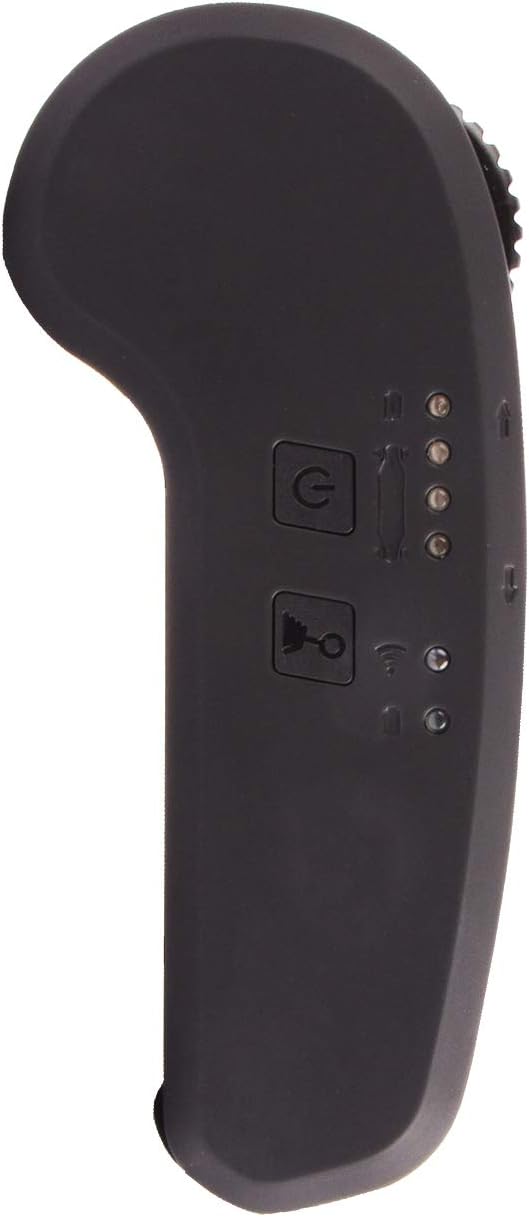
Image: The Bluetooth remote control, showing its buttons and indicators.
Video: A seller demonstrating how to charge the electric skateboard and its remote control.
3. Алыстан жупташтыруу
The remote control and skateboard should automatically sync when both are powered on and fully charged. Ensure both devices have sufficient power for successful pairing.
Video: A seller demonstrating how to power on the skateboard and remote, and how they sync together.
Иштөө нускамалары
1. Күйгүзүү / Өчүрүү
- Скейтборд: The skateboard can be powered on by simply rolling it or by manually pressing the power button located on the underside of the deck.
- Алыстан башкаруу: Long-press the power button on the remote control to turn it on. To power off, long-press the power button again.
Video: A seller demonstrating how to power on the skateboard and remote, and how they sync together.
2. Speed Modes and Control
The remote control features four power modes, allowing you to adjust the speed according to your preference and skill level. These modes progressively increase in speed.
- Өзгөртүү режимдери: Short-press the power button on the remote to cycle through the four speed modes. Indicator lights on the remote will show the currently selected mode.
- Ылдамдатуу: Push the accelerator lever forward to increase speed.
- Тормоздоо: Pull the accelerator lever backward to engage the brake.
- Тескери: Long-press the reverse button on the remote. The indicator light will change to red, allowing you to move the skateboard backward using the accelerator lever.
Video: A seller demonstrating the remote control's functions, including power modes, acceleration, braking, and reverse.
3. Коопсуздук боюнча көрсөтмөлөр
- Ар дайым тиешелүү коопсуздук шаймандарын, анын ичинде каска, тизе жана чыканак төшөктөрүн кийиңиз.
- Коопсуз, ачык жерлерде, жол кыймылынан жана жөө жүргүнчүлөрдөн алыс жүрүңүз.
- Familiarize yourself with the controls and different speed modes before attempting higher speeds.
- Айланаңыздагыларга жана мүмкүн болгон тоскоолдуктарга көңүл буруңуз.
- Avoid riding on wet or uneven surfaces, despite the IP55 rating, to prevent accidents.
- 200 LBS максималдуу салмагы кубаттуулугу ашпагыла.
Video: A user demonstrating the skateboard, with a caption emphasizing the importance of wearing a helmet before use.
Техникалык тейлөө
1. Жалпы кам көрүү
- Keep the skateboard clean and dry. Wipe down the deck and components with a damp колдонулгандан кийин кездеме.
- Скейтбордду салкын, кургак жерде, күндүн түз нурунан жана өтө жогорку температурадан алыс сактаңыз.
- Avoid exposing the skateboard to prolonged periods of moisture, despite its water resistance.
2. Батареяга кам көрүү
- Батареяны ашыкча заряддабаңыз же толугу менен сарптабаңыз.
- Эгер узак убакытка сактасаңыз, батареяны болжол менен 50-60% га чейин заряддап, ар бир 2-3 ай сайын кайра заряддап туруңуз.
- Use only the original charger provided with the skateboard.
3. Wheel and Truck Adjustment
The package includes an adjustable spanner for the wheels. Use this tool to ensure the wheels and trucks are properly tightened for optimal performance and safety. Adjust tightness to your preference for turning responsiveness.

Сүрөт: деталдуу view of the skateboard's wheels and trucks, which can be adjusted for ride preference.
Проблемаларды чечүү
- Skateboard Not Powering On: Ensure the battery is fully charged. Try rolling the skateboard to activate it, or manually press the power button.
- Алыстан башкаруу жупташтырылбайт: Make sure both the skateboard and remote are fully charged and powered on. Bring them close together to facilitate pairing.
- Төмөнкү өндүрүмдүүлүк/диапазон: This may indicate a low battery charge. Ensure the battery is fully charged before use. Performance can also be affected by rider weight, terrain, and speed mode.
- адаттан тыш үндөр: Check wheels and trucks for any loose components or debris. Tighten as necessary using the provided spanner.
Техникалык шарттар
| Өзгөчөлүк | Спецификация |
|---|---|
| Бренд | VOYAGER |
| Модель аты | Neutrino Compact Electric Cruiser Skateboard with Bluetooth |
| Модель номери | BOARD-3010P |
| Мотор күчү | 350W щеткасыз |
| Максималдуу ылдамдык | 12.5 миль/саат |
| Макс диапазон | 7 миляга чейин |
| Элемент Салмагы | 9.5 фунт |
| Максималдуу жүктөө сыйымдуулугу | 200 фунт |
| Суу каршылык | IP55 рейтинги |
| Wheel Size | 75 миллиметр |
| Дөңгөлөк материалы | Urethane (80A-85A Durometer Hardness) |
| Өлчөмдөрү (LxWxH) | 30.2 x 7.1 x 12 дюйм |
| Power Source | Электр батареясы |
| Жаш аралыгы | Adult (suitable for teens) |
Кепилдик жана колдоо
For warranty information, product support, or to purchase replacement parts, please refer to the official VOYAGER webсайтка же түздөн-түз кардарларды тейлөөгө кайрылыңыз. Сатып алуу квитанциясын кепилдик дооматтары үчүн сатып алуунун далили катары сактаңыз.
Additional protection plans may be available for purchase from third-party providers. Please review their terms and conditions for coverage details.


