The MOZA Air 2 is a professional 3-axis handheld gimbal stabilizer designed for DSLRs, mirrorless cameras, and pocket cinema cameras. It offers advanced stabilization, extended battery life, and intelligent features to enhance your videography experience. This manual provides essential information for setup, operation, and maintenance of your MOZA Air 2.
Пакеттин мазмуну
Төмөндө тизмеленген нерселердин баары пакетиңизге камтылганын текшериңиз:
Air2 Gimbal x 1
Lens support x 1
Lens support screw x 1
Follow focus install pipe x 2
Riser Plate x 2
Штатив x 1
18650 battery x 4
Intelligent charger x 1
MOZA control cable - Micro USB x 1
MOZA control cable - Mini USB x 1
MOZA control cable - Panasonic x 1
MOZA control cable - Sony x 1
USB Type-C кабели x 1
Колдонуучунун колдонмосу x 1
Warning card x 1
Tool bag x 1
H2 Hexagon wrench x 1
3/8 turn 1/4 nut x 1
M3 x 10 hexagon socket countersunk flat cap head screw x 10
Follow focus support x 1
Продукт бүттүview
The MOZA Air 2 gimbal stabilizer is designed for professional filmmaking, offering robust support and precise control for various camera setups.
Figure 1: MOZA Air 2 Gimbal with a camera mounted, showcasing анын компакттуу жана эргономикалык дизайны.
Key features include a maximum payload capacity of 9 lbs (4.2 kg), supporting a wide range of cameras. It features an OLED display for easy parameter customization and offers 4-axis control with 8 follow modes for versatile shooting scenarios.
2-сүрөт: Детальдуу view of the MOZA Air 2's control panel, including the OLED display, multi-function dial, and various control buttons.
The gimbal also integrates with a newly developed ecosystem of accessories, such as the MOZA thumb controller, iFocus, camera cage, and camera backpack (sold separately), to provide comprehensive control over gimbal movement and camera functions.
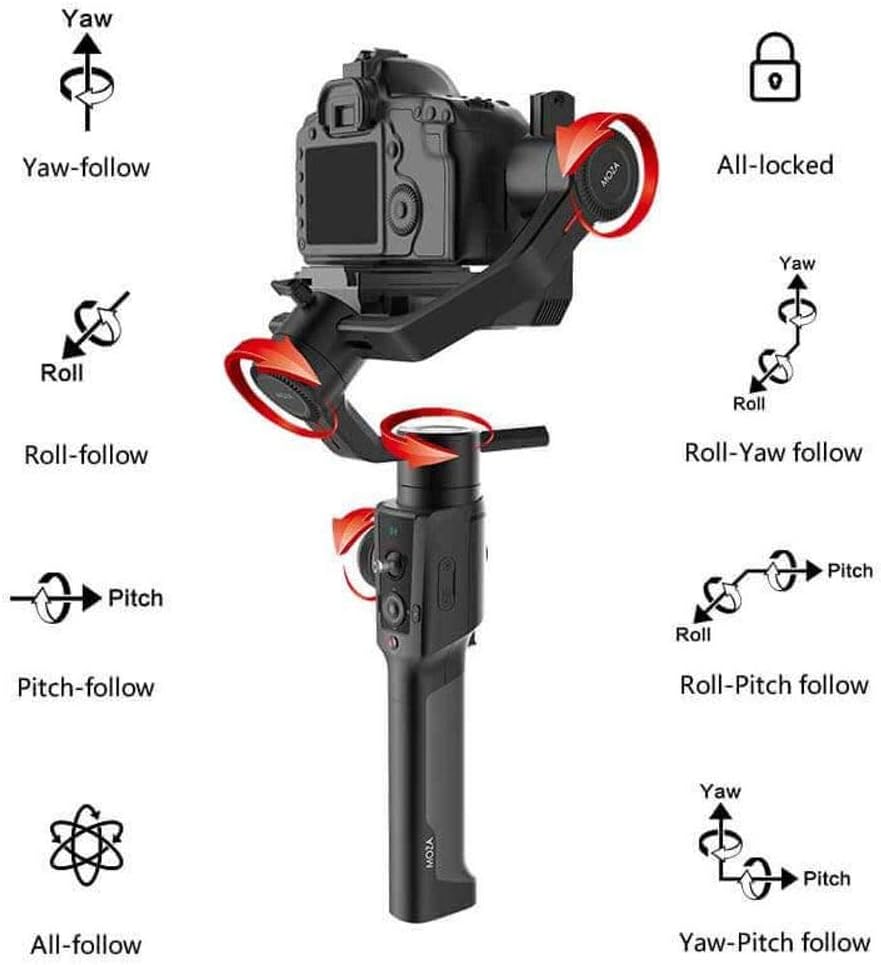
Figure 3: Visual representation of the MOZA Air 2's various operational modes, including Yaw, Roll, Pitch, and their respective follow modes, as well as All-locked and All-follow modes.
Жайгашуу
1. Батареяны орнотуу жана заряддоо
The MOZA Air 2 is powered by four 18650 Li-on batteries. Ensure batteries are fully charged before first use.
Insert the four 18650 batteries into the battery compartment located in the handle. Ensure correct polarity.
Connect the intelligent charger to a power source and insert the batteries for charging. The charger's indicator lights will show charging status.
The MOZA Spark power supply system includes input and output ports for versatile power management. The input port allows for alternative power sources, while output ports can power the camera and other accessories.
2. Camera Mounting and Balancing
Proper balancing is crucial for optimal gimbal performance and battery efficiency. The MOZA Air 2 features quick-release plates and mechanical locks for easy setup.
Figure 4: The MOZA Air 2 gimbal highlighting the adjustable axes (tilt, roll, pan) for precise camera balancing.
Attach your camera to the MOZA quick release plate.
Mount the quick release plate with the camera onto the gimbal. Ensure it is securely locked.
Unlock each axis (tilt, roll, pan) one by one and adjust the camera position until it remains stable in any orientation without motor power. Use the lens support and screw if necessary for heavier lenses.
Тең салмактуулукка жеткенден кийин, бардык окторду бекитиңиз.
Figure 5: MOZA Air 2 Gimbal with a camera connected, demonstrating the cable connection for camera control and power.
3. Камера туташуу
Connect your camera to the gimbal using the appropriate camera control cable (Micro USB, Mini USB, Panasonic, or Sony) to enable camera control features via the gimbal.
Video 1: An official MOZA video demonstrating the features and capabilities of the MOZA Air 2 gimbal stabilizer, including its design and operational aspects.
Иштөө режимдери
The MOZA Air 2 offers various operating modes to suit different shooting requirements:
Yaw-follow: The camera follows the pan movement of the gimbal while tilt and roll axes are locked.
Roll-follow: The camera follows the roll movement of the gimbal while pan and tilt axes are locked.
Pitch-follow: The camera follows the pitch movement of the gimbal while pan and roll axes are locked.
All-follow: The camera follows all pan, tilt, and roll movements of the gimbal.
All-locked: Үч ок тең (панорамалоо, кыйшайтуу, тоголонуу) кулпуланып, камераны туруктуу багытка буруп турат.
Roll-Yaw follow: The camera follows roll and yaw movements.
Yaw-Pitch follow: The camera follows yaw and pitch movements.
Sport Gear Mode: Provides rapid response for fast-moving scenes.
Switch between modes using the gimbal's control buttons or the MOZA Assistant App.
Advanced Features
Smart Time-Lapse
The MOZA Air 2 features comprehensively upgraded time-lapse functions, offering up to 20 optimizations. This allows users to easily create various personalized and professional time-lapse videos, including motion-lapse, tracking time-lapse, and zoom time-lapse.
MOZA Spark Power Supply System
Equipped with four power ports, the MOZA Spark power supply system ensures extended working time. One input port allows for alternative power sources, while three output ports provide power to the camera and other accessories like follow focus systems, LED lights, and monitors. The integrated Battery Management System (BMS) enhances the gimbal's operational duration.
Колдоого алынган камералар
The MOZA Air 2 is compatible with a wide range of cameras, including but not limited to:
Canon: 1D, 1DX, 1DX2, 5D Mark IV, 5D Mark III, 5D Mark II, 6D, 60D, 7D, 70D, 750D
For specific compatibility questions, please contact MOZA support.
Техникалык шарттар
Өзгөчөлүк
Деталь
Продукциянын өлчөмдөрү
13.39 x 5.51 x 18.11 дюйм
Элемент Салмагы
3.64 фунт (1650 грамм)
Модель номери
MCG01
Батареялар
4 А батарейка талап кылынат (кошулган)
Максималдуу салмак боюнча сунуш
9 фунт (4.2 кг)
Түс
Кара
Шайкеш түзмөктөр
Monitor, Camera
Өндүрүүчү
Гудсен
Дата биринчи жеткиликтүү
19-сентябрь, 2018-жыл
UPC
712424355122
Техникалык тейлөө
To ensure the longevity and optimal performance of your MOZA Air 2 gimbal, follow these maintenance guidelines:
Гимбалды таза, чаң менен таштандылардан таза кармаңыз. Тазалоо үчүн жумшак, кургак чүпүрөк колдонуңуз.
Гимбалды өтө жогорку температурага же нымдуулукка дуушар кылбаңыз.
Store the gimbal in its carrying case when not in use to protect it from impacts.
Бардык бурамалар менен туташуулардын бекем экенине ынануу үчүн аларды үзгүлтүксүз текшерип туруңуз.
Ensure batteries are charged periodically even when not in use to maintain battery health.
Проблемаларды чечүү
This section addresses common issues you might encounter with your MOZA Air 2 gimbal.
Gimbal Not Powering On or Malfunctioning
Батареяларды текшерүү: Ensure all four 18650 batteries are fully charged and correctly inserted with proper polarity.
Батареянын ден соолугу: If batteries are old or frequently used, their capacity might degrade. Consider replacing them with new MOZA-approved 18650 batteries.
Орнотулган программаны жаңыртуу: Ensure the gimbal's firmware is up to date. Outdated firmware can sometimes cause operational issues.
Кайра калибрлөө: If the gimbal behaves erratically or drifts, perform a re-calibration through the MOZA Assistant App.
Difficulty Balancing Camera
Payload Limit: Verify that your camera and lens setup does not exceed the 9 lbs (4.2 kg) payload capacity.
Октук кулпулар: Ensure all axis locks are disengaged when attempting to balance.
Жакшы жөндөөлөр: Use the fine-tuning knobs and sliding plates for precise balance adjustments on each axis.
Lens Support: For longer or heavier lenses, utilize the included lens support to prevent front-heavy imbalance.
Camera Control Issues
Correct Cable: Ensure you are using the correct camera control cable for your specific camera model.
Коопсуз туташуу: Check that the control cable is securely connected to both the gimbal and the camera.
Камера орнотуулары: Some cameras require specific settings (e.g., USB mode) to enable external control. Refer to your camera's manual.
For persistent issues not covered here, please refer to the official MOZA support resources or contact customer service.
Кепилдик жана колдоо
MOZA products are covered by a limited warranty. For detailed warranty information, product registration, and technical support, please visit the official MOZA webсайтка же кардарларды тейлөө бөлүмүнө кайрылыңыз. Сатып алуу квитанциясын кепилдик дооматтары үчүн сатып алуунун далили катары сактаңыз.
For any questions regarding the use of your MOZA Air 2 Gimbal with your camera, please contact MOZA directly.
Тектеш документтер - MCG01
MOZA Air Professional колго кармалуучу гимбал колдонуучусунун колдонмосу | Gudsen Technology Gudsen Technology компаниясынын кесипкөй колго кармалуучу гимбалынын MOZA Air колдонуучу колдонмосун карап чыгыңыз. Анын 5.5 фунтка чейинки күзгүсүз камералар жана DSLR камералары менен кинематографиялык камера кыймылы үчүн өркүндөтүлгөн функциялары, орнотуулары, башкаруу элементтери жана техникалык тейлөөсү жөнүндө билип алыңыз.
MOZA Mini-P колдонуучусунун колдонмосу: Көчмө 3-октуу гимбалдык стабилизатор Күзгүсүз камералар жана смартфондор үчүн көчмө 3-огу бар гимбалдык стабилизатор болгон MOZA Mini-P үчүн толук колдонуучу колдонмосу, анда орнотуу, иштетүү жана Баштоо режими жана Объектти көзөмөлдөө сыяктуу өркүндөтүлгөн функциялар камтылган.
MOZA NANO SE Smartphone Gimbal Stabilizer Колдонуучунун колдонмосу Бул колдонуучу колдонмосу MOZA NANO SE смартфонунун гимбалы стабилизаторун иштетүү боюнча кеңири нускамаларды камтыйт. Ал орнотууларды, баскычтардын функцияларын, MOZA Genie менен колдонмо интеграциясын, микропрограмманы жаңыртууларды, көйгөйлөрдү аныктоону жана оптималдуу мобилдик видеография үчүн техникалык мүнөздөмөлөрдү камтыйт.
MOZA Mini-MI тез баштоо боюнча колдонмо - Смартфондун гимбалдык стабилизатору Бул кыскача баштоо көрсөтмөсү менен MOZA Mini-MI смартфонуңуздун гимбалын кантип орнотууну, иштетүүнү жана мүчүлүштүктөрдү кантип оңдоону үйрөнүңүз. Батареяны кубаттоо, телефонду орнотуу, башкаруу функциялары, колдонмолорду колдонуу жана мүнөздөмөлөрү камтылган.
MOZA AirCross 3 & AirCross 3 Pro колдонуучу колдонмосу MOZA AirCross 3 жана AirCross 3 Pro камера гимбалынын колдонуучу колдонмосу, анда даярдоо, орнотуу, иштетүү, мүнөздөмөлөр жана коопсуздук көрсөтмөлөрү камтылган.