Introduction
This manual provides instructions for the PERLESMITH 4K HDMI 2.0 Cable. These cables are designed for high-speed data transmission, supporting 4K@60Hz Ultra HD resolution, and are compatible with various HDMI-enabled devices. Please read this manual thoroughly before use to ensure proper setup and operation.
Пакеттин мазмуну
Пакетиңизде бардык буюмдар бар экенин текшериңиз:
- 4 x 6-foot HDMI Cables
- 1 x 90-Degree HDMI Adapter
- 3 x 6-inch Cable Ties

An image showing four 6-foot black HDMI cables, one gold-plated 90-degree HDMI adapter, and three black cable ties, representing the complete package contents.
Негизги өзгөчөлүктөрү
4K@60Hz Ultra HD Resolution:
Supports maximum data input for smooth images and clear audio, compatible with new 4K Ultra HD Televisions.Жогорку шайкештик:
Compatible with all HDMI 2.0 devices and previous HDMI standards, including Apple TV, PS4, Xbox, PC, Blu-ray players, monitors, and projectors.Туруктуу курулуш:
Features 24K gold-plated connectors and a premium material cable with an unparalleled 10,000+ bend lifespan, increasing conductivity and durability.90-Degree Adapter:
Included to prevent damage to device HDMI ports and improve cable lifespan in tight spaces.Кабелдик башкаруу:
Comes with cable ties for organizing cables and maintaining a tidy setup in your workspace or home.

A visual representation demonstrating the clarity difference between 720p, 1080p, and 4K Ultra HD resolutions, highlighting the superior detail of 4K.
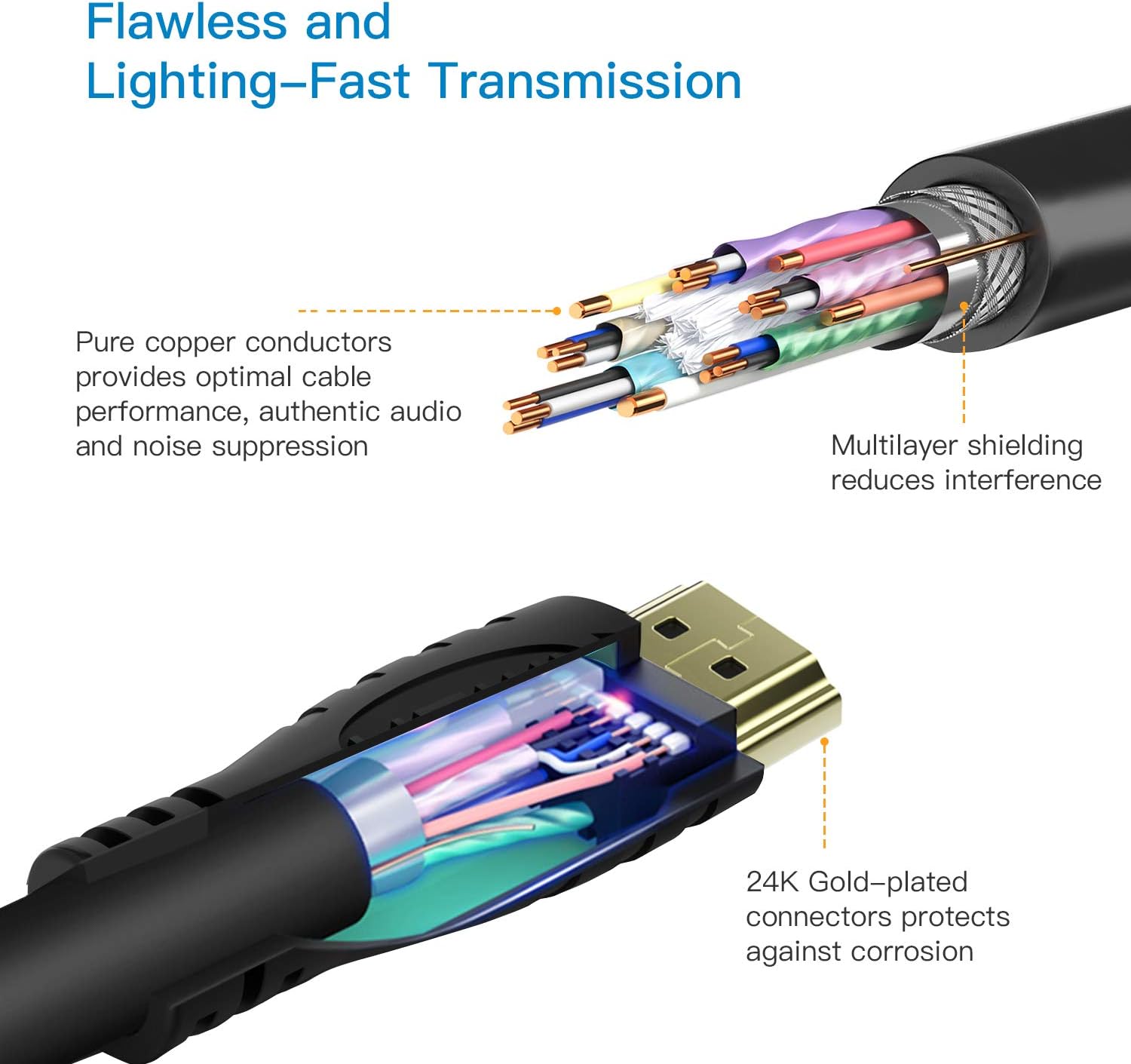
A cutaway diagram illustrating the internal components of the HDMI cable, including pure copper conductors for optimal performance and multilayer shielding for interference reduction, with 24K gold-plated connectors.
Орнотуу нускамалары
Портторду аныктоо:
Locate the HDMI output port on your source device (e.g., game console, Blu-ray player, PC) and the HDMI input port on your display device (e.g., TV, monitor, projector).Кабелди туташтыруу:
Insert one end of the PERLESMITH HDMI cable into the HDMI output port of your source device.Дисплейге туташуу:
Insert the other end of the HDMI cable into an available HDMI input port on your display device.Using the 90-Degree Adapter (Optional):
If space is limited behind your display or source device, attach the 90-degree HDMI adapter to the device's HDMI port first, then connect the HDMI cable to the adapter. This helps prevent cable bending and port strain.Түзмөктөрдү күйгүзүү:
Ensure both your source and display devices are powered on. Select the correct HDMI input on your display device using your remote or device controls.

An image showing an HDMI cable connecting a projector to a wall-mounted television, with a close-up inset demonstrating the use of the 90-degree HDMI adapter for a flush connection against the wall.

A circular diagram illustrating the universal compatibility of the HDMI cable with common devices such as a Top Box, Projector, Monitor/TV, PS3/4, and Laptop, all connected via an HDMI cable.
Иштөө көрсөтмөлөрү
Once connected, the PERLESMITH HDMI cable facilitates the transmission of audio and video signals between your devices.
Сигнал берүү:
The cable automatically transmits high-definition video and audio signals. No additional software or drivers are required for basic functionality.Чечимди колдоо:
Ensure your source and display devices are configured to output and receive the desired resolution (up to 4K@60Hz) for optimal performance. Refer to your device manuals for specific display settings.HDMI Ethernet Channel (HEC):
The HDMI 2.0 cable supports HEC, allowing internet-enabled HDMI devices to share an internet connection without a separate Ethernet cable, provided both connected devices also support HEC.
Техникалык тейлөө
Тазалоо:
Use a soft, dry cloth to gently clean the cable and connectors. Avoid using liquid cleaners directly on the connectors to prevent damage.Сактагыч:
When not in use, store cables in a cool, dry place away from direct sunlight and extreme temperatures. Use the included cable ties to keep them neatly coiled and prevent tangling or kinking.Колдонуу:
Avoid excessive bending, twisting, or pulling of the cable, especially near the connectors, to prolong its lifespan and maintain signal integrity. The 90-degree adapter is designed to reduce strain in tight installations.

An image showing an HDMI cable neatly coiled and secured with a Velcro cable tie, demonstrating effective cable management to save space and keep the area tidy, next to a laptop.
Проблемаларды чечүү
- Сүрөт же үн жок:
- Ensure the HDMI cable is securely connected to both the source and display devices.
- Verify that the correct HDMI input is selected on your display device.
- Try a different HDMI port on your display device.
- Test the cable with another device or use a different HDMI cable to rule out cable malfunction.
- Жаркылдаган же үзгүлтүктүү сигнал:
- Check for loose connections at both ends of the cable.
- Ensure the cable is not excessively bent or kinked, which can damage internal wires.
- Мүмкүн болсо, түзмөктөрдүн ортосундагы аралыкты азайтыңыз же кабелдин узундугу талап кылынган сигналдын күчүнө туура келерин текшериңиз.
- Verify that both devices support the resolution and refresh rate being used.
- No 4K Resolution:
- Confirm that both your source device and display device are 4K compatible and configured to output/receive 4K signals.
- Ensure the HDMI ports on your devices are HDMI 2.0 or higher.
- Check device settings for 4K or UHD options, as some devices require manual activation.
Техникалык шарттар
| Өзгөчөлүк | Деталь |
|---|---|
| Бренд | ПЕРЛЕСМИТ |
| Модел | PS4PHK1-4K |
| Туташтыргыч түрү | HDMI |
| Кабель түрү | HDMI 2.0 (High Speed with Ethernet) |
| Резолюцияны колдоо | Up to 4K@60Hz Ultra HD |
| Туташтыргыч материал | 24 карат алтын жалатылган |
| Кабелдин узундугу | 6 фут (болжол менен 1.8 метр) |
| Камтылган аксессуарлар | 90-Degree HDMI Adapter, Cable Ties |
| Шайкештик | All HDMI, 4K@60Hz HDMI 2.0 devices, backward compatible with previous HDMI standards. |
| Элемент Салмагы | 1.6 унция |

A detailed diagram illustrating the dimensions of the HDMI connector, including its length, width, and pin configuration, emphasizing its heavy-duty design.
Кепилдик жана колдоо
For warranty information or technical support regarding your PERLESMITH 4K HDMI 2.0 Cables, please refer to the PERLESMITH official webсайтка же түздөн-түз кардарларды тейлөөгө кайрылыңыз. Сатып алуу квитанциясын кепилдик дооматтары үчүн сатып алуунун далили катары сактаңыз.


