1. Киришүү
This manual provides comprehensive instructions for the safe and effective use of your Joby TelePod Pro Kit. Please read this manual thoroughly before operating the product and retain it for future reference.
2. Продукт бүтүп калдыview
The Joby TelePod Pro Kit is a versatile camera support system designed for various content creation needs. It functions as a grip, monopod, elevated stand, and stable tripod. Key components include a removable BallHead 1K, a 1/4"-20 attachment point, and adjustable legs.

Image 1: The Joby TelePod Pro Kit demonstrating its multi-functional capabilities as a tripod, monopod, and grip, with different camera types attached.
2.1. Компоненттер
- TelePod Pro Base: The main body with integrated legs and extension pole.
- Removable BallHead 1K: Provides flexible camera positioning.
- 1/4"-20 Attachment: Standard screw for mounting cameras and accessories.
- Жөнгө салынуучу буттар: Three-position click-set legs for stability.
- Билек боосу: Коопсуз иштетүү үчүн.
3. Орнотуу
3.1. Attaching the BallHead 1K
- Unscrew the top cap from the TelePod Pro base if present.
- Align the BallHead 1K with the 1/4"-20 screw on the top of the extension pole.
- Rotate the BallHead 1K clockwise until it is securely tightened. Ensure it is firm but do not overtighten.
3.2. Камераны орнотуу
- Ensure the BallHead 1K is securely attached to the TelePod Pro base.
- Locate the 1/4"-20 screw on the BallHead 1K.
- Align your camera's tripod mount with the screw.
- Rotate the camera clockwise until it is firmly attached to the BallHead 1K.
- Adjust the angle of your camera using the BallHead 1K's locking knob. Tighten the knob to secure the desired position.
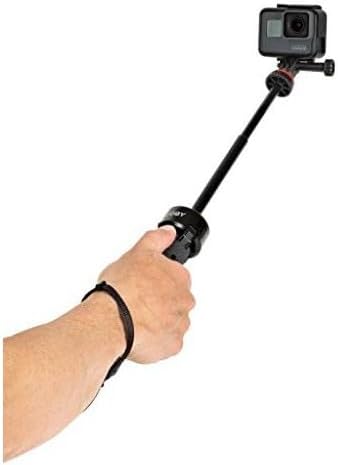
Image 2: A GoPro camera mounted on the BallHead 1K of the Joby TelePod Pro Kit, ready for use.
4. Иштөө режимдери
The Joby TelePod Pro Kit offers three primary operating modes:
4.1. Grip / Monopod Mode
In this mode, the legs are closed, and the extension pole is extended to function as a handheld grip or a monopod for overhead shots.
- Ensure the legs are fully closed and secured.
- Twist the extension pole collar counter-clockwise to unlock.
- Уюлду каалаган узундукка чейин узартыңыз.
- Twist the extension pole collar clockwise to lock the pole in place.
- Use the wrist strap for added security during handheld operation.

Image 3: A hand holding the Joby TelePod Pro Kit in grip mode, with a GoPro camera attached, demonstrating its use as a handheld support.
4.2. Elevated Stand Mode
For elevated camera or 360-degree camera setups, extend the mount and deploy the legs.
- Twist the extension pole collar counter-clockwise to unlock.
- Extend the pole to the desired height.
- Twist the extension pole collar clockwise to lock the pole in place.
- Open the legs to one of the three click-set positions for stability. Ensure all three legs are evenly spread.

Image 4: The Joby TelePod Pro Kit configured as an elevated stand, supporting a 360-degree camera for a wider field of view.
4.3. Stable Tripod Mode
With legs folded out and the extension lowered, the TelePod Pro Kit provides a stable base for your camera.
- Ensure the extension pole is fully retracted and locked.
- Open the legs to the widest click-set position for maximum stability. This is especially recommended for heavier cameras or uneven surfaces.

Image 5: The Joby TelePod Pro Kit in its stable tripod configuration, supporting a camera at a low height.
5. Техникалык тейлөө
- Тазалоо: Wipe the product with a soft, dry cloth. Avoid using harsh chemicals or abrasive materials.
- Сактагыч: Store the TelePod Pro Kit in a dry, cool place away from direct sunlight and extreme temperatures.
- Текшерүү: Periodically check all screws and joints for tightness. Re-tighten if necessary, but do not overtighten.
- Майлоо: Do not apply lubricants to the extension pole or leg mechanisms, as this can attract dirt and impair function.
6. Кыйынчылыктарды
- Issue: BallHead 1K or camera wobbles/spins.
- Чечим: Ensure the BallHead 1K is securely tightened to the TelePod Pro base and the camera is firmly attached to the BallHead 1K. The BallHead 1K's locking knob must be fully tightened to secure the camera angle.
- Issue: Extension pole does not stay at desired length or wobbles.
- Чечим: Ensure the extension pole collar is twisted clockwise until fully locked. If the issue persists, check for any debris obstructing the locking mechanism.
- Issue: Tripod feels unstable.
- Чечим: Ensure the legs are fully splayed out to their widest click-set position, especially when supporting heavier cameras or on uneven surfaces. Verify that the extension pole is fully retracted and locked when using as a stable tripod.
7. Техникалык шарттар
| Өзгөчөлүк | Деталь |
|---|---|
| Модель номери | JB01548-BWW |
| Продукциянын өлчөмдөрү | 2.17 x 2.17 x 10.35 дюйм |
| Элемент Салмагы | 12.3 унция (0.35 килограмм) |
| Салмагы Limit | 6.6 фунт (3 кг) |
| Максималдуу бийиктик | 70 сантиметр |
| Минималдуу бийиктик | 262.9 миллиметр |
| Материал | Aluminum, ABS Plastic, Glass-Filled Nylon Plastic, TPE |
| Tripod баш түрү | Ball Heads |
| Шайкеш түзмөктөр | Камера |
8. Кутуда эмне бар
- TelePod™ Pro Kit (includes integrated extension pole and legs)
- Removable BallHead 1K
9. Кепилдик маалыматы
The Joby TelePod Pro Kit comes with a JOBY 1 Year Warranty. For detailed warranty terms and conditions, please refer to the official Joby webсайтка же кардарларды колдоо менен байланышыңыз.
10. Колдоо
Кошумча жардам, өнүмдөрдү каттоо, же үчүн view additional resources, please visit the official Joby webсайт:


