1. Киришүү
This manual provides essential information for the safe and efficient operation of your NEC C861Q-AVT2 86-inch 4K UHD LED LCD Display. The C861Q-AVT2 is designed for commercial environments, offering clear, detailed imagery with a 4K UHD resolution, 350 cd/m² brightness, and an anti-glare surface for optimal readability in various lighting conditions. Its robust design includes a full metal chassis, real-time temperature sensors, and integrated cooling fans for reliable 24/7 operation.
Key features include multiple connectivity options such as HDMI 2.0 and DisplayPort 1.2, an integrated media player for USB or SD card playback, and a Raspberry Pi Compute Module slot for direct source integration.
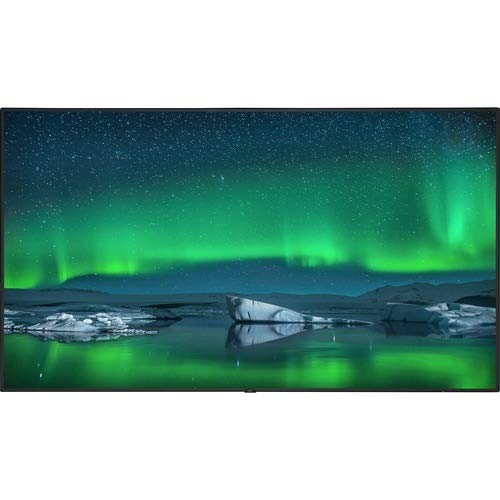
Фронт view of the NEC C861Q-AVT2 86-inch 4K UHD LED LCD Display, showcasing its slim bezel and large screen.
2. Коопсуздук маалыматы
Please read all safety instructions carefully before using the display. Failure to follow these instructions may result in electric shock, fire, or damage to the product.
- Кубат булагы: Connect the display only to the type of power source indicated on the label. Ensure the power cord is securely plugged into a grounded outlet.
- Вентиляция: Желдетүүчү тешиктерди жаппаңыз. Ашыкча ысып кетүүнүн алдын алуу үчүн дисплейдин айланасында абанын туура айланышы үчүн жетиштүү орун болушун камсыз кылыңыз.
- Суюктук таасири: Do not expose the display to rain, moisture, or spill liquids onto it. If liquid enters the display, disconnect power immediately and contact qualified service personnel.
- Тазалоо: Unplug the display from the power outlet before cleaning. Use a soft, dry cloth. Do not use liquid cleaners or aerosol cleaners.
- Монтаждоо: Ensure the display is mounted securely to a stable surface or wall using appropriate mounting hardware. If wall-mounting, use a compatible mount such as the WMK-3255S to meet ADA compliance requirements.
- Тейлөө: Бул продуктту өзүңүз тейлөөгө аракет кылбаңыз. Бардык тейлөөнү квалификациялуу тейлөө кызматкерлерине тапшырыңыз.
3. Кутуда эмне бар
Кутучаны кылдаттык менен ачып, бардык буюмдардын бар экенин текшериңиз:
- NEC C861Q-AVT2 86-inch 4K UHD LED LCD Display
- Stand (for table mounting)
- Электр кабели
- Remote Control (not explicitly listed but standard for displays)
- Колдонуучунун Колдонмосу (бул документ)
4. Орнотуу
4.1 Дисплейди орнотуу
The NEC C861Q-AVT2 can be used with the included stand for table mounting or with a compatible VESA wall mount (sold separately).
- Стол орнотуу: Attach the provided stand to the display following the instructions in the separate stand assembly guide. Place the display on a stable, level surface.
- Дубалга орнотуу: If wall-mounting, ensure the wall mount is rated for the display's weight (approximately 127.4 pounds or 57.8 kg). Follow the wall mount manufacturer's instructions carefully. For ADA compliance, consider using the WMK-3255S wall mount.
4.2 Тышкы түзмөктөрдү туташтыруу
The display offers various input ports:
- HDMI: Connect up to three HDMI devices (e.g., media players, computers) to the HDMI 2.0 ports.
- DisplayPort: Connect DisplayPort devices to the DisplayPort 1.2 inputs. Daisy chain functionality is also supported.
- USB: Use the USB ports for connecting storage devices for the integrated media player or for service purposes.
- Raspberry Pi Compute Module Slot: Insert a compatible Raspberry Pi Compute Module for integrated source functionality.
4.3 Кубат туташтыруу
- Ensure all external devices are connected.
- Connect the power cord to the display's power input.
- Электр шнурунун экинчи учун жерге туташтырылган электр розеткасына сайыңыз.
5. Иштөө нускамалары
5.1 Күйгүзүү/өчүрүү
Press the power button on the display or the remote control to turn the display on or off. The power indicator light will illuminate when the display is on.
5.2 Киргизүүнү тандоо
Use the 'Input' or 'Source' button on the remote control to cycle through available input sources (HDMI 1, HDMI 2, HDMI 3, DisplayPort 1, DisplayPort 2, Internal Media Player, Raspberry Pi Module).
5.3 Сүрөт орнотуулары
Access the on-screen display (OSD) menu using the remote control to adjust picture settings such as:
- Жарыктык
- Контраст
- Түс температурасы
- Аспект катышы
- Advanced settings via SpectraView Engine for color, intensity, gamma, or uniformity control.
5.4 Интеграцияланган медиа ойноткуч
The display features an integrated media player. Insert a USB drive or SD card containing audio, video, or image files into the designated slot. Select the 'Internal Media Player' input source to access and play your content.
6. Техникалык тейлөө
6.1 Дисплейди тазалоо
- Экран: Экранды жумшак, түксүз чүпүрөк менен акырын сүртүңүз. өжөр белгилери үчүн, жеңил гampen the cloth with water or a non-abrasive, display-safe cleaning solution. Do not spray liquid directly onto the screen.
- Casing: с сүртүңүзasinжумшак, кургак чүпүрөк менен сүртүңүз. Катуу химиялык заттарды же абразивдүү материалдарды колдонуудан алыс болуңуз.
6.2 Вентиляция
Ensure that the ventilation openings on the display are not obstructed. Proper airflow is crucial for maintaining optimal operating temperature and extending the lifespan of the display, especially during 24/7 operation.
7. Кыйынчылыктарды
Эгерде сиз дисплейиңизде көйгөйлөргө туш болсоңуз, төмөнкү жалпы көйгөйлөрдү чечүү кадамдарын караңыз:
- Кубат жок:
- Check if the power cord is securely connected to both the display and the electrical outlet.
- Башка аспапка сайып, розетка иштеп жатканын текшериңиз.
- Сигнал жок:
- Ensure the correct input source is selected on the display.
- Check the connection cables (HDMI, DisplayPort) between the display and the source device. Try a different cable if possible.
- Баштапкы түзмөк күйүп турганын жана сигнал чыгарып жатканын текшериңиз.
- Сүрөттүн сапаты начар:
- Adjust picture settings (brightness, contrast, sharpness) via the OSD menu.
- Ensure the source device is outputting a resolution compatible with the display's native 4K UHD resolution.
- Экранга же кабелдерге кандайдыр бир физикалык зыян келтирилгенин текшериңиз.
- Display Overheating:
- Ensure adequate ventilation around the display. Clear any obstructions from the vents.
- Эгер көйгөй чечилбесе, кардарларды колдоо менен байланышыңыз.
8. Техникалык шарттар
| Өзгөчөлүк | Спецификация |
|---|---|
| Бренд | NEC |
| Модель номери | C861Q-AVT2 |
| Screen Size | 86 дюйм |
| Дисплей технологиясы | LED-LCD |
| Резолюция | 4K UHD (3840 x 2160) |
| Жарыктык | 350 кд/м² |
| Өзгөчөлүктөр | Anti-Glare Screen, Integrated ATSC Tuner, Flat Panel, Full Metal Chassis, Integrated Media Player, Raspberry Pi Compute Module Slot |
| Жаңыртуу ылдамдыгы | 60 Гц |
| Байланыш технологиясы | USB, DisplayPort 1.2 (x2, daisy chain), HDMI 2.0 (x3) |
| Продукциянын өлчөмдөрү | 2.9 x 75.9 x 43.3 дюйм (7.37 x 192.79 x 109.98 см) |
| Элемент Салмагы | 127.4 фунт (57.8 кг) |
| Монтаж түрү | Үстөлгө орнотуу (дубалга орнотуу үчүн VESA менен шайкеш келет) |
| Иштөө сааттары | 24/7 operation capable |
9. Кепилдик жана колдоо
9.1 Кепилдик маалыматы
This NEC C861Q-AVT2 display comes with a full 3-year commercial warranty. Please retain your proof of purchase for warranty claims.
9.2 Кардарларды колдоо
For technical assistance, troubleshooting beyond this manual, or warranty service, please contact NEC customer support. Refer to the contact information provided with your purchase documentation or visit the official NEC webколдоо чоо-жайы үчүн сайт.


