1. Киришүү
The Leitz IQ Office Pro P5+ Shredder is designed for secure and efficient document destruction in office environments. Featuring advanced micro-cut technology, it ensures a high level of security for your confidential information. This manual provides essential information for the safe and effective operation, maintenance, and troubleshooting of your shredder.

Сүрөт: алдыңкы view of the Leitz IQ Office Pro P5+ Shredder, showing its sleek design and the waste bin filled with shredded paper.
2. Коопсуздук маалыматы
Жалпы коопсуздук чаралары
- Колдонуудан мурун бардык нускамаларды окуп чыгыңыз.
- Keep hands, hair, loose clothing, and ties away from the paper entry slot.
- Балдарды жана үй жаныбарларын майдалагычтан алыс кармаңыз.
- Do not insert more sheets than specified (7-8 sheets A4, 70-80 gsm).
- Do not shred metal objects, plastic cards, or adhesive labels unless explicitly stated as compatible. This shredder is designed for paper, staples, and paper clips.
- Тыгылып калбашы үчүн таштанды челекти үзгүлтүксүз бошотуп туруңуз.
Электр коопсуздугу
- Электр розеткасынын томго дал келишин текшериңизtage requirements of the shredder.
- Электр зымы бузулган болсо, майдалагычты колдонбоңуз.
- Unplug the shredder before moving, cleaning, or performing maintenance.
- Avoid placing the shredder near water or in damp чөйрөлөр.
3. Продукт бүтүп калдыview
Негизги өзгөчөлүктөрү
- Micro Cut Security (DIN P5+): Shreds documents into tiny 2x5mm particles for enhanced security.
- Жогорку кубаттуулугу: Shreds up to 7-8 sheets of A4 paper (70-80 gsm) per pass.
- Large Waste Bin: 30-liter removable bin holds up to 350 shredded sheets.
- Анти-джем технологиясы: Automatically reverses if too much paper is inserted, preventing jams.
- Тынч иштөө: Designed for a calm working environment.
- Узартылган иштөө убактысы: Operates continuously for up to 4 hours (240 minutes).
- Интуитивдик сенсордук башкаруулар: Easy-to-use interface for simple operation.

Сүрөт: Жакын план view of the shredder's control panel with touch buttons and the fine micro-cut shredded paper in the bin.
4. Орнотуу
Пакеттен чыгаруу
- Майдалагычты таңгагынан этияттык менен чыгарыңыз.
- Remove any protective materials or plastic bags.
- Ensure all components are present, including the shredder unit and waste bin.

Image: The Leitz IQ Office Pro P5+ Shredder next to its instruction manual, indicating the contents of the package.
Жайгаштыруу
- Майдалагычты тегиз, туруктуу бетке коюңуз.
- Ensure there is adequate space around the shredder for ventilation and easy access to the waste bin.
- Position the shredder near a power outlet.
Power Connection
- Insert the waste bin securely into the shredder unit.
- Электр шнурын жерге туташтырылган электр розеткасына сайыңыз.
- The shredder is now ready for operation.
5. Иштөө нускамалары
Документтерди майдалоо
- Ensure the shredder is plugged in and the waste bin is correctly inserted.
- Turn on the shredder using the power button on the control panel.
- Insert up to 7-8 sheets of A4 paper (70-80 gsm) into the paper entry slot. The shredder will automatically start shredding.
- The shredder can also handle small staples and paper clips.
- For optimal performance and quiet operation, consider using Leitz pre-lubricated paper.

Image: The shredder with visual indicators for its 7-sheet capacity and 30-liter waste bin, highlighting its efficiency.
Анти-джем технологиясы
The Leitz IQ Office Pro P5+ Shredder features advanced anti-jam technology. If too much paper is inserted, the shredder will automatically reverse to clear the jam. Remove the excess paper and re-insert a smaller quantity.

Image: Graphic illustrating the Anti-Jam feature and the 2+1 year guarantee offered with the shredder.
Таштанды кутусун бошотуу
- When the waste bin is full, the shredder will stop operating.
- Pull out the removable waste bin from the front of the shredder.
- Dispose of the shredded paper.
- Reinsert the waste bin firmly until it clicks into place. The shredder will then be ready for use again.
6. Техникалык тейлөө
Тазалоо
- Тазалоодон мурун, майдалагычты ар дайым розеткадан сууруп алыңыз.
- Майдалагычтын сыртын жумшак, кургак чүпүрөк менен сүртүңүз. Абразивдүү тазалоочу каражаттарды же эриткичтерди колдонбоңуз.
- Periodically clean the paper entry area to remove any paper dust or debris.
Майлоо
To maintain optimal performance and extend the life of your shredder, it is recommended to lubricate the cutting blades regularly. Use shredder oil or lubrication sheets specifically designed for paper shredders. Follow the instructions provided with the lubrication product.
7. Кыйынчылыктарды
| Көйгөй | Мүмкүн себеп | Чечим |
|---|---|---|
| Шредер күйбөйт. | Not plugged in; Waste bin not fully inserted; Overheat protection activated. | Check power connection; Ensure bin is correctly seated; Allow shredder to cool down for 30-60 minutes. |
| Кагаз тыгылышы. | Өтө көп кагаз салынган; Кагаз түз киргизилген эмес. | Use the reverse function to clear the jam; Remove excess paper; Insert fewer sheets straight into the slot. |
| Майдалагыч иштөө учурунда токтоп калат. | Waste bin is full; Overheat protection activated. | Empty the waste bin; Allow shredder to cool down. |
| Шредер ызы-чуу чыгарып жатат. | Майлоого муктаж. | Lubricate the cutting blades with shredder oil. |
8. Техникалык шарттар
| Өзгөчөлүк | Деталь |
|---|---|
| Модель номери | 80040000 |
| Бренд | Лейц |
| Кесүү түрү | Micro Cut |
| Коопсуздук деңгээли | DIN P5+ |
| Размер | 2x5мм |
| Барактын сыйымдуулугу | 7-8 sheets (A4, 70-80 gsm) |
| Таштанды урнасынын сыйымдуулугу | 30 литр |
| Үзгүлтүксүз иштөө убактысы | 240 мүнөт (4 саат) |
| Шайкеш материалдар | Paper documents, staples, paper clips |
| Өлчөмдөрү (HxLxP) | 58.9 x 40.6 x 32 см |
| Салмагы | 22 кг |
| Материал | Пластик |
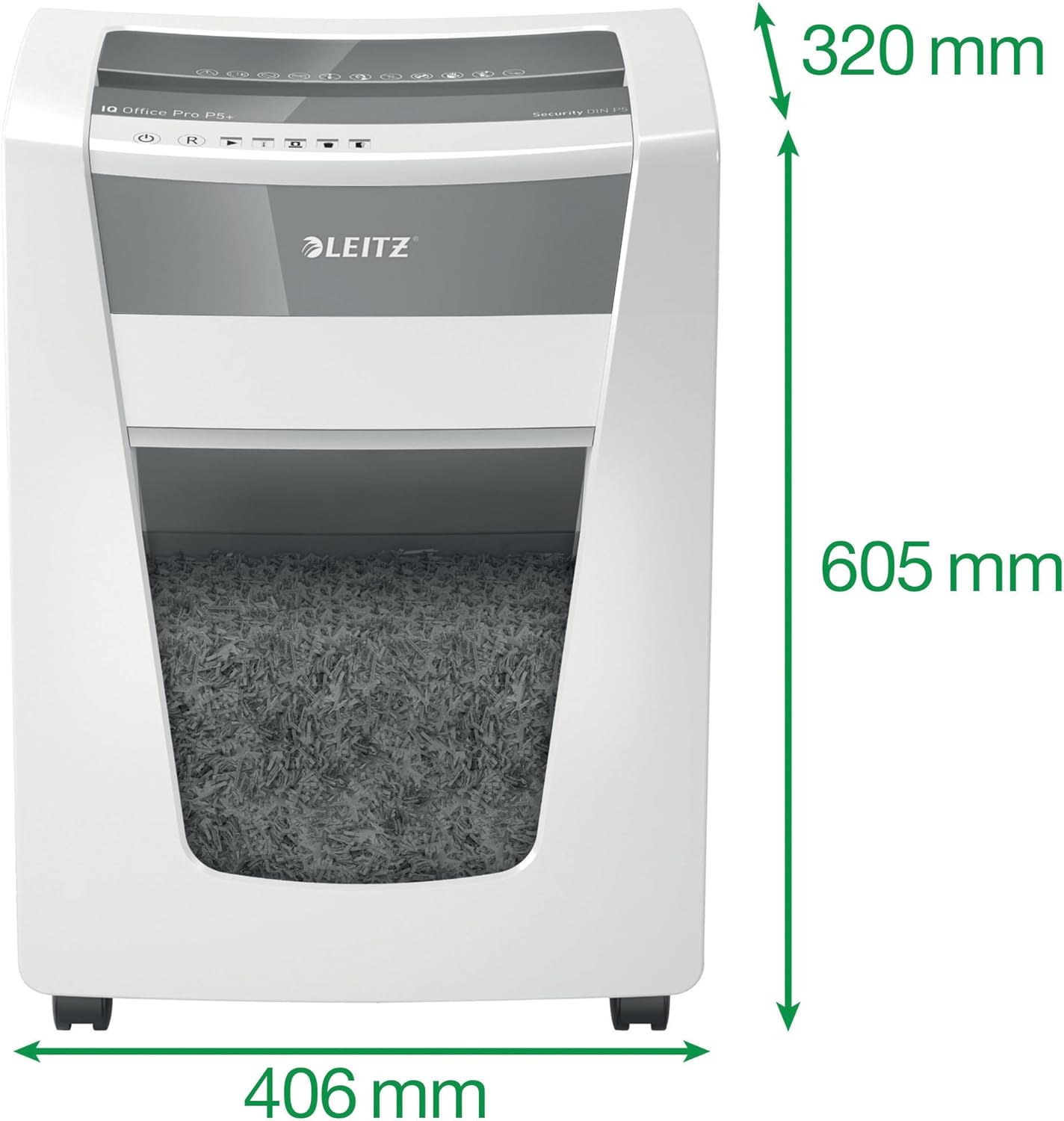
Image: The shredder with its key dimensions (height, width, depth) clearly marked.
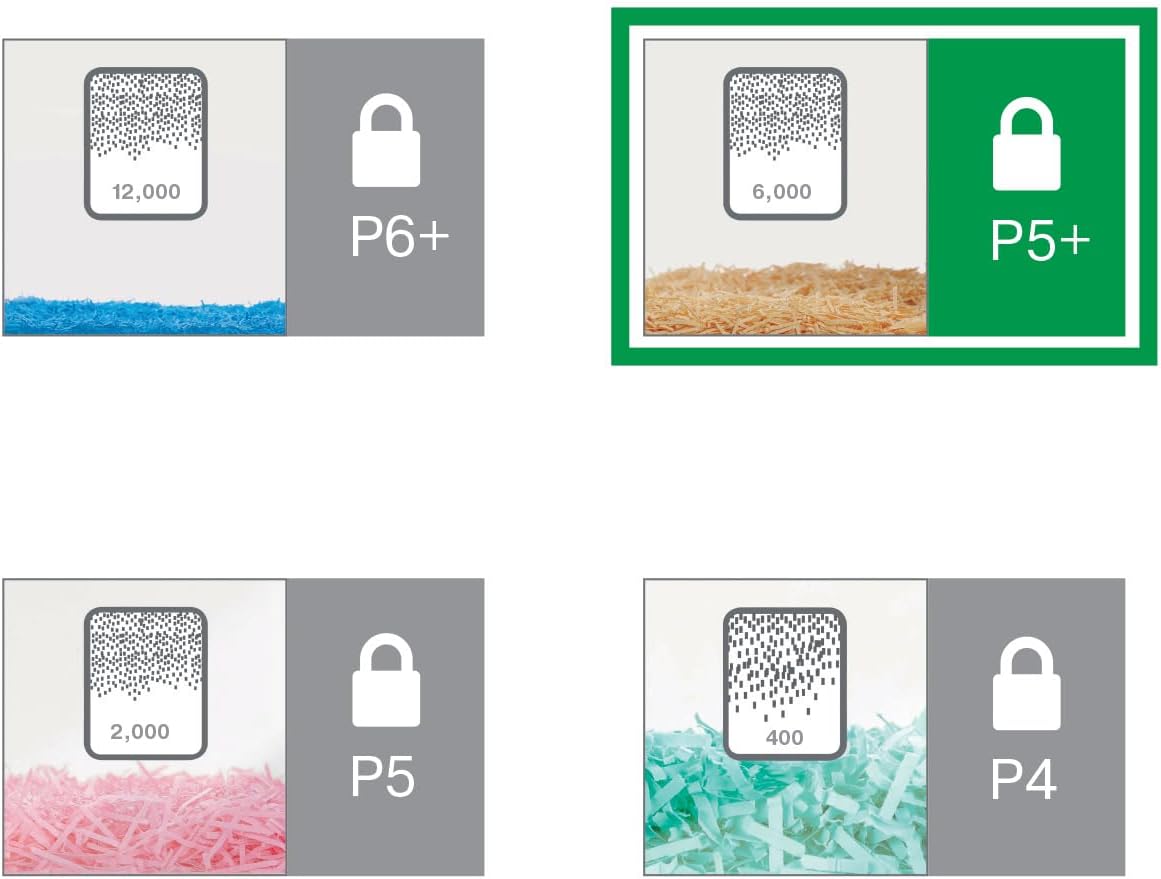
Image: A visual comparison of different DIN security levels (P4, P5, P5+, P6+), illustrating the decreasing particle size for higher security.
9. Кепилдик жана колдоо
Кепилдик маалымат
This Leitz IQ Office Pro P5+ Shredder comes with a 2-year warranty. An additional 1-year warranty (total 3 years) can be obtained upon product registration. Please refer to the warranty card included with your product for detailed terms and conditions, or visit the official Leitz webкаттоо үчүн сайт.
Кардарларды колдоо
For technical assistance, spare parts, or any inquiries regarding your Leitz shredder, please contact Leitz customer support. Contact information can typically be found on the official Leitz webсайтында же продуктунун таңгагында.
Сиз да зыярат кылсаңыз болот Leitz official webсайт көбүрөөк маалымат жана колдоо булактары үчүн.


