1. Киришүү
Thank you for choosing the BLAUPUNKT CLRD 30 DAB+ FM Clock Radio. This device combines a digital radio with an alarm clock and a convenient USB charging function. This manual will guide you through the setup, operation, and maintenance of your new clock radio to ensure optimal performance and longevity.
2. Коопсуздук маалыматы
- Колдонуудан мурун бардык көрсөтмөлөрдү кунт коюп окуп чыгыңыз жана келечекте колдонуу үчүн сактап коюңуз.
- Аппаратты жамгырдын, нымдуулуктун же экстремалдык температуранын таасиринде калтырбаңыз.
- туура желдетүүнү камсыз кылуу; вентиляция тешиктерин жаап салбаңыз.
- Берилген кубат адаптерин гана колдонуңуз.
- Агрегатты ажыратууга же өзгөртүүгө аракет кылбаңыз. Бардык тейлөөлөрдү квалификациялуу кызматкерлерге тапшырыңыз.
- Аппаратты күчтүү магнит талаасынан алыс кармаңыз.
3. Пакеттин мазмуну
Пакетте бардык буюмдар бар экенин текшериңиз:
- BLAUPUNKT CLRD 30 DAB+ FM Clock Radio
- Кубаттуу адаптер
- User Manual
- Кепилдик картасы

Image: Power adapter for the BLAUPUNKT CLRD 30 clock radio.
4. Продукциянын өзгөчөлүктөрү
- DAB+ жана FM радиосу: Enjoy a wide range of digital and analog radio stations with clear reception.
- USB кубаттоо порту: Conveniently charge your smartphone or other USB-powered devices (5V, 2A output).
- Кош ойготкуч: Set two independent alarm times with options to wake to radio or buzzer.
- Чырым Function: Temporarily pause the alarm for a few extra minutes of sleep.
- Уйку таймери: Program the radio to turn off automatically after a set duration (up to 90 minutes).
- Dimmable LCD Display: Large display shows time, date, and radio information with adjustable brightness.
- 6W RMS Audio Output: Delivers clear and balanced sound.
5. Башкаруу жана дисплей
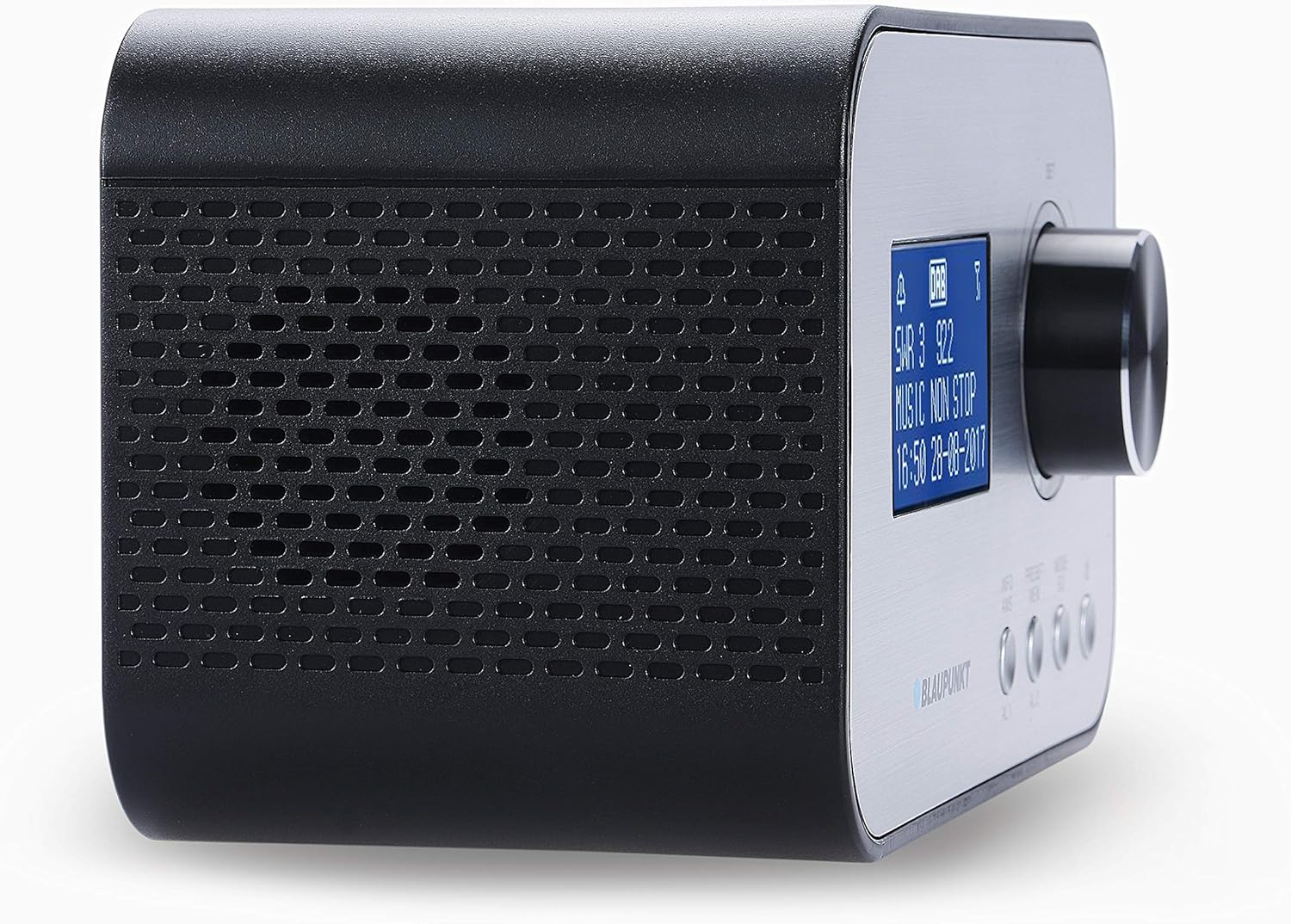
Сүрөт: алдыңкы жана каптал view of the BLAUPUNKT CLRD 30 clock radio, highlighting the display and main control knob.

Сүрөт: Үстү жана капталы view of the BLAUPUNKT CLRD 30 clock radio, showing the 'SNOOZE / SLEEP / DIMMER' button and other front panel controls.
Алдыңкы панелдин башкаруу элементтери:
- Дисплей: Убакытты, күндү, радиостанциянын маалыматын жана меню параметрлерин көрсөтөт.
- Control Knob (SET/SELECT/VOLUME): Rotate to navigate menus or adjust volume. Press to confirm selections.
- PRESET/MENU Button: Access preset stations or the main menu.
- MODE/INFO Button: Switch between DAB+, FM, and other modes; display additional information.
- AL1/AL2 Buttons: 1-ойготкучту жана 2-ойготкучту орнотуп, иштетиңиз.
Жогорку панелдин башкаруу элементтери:
- SNOOZE / SLEEP / DIMMER Button: Press to activate snooze, set sleep timer, or adjust display brightness.
Арткы панелдин туташуулары:

Сүрөт: Арткы view of the BLAUPUNKT CLRD 30 clock radio, showing the DC 5V power input and the USB charging port.
- DC 5V киргизүү: Берилген кубат адаптерин туташтырыңыз.
- USB Output (CHARGING ONLY): Connect your mobile device for charging.
- Телескопиялык антенна: Оптималдуу радио кабыл алуу үчүн кеңейтүү.
6. Орнотуу
6.1 Кубат туташтыруу
- Insert the DC plug of the provided power adapter into the DC 5V input jack on the rear of the clock radio.
- Кубат адаптерин стандарттуу розеткага сайыңыз.
- Түзмөк күйүп, дисплей күйөт.
6.2 Антенна
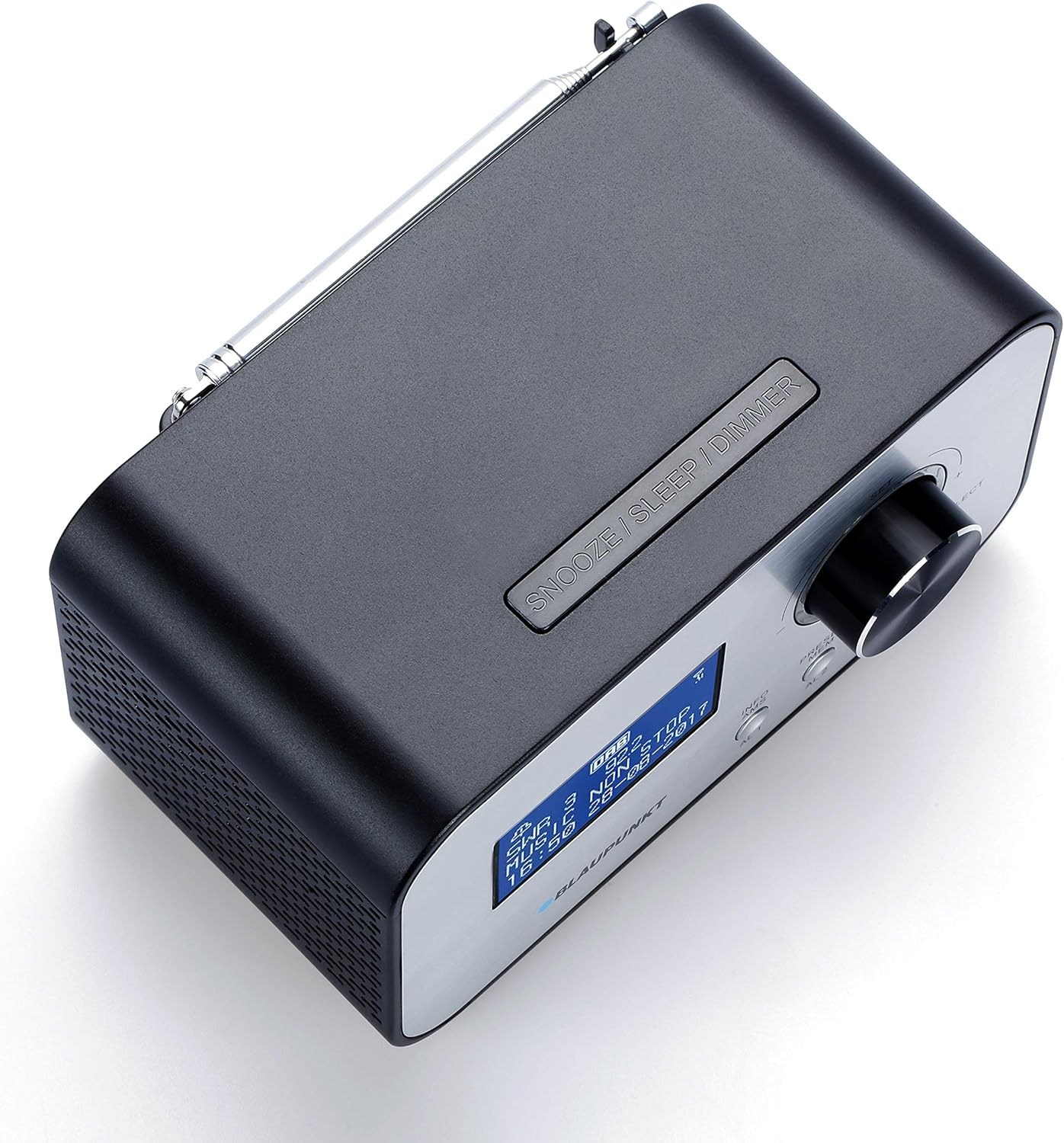
Сүрөт: Жогорку view of the BLAUPUNKT CLRD 30 clock radio with its telescopic antenna fully extended for improved reception.
DAB+ жана FM радиолорун оптималдуу кабыл алуу үчүн, түзмөктүн арткы жагында жайгашкан телескопиялык антеннаны толугу менен сунуңуз. Эң жакшы сигнал сапаты үчүн анын абалын тууралаңыз.
6.3 Initial Setup (Time, Date, Language)
Upon first power-on, the unit may automatically scan for DAB+ stations and set the time/date. If not, or if you wish to adjust settings:
- басыңыз PRESET/MENU негизги менюга кирүү үчүн баскычты басыңыз.
- айлантыңыз Башкаруу баскычы to navigate to 'System Settings' or 'Time/Date' and press the knob to select.
- Follow the on-screen prompts to set the time, date, and preferred language.
- For language, select English to ensure all menu options are understandable.
7. Иштөө нускамалары
7.1 Радио аркылуу иштөө (DAB+/FM)
- басыңыз РЕЖИМ/МААЛЫМАТ DAB+ жана FM радио режимдери ортосунда которулуу үчүн баскыч.
- DAB+ радиосу: The radio will automatically scan for available DAB+ stations. Rotate the Башкаруу баскычы to browse stations and press to select.
- FM радиосу: айлантыңыз Башкаруу баскычы to manually tune to FM frequencies. Press and hold the knob for an automatic scan to the next available station.
- Үндү айлантуу менен тууралаңыз Башкаруу баскычы ойнотуу учурунда.
7.2 Setting Alarms (AL1/AL2)
- же басыңыз AL1 or AL2 button to enter alarm setup for the respective alarm.
- айлантыңыз Башкаруу баскычы to adjust the hour and minute, pressing the knob to confirm each setting.
- Сигнал булагын тандаңыз (Зумзер же Радио). Эгер Радио болсо, каалаган станцияны тандаңыз.
- Set the alarm volume. Note that the minimum volume setting might be louder than expected for some users.
- Choose the alarm frequency (Daily, Weekdays, Weekends, Once).
- Ойготкучту иштетүү үчүн жөндөөлөрдү ырастаңыз. Дисплейде ойготкучтун сүрөтчөсү пайда болот.
7.3 Тындыруу функциясы
Ойготкуч чыкканда, басыңыз ЭРДИКТҮҮ / УКТУУ / КӨҢҮЛТҮҮ button to temporarily silence the alarm. The alarm will sound again after a short interval (typically 9 minutes).
7.4 Уйку таймери
- Радио ойноп жатканда, баскычын басыңыз ЭРДИКТҮҮ / УКТУУ / КӨҢҮЛТҮҮ Уйку таймеринин параметрлерин (мисалы, 15, 30, 45, 60, 90 мүнөт, ӨЧҮРҮҮ) карап чыгуу үчүн баскычын кайра-кайра басыңыз.
- Тандалган убакыттан кийин радио автоматтык түрдө өчөт.
7.5 USB кубаттоо
Connect your smartphone or other USB-powered device to the USB output port on the rear of the clock radio using a compatible USB cable. The port provides 5V/2A output for charging.
7.6 Дисплейдин күңүрткүсү
басыңыз ЭРДИКТҮҮ / УКТУУ / КӨҢҮЛТҮҮ button (when no alarm is active) to adjust the brightness of the LCD display. Cycle through available brightness levels to find your preferred setting. If the display appears too bright or too dim, adjust it using this button.
8. Техникалык тейлөө
- Тазалоодон мурун кубат адаптерин ажыратыңыз.
- Агрегатты жумшак, кургак чүпүрөк менен сүртүңүз. Абразивдүү тазалагычтарды же эриткичтерди колдонбоңуз.
- Keep the ventilation openings clear of dust.
9. Кыйынчылыктарды
- Кубат жок: Кубат адаптери түзмөккө да, иштеп жаткан розеткага да бекем туташтырылганын текшериңиз.
- Радио кабыл алуу начар: Fully extend and adjust the telescopic antenna. Try repositioning the unit to improve signal.
- Ойготкуч угулбайт: Check that the alarm is activated (alarm icon on display) and the alarm volume is set appropriately. Ensure the time and alarm time are correct.
- Дисплей өтө жарык/күңүрт: колдонуу ЭРДИКТҮҮ / УКТУУ / КӨҢҮЛТҮҮ жарыктык деңгээлдерин өзгөртүү үчүн баскычты басыңыз.
- USB заряддоо иштебей жатат: Ensure the device is properly connected and the USB cable is functional. The USB port is for charging only, not data transfer.
- Difficulty with Menu Navigation: The menu system is primarily controlled by the Башкаруу баскычы (rotate to navigate, press to select) and the PRESET/MENU button to access. If the language is incorrect, navigate to 'System Settings' to change it to English.
10. Техникалык шарттар
| Бренд: | BLAUPUNKT |
| Модель номери: | CLRD 30 BK |
| Өлчөмдөрү (L x W x Y): | 17 x 11.5 x 10.2 см |
| Салмагы: | 550 грамм |
| Материал: | Пластик |
| Байланыш технологиясы: | USB |
| Тюнер технологиясы: | DAB+ |
| Кубат булагы: | AC (Adapter included) |
| Колдоого алынган радио тилкелери: | DAB+/FM |
| USB чыгышы: | 5V, 2A (Charging Only) |
11. Кепилдик жана колдоо
This product comes with a warranty. Please refer to the included warranty card for details regarding coverage and duration. For technical support or service inquiries, you may contact:
- Кызматтын ишеним телефону: 00 800 1300 1400 (Free call)
- Электрондук почта: blaupunkt@gt-support.de
Please have your model number (CLRD 30 BK) and purchase information ready when contacting support.