1. Продукт бүтүп калдыview
The GREENCYCLE Smart Wireless Light Switch and Receiver system provides a convenient solution for controlling lights and appliances. This kit includes a wireless switch panel and a compact receiver module. It supports traditional manual control, remote control via a smartphone application, and voice control through Amazon Alexa and Google Home. The system is designed for easy installation without the need for new wiring to the switch location, offering flexibility in placement and control.

1-сүрөт: GREENCYCLE Smart Wireless Light Switch and Receiver. The image displays the white, rectangular wireless switch panel on the left and the smaller, white receiver module with an antenna on the right. The receiver has input/output labels and a warning sticker.
2. Пакеттин мазмуну
Пакетиңизде бардык буюмдар бар экенин текшериңиз:
- 1 x Wireless Switch Panel
- 1 x Receiver Module
- 2 x Adhesive Rubbers
- 1 x User Manual
3. Техникалык шарттар
| Модель номери | M-KS-WLSWH-1B-1PK+WLREV-WIFI-1PK-001 |
| Киргизүү көлөмүtage (Кабыл алуучу) | AC 80-270V, 50/60Hz |
| Максималдуу жүк (кабыл алгыч) | 10A / 1000W (LED) |
| Зымсыз жыштык | 433MHz (Switch to Receiver) |
| Wi-Fi стандарты | 2.4GHz (Receiver to Router) |
| Сырткы берүү аралыгы | >500м |
| Ички берүү аралыгы | >40m (through walls) |
| Switch Battery | CR2032 button lithium battery |
| Switch Battery Lifetime | Up to 20 years (approx. 4-6 years with 10 operations/day) |
| Switch Button Life | 800,000 жолу |
| Receiver Life | 400,000 жолу |
| Switch Waterproof Rating | IP54 |
| Материал | Поликарбонат |
| Сертификаттар | CE, CQC, FCC, RoHS |

2-сүрөт: Dimensions of the Wireless Switch (3.38 x 3.38 inches) and Receiver (2.95 x 1.10 x 1.12 inches).
4. Коопсуздук боюнча маанилүү маалымат
Сураныч, орнотуудан жана колдонуудан мурун бардык коопсуздук нускамаларын окуп, түшүнүңүз. Бул нускамаларды аткарбоо электр шокуна, өрткө же башка коркунучтарга алып келиши мүмкүн.
- ЭСКЕРТҮҮ: Always turn off power at the circuit breaker before installing or servicing the receiver module.
- Орнотуу квалификациялуу электрик тарабынан же жергиликтүү электр эрежелерине ылайык жүргүзүлүшү керек.
- 10A / 1000W максималдуу жүктөмдөн ашпаңыз.
- Ensure proper wiring connections (Live In, Neutral In, Live Out, Neutral Out) as indicated on the receiver.
- The wireless switch is IP54 water-resistant, suitable for damp environments like bathrooms, but should not be submerged in water.
- Продукцияны балдар жетпеген жерде сактаңыз.
5. Орнотуу жана орнотуу
5.1 Кабылдагычтын зымдары
- Электр кубатын өчүрүү: Жарык бергичти башкарып турган автоматтык өчүргүчтү таап, электр кубатын өчүрүңүз. Үн өлчөгүчтү колдонуп, электр кубаты өчүк экенин текшериңиз.tage сыноочу.
- Ресиверди туташтыруу: The receiver module should be wired between the power supply and the light fixture. Refer to the wiring diagram below.
- туташтыруу Жашоо wire from the power supply to the 'L IN' terminal on the receiver.
- туташтыруу Нейтралдуу In wire from the power supply to the 'N IN' terminal on the receiver.
- туташтыруу Жашоо wire to the light fixture to the 'L OUT' terminal on the receiver.
- туташтыруу Нейтралдуу чыгуу wire to the light fixture to the 'N OUT' terminal on the receiver.
- Secure the receiver: The compact receiver can be placed inside a wiring box, canopy, or electrical box.
- Күчтү калыбына келтирүү: Once all connections are secure, turn the power back on at the circuit breaker.

3-сүрөт: Wiring diagram showing the receiver connected between the power source (AC 80-270V) and the lamp. Live and Neutral input wires connect to 'IN', and Live and Neutral output wires connect to 'OUT'.
5.2 Wireless Switch Placement
The wireless switch requires no wiring and can be mounted anywhere using the provided adhesive rubbers or screws (not included).
- Clean the desired surface for mounting.
- Peel off the backing from the adhesive rubbers and firmly press the switch panel onto the surface.
- Alternatively, use screws to secure the switch panel to a wall or junction box.

4-сүрөт: Examples of the wireless switch installed in different rooms, demonstrating its flexible placement without wiring.
5.3 Pairing the Wireless Switch with the Receiver
The switch and receiver are typically pre-paired. If re-pairing is needed or for multi-way control setup:
- Ресивер күйгүзүлгөнүн текшериңиз.
- Press and hold the pairing button on the receiver (refer to receiver diagram for location, usually a small button or indicator). The indicator light on the receiver will start blinking.
- While the receiver indicator is blinking, press the desired button on the wireless switch panel.
- The receiver's indicator light will stop blinking or flash a confirmation, indicating successful pairing.
- To set up multi-way control, repeat steps 2-3 with additional wireless switch panels.
5.4 Wi-Fi'га туташуу жана тиркемени орнотуу
To enable smart control features, connect the receiver to your home Wi-Fi network and set up the companion application.
- Колдонмону жүктөп алыңыз: Издөө the "Wireless Smart" app on the Apple App Store (for iOS) or Google Play Store (for Android) and install it on your smartphone.
- Катталуу/Кирүү: Каттоо эсебин түзүү же кирүү үчүн колдонмону ачып, экрандагы нускамаларды аткарыңыз.
- Түзмөк кошуу: In the app, select the option to add a new device. Follow the app's instructions to put the receiver into Wi-Fi pairing mode (this usually involves a specific power cycle or button press on the receiver).
- Wi-Fi'га туташуу: Enter your 2.4GHz Wi-Fi network name and password when prompted by the app. The receiver will connect to your home network.
- Түзмөктүн аталышы: Assign a descriptive name to your smart switch (e.g., "Living Room Light") for easy identification and voice control.

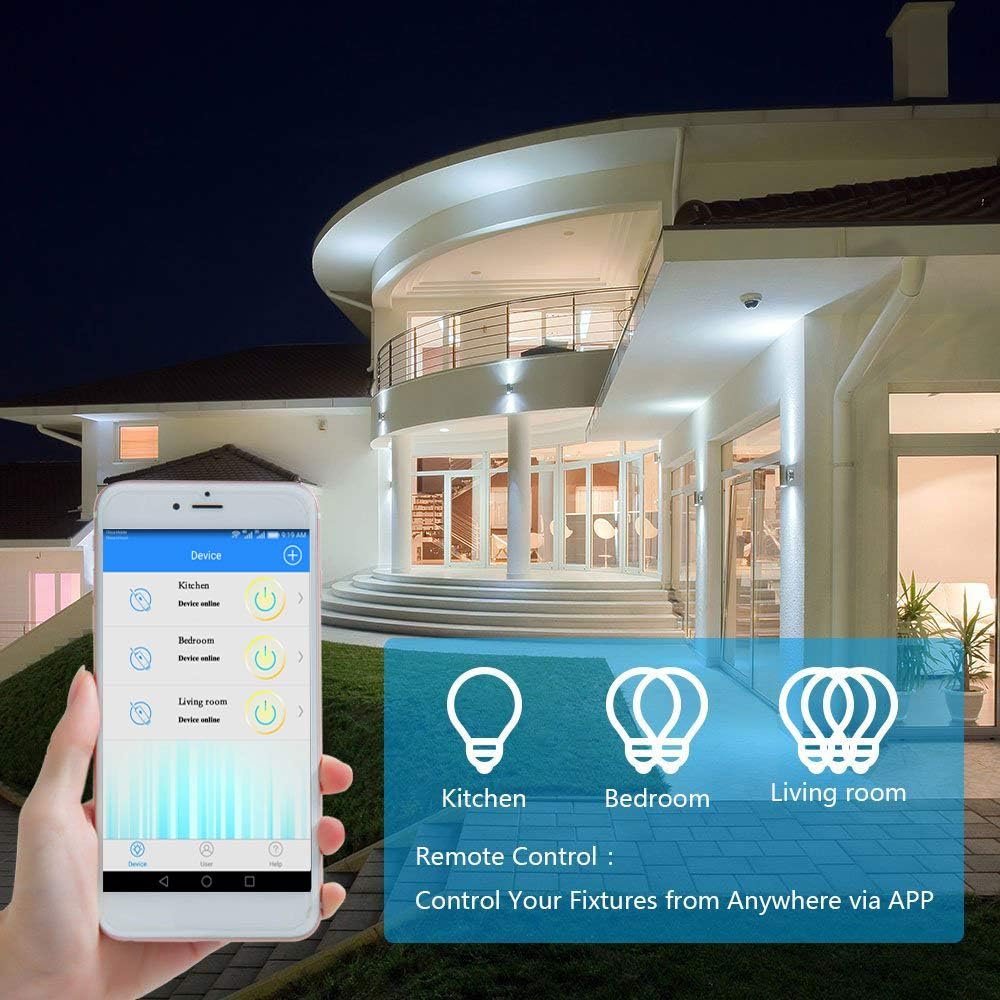
5-сүрөт: A smartphone displaying the "Wireless Smart" app interface, showing control over various light fixtures (Kitchen, Bedroom, Living Room).
6. Иштөө нускамалары
6.1 Кол менен башкаруу
Press the wireless switch panel to toggle the connected light or appliance on and off. The switch transmits a 433MHz signal to the receiver.
6.2 Колдонмону башкаруу
Use the "Wireless Smart" application on your smartphone to control your lights from anywhere with an internet connection.
- Open the "Wireless Smart" app.
- Select the desired smart switch from your device list.
- Tap the on/off icon to toggle the light.
- If the connected light fixture supports dimming and the app provides the function, you can adjust brightness levels.
6.3 Үн менен башкаруу (Amazon Alexa жана Google Home)
Integrate your GREENCYCLE Smart Wireless Light Switch with Amazon Alexa or Google Home for convenient voice control.
- Каттоо эсебин байланыштыруу: In your Alexa or Google Home app, navigate to the 'Skills' or 'Works with Google' section. Издөө and enable the "Wireless Smart" skill/service. Link your "Wireless Smart" account.
- Түзмөктөрдү табуу: Ask your voice assistant to "Discover devices" or manually initiate device discovery in the app.
- Үн буйруктары: Once discovered, you can use commands such as:
- "Alexa, [Түзмөктүн аталышын] күйгүз"
- "Окей Google, [Түзмөктүн аталышын] өчүр"
- "Alexa, set [Device Name] to 50%" (if dimming is supported)
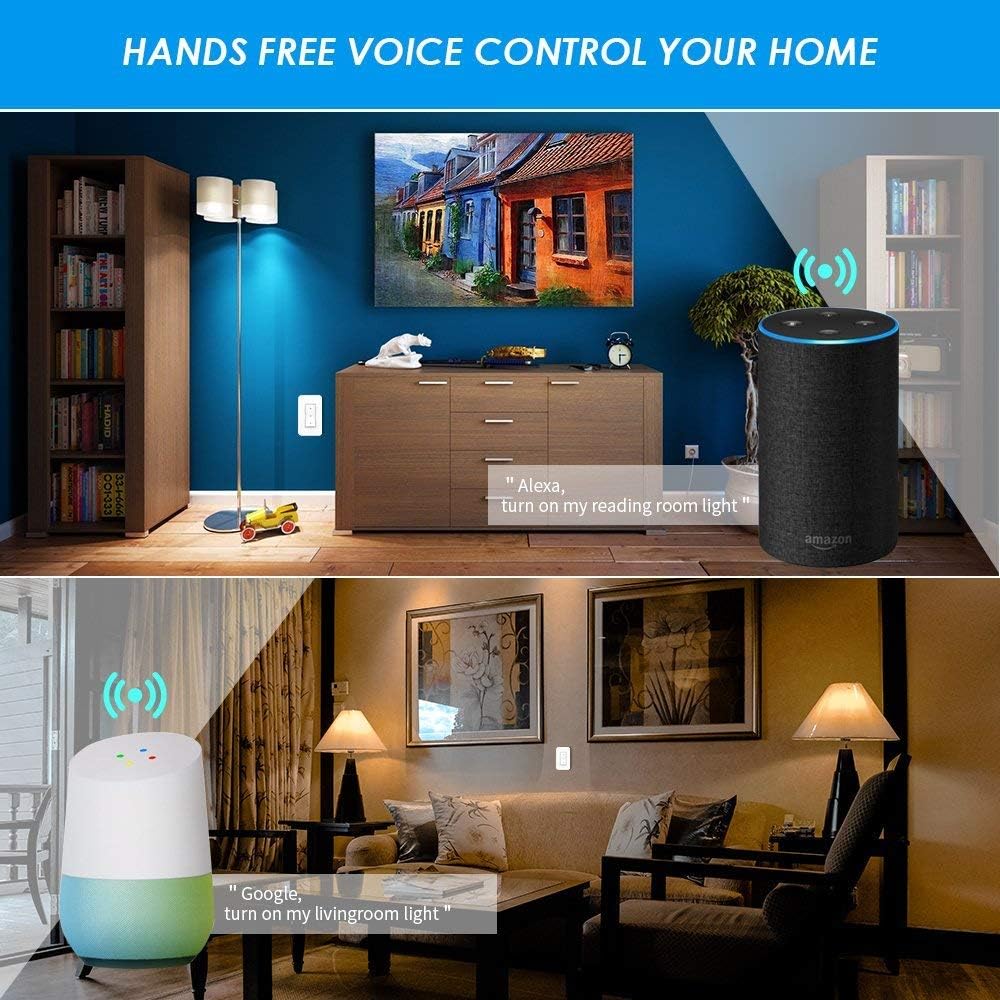
6-сүрөт: Examples of voice control in a home setting, showing an Amazon Echo and Google Home device responding to commands to control lights.
6.4 Убакыт функциясы
Utilize the app's timing functions to automate your lights and appliances.
- Scheduled Timer: Set specific times for your lights to turn on or off daily.
- Артка саноо таймери: Set a timer for the light to turn off after a specified duration.
- Цикл таймери: Configure repetitive on/off cycles.
- Sunrise/Sunset Sync: Schedule lights to turn on or off based on local sunrise and sunset times.
7-сүрөт: Screenshots from the app demonstrating scheduled timers for lights, including daily on/off times and synchronization with sunrise/sunset.
7. Техникалык тейлөө
7.1 Тазалоо
Wipe the wireless switch panel and receiver with a soft, dry cloth. Do not use abrasive cleaners or solvents, as these may damage the surface or internal components.
7.2 Wireless Switch Battery Replacement
The wireless switch is powered by a CR2032 button lithium battery, which has a long lifespan (up to 20 years, or 4-6 years with typical use). If the switch becomes unresponsive, the battery may need replacement.
- Carefully pry open the back cover of the wireless switch panel.
- Эски CR2032 батареясын алып салыңыз.
- Жаңы CR2032 батареясын оң (+) тарабын өйдө каратып салыңыз.
- Арткы капкакты бекем ордуна коюңуз.
8. Кыйынчылыктарды
8.1 Light Not Responding to Wireless Switch
- Кабыл алгычтын кубаттуулугун текшерүү: Ensure the receiver is properly wired and receiving power.
- Жупташууну текшерүү: Re-pair the wireless switch with the receiver (refer to Section 5.3).
- Батареяны текшерүү: Replace the CR2032 battery in the wireless switch (refer to Section 7.2).
- Distance/Obstructions: Ensure the switch is within the effective range of the receiver (up to 40m indoors) and there are no excessive obstructions.
8.2 App/Voice Control Not Working
- Wi-Fi туташуусу: Verify that your receiver is connected to your 2.4GHz Wi-Fi network. Check your router and internet connection.
- Колдонмонун абалы: Ensure the "Wireless Smart" app shows the device as "Online".
- Каттоо эсебин байланыштыруу: Confirm that your "Wireless Smart" account is correctly linked to Amazon Alexa or Google Home.
- Түзмөктүн аты: Use the exact device name configured in the app for voice commands.
- Роутердин кийлигишүүсү: If you have a dual-band router, ensure the receiver is connected to the 2.4GHz band.
8.3 Light Flickers or Does Not Turn On/Off Correctly
- Жүктөө шайкештиги: Ensure the connected light fixture's wattage does not exceed the receiver's maximum load (1000W).
- Зымдарды текшерүү: Double-check all wiring connections to the receiver (Live In, Neutral In, Live Out, Neutral Out) for looseness or incorrect placement.
- Караңгылатуу функциясы: If attempting to dim, ensure the light bulb itself is dimmable and the app supports dimming for this specific device.
9. Кепилдик жана колдоо
For warranty information or technical support, please contact GREENCYCLE customer service. Refer to the product packaging or the GREENCYCLE official webакыркы байланыш маалыматы үчүн сайт.
Өндүрүүчү: GREENCYCLE TECH INC.


