1. Киришүү
Сатып алганыңыз үчүн рахматasing the auna V-20 Vertical Stereo System. This manual provides essential information for the safe and efficient operation of your device. Please read it thoroughly before use and keep it for future reference.
2. Коопсуздук нускамалары
- Аппаратты иштетүүдөн мурун бардык нускамаларды кылдат окуп чыгыңыз.
- Аппаратты суудан, нымдан жана экстремалдык температурадан алыс кармаңыз.
- Эч кандай желдетүүчү тешиктерди жаап албаңыз.
- Өндүрүүчү белгилеген тиркемелерди/аксессуарларды гана колдонуңуз.
- Аппаратты чагылгандуу бороондордо же узак убакыт бою колдонбогондо электр розеткасынан ажыратыңыз.
- Бардык тейлөөлөрдү квалификациялуу тейлөө кызматкерлерине тапшырыңыз.
- в ачпагылаasing; ичинде колдонуучу тейлей турган бөлүктөр жок.
3. Пакеттин мазмуну
Сураныч, бардык элементтер бар экенин текшериңиз:
- 1 x auna V-20 Vertical Stereo System
- 1 x Remote Control (including 2 x 1.5V AAA batteries)
- 1 х кубат адаптери
- 1 x Removable Stand Base
- 1 x Wire Antenna
- User Manual (English and German)
4. Продукт бүтүп калдыview
The auna V-20 is a versatile micro stereo system featuring a vertical design. It includes a CD player, DAB+ and FM radio, Bluetooth, NFC, USB, and AUX connectivity. The system can be used with its stand or mounted on a wall.

Figure 4.1: The auna V-20 Vertical Stereo System shown with its remote control in a modern living room environment.
Алдыңкы панелдин башкаруу элементтери жана дисплей
The front panel features a sleek design with a motorized CD drive cover and an LED display that shows time and operational information. Control buttons are located on the top edge of the unit.
Арткы панелдик байланыштар
The rear panel provides various connection ports for external devices and power.
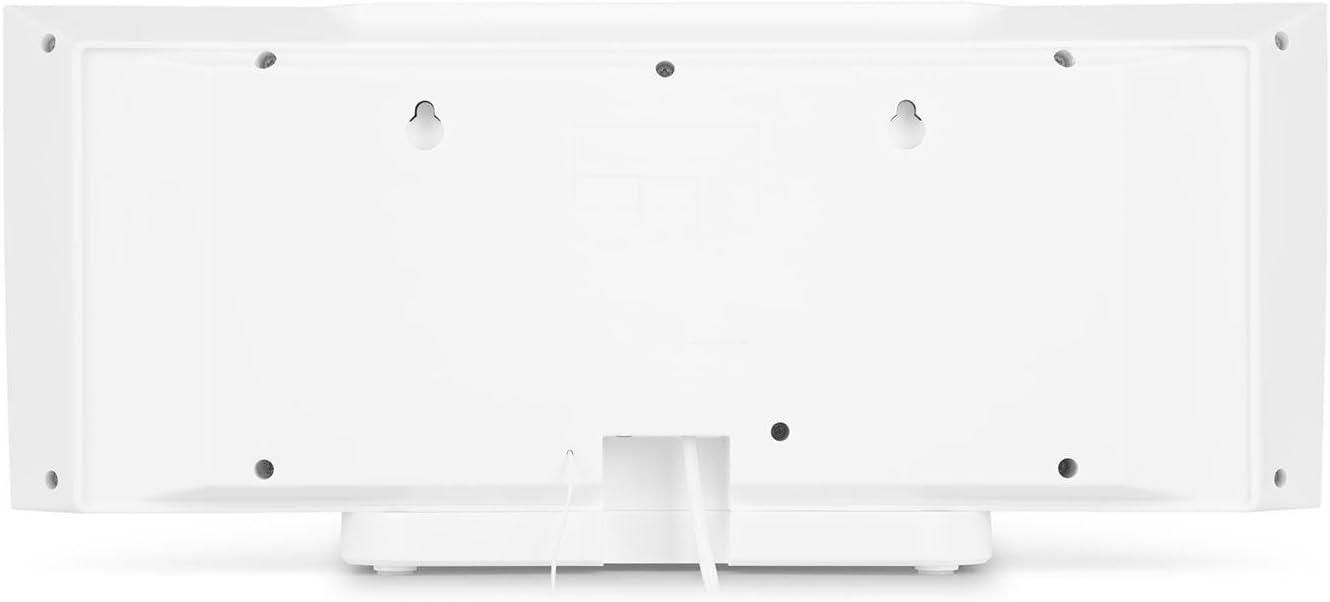
4.2-сүрөт: Арткы view of the auna V-20, highlighting the USB port and AUX input.
Алыстан башкаруу
Комплекттеги алыстан башкаруу пульту бардык функцияларды алыстан ыңгайлуу башкарууга мүмкүндүк берет.

4.3-сүрөт: Детальдуу view of the remote control for the auna V-20 stereo system.
5. Орнотуу
5.1 Жайгаштыруу параметрлери
The auna V-20 offers flexible placement:
- Стенд орнотуу: Attach the removable stand base for desktop or shelf placement. Ensure the unit is stable on a flat surface.
- Дубалга орнотуу: The unit can be mounted on a wall to save space. Use appropriate wall mounting hardware (not included) and ensure the wall can support the unit's weight.

5.1-сүрөт: Арткы view illustrating the wall mounting points and the stand attachment area.
5.2 Кубат туташтыруу
Connect the provided power adapter to the DC IN port on the rear of the unit, then plug it into a standard wall outlet (AC 230V, 50 Hz).
5.3 Антеннаны туташтыруу
Extend the wire antenna for optimal DAB+ and FM radio reception. Adjust its position for the best signal quality.
6. Иштөө нускамалары
6.1 Күйгүзүү/өчүрүү жана күтүү режими
басыңыз КҮТҮҮ РЕЖИМИНДЕ button on the unit or remote control to switch the system on or put it into standby mode.
6.2 Режимди тандоо
басыңыз ФУНКЦИЯ button on the unit or the dedicated mode buttons (FM/DAB, USB, CD, AUDIO IN, BLUETOOTH) on the remote control to switch between different audio sources.
6.3 Үндү башкаруу
Үнүн колдонуп, үнүн жөндөңүз VOL+ жана VOL- buttons on the unit or remote control. The LED display will show the current volume level.
6.4 Эквалайзердин жөндөөлөрү
The system features a 2-band equalizer and equalizer presets. Use the EQ button on the remote control to cycle through presets or adjust bass/treble. The X-BASS function can be activated for enhanced bass.
7. Bluetooth жана NFC байланышы
7.1 Bluetooth жупташтыруу
Смартфонуңуздан, планшетиңизден же ноутбукуңуздан музыканы зымсыз угуу үчүн:
- Switch the stereo system to Bluetooth mode. The LED display will indicate pairing mode.
- Мобилдик түзмөгүңүздө Bluetooth'ду иштетиңиз жана жеткиликтүү түзмөктөрдү издеңиз.
- Select "auna V-20" from the list to pair. Once connected, you can play audio from your device.

Figure 7.1: A smartphone being used to connect to the auna V-20 via Bluetooth.
7.2 NFC туташуусу
For intuitive pairing with NFC-enabled devices:
- Мобилдик түзмөгүңүздө NFC иштетилгенин текшериңиз.
- Gently swipe your NFC-enabled device over the NFC sensor on the auna V-20.
- The devices will automatically pair via Bluetooth.

Сүрөт 7.2: Жакын пландан view of the NFC sensor for quick device pairing.
8. CD ойноткучтун иштеши
The auna V-20 features an MP3-compatible CD player with a motorized drive.

Figure 8.1: The motorized CD player mechanism with a disc inserted.
8.1 Loading a CD
- басыңыз АЧУУ/ЖАБУУ button to open the motorized CD cover.
- Carefully place a CD (CD, CD-R/RW, MP3-CD) onto the spindle with the label side facing you.
- Басыңыз АЧУУ/ЖАБУУ again to close the cover. The system will automatically switch to CD mode and begin playback.
8.2 Ойнотуу башкаруулары
- Ойнотуу/тындыруу: Басыңыз ОЙНОО/ТЫНЫТТЫРУ ойнотууну баштоо же тындыруу үчүн.
- Тректерди өткөрүп жиберүү: колдонуу АЛГА ӨТҮҢҮЗ or АРТКА ӨТКӨРҮҮ тректер арасында өтүү үчүн баскычтар.
- Токтотуу: басыңыз ТОКТОТ ойнотууну аяктоо үчүн баскыч.
- Кайталоо/Кокустук: колдонуу КАЙТАЛОО жана RANDOM buttons on the remote for playback options.
- Программалануучу ойнотуу: The system supports programmable title display for custom playlists.
9. Радио аркылуу иштөө (DAB+/FM)
The auna V-20 features both DAB+ digital radio and analog FM radio with RDS function.
9.1 Selecting Radio Mode
басыңыз FM/DAB button on the remote control to switch between FM and DAB+ modes.
9.2 Automatic Station Scan
In either FM or DAB+ mode, press the SCAN button on the remote control to automatically scan and store available stations. The system can store up to 20 presets per reception type.
9.3 Manual Tuning and Presets
- Кол менен жөндөө: колдонуу ТУНЕ +/- buttons on the remote control for fine-tuning.
- Алдын ала орнотууларды сактоо: Once a station is found, press the АЛДЫН АЛА button, then use the number buttons (0-9, 10+) to assign a preset number. Press ENTER ырастоо үчүн.
- Алдын ала орнотууларды эстөө: Press the corresponding number button on the remote control to quickly access a saved station.
- Маалымат баскычы: DAB+ режиминде, басыңыз INFO button to display additional information such as artist, title, album, or news.
10. USB ойнотуу
The auna V-20 allows playback of MP3 audio fileтүздөн-түз USB таяктан.
10.1 USB түзмөктү туташтыруу
- Insert your USB stick into the USB port on the rear of the unit.
- Switch the stereo system to USB mode using the USB алыстан башкаруудагы баскыч.
- The system will automatically detect and begin playing MP3 files.
10.2 USB Playback Controls
Playback controls (Play/Pause, Skip, Stop, Repeat, Random) are similar to CD player operation. Use the Папка button on the remote to navigate through folders on the USB device.
11. AUX киргизүү
Connect external audio devices such as MP3 players, CD players, or computers using the AUX input.
11.1 Тышкы Түзмөктү туташтыруу
- Connect a 3.5mm audio cable (not included) from the headphone jack or audio output of your external device to the AUX IN port on the rear of the auna V-20.
- Switch the stereo system to AUDIO IN mode using the AUDIO IN алыстан башкаруудагы баскыч.
- Play audio from your external device. The sound will be output through the auna V-20 speakers.
12. Техникалык тейлөө
12.1 Тазалоо
- Тазалоодон мурун ар дайым аппаратты розеткадан сууруп алыңыз.
- Сырткы беттерди тазалоо үчүн жумшак, кургак чүпүрөктү колдонуңуз.
- Абразивдүү тазалагычтарды, момдорду же эриткичтерди колдонбоңуз, анткени алар финишке зыян келтириши мүмкүн.
- CD линзасы үчүн, зарыл болсо, атайын CD линзасын тазалоочу каражатты колдонуңуз.
12.2 Жалпы кам көрүү
- Аппараттын үстүнө оор нерселерди коюудан алыс болуңуз.
- Аппаратты күн нурунан жана жылуулук булактарынан алыс кармаңыз.
- Ашыкча ысып кетүүнүн алдын алуу үчүн аппараттын айланасында туура желдетүүнү камсыз кылыңыз.
13. Кыйынчылыктарды
| Көйгөй | Мүмкүн себеп | Чечим |
|---|---|---|
| Күч жок | Электр кабели туташкан эмес; розетка бузук | Электр кабелинин туташуусун текшериңиз; башка розетканы колдонуп көрүңүз |
| Үн жок | Volume too low; incorrect source selected; mute activated | Increase volume; select correct source; deactivate mute |
| CD ойнобой жатат | CD inserted incorrectly; CD dirty/scratched; unsupported format | Reinsert CD correctly; clean or replace CD; ensure CD is compatible (CD, CD-R/RW, MP3-CD) |
| Радио кабыл алуу начар | Антенна узартылган эмес; сигнал алсыз | Extend and adjust antenna position; try moving the unit to a different location |
| Bluetooth жупташтыруу ишке ашпай калды | Device too far; Bluetooth not enabled; incorrect pairing procedure | Ensure devices are close; enable Bluetooth on mobile device; follow pairing instructions (Section 7.1) |
14. Техникалык шарттар
| Өзгөчөлүк | Деталь |
|---|---|
| Бренд | auna |
| Модел | V-20 |
| Бөлүмдүн номери | AUVZ-1100-ghfr |
| Продукциянын өлчөмдөрү | 51 x 25 x 16 см |
| Салмагы | 2.6 кг |
| Power Source | Электр |
| Ватtage | 27 ватт |
| Аудио чыгаруу режими | Стерео |
| Динамик конфигурациясы | 2.0 |
| Колдоого алынган аудио форматтары | MP3 |
| Медиа түрү | CD, MP3 |
| Туташтыргычтын түрлөрү | Bluetooth, NFC, USB, AUX |
| Bluetooth шайкеш | Ооба |
| Bluetooth версиясы | 2.1+EDR |
| Bluetooth Profile | A2DP |
| Шайкеш түзмөктөр | Smartphone, tablet, MP3 player |
| Өзгөчөлүктөр | Колдонууга оңой |
| Алыстан башкаруунун батареялары | 2 x 1.5V AAA (кошулган) |
| DAB+ жыштык диапазону | 174 - 240 MHz (Band III) |
15. Кепилдик жана колдоо
This product is covered by a manufacturer's warranty. For detailed warranty information, please refer to the documentation provided at the time of purchase or contact auna customer support.
If you encounter any issues not covered in the troubleshooting section, or require further assistance, please contact auna customer service through their official webсайт же сатуучу.


