1. Киришүү
The Optex ORT 8930-HD is a digital terrestrial receiver designed to receive free-to-air digital programs broadcast in MPEG2/MPEG4 format, compatible with DVB-T2 and HEVC/H.265 standards. This device connects to your television via HDMI or SCART. It features a USB input for future software updates, multimedia file playback (photos, music, videos), and direct recording to an external USB storage device (not included).
This manual provides detailed instructions for the proper installation, operation, and maintenance of your Optex ORT 8930-HD receiver. Please read it thoroughly before use to ensure optimal performance and to prevent damage.
2. Коопсуздук маалыматы
- Ашыкча ысып кетүүнүн алдын алуу үчүн аппараттын айланасында туура желдетүүнү камсыз кылыңыз.
- Do not expose the receiver to rain, moisture, or extreme temperatures.
- Аппаратты радиаторлор же мештер сыяктуу жылуулук булактарынын жанына коюудан алыс болуңуз.
- Аппарат менен кошо берилген кубат адаптерин гана колдонуңуз.
- в ачпагылаasing; бардык тейлөөлөрдү квалификациялуу кызматкерлерге тапшырыңыз.
- Disconnect the power plug from the wall outlet during lightning storms or when unused for long periods.
3. Пакеттин мазмуну
Пакетте бардык буюмдар бар экенин текшериңиз:
- 1 x Optex ORT 8930-HD Digital Receiver
- 1 x Алыстан башкаруу
- 1 x User Manual
4. Продукт бүтүп калдыview
4.1 алдыңкы панели

Сүрөт 1: Фронт view of the Optex ORT 8930-HD receiver, showing the display, USB port, and control buttons.
The front panel includes a digital display for channel numbers, a USB 2.0 port for external storage, and basic control buttons (CH+, CH-, Power).
4.2 Арткы панель
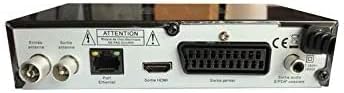
Сүрөт 2: Арткы view of the Optex ORT 8930-HD receiver, displaying various connectivity ports.
Арткы панелде төмөнкү туташуулар бар:
- Antenna In/Out: IEC 9.52 mm connectors for terrestrial antenna.
- HDMI чыгышы: For connecting to an HD television.
- SCART Connector: For connecting to older televisions.
- S/PDIF Coaxial Audio: Санарип аудио чыгаруу.
- Кубат киргизүү: For the external power adapter.
4.3 Алыстан башкаруу

Сүрөт 3: The remote control unit for the Optex ORT 8930-HD receiver.
The remote control allows full operation of the receiver, including power, channel selection, volume, menu navigation, recording functions, and multimedia playback controls.
5. Орнотуу
5.1 Антеннаны туташтыруу
- Connect your terrestrial antenna cable to the "Antenna In" port on the rear panel of the receiver.
- If you wish to loop the antenna signal to another device, connect a coaxial cable from the "Antenna Out" port to the input of the next device.
5.2 Телевизоруңузга туташуу
Төмөнкү туташуу ыкмаларынын бирин тандаңыз:
- HDMI (HD үчүн сунушталат): Connect an HDMI cable from the "HDMI Output" port on the receiver to an available HDMI input on your television.
- SCART: Connect a SCART cable from the "SCART Connector" on the receiver to the SCART input on your television.
5.3 Кубат туташтыруу
- Connect the power adapter to the power input port on the receiver.
- Кубат адаптерин ылайыктуу розеткага сайыңыз.
5.4 Баштапкы каналды сканерлөө
- Сыналгыңызды күйгүзүңүз жана туташууңузга туура келген туура киргизүү булагын (HDMI же SCART) тандаңыз.
- Power on the Optex ORT 8930-HD receiver.
- The first-time setup wizard should appear. Follow the on-screen instructions to perform an automatic channel search. This will scan for all available digital terrestrial channels in your area.
- If the wizard does not appear, navigate to the "Menu" > "Installation" > "Automatic Search" using the remote control.
6. Иштөө нускамалары
6.1 Негизги операция
- Күйгүзүү/өчүрүү: басыңыз КҮЧ пульттун же алдыңкы панелдин баскычы.
- Канал тандоо: колдонуу CH+ / CH- баскычтарын басыңыз же сандык баскычтоп аркылуу каналдын номерин түз киргизиңиз.
- Үндү көзөмөлдөө: колдонуу VOL+ / VOL- баскычтар.
- Үнсүз: басыңыз БАСУУ аудиону убактылуу басуу үчүн баскыч.
6.2 Каналды башкаруу
- Automatic/Manual Search: аркылуу кирүү Меню > Орнотуу to rescan for channels.
- LCN функциясы: The Logical Channel Numbering (LCN) function automatically sorts channels into a logical order. This can usually be enabled/disabled in the installation menu.
- Favorite List: Create personalized lists of your preferred channels for quick access. Refer to the on-screen menu for instructions on adding and managing favorite channels.
6.3 Жазуу жана ойнотуу
To use recording and multimedia playback features, connect a USB storage device (e.g., USB flash drive or external hard drive) to the USB port on the front panel.
- USB жаздыруу: басыңыз REC button on the remote control to start recording the current program. Press ТОКТОТ жазууну токтотуу.
- Убакытты жылдыруу функциясы: This allows you to pause live TV and resume watching later. Activate Timeshift via the remote control (usually a dedicated button or through the menu).
- Мультимедиа ойнотуу: Access the multimedia player via the Меню. You can browse and play music, photo, and video files stored on your connected USB device.
6.4 Электрондук программалык колдонмо (EPG)
басыңыз EPG үчүн пульттун баскычын басыңыз view the Electronic Program Guide, which displays program schedules for upcoming broadcasts.
6.5 Ата-энелик кулпу
Set up a parental lock to restrict access to certain channels or programs. This feature is typically found in the Меню > Системалык орнотуулар > Ата-энелик көзөмөл бөлүм.
6.6 Таймер функциясы
The timer function allows you to schedule the receiver to turn on/off or record a specific program at a set time. Access this feature through the Меню.
6.7 Software Update via USB
Мезгил-мезгили менен өндүрүүчүнүн текшерүү website for available software updates. Download the update file to a USB drive and follow the instructions in the Меню > Системалык орнотуулар > Программалык камсыздоону жаңыртуу section to install it.
7. Техникалык тейлөө
- Тазалоо: Use a soft, dry cloth to clean the exterior of the receiver. Do not use liquid or aerosol cleaners.
- Вентиляция: Ашыкча ысып кетүүнүн алдын алуу үчүн түзмөктөгү желдетүү тешиктери бүтөлүп калбаганын текшериңиз.
- Программалык камсыздоо: Keep the receiver's software updated to ensure optimal performance and access to the latest features.
8. Кыйынчылыктарды
| Көйгөй | Мүмкүн себеп | Чечим |
|---|---|---|
| Күч жок | Электр кабели ажыратылган; розетка бузук. | Электр кабелинин туташуусун текшерүү; башка розеткага аракет кылып көрүңүз. |
| Сигнал жок / Каналдар жок | Antenna not connected; incorrect input source on TV; no channel scan performed. | Check antenna connection; select correct TV input; perform an automatic channel scan. |
| Пульт иштебей жатат | Батареялар түгөнгөн; пульт менен кабыл алгычтын ортосундагы тоскоолдук. | Replace batteries; ensure clear line of sight to the receiver's IR sensor. |
| USB жаздыруу иштебей жатат | USB device not connected or formatted incorrectly; insufficient storage space. | Ensure USB device is properly connected; format USB device (FAT32/NTFS); check available space. |
| Түзмөк катып калат же жооп бербей калат | Убактылуу программалык ката. | Disconnect power for a few seconds, then reconnect. If problem persists, check for software updates. |
9. Техникалык шарттар
| Өзгөчөлүк | Деталь |
|---|---|
| Модел | ORT 8930-HD |
| Бренд | Оптекс |
| Тюнер түрү | Жердик (DVB-T2) |
| Видеону чечмелөө | HEVC/H.265, MPEG-2.5 |
| Байланыш | 1x HDMI, 1x SCART, 1x USB 2.0, 1x S/PDIF Coaxial Audio, Antenna In/Out |
| Канал сыйымдуулугу | Over 1000 channels |
| Жаздыруу | External USB media (PVR function) |
| Мультимедиа ойнотуу | Music, Photos, Videos |
| Өзгөчөлүктөр | Timeshift, EPG, Parental Lock, Favorite List, Multi-language Menu, LCN, 5V Antenna Power, Timer Function, Dolby Digital+ compatible |
| Аудио чыгаруу режими | [SOM] |
| Динамиктин айланасындагы үн конфигурациясы | 5.1 |
| Power Output | 5 Ватт |
| Продукт Салмагы | 600 г |
10. Кепилдик жана колдоо
Specific warranty information is not provided within this manual. Please refer to the warranty card included with your purchase, contact your retailer, or visit the official Optex webдеталдуу кепилдик шарттары жана шарттары үчүн сайт.
For technical support or service inquiries, please contact your local Optex distributor or the customer service department as indicated on the product packaging or manufacturer's webсайт.


