1. Киришүү
Welcome to the user manual for your new Finder BLISS WiFi NEXT Digital Connected Thermostat. This manual provides comprehensive instructions for the installation, operation, maintenance, and troubleshooting of your device. Please read this manual carefully before using the product to ensure safe and efficient operation.
The Finder BLISS WiFi NEXT is designed to offer precise temperature control and smart home integration, allowing you to manage your heating system remotely via a dedicated app or through voice commands. Its sleek design and intuitive interface make it a valuable addition to any modern home.
2. Продукт бүтүп калдыview
The Finder BLISS WiFi NEXT thermostat features a minimalist LED display and capacitive touch buttons for manual control. It offers flexible power options, either via batteries or an optional power supply.

Сүрөт 2.1: Алдыңкы view of the Finder BLISS WiFi NEXT Thermostat.
Негизги өзгөчөлүктөр төмөнкүлөрдү камтыйт:
- Essential LED Display: Clear and easy-to-read temperature display.
- Capacitive Touch Buttons: Responsive controls for manual adjustments.
- Ийкемдүү кубат параметрлери: Can be powered by 4 AAA batteries or an optional Type 01C.02.8.230.0300 power supply.
- Дарбаза талап кылынбайт: Connects directly to your Wi-Fi network for internet functionality.
- Акылдуу функциялар: Remote control, geofencing (auto-away), consumption history, and voice control via Amazon Alexa and Google Home.

Figure 2.2: The thermostat mounted, showcasing its modern display and energy efficiency.
3. Орнотуу
3.1 Термостатты орнотуу
The thermostat can be mounted on a wall. Ensure the mounting location is away from direct sunlight, drafts, or heat sources that could affect temperature readings.

Figure 3.1: Product dimensions and mounting hole specifications.
3.2 Электр менен жабдуунун параметрлери
The BLISS WiFi NEXT can be powered by 4 AAA batteries or an optional Type 01C.02.8.230.0300 power supply.
- Батарея кубаттуулугу: Insert 4 AAA batteries into the designated compartment. Ensure correct polarity.
- Кошумча кубат менен камсыздоо: If using the optional power supply, connect it according to the wiring diagram provided.
3.3 Wiring (for Boiler Connection)
Connect the thermostat to your boiler using the appropriate wiring. The BLISS WiFi NEXT does not require a separate gateway for internet connectivity.
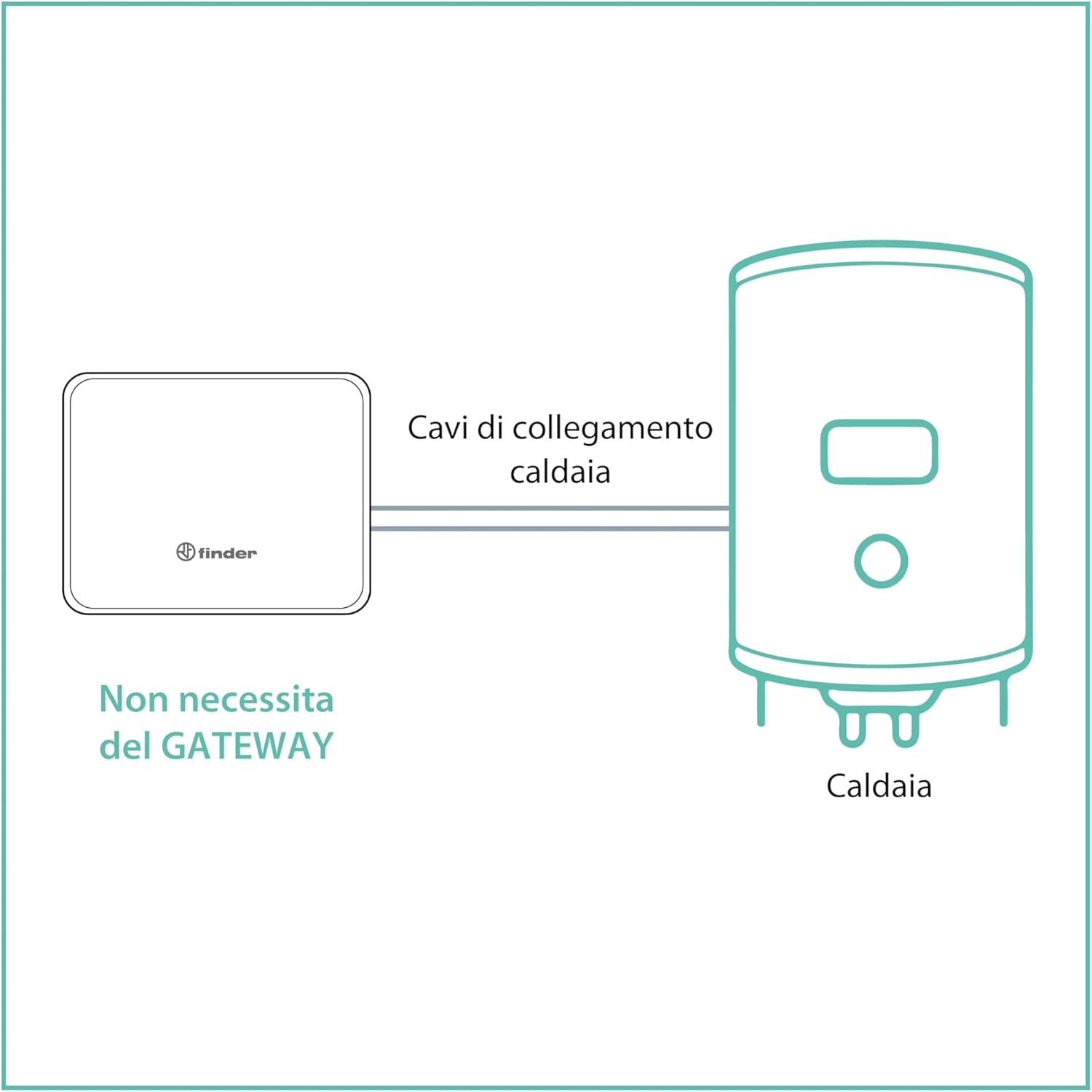
Figure 3.2: Direct connection to boiler, no gateway required.
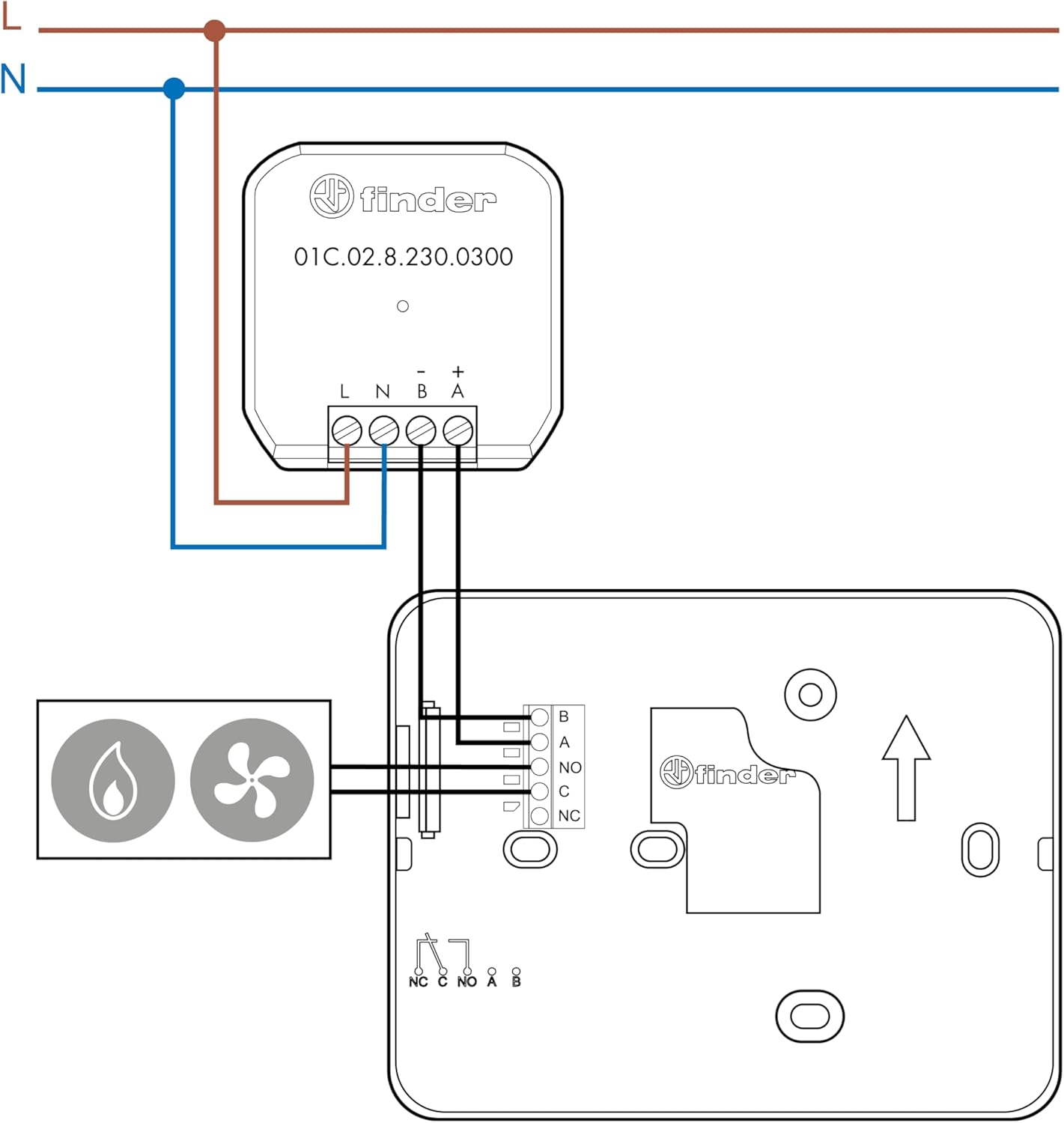
Figure 3.3: Detailed wiring connections for the thermostat.
3.4 Колдонмону орнотуу жана баштапкы жупташтыруу
Download the official Finder app from your device's app store (Google Play or Apple App Store). Follow the in-app instructions to pair your thermostat with your Wi-Fi network and complete the initial setup.

Figure 3.4: The thermostat supports integration with Google Assistant and Amazon Alexa.
4. Термостатты иштетүү
4.1 Кол менен башкаруу
You can adjust the temperature directly on the thermostat using the capacitive touch buttons. The LED display will show the current temperature and settings.
4.2 App Control and Programming
The Finder app provides comprehensive control and programming options for your thermostat. You can set schedules, adjust temperatures, and monitor consumption from anywhere.

Figure 4.1: The Finder app interface for remote control and scheduling.
- Manual or Guided Programming: Create custom heating schedules or use guided programming for quick setup.
- Алыстан башкаруу: Adjust settings and monitor your home's temperature from anywhere with an internet connection.
- Geofencing (Auto-Away): Automatically adjust temperature based on your proximity to home.
- Керектөө тарыхы: Track your energy usage to optimize efficiency.
4.3 Үн менен башкаруу
The thermostat is compatible with Amazon Alexa and Google Home. Link your Finder account to your voice assistant app to enable voice commands for temperature adjustments and status checks.

Figure 4.2: System diagram illustrating smart home integration.
5. Техникалык тейлөө
5.1 Батареяны алмаштыруу
If powered by batteries, the thermostat will indicate when the battery level is low. Replace all 4 AAA batteries simultaneously to ensure optimal performance. Use high-quality alkaline batteries.
Эскертүү: Frequent Wi-Fi communication can increase battery consumption. Adjust the synchronization frequency in the app to balance battery life and responsiveness.
5.2 Тазалоо
Clean the thermostat's surface with a soft, dry cloth. Do not use abrasive cleaners or solvents, as they may damage the display or casing.
6. Кыйынчылыктарды
6.1 Байланыш маселелери
- Термостат Wi-Fi'га туташпай жатат: Ensure your Wi-Fi network is 2.4 GHz. The thermostat does not support 5 GHz networks.
- Үзгүлтүксүз туташуу: Check your Wi-Fi signal strength at the thermostat's location. If weak, consider a Wi-Fi extender or repositioning your router.
- Күчтөн кийинtage/router reset: The thermostat should automatically reconnect. If not, try restarting your router.
- Колдонмо шайкештирилбей жатат: Ensure the thermostat has fresh batteries (if applicable) and a stable Wi-Fi connection. Check the synchronization frequency setting in the app.
6.2 Батареяны төгүү
- Батарейканын кыска мөөнөтү: This can be caused by frequent Wi-Fi communication. Adjust the synchronization interval in the app to a higher value (e.g., from minutes to hours) to conserve battery life.
- Consider optional power supply: For continuous operation without battery concerns, especially in secondary homes, consider installing the optional Type 01C.02.8.230.0300 power supply.
6.3 Температуранын так эмес көрсөткүчтөрү
- Check placement: Термостаттын күндүн түз нуруна, терезелерден/эшиктерден чыккан шамалга же жылуулук булактарына (мисалы,ampс, шаймандар) көрсөткүчтөрдү бурмалашы мүмкүн.
7. Техникалык шарттар
| Өзгөчөлүк | Спецификация |
|---|---|
| Модель номери | 1C.91.9.003.0W07 |
| Өлчөмдөрү (L x W x Y) | 12.59 x 9.89 x 1.95 см |
| Салмагы | 120 грамм |
| Электр камсыздоо | 4 x AA batteries (not included) or optional Type 01C.02.8.230.0300 power supply |
| Тtage | 3 Volt (battery) |
| Түс | Ак |
| Дисплей түрү | Touch screen (LED) |
| Монтаж түрү | Дубалга орнотуу |
| Controller Type | iOS, Android |
| Өзгөчөлүктөр | Adjustable, Remote Control, Geofencing, Consumption History, Voice Control (Alexa, Google Home) |
| Колдонуу | Бойлер башкаруу |
8. Кепилдик жана колдоо
For detailed warranty information and technical support, please refer to the official Finder website or contact Finder customer service. You can also find additional technical details and the full instruction manual (PDF) by scrolling to the "Safety and Product Resources" section on the product's online listing and clicking on "Instructions for Use (PDF)".
Ensure you keep your proof of purchase for any warranty claims.


