1. Киришүү
The EXFIT BCS-700 Wireless Bluetooth Neckband Headphones provide a convenient audio solution with retractable earbuds and advanced call management features. This manual provides instructions for proper setup, operation, and maintenance of your device.
2. Коопсуздук маалыматы
- Аппаратты экстремалдык температурага же тике күн нуруна калтырбаңыз.
- Угуу жөндөмүнө зыян келтирбөө үчүн узак убакыт бою жогорку үн деңгээлинде угуудан качыңыз.
- Keep the device away from water and moisture. The device is IPx4 sweat and splash resistant, but not waterproof.
- Аппаратты өз алдынча бөлүүгө же оңдоого аракет кылбаңыз. Квалификациялуу тейлөө кызматкерлерине кайрылыңыз.
- Ensure earbuds are securely placed in your ears to prevent them from falling out.
3. Пакеттин мазмуну
Пакетиңизде бардык буюмдар бар экенин текшериңиз:
- EXFIT BCS-700 Neckband Headphones
- USB заряддоо кабели
- Кулак учтарынын ар кандай өлчөмдөрү
- User Manual

3.1-сүрөт: Пакеттин мазмуну
4. Продукт бүтүп калдыview
The EXFIT BCS-700 features a flexible neckband design with retractable earbuds for convenient storage and use. Key components include control buttons for power, volume, and call management, as well as a charging port.

Figure 4.1: EXFIT BCS-700 Neckband Headphones
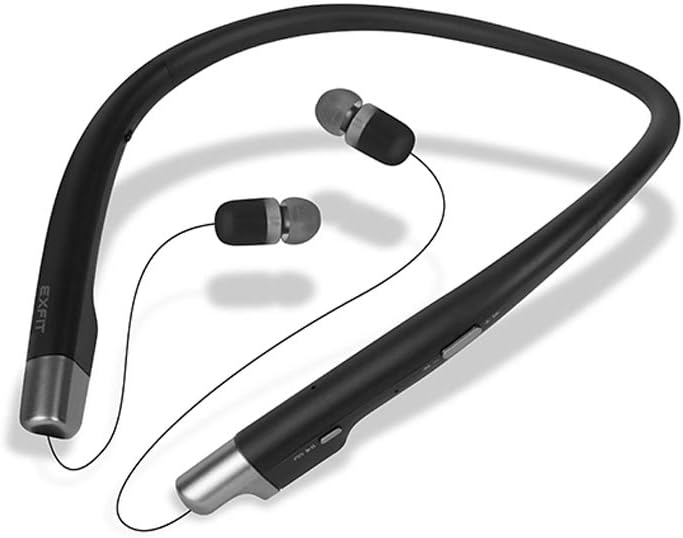
Figure 4.2: Earbuds Extended

4.3-сүрөт: Башкаруу баскычтары
5. Орнотуу
5.1 Наушниктерди заряддоо
Before first use, fully charge the headphones. Connect the provided USB cable to the charging port on the neckband and to a USB power source. The LED indicator will show charging status and turn off when fully charged.
5.2 Bluetooth жупташтыруу
- Наушниктердин өчүрүлгөнүн текшериңиз.
- LED индикатору жупташтыруу режимин көрсөткөн көк жана кызыл күйгүчө Күч баскычын басып, кармап туруңуз.
- Түзмөгүңүздө (смартфон, планшет ж.б.) Bluetooth иштетиңиз жана жеткиликтүү түзмөктөрдү издеңиз.
- Select 'EXFIT BCS-700' from the list of devices.
- Туташтырылгандан кийин, LED индикатору мезгил-мезгили менен көк түстө күйүп-өчөт.
6. Иштөө нускамалары
6.1 Күйгүзүү/өчүрүү
- Күйгүзүү: Press and hold the Power button until the LED indicator flashes blue.
- Өчүрүү: Press and hold the Power button until the LED indicator flashes red and then turns off.
6.2 Чалууларды башкаруу
- Чакырууга жооп берүү: Pull an earbud wire from the neckband.
- Чакырууну аяктоо: Retract the extended earbud(s) into the neckband.
- Чакырууну четке кагуу: Чакыруу баскычын басып, кармап туруңуз.
- Дирилдөө эскертүүсү: The neckband will vibrate for incoming calls.
6.3 Аудио ойнотуу
- Ойнотуу/тындыруу: Play/Pause баскычын басыңыз.
- Кийинки трек: Үнүн жогорулатуу баскычын басып, кармап туруңуз.
- Мурунку трек: Үндү азайтуу баскычын басып, кармап туруңуз.
- Үнүн жогорулатуу/төмөндөтүү: Press the Volume Up/Down buttons.
6.4 Audio Transparency Mode
This mode allows you to hear ambient sounds while wearing the headphones. Activate or deactivate this feature using the dedicated switch on the neckband. This feature is for awareness, not a substitute for caution in dangerous environments.
6.5 Үн жардамчысы
The EXFIT BCS-700 is compatible with Apple Siri and Google Assistant. Activate your device's voice assistant by pressing the dedicated Voice Assistant button (if available) or following your device's instructions.
Видео 6.1: Бүттүview of EXFIT BCS-700 Wireless Neckband Headphones features and design.
7. Техникалык тейлөө
- Тазалоо: Wipe the neckband and earbuds with a soft, dry cloth. Do not use harsh chemicals or abrasive materials.
- Сактагыч: When not in use, store the headphones in a cool, dry place. Ensure earbuds are retracted to prevent cable damage.
- Кулак кеңештери: Regularly clean or replace ear tips for hygiene and optimal sound quality.
8. Кыйынчылыктарды
8.1 Күч жок
- Наушниктердин толук заряддалганын текшериңиз.
- Заряддоо кабелин жана кубат булагын текшериңиз.
8.2 Жупташтыруу маселелери
- Түзмөгүңүздө Bluetooth иштетилгенин жана гарнитура жупташтыруу режиминде экенин текшериңиз.
- Наушниктерди түзмөгүңүзгө жакыныраак жылдырыңыз.
- Телефонуңуздун Bluetooth жөндөөлөрүнөн түзмөктү унутуп, кайра жупташтырып көрүңүз.
8.3 Үн жок же үн сапаты начар
- Наушниктердин жана туташкан түзмөгүңүздүн үнүн тууралаңыз.
- Кулакчындар туура жупташтырылганын текшериңиз.
- Check for obstructions or debris in the earbud nozzles.
8.4 Callers Cannot Hear Me
- Микрофондун тоскоол болбогонун текшериңиз.
- Check the microphone settings on your connected device.
9. Техникалык шарттар
| Модель аты | BCS-700 |
| Байланыш технологиясы | Зымсыз (Bluetooth) |
| Bluetooth версиясы | 4.0 |
| Bluetooth диапазону | 10 метр |
| Батареянын иштөө мөөнөтү | 8 Hours (Play Time) |
| Аудио драйверинин өлчөмү | 8 миллиметр |
| Сууга туруктуулук деңгээли | IPx4 (Sweat and Splash Resistant) |
| Элемент Салмагы | 4 унция |
| Продукциянын өлчөмдөрү | 7.01 x 6.26 x 0.71 дюйм |
| Материал | Металл, Пластик, Силикон |
10. Кепилдик жана колдоо
The EXFIT BCS-700 comes with a manufacturer's warranty. For detailed warranty information, please refer to the warranty card included in your product packaging or visit the official EXFIT website. For technical support, troubleshooting assistance, or service inquiries, please contact EXFIT customer support through their official channels.


