1. Киришүү
Thank you for choosing the LECLSTAR Motion Sensor Closet Light. This manual provides essential information for the safe and effective use of your new lighting product. Please read these instructions carefully before installation and operation, and retain them for future reference.
This wireless, battery-operated light features 51 LEDs, motion sensing capabilities, and is designed for various indoor applications such as closets, cabinets, kitchens, and stairs.
2. Коопсуздук маалыматы
- Аппаратты сууга же ашыкча нымдуулукка дуушар кылбаңыз.
- Жарыкты бөлүктөргө бөлүүгө, оңдоого же өзгөртүүгө аракет кылбаңыз. Бул кепилдикти жокко чыгарат жана бузулууга же жаракат алууга алып келиши мүмкүн.
- Заряддоо үчүн берилген USB кабелин гана колдонуңуз.
- Avoid direct eye exposure to the LED light, as it can be very bright.
- Балдар жетпеген жерде сактаңыз.
3. Пакеттин мазмуну
Сураныч, бардык буюмдар бар экенин текшерүү үчүн пакетти текшериңиз:
- 1 x LECLSTAR Motion Sensor Closet Light
- 1 x Magnetic Plastic Bracket
- 2 x 3M жабышчаак жаздыкчалар
- 4 x Монтаждоо бурамалар
- 1 x USB заряддоо кабели
- 1 x User Manual
4. Продукт бүтүп калдыview
Familiarize yourself with the components of your LECLSTAR Motion Sensor Closet Light.

1-сүрөт: Product Components. This diagram illustrates the various parts of the light, including the USB charging port, magnetic strip for mounting, LED light board, durable aluminum alloy casing, ON/OFF switch, infrared motion sensor receiver, and protective ABS cover.
- USB порт: Ички батареяны заряддоо үчүн.
- Магниттик тилке: Allows for easy attachment to magnetic surfaces or the included bracket.
- LED Light Board: Contains 51 bright LEDs for illumination.
- Aluminum Alloy Material: Provides a durable and lightweight housing.
- ON/OFF баскычы: Controls the power and operating modes.
- Инфракызыл кабылдагыч: Detects signals from the remote control (if applicable).
- ABS Cover: Protects the LEDs and diffuses light.
5. Орнотуу жана орнотуу
The LECLSTAR Motion Sensor Closet Light offers flexible installation options.
5.1 Charging Before First Use
Before installation, fully charge the light. Refer to Section 6 for detailed charging instructions.
5.2 Монтаждоо параметрлери
You can install the light using the magnetic plastic bracket with 3M adhesive or screws.
- Magnetic Adhesion: Peel off the protective film from the 3M adhesive pads and attach them to the magnetic plastic bracket. Press the bracket firmly onto a clean, dry surface where you wish to install the light. The light can then be magnetically attached to the bracket.
- Бурама орнотуу: Use the provided screws to secure the magnetic plastic bracket to a desired surface. Once the bracket is securely mounted, attach the light magnetically.

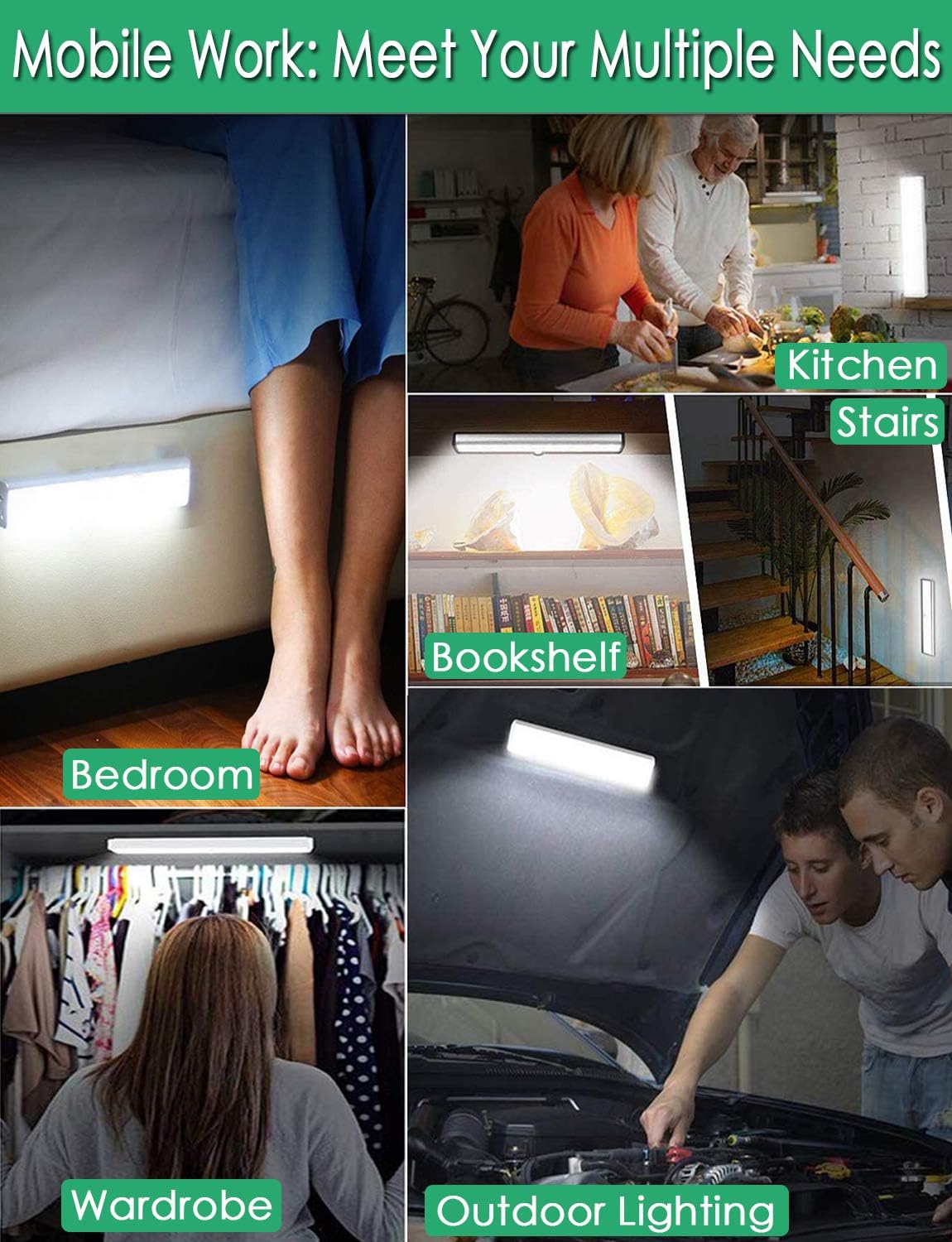
2-сүрөт: Versatile Installation. This image illustrates the light's adaptability, showing it mounted under a bed, in a kitchen, on a bookshelf, along stairs, inside a wardrobe, and providing illumination for outdoor tasks, highlighting its ease of placement in diverse environments.
5.3 Жайгаштыруу маселелери
- For optimal motion detection, position the sensor ball to face the direction of expected movement.
- When using multiple motion sensor lights, avoid placing them too close together in motion-sensing mode, as they may interfere with each other's sensitivity.
- Ensure the installation surface is clean and dry for secure adhesion.
6. Заряддоо инструкциясы
The LECLSTAR Motion Sensor Closet Light is equipped with a built-in 2400mAh lithium battery.
- Connect the provided USB charging cable to the light's USB port.
- USB кабелинин экинчи учун стандарттуу USB кубат адаптерине (кошулмада жок) же компьютердин USB портуна сайыңыз.
- During charging, the indicator light on the device will be көк.
- Толук заряддалгандан кийин, индикатор жарыгы күйөт кызыл.
- Толук кубаттоо, адатта, болжол менен 4 саатты талап кылат.
3-сүрөт: Charging Status. This image demonstrates the charging process, showing the light connected to a power source. The indicator light is red when charging and turns blue when the battery is fully charged, indicating its status clearly.
7. Иштөө нускамалары
The light features multiple operating modes and can be controlled via its ON/OFF button or an optional remote control.
7.1 Mode Selection (ON/OFF Button)
Locate the ON/OFF button on the side of the light. Toggle the switch to select the desired mode:
- ӨЧҮК: The light is completely off.
- КҮЙҮК: Жарык тынымсыз күйүп турат.
- АВТО (Кыймыл сенсорунун режими): Караңгы чөйрөдө кыймыл аныкталганда жарык автоматтык түрдө күйөт. Кыймыл аныкталбагандан кийин болжол менен 30 секунддан кийин ал өчөт.

4-сүрөт: Motion Sensor Operation. This image demonstrates how the motion sensor works: the light remains off in bright environments, automatically turns on when movement is detected in the dark within a 3-meter, 120-degree range, and then automatically turns off after 30 seconds of inactivity.
7.2 Motion Sensor Details
- Аныктоо бурч: 120 градус.
- Аралыкты аныктоо: 3 метрге чейин (болжол менен 10 фут).
- The sensor is designed to activate only in low-light conditions to conserve battery life.
7.3 Remote Control Functions (Optional)
If your model includes a remote control, you can access additional features:

5-сүрөт: Remote Control Functions. This image displays the remote control, highlighting its various buttons: ON/OFF for power, 'S' for sensor mode, '1', '2', '3' for different light modes or brightness levels, '+' and '-' for adjusting brightness, and '15', '30', '60', '120' for setting a timer.
- КҮЙГҮЗҮҮ/ӨЧҮРҮҮ: Жарыкты күйгүзөт же өчүрөт.
- S (Sensor Mode): Кыймыл сенсорунун режимин иштетет.
- 1, 2, 3 (Light Modes): Selects different light modes or brightness levels.
- 50%, 100%, +, - (Adjustable Brightness): Жарыктын интенсивдүүлүгүн тууралайт.
- 15, 30, 60, 120 (Timer Function): Sets the light to turn off automatically after a specified duration.
8. Техникалык тейлөө
- Тазалоо: Лампаны жумшак, кургак чүпүрөк менен сүртүңүз. Абразивдүү тазалоочу каражаттарды же эриткичтерди колдонбоңуз.
- Батареяга кам көрүү: To prolong battery life, avoid fully discharging the battery frequently. Charge the light regularly, especially if it will not be used for an extended period.
9. Кыйынчылыктарды
- Жарык күйбөйт:
- Батарея заряддалганын текшериңиз.
- Check that the light is switched to the 'ON' or 'AUTO' mode.
- Кыймыл сенсору иштебей жатат:
- Ensure the light is in 'AUTO' mode.
- Verify that the ambient light is dark enough for the sensor to activate.
- Check that the sensor is not obstructed and is facing the area of expected movement.
- If multiple motion sensor lights are nearby, they might interfere with each other. Try repositioning them.
- Жарык күтүлбөгөн жерден бүлбүлдөп же өчүп калат:
- The battery level may be low. Recharge the light.
10. Техникалык шарттар
| Модел | B07JRBSJDR |
| Ачык түс | Таза ак (6000K) |
| LED саны | 51 LED |
| Lumen Output | 240лм |
| Motion Detecting Angle | 120 градус |
| Motion Detecting Distance | 3 метрге чейин (10 фут) |
| LED Life Time | 80,000 сааттан ашык |
| Батарея түрү | 2400mAh литий батареясы |
| USB заряддоо убактысы | Болжол менен 4 саат |
| Operating Voltage | 4.2V |
| Ватtage | 3W |
| Өлчөмдөр | 15.3 x 0.8 x 0.8 дюйм |
| Материал | Металл, пластик |
| Power Source | Батарея менен иштейт |
| Өзгөчөлүктөр | Instant On |
11. Кепилдик жана колдоо
LECLSTAR provides a lifetime warranty for this product. If you encounter any issues or have questions regarding your Motion Sensor Closet Light, please contact the LECLSTAR service team for assistance. Our dedicated support team is ready to help you.
For warranty claims or technical support, please refer to the contact information provided on the product packaging or the official LECLSTAR webсайт.

