1. Киришүү
This manual provides detailed instructions for the operation and maintenance of your AUNA Worldwide Internet Radio. Please read this manual thoroughly before using the device to ensure proper function and to prevent damage. Keep this manual for future reference.
The AUNA Worldwide Internet Radio is a versatile audio system featuring Internet Radio, DAB/DAB+ and FM tuners, a CD player, Bluetooth connectivity, USB playback, and AUX input. It offers a wide range of listening options and convenient control features.
2. Коопсуздук нускамалары
- Аппаратты иштетүүдөн мурун бардык нускамаларды окуп чыгыңыз.
- Өрт же электр тогуна урунуп калбаш үчүн аппаратты жамгырга же нымдуулукка дуушар кылбаңыз.
- Туура желдетүүнү камсыз кылыңыз. Эч кандай желдетүүчү тешиктерди жаап албаңыз.
- Аппаратты туруктуу, тегиз бетке коюңуз.
- Аппарат менен кошо берилген кубат адаптерин гана колдонуңуз.
- Аппаратты чагылгандуу бороондордо же узак убакыт бою колдонбогондо электр розеткасынан ажыратыңыз.
- Түзмөктү өз алдынча оңдоого аракет кылбаңыз. Бардык тейлөө иштерин квалификациялуу адистерге тапшырыңыз.
3. Пакеттин мазмуну
Сураныч, бардык буюмдар бар экенин жана жакшы абалда экендигин текшериңиз:
- 1 x AUNA Worldwide Internet Radio Unit
- 1 х кубат адаптери
- 1 x Алыстан башкаруу
- 1 x Колдонуучунун колдонмосу (немис, англис, француз)
4. Продукт бүтүп калдыview
The AUNA Worldwide Internet Radio features a sleek design with intuitive controls and a clear LCD display.

Сүрөт 4.1: Фронт view of the AUNA Worldwide Internet Radio, showcasing the central LCD display, control knobs, buttons for various functions (USB, Audio In, Mode, Scan, Stop, Tuning, Back), and the CD slot. Two speaker grilles are visible on either side.

Сүрөт 4.2: A close-up of the radio's LCD display, showing 'Internet Radio' mode with 'Burn FM' and 'AIM - Wicked Game' displayed. The volume knob and 'SELECT' button are prominent, along with power and mode buttons.
4.1 Алдыңкы панелдин башкаруу элементтери
- Кубат баскычы: Turns the unit on/off or into standby mode.
- LCD дисплей: Shows current mode, station information, time, and date.
- Үн баскычы: Аудио чыгаруу деңгээлин тууралайт.
- Select Knob/Button: Менюларды багыттоо жана тандоолорду ырастоо.
- USB Port (5V 1A): For connecting USB storage devices and charging.
- AUDIO IN (3.5mm AUX): Тышкы аудио булактарын туташтыруу үчүн.
- Режим баскычы: Switches between different operating modes (Internet Radio, DAB, FM, CD, Bluetooth, USB, AUX).
- Скандоо баскычы: Радио режимдеринде станцияларды сканерлөөнү баштайт.
- Stop/Play/Pause Buttons: Controls playback for CD, USB, and Bluetooth.
- Tuning/Skip Buttons: Станциялар же жолдор аркылуу багыт алат.
- Артка баскычы: Мурунку менюга же экранга кайтат.
- Маалымат баскычы: Учурдагы трек же станция жөнүндө кошумча маалыматты көрсөтөт.
- Меню баскычы: Accesses the main system menu.
4.2 Арткы панелдин туташуулары
- DC IN: Кубат адаптерин туташтыруу.
- Телескопиялык антенна: DAB/DAB+ жана FM кабыл алуу үчүн.
5. Орнотуу
5.1 Кубат туташтыруу
- Connect the supplied power adapter to the DC IN port on the rear of the radio.
- Plug the power adapter into a standard wall outlet (220-240V ~ | 50/60Hz).
- Press the Power button on the front panel to turn on the device.
5.2 Антеннаны орнотуу
DAB/DAB+ жана FM радиолорун оптималдуу кабыл алуу үчүн телескопиялык антеннаны толугу менен узартыңыз. Зарыл болсо, сигналдын күчүн жогорулатуу үчүн анын абалын тууралаңыз.
5.3 Тармакка туташуу (Wi-Fi)
To access Internet Radio and Spotify Connect, the device requires a Wi-Fi connection.
- Upon first power-on, the radio will guide you through the initial setup, including Wi-Fi configuration.
- Alternatively, navigate to Menu > System Settings > Network > Wi-Fi Setup.
- Радио жеткиликтүү Wi-Fi тармактарын издейт. Тизмеден тармагыңызды тандаңыз.
- Enter your Wi-Fi password using the Select knob and buttons.
- Туташкандан кийин, Wi-Fi сүрөтчөсү дисплейде пайда болот.

Сүрөт 5.1: A hand holding a smartphone with a Wi-Fi symbol, illustrating the wireless connectivity feature of the AUNA radio, which allows for remote control via an app.
6. Иштөө нускамалары
6.1 Негизги башкаруу каражаттары
- Күйгүзүү/өчүрүү: Кубат баскычын басыңыз.
- Үндү тууралоо: Үн баскычын айландырыңыз.
- Режим тандоо: Press the Mode button repeatedly to cycle through available sources (Internet Radio, DAB, FM, CD, Bluetooth, USB, AUX).
- Меню навигациясы: Use the Select knob to scroll and press to confirm. Use the Back button to return.
6.2 Интернет радиосу
Wi-Fi байланышыңыз аркылуу дүйнө жүзү боюнча миңдеген радиостанцияларга кириңиз.
- Select 'Internet Radio' mode using the Mode button.
- Navigate through categories (e.g., Location, Genre, Popular) using the Select knob.
- Ойнотууну баштоо үчүн станцияны тандаңыз.
6.3 DAB/DAB+ радиосу
Enjoy digital radio broadcasts with clear sound quality.
- Select 'DAB' mode.
- The radio will automatically scan for available DAB/DAB+ stations on first use or if you initiate a scan via the Menu.
- Use the Tuning/Skip buttons to browse through the station list.
6.4 FM радиосу
Салттуу аналогдук FM берүүлөрүн угуңуз.
- "FM" режимин тандаңыз.
- Press the Scan button to automatically search for and store available stations.
- Use the Tuning/Skip buttons for manual tuning or to navigate stored stations.
- The RDS function provides additional information like station name and program details.
6.5 CD ойноткуч
Play your favorite audio CDs and MP3 CDs.

Сүрөт 6.1: A close-up of the AUNA Worldwide Internet Radio, showing a CD being inserted into the slot-loading CD player, highlighting its capability to play physical media.
- "CD" режимин тандаңыз.
- Insert an audio CD or MP3 CD into the slot. The disc will be loaded automatically.
- Playback will start automatically. Use the Play/Pause, Stop, and Skip buttons to control playback.
6.6 Bluetooth байланышы
Bluetooth иштетилген түзмөктөрүңүздөн аудиону зымсыз агылтыңыз.
- Select 'Bluetooth' mode. The radio will enter pairing mode, indicated on the display.
- On your smartphone, tablet, or other Bluetooth device, enable Bluetooth and search for 'AUNA Worldwide'.
- Select the radio from your device's list to pair. Once connected, you can stream audio.
6.7 USB ойнотуу
MP3 жана WMA ойнотуу fileUSB сактагыч түзмөгүнөн.
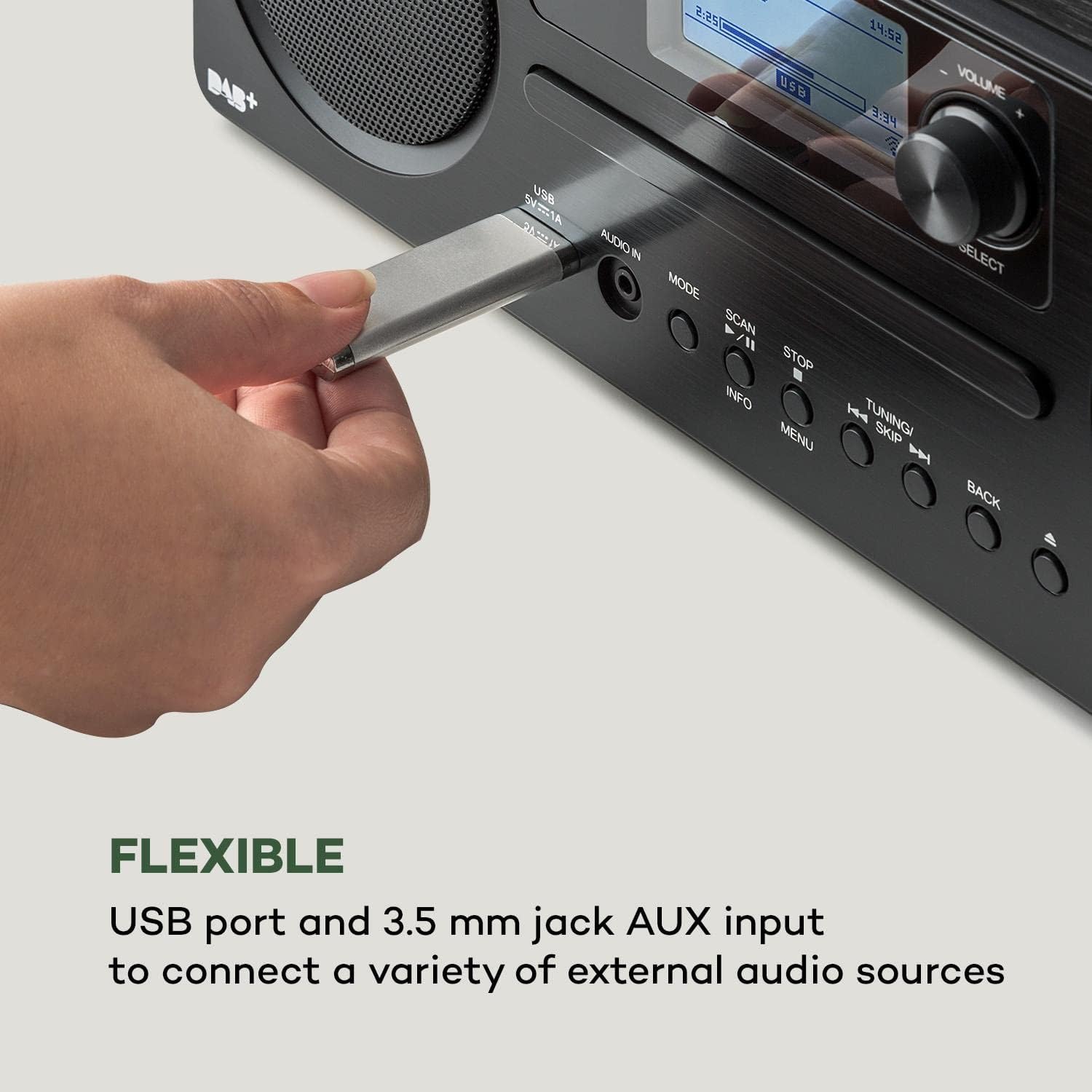
Сүрөт 6.2: Жакын план view of a USB stick inserted into the USB port on the front panel of the AUNA Worldwide Internet Radio, demonstrating its capability for playing media from external storage.
- USB сактагычты алдыңкы панелдеги USB портуна кыстарыңыз.
- Select 'USB' mode. The radio will automatically detect and display the content.
- Папкалар аркылуу чабыттоо жана files using the Select knob and buttons. Use playback controls as needed.
6.8 AUX киргизүү
3.5 мм аудио кабелин колдонуу менен тышкы аудио түзмөктөрдү туташтырыңыз.
- Connect your external audio device to the 'AUDIO IN' (3.5mm AUX) port on the front panel.
- Select 'AUX' mode.
- Туташкан тышкы түзмөгүңүздөн ойнотууну көзөмөлдөңүз.
6.9 Spotify Connect
Stream music directly from your Spotify account.

Сүрөт 6.3: A person relaxing on a couch, using a smartphone with the Spotify logo visible, illustrating the convenience of Spotify Connect for streaming music directly to the AUNA radio.
- Ensure your radio is connected to the same Wi-Fi network as your smartphone or tablet running the Spotify app.
- Түзмөгүңүздө Spotify колдонмосун ачыңыз.
- Ырды ойнотуп, "Жеткиликтүү түзмөктөр" сүрөтчөсүн тандаңыз.
- Choose your AUNA Worldwide radio from the list to start streaming.
6.10 UNDOK тиркемесин башкаруу
Control your radio remotely using the UNDOK app on your smartphone or tablet.

Сүрөт 6.4: A screenshot of the UNDOK app interface on a smartphone, displayed next to the physical remote control for the AUNA radio, demonstrating the dual control options available to the user.
- Download the 'UNDOK' app from your device's app store.
- Ensure your radio and smartphone/tablet are connected to the same Wi-Fi network.
- Open the UNDOK app. It will automatically detect your AUNA radio.
- Select your radio within the app to gain full control over modes, stations, volume, and settings.
6.11 Ойготкуч функциялары
The radio includes dual alarm, sleep timer, and snooze functions.
- багыттоо Menu > Alarms to set up dual alarms with customizable sources (buzzer, radio) and schedules.
- коюу a Уйку таймери via the Menu to automatically turn off the radio after a set period.
- Ойготкуч чыкканда, басыңыз Тындыр button (often the Select knob) to temporarily silence it.
7. Техникалык тейлөө
- Тазалоо: Түзмөктүн сыртын тазалоо үчүн жумшак, кургак чүпүрөктү колдонуңуз. Абразивдүү тазалоочу каражаттарды же эриткичтерди колдонбоңуз.
- CD ойноткуч: Keep the CD slot free from dust and debris. Do not insert damaged or dirty CDs.
- Сактагыч: Эгерде аппаратты узак убакытка сактасаңыз, аны розеткадан сууруп, салкын, кургак жерде сактаңыз.
8. Кыйынчылыктарды
| Көйгөй | Мүмкүн себеп | Чечим |
|---|---|---|
| Күч жок | Кубат адаптери туташтырылган эмес; розетка иштебейт. | Кубат адаптеринин туташуусун текшериңиз; башка розетканы колдонуп көрүңүз. |
| Үн жок | Volume too low; incorrect source selected. | Increase volume; ensure correct mode (e.g., Internet Radio, CD) is selected. |
| Интернет радио туташпай жатат | Wi-Fi connection issue; incorrect password. | Check Wi-Fi settings and password; ensure router is working; restart radio and router. |
| DAB/FM кабыл алуу начар | Антенна узартылган эмес; сигнал начар. | Телескопиялык антеннаны толугу менен сунуп, тууралаңыз; түзмөктүн ордун башка жакка буруп көрүңүз. |
| CD ойнобой жатат | CD туура эмес салынган; CD кир же чийилген. | Re-insert CD correctly; clean or try a different CD. |
| Bluetooth жупташкан жок | Radio not in pairing mode; device too far. | Ensure radio is in Bluetooth mode; bring devices closer; restart Bluetooth on both devices. |
9. Техникалык шарттар
- Модел: MG2-2200-gfvd
- Электр камсыздоо: 220-240 V ~ | 50/60 Hz (via power adapter)
- Чыгуу күчү: 2 x 5 Вт RMS
- Supported Playback Formats: MP3, WMA, WAV, AAC, FLAC
- Байланыштары: 1 x USB port (5 V, 1 A charging function), 1 x 3.5 mm jack AUX input, Bluetooth, Wi-Fi
- Radio Tuners: Internet Radio, DAB/DAB+, FM/AM
- Өзгөчөлүктөр: Spotify Connect, UNDOK App Control, LCD Display, Time and Date Display, Standby Function, Alarm Functions (Dual Alarm, Sleep Timer, Snooze), RDS Function
- Өлчөмдөрү (W x Y x D): 35 x 12 x 20 см
- Салмагы: Болжол менен 2.6 кг
- Түсү: Кара
10. Кепилдик жана колдоо
AUNA products are designed and manufactured to the highest quality standards. In the unlikely event of a problem with your device, please refer to the troubleshooting section of this manual. If the issue persists, please contact your retailer or authorized service center for assistance.
Please retain your proof of purchase for warranty claims. Information regarding spare parts availability and software updates is not available at this time.


