Introduction
Thank you for choosing the auna Streetstar 2.0 15 Mobile PA System. This portable audio system is designed to deliver powerful sound with versatile connectivity options, including Bluetooth, USB/SD playback, and FM radio. It features a robust design with integrated trolley function for easy transport and comes with a wireless microphone for various applications.
This manual provides important information regarding the safe operation, setup, and maintenance of your device. Please read it thoroughly before first use and keep it for future reference.

Image: The auna Streetstar 2.0 15 Mobile PA System, showcasing its main unit and included wireless microphone.
Коопсуздук нускамалары
Коопсуз эксплуатацияны камсыз кылуу жана зыян келтирбөө үчүн төмөнкү коопсуздук чараларын сактаңыз:
- Кубат булагы: Түзмөктү көрсөтүлгөн вольттогу розеткага гана туташтырыңызtage (220 вольт).
- Вентиляция: Адекваттуу вентиляцияны камсыз кылыңыз. Вентиляция тешиктерин жаап албаңыз.
- Нымдуулук: Do not expose the device to rain or moisture. Do not place objects filled with liquids, such as vases, on the device.
- Жылуулук: Түзмөктү радиаторлор, жылыткычтар, плиталар же башка жылуулук булактарынан (анын ичинде ampкөтөргүчтөр) жылуулукту пайда кылуучу.
- Тазалоо: Unplug the device from the power outlet before cleaning. Use a dry cloth for cleaning.
- Тейлөө: Бул продуктту өзүңүз тейлөөгө аракет кылбаңыз. Бардык тейлөөнү квалификациялуу тейлөө кызматкерлерине тапшырыңыз.
- Жайгашкан жери: Агрегатты туруктуу, тегиз бетке коюңуз. Аны күн тийген жерге же күчтүү магнит талаасына коюудан алыс болуңуз.
- Батареяга кам көрүү: If the unit has an internal battery, avoid fully discharging it for extended periods. Charge regularly to maintain battery health.
Пакеттин мазмуну
Сураныч, бардык буюмдар бар экенин жана жакшы абалда экендигин текшериңиз:
- auna Streetstar 2.0 15 Mobile PA System
- Зымсыз микрофон
- Электр кабели
- Алыстан башкаруу
- Колдонуучунун Колдонмосу (бул документ)
Продукт бүттүview жана Controls
Familiarize yourself with the various parts and controls of your PA system.

Сүрөт: деталдуу view of the control panel, showing inputs, outputs, and adjustment knobs.
Башкаруу панелинин өзгөчөлүктөрү:
- MEDIAPLAYER: Digital display for USB/SD playback and mode selection.
- USB порт: USB флэш-дисктерди туташтыруу үчүн.
- SD оюгу: SD эстутум карталарын салуу үчүн.
- MODE баскычы: Bluetooth, USB, SD, FM жана AUX режимдеринин ортосунда которулат.
- MIC ДЕҢгээли: Микрофон киргизүүнүн үнүн тууралайт.
- MIC ЭХО: Микрофон үчүн жаңырык эффектин тууралайт.
- ТРЕБЛ/БАС: Tone controls for adjusting high and low frequencies.
- MIC IN: 6.3mm jack inputs for wired microphones.
- AUX КИРИШИ: RCA (L/R) inputs for external audio devices.
- LINE IN / OUT: RCA (L/R) connections for linking multiple PA systems.
- POWER которуштуруу: Агрегатты күйгүзөт же өчүрөт.
- UHF MICROPHONE Volume: Зымсыз микрофондун үнүн тууралайт.
- Көрсөткүчтөр: PWR (Power), CHARGE (Charging status), LOW (Low battery).
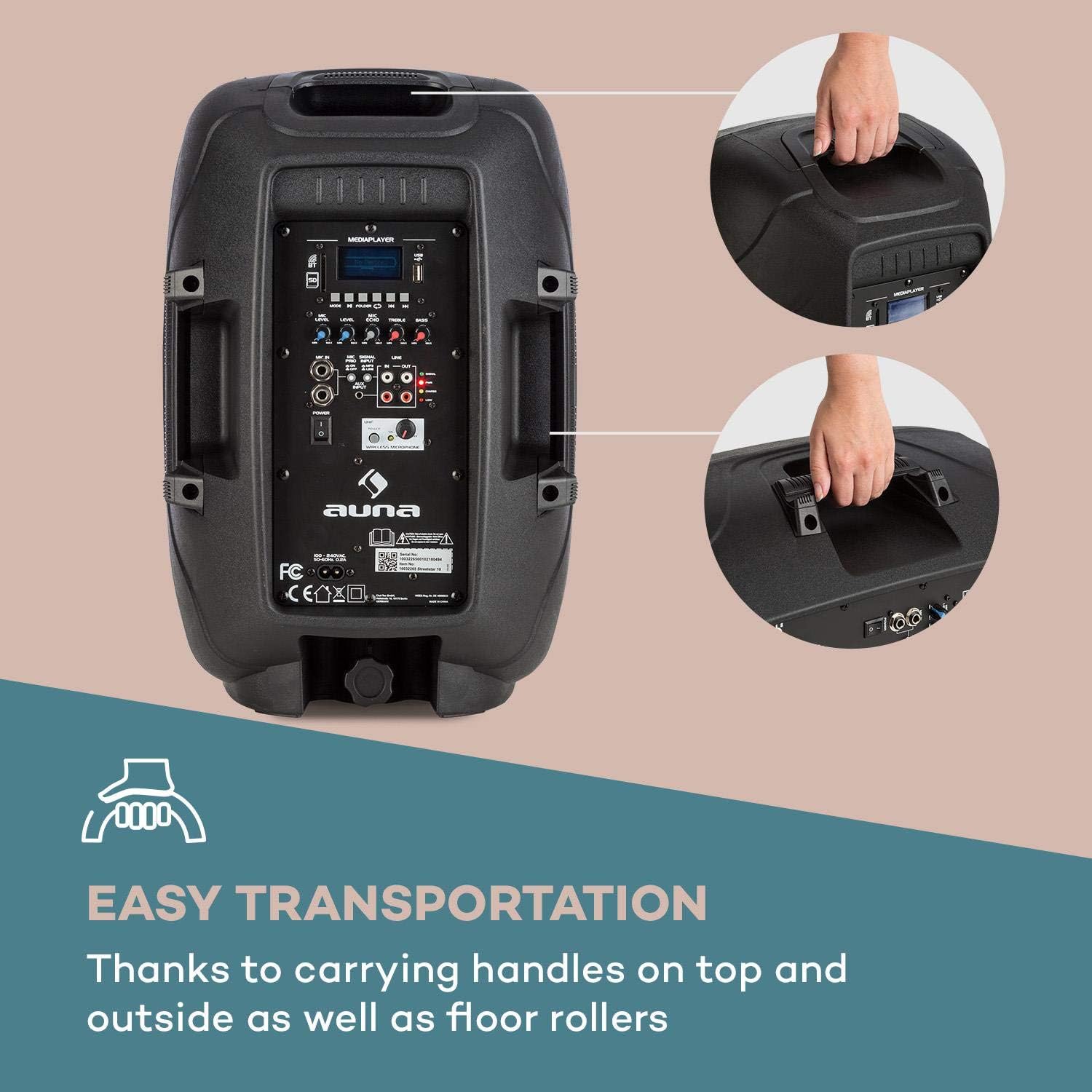
Image: The integrated carrying handles on top and side, along with floor rollers, facilitate easy transportation of the unit.
Жайгашуу
- Пакеттен чыгаруу: Carefully remove the PA system and all accessories from the packaging. Retain the packaging for future transport or storage.
- Кубат туташуу: Connect the supplied power cable to the AC IN port on the unit and then to a suitable 220V AC power outlet. The unit can operate on AC power and simultaneously charge its internal battery.
- Алгачкы заряддоо: For first use, it is recommended to fully charge the internal battery. The CHARGE indicator will illuminate during charging and turn off when fully charged.
- Жайгашкан жери: Place the PA system on a stable, flat surface. It can be used upright or on its side as a stage монитор.
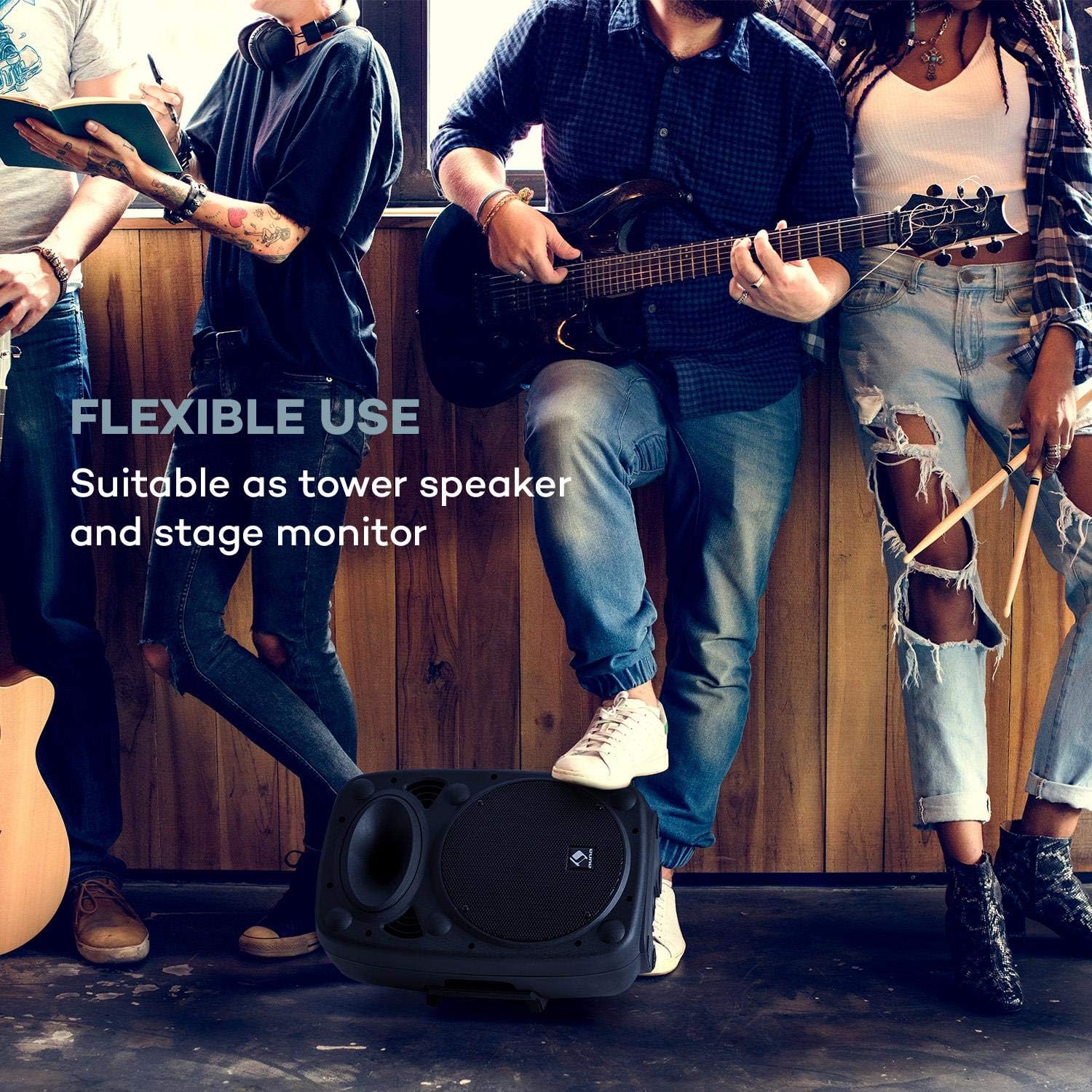
Image: The PA system positioned on its side, demonstrating its flexible use as a stage монитор.
- Микрофондорду туташтыруу:
- Зымсыз микрофон: Ensure the wireless microphone has fresh batteries. Turn on the microphone. The PA system will automatically connect to the included wireless microphone. Adjust its volume using the UHF MICROPHONE knob.
- Зымдуу микрофондор: Connect wired microphones to the MIC IN 6.3mm jack inputs. Adjust their volume using the MIC LEVEL knob.

Image: A user engaging with the wireless microphone, highlighting the system's karaoke and vocal performance capabilities.
- Connecting External Audio Devices: Use the AUX INPUT (RCA L/R) to connect devices like CD players, laptops, or other audio sources.
- Expanding the System: To connect multiple auna Streetstar PA systems, use the LINE OUT of one unit and connect it to the LINE IN of another unit using RCA cables.

Image: An illustration demonstrating how multiple PA systems can be linked together via line input/output for an expanded audio setup.
Иштөө нускамалары
Күйгүзүү/өчүрүү:
Flip the POWER switch to the "ON" position to turn on the unit. The PWR indicator will light up. Flip to "OFF" to power down.
Режим тандоо:
Press the MODE button on the control panel or remote control to cycle through available input modes: Bluetooth, USB, SD, FM Radio, and AUX.

Image: The PA system alongside its remote control, illustrating convenient wireless operation.
Bluetooth жупташууда:
- Select Bluetooth mode using the MODE button. The display will show "BT" and flash, indicating it's ready for pairing.
- On your smartphone or other Bluetooth device, enable Bluetooth and search for "auna Streetstar".
- Select "auna Streetstar" to pair. Once connected, the "BT" indicator will stop flashing.
- You can now play audio from your device wirelessly through the PA system.
USB/SD ойнотуу:
- Insert a USB flash drive into the USB port or an SD card into the SD slot.
- The system will automatically switch to USB or SD mode and begin playing compatible audio files (MP3).
- Use the media player controls (Play/Pause, Next/Previous, Folder) on the unit or remote to navigate and control playback. The display supports ID3 tag information for artist, song or album.
FM радиосу:
- Select FM mode using the MODE button.
- Press the Play/Pause button to initiate an automatic station scan. The system will scan and save available FM stations.
- Use the Next/Previous buttons to switch between saved stations.
Аудио жөндөө:
- Көлөмү: Use the main volume knob to adjust the overall output volume.
- Микрофондун үнү: Adjust MIC LEVEL for wired microphones and UHF MICROPHONE for the wireless microphone.
- Эхо эффектиси: Use the MIC ECHO knob to add or remove echo from microphone inputs.
- Тон көзөмөлү: Adjust the TREBLE and BASS knobs to fine-tune the sound output to your preference.
Техникалык тейлөө
- Тазалоо: Always unplug the unit before cleaning. Use a soft, dry cloth to wipe the exterior. Do not use liquid cleaners or aerosols.
- Сактагыч: Түзмөктү узак убакыт бою колдонбогон учурда, салкын, кургак жерде, мүмкүн болсо, баштапкы таңгагында сактаңыз.
- Батареяга кам көрүү: If the unit is not used regularly, charge the battery at least once every three months to prolong its lifespan. Avoid storing the unit with a completely depleted battery.
- Коргоо: The sturdy ABS casing provides good protection, but avoid dropping or subjecting the unit to strong impacts.

Сүрөт: жакын план view of the speaker's horn and the robust ABS casing, emphasizing its durable construction.
Проблемаларды чечүү
| Көйгөй | Мүмкүн себеп | Чечим |
|---|---|---|
| Күч жок | Power cable not connected; Unit not switched on; Battery depleted. | Ensure power cable is securely connected and plugged into a live outlet. Flip POWER switch to ON. Charge the battery. |
| Үн чыгышы жок | Volume too low; Incorrect input mode selected; Audio source not playing or connected incorrectly. | Increase main volume. Press MODE to select the correct input. Check audio source connection and playback. |
| Bluetooth жупташкан жок | PA system not in pairing mode; Device too far; Bluetooth disabled on source device. | Ensure PA system is in BT mode and flashing. Move source device closer. Enable Bluetooth on your device. |
| Микрофон иштебей жатат | Microphone volume too low; Microphone not switched on; Batteries dead (wireless mic). | Increase MIC LEVEL or UHF MICROPHONE volume. Ensure microphone is switched on. Replace batteries in wireless microphone. |
| Distorted sound / High-frequency noise | Volume too high; Input signal too strong; Interference. | Reduce volume. Check input signal level. Move unit away from other electronic devices that may cause interference. |
Техникалык шарттар
Key technical specifications for the auna Streetstar 2.0 15 Mobile PA System:
- Модель номери: Sky2-90400-asmg
- Чыгуу Wattage: 400 Ватт (макс)
- Динамик өлчөмү: 10" (25.5 см)
- Кубат булагы: Corded Electric (220 Volts) / Internal Battery
- Байланыш: Bluetooth, USB, SD, AUX (RCA), MIC IN (6.3mm), LINE IN/OUT (RCA)
- Каналдар: 2
- Элемент Салмагы: 6 кг
- Продукциянын өлчөмдөрү (L x W x Y): 26 x 33.5 x 49.5 см
- Монтаж түрү: Кабат туруктуу
- Casing Материал: ABS
- Шайкеш түзмөктөр: Ноутбук, смартфон

Сүрөт: деталдуу view of the 10-inch active PA speaker, highlighting its powerful design and XMR Bass Technology.
Кепилдик жана колдоо
This auna product comes with a standard manufacturer's warranty. Please refer to the warranty card included in your package for specific terms and conditions, including warranty period and coverage details.
For technical support, service, or spare parts, please contact your retailer or the official AUNA customer service. Keep your purchase receipt as proof of purchase for warranty claims.
Өндүрүүчү: auna
Биринчи жеткиликтүү болгон күнү: 23 декабрь 2018 жыл


