Introduction
Thank you for choosing the auna Worldwide CD Internet Radio. This manual provides essential information for the safe and efficient operation of your device. Please read it thoroughly before use and keep it for future reference.
This versatile audio system combines traditional CD playback with modern internet radio, DAB/DAB+ digital radio, FM radio, Bluetooth connectivity, and USB playback. It also features Spotify Connect and multiroom functionality for a comprehensive listening experience.
Коопсуздук нускамалары
Электр тогуна урунууну, өрттү же шайманга зыян келтирүүнү алдын алуу үчүн ар дайым төмөнкү коопсуздук чараларын сактаңыз.
- Кубат булагы: Берилген кубат адаптерин гана колдонуңуз. Voltage сиздин жергиликтүү электр камсыздооңузга дал келет.
- Вентиляция: Do not block any ventilation openings. Place the device on a stable, flat surface with adequate space around it for proper airflow.
- Суу жана ным: Түзмөктү жамгырдын, нымдуулуктун же тамчылаган/чачыраган суюктуктардын таасирине дуушар кылбаңыз. Түзмөктүн үстүнө вазалар сыяктуу суюктуктар толтурулган буюмдарды койбоңуз.
- Жылуулук булактары: Түзмөктү радиаторлор, жылыткычтар, плиталар же башка жылуулук булактарынан (анын ичинде ampкөтөргүчтөр) жылуулукту пайда кылуучу.
- Тазалоо: Unplug the device from the power outlet before cleaning. Use a soft, dry cloth only. Do not use liquid cleaners or aerosol cleaners.
- Тейлөө: Бул продуктту өзүңүз тейлөөгө аракет кылбаңыз. Бардык тейлөөнү квалификациялуу тейлөө кызматкерлерине тапшырыңыз.
- Объект жана суюк кирүү: Эч качан бул буюмдун ичине тешиктер аркылуу эч кандай түрдөгү нерселерди түртпөңүз, анткени алар коркунучтуу томtagөрткө же электр шокуна алып келиши мүмкүн болгон чекиттер же кыска өчүк бөлүктөр.
Пакеттин мазмуну
Сураныч, бардык буюмдар бар экенин жана жакшы абалда экендигин текшериңиз:
- 1 x auna Worldwide CD Internet Radio Unit
- 1 х кубат адаптери
- 1 x Remote Control (Battery not included for remote control, typically CR2025)
- 1 x User Manual (English, French, German)
Продукт бүттүview
The auna Worldwide CD Internet Radio features a sleek design with a walnut finish, integrating seamlessly into various home environments. Below is an overview of its main components and dimensions.

Сүрөт 1: Алдыңкы view of the auna Worldwide CD Internet Radio.

Figure 2: Dimensions of the auna Worldwide CD Internet Radio (Width: 45cm, Height: 18cm, Depth: 26cm).
Алдыңкы панелдин башкаруу элементтери жана дисплей
The front panel houses the main controls, display, and media inputs for easy access.

3-сүрөт: Детальдуу view of the LCD display and front panel controls, including volume knob, select button, and navigation buttons.
- LCD дисплей: Учурдагы режимди, станция жөнүндө маалыматты, убакытты жана меню параметрлерин көрсөтөт.
- Кубат баскычы: Агрегатты күйгүзөт же өчүрөт.
- Үн баскычы: Аудио чыгаруу деңгээлин тууралайт.
- Тандоо баскычы: Менюлардагы тандоолорду ырастайт.
- Чабыттоо баскычтары: For navigating menus and tuning stations (Tuning/Skip, Back).
- Режим баскычы: Switches between different audio sources (Internet Radio, DAB, FM, CD, USB, Bluetooth, AUX).
- Маалымат баскычы: Учурдагы трек же станция жөнүндө кошумча маалыматты көрсөтөт.
- Меню баскычы: Негизги менюга кирет.
- CD лоток: Аудио компакт-дисктерди киргизүү үчүн.
- USB Port (5V/1A): For connecting USB storage devices and charging.
- Audio In (3.5mm AUX): Тышкы аудио булактарын туташтыруу үчүн.
Жайгашуу
1. Power Connection
Connect the provided power adapter to the DC IN port on the rear of the radio and then plug it into a wall outlet. The unit will enter standby mode.
2. Антенна туташтыруу
Extend the telescopic antenna fully for optimal DAB/DAB+ and FM radio reception.
3. Баштапкы орнотуу устасы
Upon first power-on, the radio will guide you through an initial setup wizard. Follow the on-screen prompts to configure:
- Тил: Каалаган тилиңизди тандаңыз.
- Тармак туташуусу: The radio will scan for available Wi-Fi networks. Select your network and enter the password using the navigation and select buttons. A stable internet connection is required for Internet Radio and Spotify Connect features.
- Убакыт жана дата: Set the correct time and date, or allow the radio to synchronize automatically via network or DAB signal.
4. Алыстан башкаруунун батареясын орнотуу
Insert one CR2025 battery (not included) into the remote control, ensuring correct polarity.
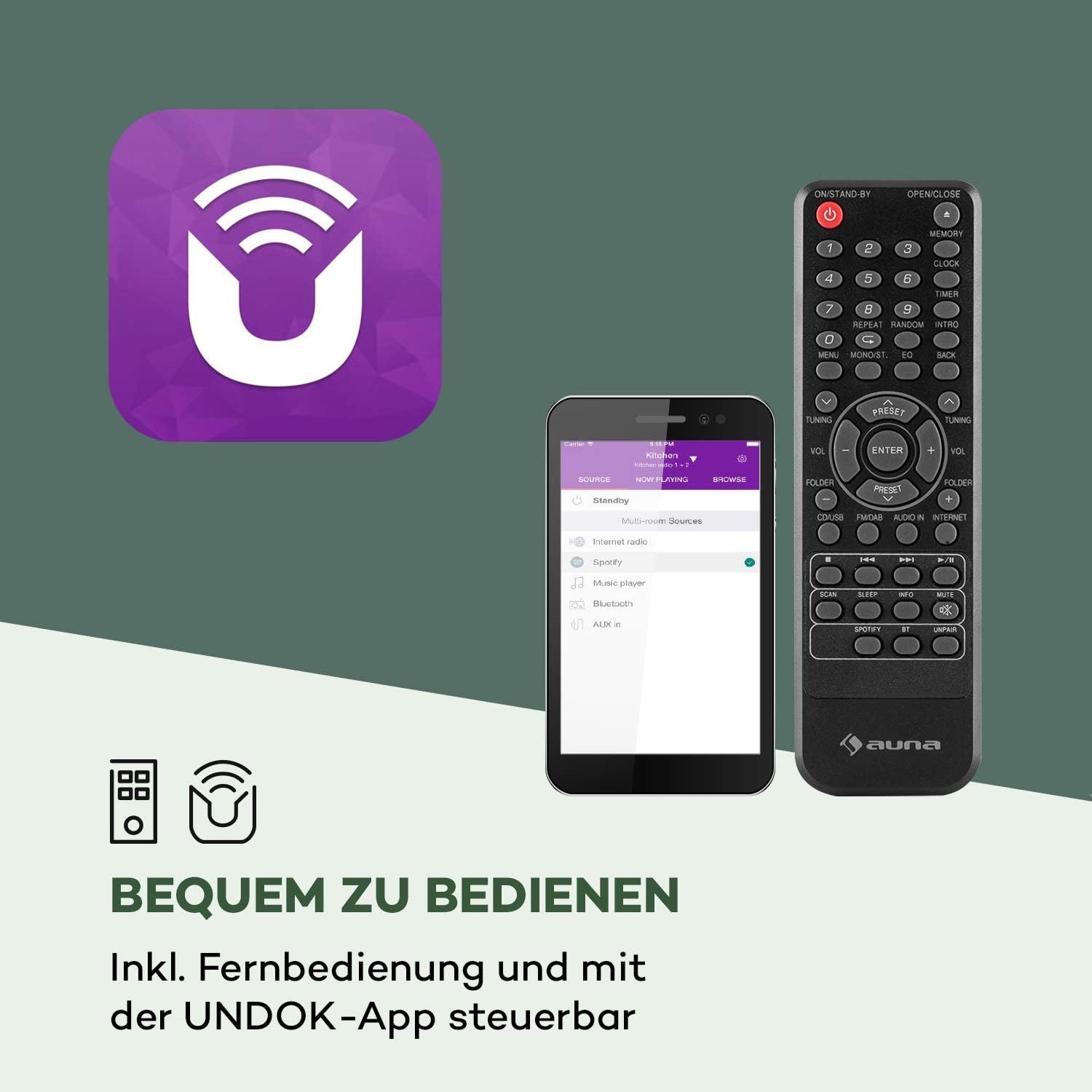
Figure 4: The included remote control and the UNDOK app interface.
Иштөө нускамалары
Негизги операция
- Күйгүзүү/өчүрүү: басыңыз Күч түзмөктөгү же алыстан башкаруу пультундагы баскычты басыңыз.
- Үндү тууралоо: айлантыңыз Көлөм баскычын колдонуңуз же VOL +/- пульттагы баскычтар.
- Булак тандоо: басыңыз Mode button on the unit or remote to cycle through available sources (Internet Radio, DAB, FM, CD, USB, Bluetooth, AUX).
Интернет радио
Access thousands of radio stations from around the world via your internet connection.

Figure 5: The radio seamlessly integrates into your home, offering a vast selection of over 10,000 internet radio stations.
- Булак катары "Интернет радиосун" тандаңыз.
- Navigate through categories (e.g., Location, Genre, Popular) using the navigation buttons and press Тандоо ырастоо үчүн.
- Сиз сүйүктүү станцияларыңызды тез жетүү үчүн алдын ала орнотуулар катары сактай аласыз.
DAB/DAB+ Радиосу
Жогорку сапаттагы санариптик радио берүүлөрдөн ырахат алыңыз.
- Select "DAB Radio" as the source.
- Радио автоматтык түрдө жеткиликтүү DAB/DAB+ станцияларын издейт.
- Use the navigation buttons to select a station from the list.
FM радиосу
Салттуу FM радиостанцияларына күүлүү.
- Булак катары "FM Radio" тандаңыз.
- колдонуу Tuning/Skip buttons to manually tune or auto-scan for stations.
CD ойноткуч
Play your favorite audio CDs.

Figure 6: The integrated CD player supports standard audio CDs and MP3-compatible discs.
- Gently insert an audio CD into the CD slot. The radio will automatically switch to CD mode and begin playback.
- Ойнотуу башкаруу элементтерин колдонуңуз (Ойнотуу/Тыныгуу, Токто, Өткөрүп жибер) аппаратта же пультта.
USB ойнотуу
Музыка ойнотуу fileUSB флешкасынан.

Figure 7: The USB port allows playback of various audio formats from a USB storage device.
- USB флэш-дискти алдыңкы панелдеги USB портуна салыңыз.
- Select "USB" as the source. The radio will display the folder structure.
- Navigate and select your desired audio files. Supported formats include MP3, WMA, WAV, AAC, FLAC.
Bluetooth байланышы
Bluetooth иштетилген түзмөктөрүңүздөн аудиону зымсыз агылтыңыз.

Figure 8: Wireless flexibility is provided through the Bluetooth interface, allowing connection to smartphones, tablets, and laptops.
- Select "Bluetooth" as the source. The radio will enter pairing mode.
- On your Bluetooth device (smartphone, tablet, etc.), search for "auna Worldwide CD" and connect.
- Жупташкандан кийин, түзмөгүңүздөгү аудиону радио аркылуу ойнотсоңуз болот.
AUX киргизүү
3.5 мм аудио кабелин колдонуу менен тышкы аудио түзмөктөрдү туташтырыңыз.
- Connect one end of a 3.5mm audio cable to the "Audio In" port on the radio and the other end to the headphone jack or audio output of your external device.
- Select "AUX" as the source.
Spotify Connect
Stream music directly from your Spotify account to the radio.

Figure 9: Spotify Connect enables seamless music streaming and multiroom audio experiences.
- Ensure your radio is connected to the same Wi-Fi network as your device running the Spotify app.
- Смартфонуңузда же планшетиңизде Spotify колдонмосун ачыңыз.
- Play a song and tap the "Devices Available" icon (speaker icon).
- Select your auna Worldwide CD radio from the list.
App Control (UNDOK App)
Control your radio conveniently from your smartphone or tablet using the UNDOK app.
- Download the "UNDOK" app from your device's app store (iOS App Store or Google Play Store).
- Смартфонуңуз/планшетиңиз жана радиоңуз бир Wi-Fi тармагына туташкандыгын текшериңиз.
- Open the UNDOK app, and it will automatically detect your radio.
- You can now control all functions of the radio, including source selection, station tuning, volume, and multiroom settings.
Alarm Clock and Timer Functions
The radio features dual alarms, a snooze function, and a sleep timer.
- Ойготкучтарды орнотуу: Access the "Alarm" option in the main menu. You can set two independent alarms with customizable time, source (buzzer, internet radio, DAB, FM), and repetition (daily, once, weekdays, weekends).
- Чырым: Сигнал чыкканда, кыска убакытка тындырууну иштетүү үчүн каалаган баскычты (Кубат баскычынан башка) басыңыз.
- Уйку таймери: Access the "Sleep" option in the main menu. Set a timer (e.g., 15, 30, 60 minutes) after which the radio will automatically turn off.
Көп бөлмөлүү функция
Connect multiple compatible auna devices to create a synchronized multiroom audio system, controlled via the UNDOK app.
- Ensure all multiroom devices are connected to the same Wi-Fi network.
- Use the UNDOK app to group devices and play synchronized audio across different rooms.
Техникалык тейлөө
Proper care will ensure the longevity of your auna Worldwide CD Internet Radio.
- Тазалоо: Disconnect the power before cleaning. Use a soft, dry, lint-free cloth to wipe the surfaces. Do not use abrasive cleaners, waxes, or solvents.
- CD ойноткуч: Handle CDs by their edges to avoid fingerprints. If the CD player experiences issues, try cleaning the lens with a specialized CD lens cleaner.
- Сактагыч: Эгерде аппаратты узак убакытка сактасаңыз, аны розеткадан сууруп, салкын, кургак жерде сактаңыз.
Проблемаларды чечүү
If you encounter any issues, please refer to the table below for common problems and their solutions.
| Көйгөй | Мүмкүн себеп | Чечим |
|---|---|---|
| Күч жок | Кубат адаптери туташтырылган эмес; Розетка иштебейт. | Ensure power adapter is securely connected and the outlet is working. |
| Үн жок | Үн өтө төмөн; Үнсүз функция активдүү; Туура эмес булак тандалды. | Increase volume; Check if mute is on; Select the correct audio source. |
| Wi-Fi'га туташпай жатат | Туура эмес сырсөз; Роутер өтө алыс; Тармак көйгөйү. | Verify Wi-Fi password; Move radio closer to router; Restart router. |
| Радио кабыл алуу начар (DAB/FM) | Антенна узартылган эмес; Алсыз сигнал. | Fully extend the telescopic antenna; Reposition the radio for better signal. |
| CD ойнобой жатат | CD inserted incorrectly; Disc is dirty or scratched; Unsupported disc format. | Re-insert CD correctly; Clean the disc; Ensure it's an audio CD or compatible MP3 CD. |
| Bluetooth жупташтыруу ишке ашпай калды | Radio not in pairing mode; Device too far; Bluetooth interference. | Ensure radio is in Bluetooth mode; Move devices closer; Turn off other Bluetooth devices. |
Техникалык шарттар
Detailed technical specifications for the auna Worldwide CD Internet Radio.
| Өзгөчөлүк | Деталь |
|---|---|
| Бренд | auna |
| Модель номери | MG2-Worldwide CD WD |
| Өнүмдүн Өлчөмдөрү (Ж x Y x D) | 45 см х 18 см х 26 см |
| Салмагы | 2.6 килограмм |
| Байланыш технологиясы | USB, 3.5 mm audio, Bluetooth, Wi-Fi |
| Колдоого алынган радио тилкелери | Internet Radio, DAB/DAB+, FM |
| Чыгуу күчү | 2 x 5 Ватт RMS |
| Supported Playback Formats | MP3, WMA, WAV, AAC, FLAC |
| Дисплей технологиясы | LCD |
| Өзгөчөлүктөр | CD Player, Spotify Connect, UNDOK App Control, Multiroom Function, Alarm Clock, Sleep Timer, USB Charging (5V, 1A) |
| Электр камсыздоо | 220-240 V~ | 50/60 Hz |
Кепилдик жана колдоо
For warranty information and technical support, please refer to the documentation included with your product or visit the official auna webсайт. Ар кандай кепилдик дооматтары үчүн сатып алганыңыздын далилин сактаңыз.
For further assistance, you may contact auna customer service directly.


