Introduction
The Sigma XNUMXmm FXNUMX DG HSM Art lens is designed to deliver exceptional optical performance, meeting the rigorous standards of professional photography and cinematography. This lens is Sigma's first to be developed with the sought-after angle of view and performance standard of a benchmark cine lens, offering both XNUMXK-compatible resolution and beautiful bokeh.
This manual provides essential information for the proper use, care, and maintenance of your Sigma XNUMXmm FXNUMX DG HSM Art lens.
Негизги өзгөчөлүктөрү
- Advanced Optical Design: Incorporates three FLD ("F" Low Dispersion) glass elements to effectively correct chromatic aberrations and deliver superior image quality.
- High Resolution and Beautiful Bokeh: Engineered for XNUMXK-compatible resolution with less than XNUMX% distortion and near non-existent sagittal coma flare, while also producing a pleasing background blur.
- Durable Build Quality: Constructed with robust materials for reliable performance in various shooting conditions.
- Fast and Accurate Autofocus: Equipped with a Hyper Sonic Motor (HSM) for quiet, high-speed, and precise autofocus.
- Ар тараптуу шайкештик: Available for various camera systems, including Sony E-mount.
Кутуда эмне бар
Upon opening the package, please ensure all the following items are present:
- Sigma XNUMXmm f/XNUMX DG HSM Art Lens
- Линза капкагы
- Lens Case
- Алдыңкы линзанын капкагы
- Арткы линзанын капкагы
- Көрсөтмө (бул документ)
Жайгашуу
Attaching the Lens to Your Camera
- Ensure both the camera and lens are powered off.
- Remove the rear lens cap from the lens and the body cap from your camera.
- Align the mounting index mark on the lens (usually a white dot or line) with the corresponding index mark on your camera's lens mount.
- Insert the lens into the camera mount and rotate it clockwise (for Sony E-mount) until it clicks securely into place. Do not force the lens.
- To detach the lens, press the lens release button on your camera body and rotate the lens counter-clockwise until it detaches.

This image displays the rear of the Sigma XNUMXmm f/XNUMX DG HSM Art lens, focusing on the metal lens mount and electronic contacts. This is the part that connects directly to your camera body.
Attaching the Lens Hood
The included lens hood helps to block extraneous light, reducing flare and ghosting, and also provides physical protection for the front element of the lens.
- Align the lens hood's mounting mark with the mark on the front of the lens barrel.
- Twist the hood clockwise until it clicks into place.
- To store the hood, reverse its direction and attach it to the lens barrel.
This image shows the Sigma XNUMXmm f/XNUMX DG HSM Art lens with its petal-shaped lens hood securely mounted on the front. The hood extends forward from the lens barrel.
Линзаны иштетүү
Focus Mode Switch (AF/MF)
The lens features a switch on its barrel to select between Autofocus (AF) and Manual Focus (MF) modes.
- AF (Autofocus): Set the switch to AF for automatic focusing. The camera will control the lens's focus.
- MF (Manual Focus): Set the switch to MF to manually adjust focus by rotating the focus ring on the lens.

This image provides a side view of the Sigma XNUMXmm f/XNUMX DG HSM Art lens, clearly showing the AF/MF (Autofocus/Manual Focus) switch located on the left side of the lens barrel.
Autofocus Operation
When the lens is set to AF, the camera's autofocus system will take control. Half-press the camera's shutter button to activate autofocus. The Hyper Sonic Motor (HSM) ensures fast and quiet focusing.
Manual Focus Operation
In MF mode, rotate the large focus ring on the lens barrel to adjust focus. Use your camera's focus peaking or magnification features for precise manual focusing.
Understanding the Distance Scale
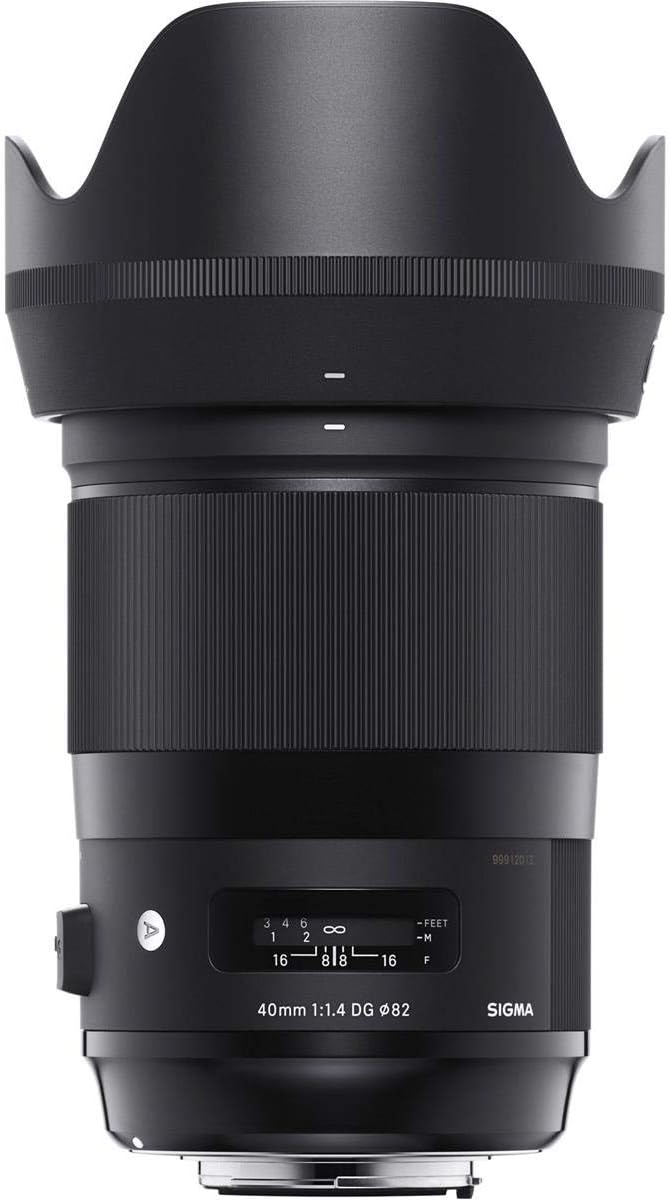
The lens features a distance scale window, indicating the current focus distance in both meters and feet. This can be useful for zone focusing or when precise distance information is required.

This image shows the front-facing view of the Sigma XNUMXmm f/XNUMX DG HSM Art lens, prominently displaying the distance scale window with markings in feet and meters, as well as aperture values.
Техникалык тейлөө жана кам көрүү
- Линзаны тазалоо: Use a soft, lint-free cloth or a lens brush to remove dust. For smudges or fingerprints, use a specialized lens cleaning solution and a microfiber cloth. Never use abrasive materials or harsh chemicals.
- Сактагыч: When not in use, store the lens with both front and rear caps attached in a cool, dry place, away from direct sunlight and extreme temperatures. Using the provided lens case is recommended for added protection.
- Колдонуу: Avoid dropping or subjecting the lens to strong impacts. Do not attempt to disassemble the lens, as this will void the warranty and may cause damage.
- Нымдуулук: Protect the lens from rain, splashes, and high humidity. If the lens gets wet, wipe it dry immediately with a soft cloth.
Проблемаларды чечүү
| Көйгөй | Мүмкүн себеп | Чечим |
|---|---|---|
| Autofocus not working. | Lens focus mode switch set to MF. Camera focus mode not set to AF. Poor lighting conditions. | Set lens switch to AF. Set camera to AF mode. Use a focus assist light or switch to manual focus. |
| Images are blurry. | Incorrect focus. Shutter speed too slow. Lens or camera shake. | Re-focus. Increase shutter speed. Use a tripod or image stabilization (if available on camera body). |
| Камера линзаны тааныган жок. | Lens not properly mounted. Dirty electrical contacts. | Re-attach the lens, ensuring it clicks into place. Clean lens and camera contacts with a clean, dry cloth. |
Техникалык шарттар
| Өзгөчөлүк | Деталь |
|---|---|
| Бренд | Сигма |
| Модель номери | 332965 |
| Фокустун узундугу | 40мм |
| Максималдуу диафрагма | f/1.4 |
| Линзанын түрү | Fixed Prime |
| Шайкеш орнотуулар | Sony E |
| Продукциянын өлчөмдөрү | 5.2 x 3.5 x 3.5 дюйм |
| Элемент Салмагы | 2.65 фунт |
| Өндүрүүчү | Sigma Corporation of America |
| Дата биринчи жеткиликтүү | 7-ноябрь, 2018-жыл |
Кепилдик жана колдоо
Sigma products are manufactured with high-quality materials and undergo strict quality control. For information regarding the warranty period and terms, please refer to the warranty card included with your product or visit the official Sigma webсиздин аймак үчүн сайт.
For technical support, repairs, or any inquiries regarding your Sigma XNUMXmm f/XNUMX DG HSM Art lens, please contact Sigma customer service or an authorized service center in your country. Contact details can typically be found on the official Sigma webсайтында же продуктунун таңгагында.


