Introduction
This manual provides essential information for the installation, operation, and maintenance of your SilverStone SST-ST65F-GS 650W 80 Plus Gold Fully Modular ATX Power Supply. The SST-ST65F-GS is designed to meet the demands of modern desktop computers, offering a compact, fully modular design with 80 PLUS Gold level efficiency. It features a 650W maximum DC output, strict voltage regulation, low ripple and noise, and a silent 120mm fan for continuous 24/7 operation at 40°C.
Коопсуздук маалыматы
- Always disconnect the AC power cord from the wall outlet before installing, removing, or cleaning the power supply unit (PSU).
- Кубат берүүчү түзүлүш жогорку вольтту камтыйтtage компоненттери. Электр кубатын ачпаңызasinг. Ичинде колдонуучу тейлей турган бөлүктөр жок.
- Ensure the PSU is installed in a well-ventilated area. Do not block the fan or ventilation openings.
- Бул кубат булагы менен кошо берилген модулдук кабелдерди гана колдонуңуз. Үчүнчү тараптын кабелдерин колдонуу кубат булагына же туташкан компоненттерге зыян келтириши мүмкүн.
- Connect the correct cables to the appropriate ports on the PSU and your system components. Incorrect connections can cause severe damage.
- Бул продукт жеке компьютер системаларында колдонуу үчүн иштелип чыккан. Аны башка эч кандай максатта колдонбоңуз.
- Keep the PSU away from water, moisture, and extreme temperatures.
Пакеттин мазмуну
Verify that all items are present in the package before installation.
- SilverStone SST-ST65F-GS 650W Power Supply Unit
- Modular Cable Set (including ATX 24-pin, EPS/ATX 8-pin, PCIe 6+2-pin, SATA, Peripheral 4-pin cables)
- AC Power Cord
- Монтаждоо бурамалар
- Cable Ties / Velcro Straps
- Колдонуучунун колдонмосу / Кепилдик жөнүндө маалымат

Image: The SilverStone SST-ST65F-GS power supply unit shown with its full set of modular cables, mounting screws, and documentation.
Продукт бүттүview
The SilverStone SST-ST65F-GS is a high-performance, fully modular power supply designed for reliability and efficiency. Key features include:
- 650 Ватт максималдуу туруктуу токтун чыгышы: камсыз кылат ample power for most gaming and workstation systems.
- Компакт дизайн: With a depth of 140mm, it allows for easy integration into various PC cases.
- 100% модулдук кабелдер: Enables users to connect only the necessary cables, reducing clutter and improving airflow.
- 80 PLUS алтын сертификаты: Жогорку энергия натыйжалуулугун камсыз кылат, жылуулук өндүрүүнү жана эксплуатациялык чыгымдарды азайтат.
- Класстагы алдыңкы бир жолку +12V рельс: Delivers stable and reliable power to demanding components.
- Strict Voltage Регламент: Чыгарылыш көлөмүн сактайтtages within 3% of the nominal value.
- Low Ripple & Noise: Ensures clean power delivery to sensitive components.
- 24/7 үзгүлтүксүз кубаттуулук: Capable of sustained operation at 40°C ambient temperature.
- Үнсүз иштеген 120 мм желдеткич: Operates with a minimum noise level of 18dBA for quiet performance.
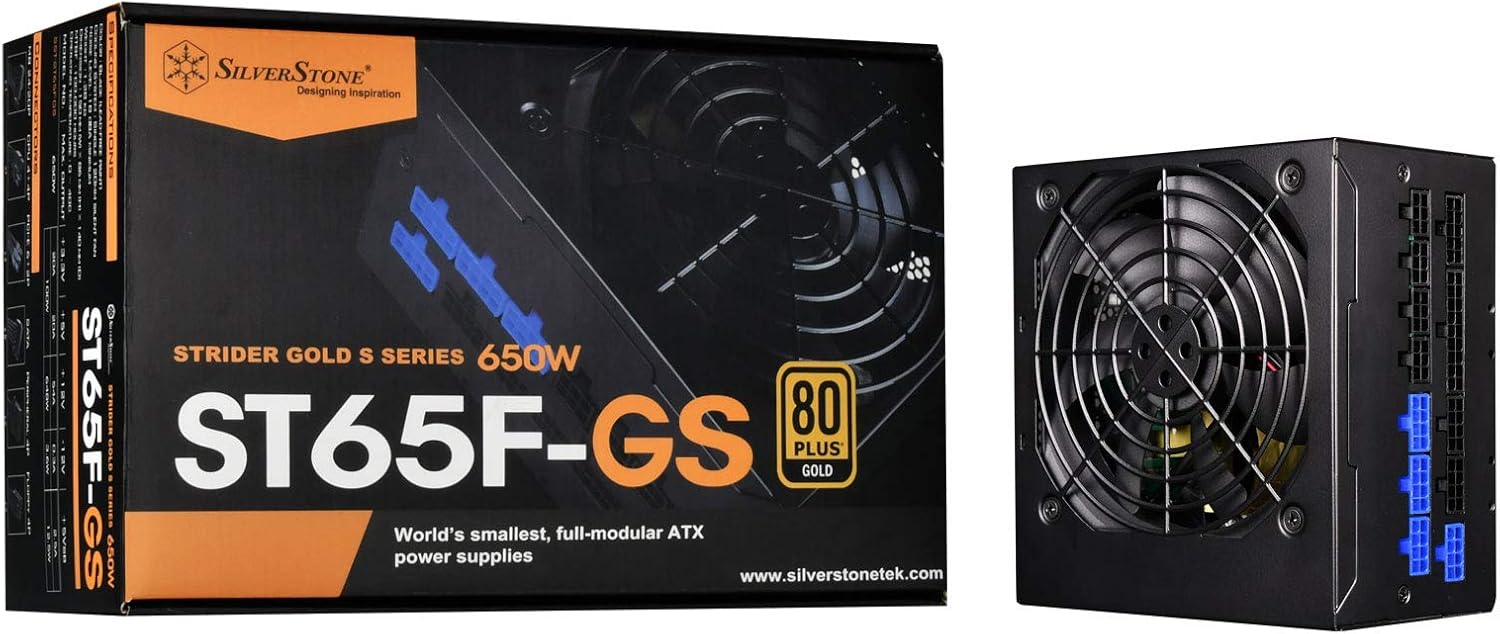
Image: The SilverStone SST-ST65F-GS power supply unit alongside its retail packaging, highlighting its compact size and 80 PLUS Gold certification.

Сүрөт: бурчтуу view of the SilverStone SST-ST65F-GS power supply, showing the fan grill and modular cable connectors.

Сүрөт: Жакын план view of the fully modular cable connection panel on the SilverStone SST-ST65F-GS, with blue connectors for main power and black for peripherals.

Сүрөт: жогорудан төмөнгө view of the 120mm cooling fan and grill on the SilverStone SST-ST65F-GS power supply.

Сүрөт: Арткы view of the SilverStone SST-ST65F-GS power supply, showing the AC power inlet, ventilation grille, and the main power switch.
Орнотуу жана орнотуу
- Системаңызды даярдаңыз: Ensure your computer is completely powered off and unplugged from the wall outlet. Open your computer case to access the PSU mounting area.
- Эски PSUну алып салуу (эгер бар болсо): Disconnect all cables from your old power supply and remove its mounting screws. Carefully slide the old PSU out of the case.
- Жаңы PSUну орнотуу: Slide the SilverStone SST-ST65F-GS into the designated PSU bay in your computer case. Align the screw holes and secure the PSU with the provided mounting screws. Ensure the fan is facing the correct direction for optimal airflow (typically facing down if there's a bottom vent, or up if there isn't).
- Модулдук кабелдерди туташтыруу:
- Main ATX Power (20+4 pin): Connect the 24-pin cable to the corresponding port on the PSU and the motherboard.
- CPU Power (4+4 pin EPS/ATX): Connect the 8-pin (or 4+4 pin) CPU power cable to the PSU and the motherboard's CPU power connector.
- PCIe Power (6+2 pin): Connect the necessary PCIe cables to the PSU and your graphics card(s). Each 6+2 pin connector can be used for either 6-pin or 8-pin PCIe power.
- SATA күчү: SATA электр кабелдерин SSD, HDD жана оптикалык дисктериңизге туташтырыңыз.
- Peripheral (Molex) Power: Connect peripheral cables for case fans, older drives, or other accessories as needed.
Маанилүү: Ensure all cable connections are firm and correctly oriented. Do not force connectors.
- Кабелдик башкаруу: Route cables neatly to improve airflow and aesthetics within your case. Use the provided cable ties or Velcro straps.
- Корпусту жаап, AC кубатын туташтырыңыз: Once all internal connections are made, close your computer case. Connect the AC power cord to the PSU's inlet and then to a wall outlet or surge protector.
- Күйгүзүү: Flip the power switch on the back of the PSU to the "I" (On) position. Then, power on your computer.
Иштөө нускамалары
The SilverStone SST-ST65F-GS power supply operates automatically once installed and powered on. It is designed for continuous operation under normal computing loads.
- Күйгүзүү/өчүрүү: Use the main power switch on the back of the PSU to completely cut power to the unit. For daily use, power your computer on and off via the operating system or case power button.
- Күйөрман операциясы: The integrated 120mm fan will automatically adjust its speed based on the PSU's internal temperature and load to maintain optimal cooling and quiet operation.
- Натыйжалуулугу: The 80 PLUS Gold certification indicates high efficiency, meaning less power is wasted as heat, contributing to lower energy consumption and a cooler system.
Техникалык тейлөө
Туура тейлөө электр менен камсыздооңуздун узак мөөнөттүү жана оптималдуу иштешин камсыз кылат.
- Чаңды тазалоо: Periodically (e.g., every 6-12 months), disconnect the PSU from AC power and use compressed air to gently clean dust from the fan grille and ventilation openings. Do not open the PSU casing.
- Аба агымын камсыз кылуу: Make sure that the PSU's intake and exhaust vents are not obstructed by cables, dust, or other components within the PC case. Good airflow is crucial for cooling.
- Кабелдик текшерүү: Occasionally check that all modular cables are securely connected to both the PSU and your components.
Проблемаларды чечүү
Эгер сиз кубат менен камсыз кылууда көйгөйлөргө туш болсоңуз, төмөнкү жалпы көйгөйлөрдү чечүү кадамдарын караңыз:
- Кубат жок:
- AC кубат шнурунун PSUга да, розеткага да бекем туташканын текшериңиз.
- Check that the power switch on the back of the PSU is in the "I" (On) position.
- Verify all modular cables are correctly and firmly seated in the PSU and connected components (motherboard, CPU, GPU).
- Дубал розеткасын башка аспап менен сынап көрүңүз, анда кубат бар.
- Системанын туруксуздугу/бузуулар:
- Системаңыздын кубаттуулук талаптары PSUнун 650 Вт кубаттуулугунан ашпасын текшериңиз.
- Кабелдик туташуулардын боштугун текшериңиз.
- Monitor system temperatures to ensure components are not overheating, which can be exacerbated by poor PSU performance or airflow.
- Катуу желдеткичтин үнү:
- Кубат берүүчү желдеткичтен жана желдеткичтерден чаңдын топтолушун тазалаңыз.
- Компьютердин корпусунда жетиштүү аба айланышын камсыз кылыңыз.
- If the noise is excessive and persistent even under low load, contact SilverStone support.
If these steps do not resolve your issue, please contact SilverStone customer support for further assistance.
Техникалык шарттар
| Өзгөчөлүк | Спецификация |
|---|---|
| Бренд | SilverStone |
| Модель номери | SST-ST65F-GS |
| Сериялар | Strider Gold S |
| Максималдуу туруктуу ток чыгаруу | 650 Вт |
| 80 PLUS сертификаты | Алтын |
| Форма фактору | ATX |
| Модулдук түрү | Толугу менен модулдук |
| Муздатуу ыкмасы | 120mm Fan (Silent running, 18dBA minimum) |
| Тtage Регламент | Strict 3% |
| Ripple & Noise | Төмөн 3% |
| Continuous Output Temperature | 40°C (24/7 operation) |
| Өлчөмдөрү (LxWxH) | 5.91 x 5.51 x 3.39 дюйм (150 x 140 x 86 мм) |
| Элемент Салмагы | 2.83 фунт (1.28 кг) |
| Шайкеш түзмөктөр | Персоналдык компьютер |
| Туташтыргыч түрү | ATX |
Кепилдик жана колдоо
SilverStone Technology provides a limited warranty for its power supply units. Please refer to the warranty information included in your product package for specific terms and conditions, including warranty duration and coverage details. You can also visit the official SilverStone Technology website for the most up-to-date warranty policy and to access customer support resources.
For technical support, troubleshooting assistance beyond this manual, or warranty claims, please contact SilverStone Technology customer service through their official webсайт:


