SERVO 225 Mobile Phone User Manual
Model: SERVO 225
1. Киришүү
This user manual provides comprehensive instructions for the operation and maintenance of your new SERVO 225 mobile phone. Please read this manual carefully before using the device to ensure proper functionality and to maximize its lifespan. The SERVO 225 is a compact and reliable mobile phone featuring dual SIM capability, a 2.4-inch display, and essential functions for daily communication.

Сүрөт 1.1: Алдыңкы жана арткы view of the SERVO 225 mobile phone, showcasinанын компакттуу дизайны жана баскычтобу.
2. Коопсуздук маалыматы
- Аппаратты ажыратпаңыз же өзгөртпөңүз.
- Аппаратты суудан жана нымдан алыс кармаңыз.
- Түпнуска же бекитилген аксессуарларды гана колдонуңуз.
- Ашыкча температурадан сактаныңыз.
- Айдоо учурунда телефонду колдонбоңуз.
- Батареяларды жана аппаратты жергиликтүү эрежелерге ылайык таштаңыз.
- Before first use, ensure to remove any insulating tape from the battery terminals.
3. Пакеттин мазмуну
Пакетиңиздин мазмунун текшериңиз. Эгерде кандайдыр бир буюмдар жок же бузулуп калса, сатуучуга кайрылыңыз.
- 1 x SERVO 225 Mobile Phone
- 1 x Battery (1400 mAh Li-ion)
- 1 х заряддагыч
- 1 x коргоочу куту
- 1 х Колдонуучунун колдонмосу (бул документ)

Figure 3.1: The SERVO 225 package contents, including the phone, battery, charger, and protective case.
4. Продукт бүтүп калдыview
The SERVO 225 features a classic candy bar design with a physical keypad and a 2.4-inch display. It supports dual SIM cards for flexible network usage.
4.1. Физикалык өзгөчөлүктөрү
- Дисплей: 2.4-inch VGA screen.
- Баскычтоп: Standard alphanumeric keypad with navigation keys.
- Камера: 0.3 Megapixel CMOS camera with flash on the rear.
- Арткы мукаба: Features a mechanical back cover, available in various colors like Black, Brown, and Gold.
- Өлчөмдөрү: Болжол менен 122 x 52 x 11 мм (4.80 x 2.05 x 0.43 дюйм).
- Салмагы: Болжол менен 80 грамм.

Figure 4.1: Close-up of the SERVO 225's rear, highlighting the camera and dual LED flash for improved low-light photography.

Figure 4.2: Various color options for the SERVO 225, demonstrating the 2.4-inch screen size.
5. Орнотуу
5.1. Батареяны орнотуу жана заряддоо
- Телефондун арткы капкагын оюктан акырын ачып, чечиңиз.
- If present, remove the insulating tape from the battery terminals.
- Insert the 1400 mAh Li-ion battery into the battery compartment, ensuring the gold contacts align with the phone's terminals.
- Арткы капкакты ордуна коюңуз, аны чыкылдатканча катуу басыңыз.
- Connect the charger to the phone's charging port and plug it into a power outlet. Charge the battery fully before first use.

Figure 5.1: The 1400 mAh battery and the phone's zinc alloy paint shell design.
5.2. SIM карталарды жана эстутум картасын салуу
The SERVO 225 supports dual SIM cards (Dual GSM) and a T-Flash memory card (up to 32GB, not included).
- With the back cover and battery removed, locate the SIM card slots. The phone supports two SIM cards.
- SIM карталарыңызды алтын түстүү контакттарын ылдый каратып, белгиленген уячаларга кылдаттык менен салыңыз.
- Locate the T-Flash (microSD) card slot. Insert the memory card until it clicks into place.
- Батареяны жана арткы капкакты кайра орнотуңуз.
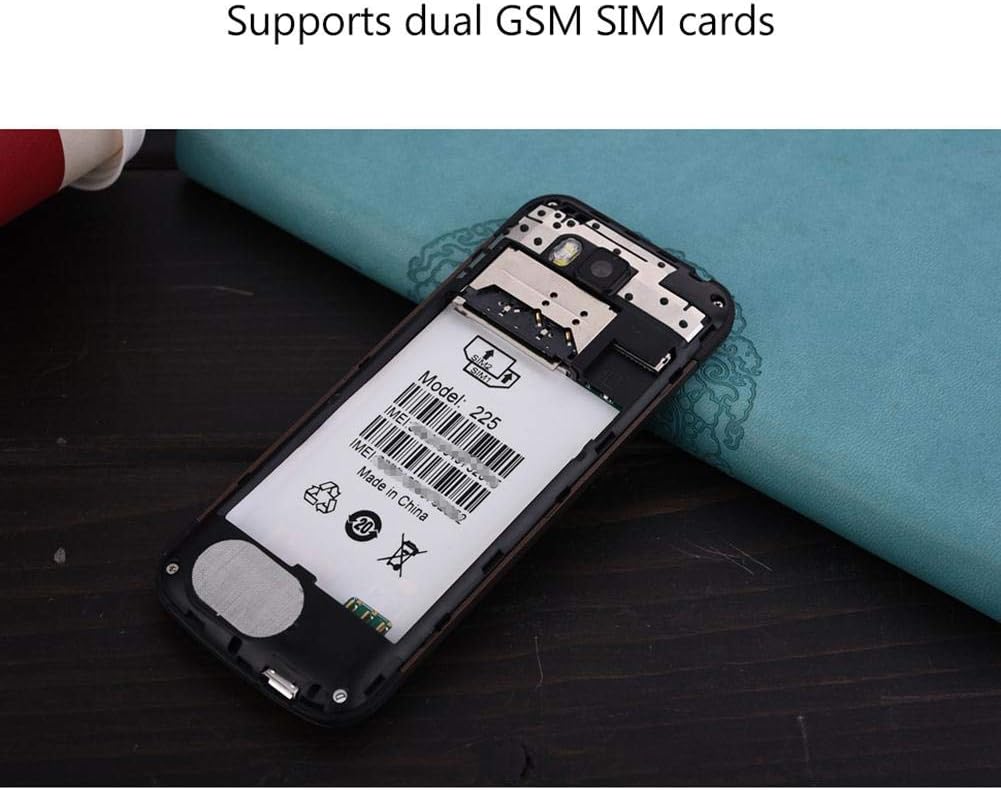
5.2-сүрөт: Ички view of the SERVO 225, illustrating the dual SIM card slots and the memory card slot.
6. Иштөө нускамалары
6.1. Күйгүзүү/өчүрүү
- Күйгүзүү үчүн: Экран күйгүчө Күч/Чалууну аяктоо баскычын басып, кармап туруңуз.
- Өчүрүү үчүн: Өчүрүү параметрлери пайда болгонго чейин Күйгүзүү/Чалууну аяктоо баскычын басып туруңуз, андан кийин "Өчүрүү" дегенди тандаңыз.
6.2. Негизги функциялар
- Чалууларды жасоо: Ариптакта аркылуу телефон номерин киргизип, Чакыруу баскычын басыңыз.
- Чалууларга жооп берүү: Телефон шыңгыраганда Чакыруу баскычын басыңыз.
- Кабарларды жөнөтүү: Navigate to the "Messages" menu, select "Write message", enter your text, and send to the desired recipient.
- Меню навигациясы: Use the navigation keys (up, down, left, right) to browse through menus and the center key to select.
6.3. Негизги өзгөчөлүктөрү
- Bluetooth: Connect to other Bluetooth-enabled devices for file transfer or hands-free communication.
- FM радиосу: Listen to your favorite radio stations. Requires headphones to be plugged in as an antenna.
- MP3/MP4 ойноткуч: Аудио жана видеону ойнотуу fileэстутум картаңызда сакталган.
- GPRS/WAP: Access basic internet services and WAP sites.
- Камера: Capture photos with the 0.3MP rear camera.
- Кошумча куралдар: Calendar, Sound Recorder, Calculator, World Clock, Alarm.
7. Техникалык тейлөө
- Тазалоо: Телефондун бетин тазалоо үчүн жумшак, кургак чүпүрөктү колдонуңуз. Суюк тазалоочу каражаттарды же аэрозольдорду колдонбоңуз.
- Сактагыч: Телефонду узак убакытка колдонбогондо салкын, кургак жерде сактаңыз.
- Батареяга кам көрүү: Avoid overcharging or completely draining the battery frequently to prolong its life.
8. Кыйынчылыктарды
| Көйгөй | Мүмкүн себеп | Чечим |
|---|---|---|
| Телефон күйбөйт. | Батарея аз же туура орнотулган эмес. | Charge the battery. Ensure battery is properly inserted and insulating tape is removed. |
| Тармак сигналы жок. | SIM card not inserted correctly or out of network coverage. | Reinsert SIM card. Move to an area with better network coverage. |
| Чалууларды кабыл алуу же жасоо мүмкүн эмес. | No network, SIM card issue, or call barring enabled. | Check network signal. Verify SIM card. Disable call barring if active. |
| Эстутум картасы табылган жок. | Memory card not inserted correctly or corrupted. | Reinsert memory card. Try a different memory card. |
9. Техникалык шарттар
| Өзгөчөлүк | Спецификация |
|---|---|
| Бренд | SERVO |
| Модел | 225 |
| Дисплей | 2.4-inch VGA |
| Платформа | Spreadtrum6531CA |
| SIM түрү | Dual SIM, Dual Standby (Dual GSM) |
| Тармак жыштыгы | GSM850/900/1800/1900 MHz (2G) |
| Ички эс тутум | 32MB RAM, 32MB ROM |
| Expandable Memory | Up to 32GB (T-Flash / microSD card, not included) |
| Камера | 0.3 Megapixel CMOS (Rear) with Flash |
| Батарея | 1400 мАч Li-ion |
| Talk Time | Болжол менен 6 саат |
| Өлчөмдөр | 122 x 52 x 11 мм (4.80 x 2.05 x 0.43 дюйм) |
| Салмагы | Болжол менен 80 г |
| Байланыш | Bluetooth |
| Башка өзгөчөлүктөр | FM Radio, MP3/MP4 Player, GPRS, WAP, Calendar, Recorder, Calculator, World Clock, Alarm |
10. Кепилдик жана колдоо
Your SERVO 225 mobile phone comes with a standard manufacturer's warranty. Please refer to the warranty card included in your package for specific terms and conditions. For technical support, troubleshooting assistance, or warranty claims, please contact your point of purchase or the official SERVO customer service channels.
Кепилдик үчүн сатып алуу дүмүрчөгүн сатып алуунун далили катары сактаңыз.


