1. Киришүү
This manual provides detailed instructions for the installation, setup, and operation of your MOES WiFi Smart Wall Touch Light Switch. Please read this manual thoroughly before installation and use to ensure proper function and safety.

Figure 1: MOES WiFi Smart Wall Touch Light Switch (1 Gang, Black)
2. Коопсуздук маалыматы
- Электр орнотуу: Орнотуу иштерин квалификациялуу электрик же электр зымдарын терең түшүнгөн адам гана аткарышы керек.
- Электр энергиясын өчүрүү: Always disconnect power at the circuit breaker before installing, removing, or servicing the switch. Failure to do so may result in serious injury or death.
- Нейтралдуу зым талап кылынат: This smart switch requires a neutral wire in your switch box to operate correctly. If you do not have a neutral wire, this switch is not compatible.
- Wi-Fi тармагы: Requires a 2.4GHz Wi-Fi network connection. It is not compatible with 5GHz Wi-Fi networks.
- Шайкештик: Only compatible with 1 gang switch boxes. Not compatible with standard US 2/3/4 gang switch plates. This switch is not designed for 3-way switch configurations or as a dimmer switch.
- Үй ичинде гана колдонуу: Бул аппарат кургак жерлерде имараттын ичинде колдонуу үчүн арналган.
- Operating Voltage: Ensure your electrical system operates within the specified voltage диапазону (240 Вольт).

Figure 2: Key compatibility and wiring considerations.
3. Пакеттин мазмуну
- MOES WiFi Smart Wall Touch Light Switch (1 Gang)
- User Manual
- Монтаждоо бурамалар
4. Продукциянын өзгөчөлүктөрү
- Сенсордук башкаруу: Features a toughened glass surface for touch operation.
- Үн менен башкаруу: Compatible with Amazon Alexa (Amazon Echo/Dot/Tap) and Google Assistant for hands-free operation.
- Wi-Fi алыстан башкаруу: Control the wall switch wirelessly from anywhere using the 'Smart Life' app on your smartphone via Wi-Fi or 4G network. No separate hub is required.
- Убакыт функциясы: Schedule lights and appliances to turn on/off automatically at specific times.

Figure 3: Smart Switch in a home environment.
5. Техникалык шарттар
| Спецификация | Нарк |
|---|---|
| Иштөө режими | Автоматтык түрдө, Өчүк, Smart Switch |
| Учурдагы рейтинг | 10 Amps |
| Operating Voltage | 240 вольт |
| Байланыш түрү | Адатта ачык |
| Туташтыргыч түрү | Зымсыз |
| Терминал | Бурама |
| Элементтин өлчөмдөрү (L x W x Y) | 4.7 x 2.9 x 1.5 дюйм |
| Circuit Type | 1-жол |
| Актуатор түрү | тийүү |
| Байланыш материалы | Жез |
| Эл аралык коргоо рейтинги | IPX4 |
| Позициялардын саны | 3 |
| Controller Type | Amazon Alexa, Google Жардамчысы |
| Башкаруу ыкмасы | Алыстан |
| Connectivity Protocol | Wi-Fi (2.4 ГГц гана) |
| Ватtage | 1000 ватт |
| Элемент Салмагы | 7.4 унция |

Figure 4: Product dimensions and wiring terminals.
6. Орнотуу боюнча колдонмо
Баштоодон мурун:
- Электр өчүргүчтө кубат өчүрүлгөнүн текшериңиз.
- Confirm your switch box has a neutral wire. This is essential for the smart switch to function.
- Wi-Fi тармагыңыз 2.4 ГГц экенин текшериңиз.
- This switch is for 1-gang setups only and is not a dimmer or 3-way switch.
Зымдарды орнотуу кадамдары:
- Алмаштырып жаткан жарык өчүргүчтүн автоматтык өчүргүчүндөгү электр кубатын өчүрүңүз.
- Учурдагы дубал плитасын жана которгучту алып салыңыз.
- Identify the wires: Live (usually black), Neutral (usually white), and Load (to the light fixture). A Ground wire (usually green or bare copper) may also be present.
- Connect the wires from your wall box to the corresponding terminals on the MOES Smart Switch:
- N: Connect the Neutral wire (usually white).
- L: Connect the Live wire (incoming power, usually black).
- L1: Connect the Load wire (to the light fixture). For 1-gang switches, only L1 is typically used.
- Жер: If present, connect the ground wire to the switch's ground terminal (if available) or safely cap it.
- Берилген бурамаларды колдонуп, өчүргүчтү дубал кутусуна бекитиңиз.
- Айнек панелди бекитиңиз.
- Автоматтык өчүргүчтөгү кубаттуулукту калыбына келтириңиз.
After installation, the indicator lights on the switch should blink quickly, indicating it is ready for Wi-Fi connection in Default Normal Mode.

Figure 5: Replacing a traditional switch with the smart touch switch.
7. Колдонмону орнотуу жана жупташтыруу
To control your smart switch via smartphone, download the 'Smart Life' app from the App Store (iOS) or Google Play (Android).
- Жүктөп алып, катталыңыз: Install the 'Smart Life' app and register an account.
- Түзмөк кошуу: Open the app, tap '+' or 'Add Device', and select 'Light Switch' or 'Electrical Switch'.
- Confirm Indicator Status: Ensure the indicator light on your switch is blinking quickly. If not, you may need to reset the device.
- Wi-Fi'га туташуу: Follow the in-app instructions to connect the switch to your 2.4GHz Wi-Fi network. Enter your Wi-Fi password when prompted.
- Түзмөктүн аталышын өзгөртүү: Once connected, you can rename the switch for easier identification (e.g., "Living Room Light").
Аппаратты баштапкы абалга келтирүү:
If the indicator lights are not blinking quickly, or if you need to reset the switch for any reason:
- Press and hold any button on the switch for approximately 20 seconds until the indicator light blinks quickly. This puts the device into Default Normal Mode for Wi-Fi connection.
- If the indicator light blinks very slowly after holding for 20 seconds, it is in AP (Access Point) mode. This is an alternative pairing mode if Default Normal Mode fails.
Video 1: Demonstrates how to reset or unlock the device by pressing and holding a button for 20 seconds, showing the indicator light changes for different pairing modes.
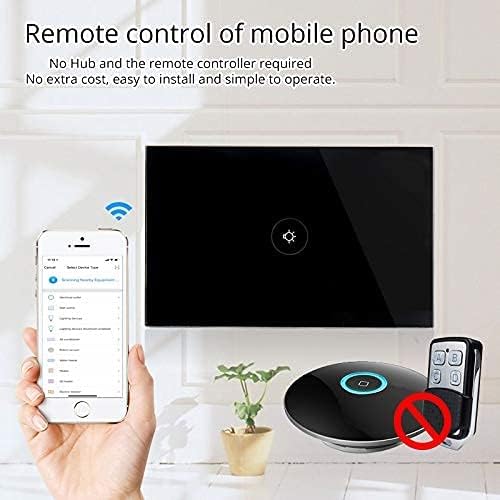
Figure 6: Remote control via mobile application.
8. Операция
Once installed and paired with the 'Smart Life' app, you can operate your switch in several ways:
- Manual Touch: Simply touch the glass panel to turn the connected light or appliance on or off.
- Колдонмону башкаруу: Use the 'Smart Life' app on your smartphone to remotely turn the switch on or off from anywhere with an internet connection.
9. Үн менен башкаруу интеграциясы
The MOES Smart Switch is compatible with Amazon Alexa and Google Assistant for convenient voice control.
- Link 'Smart Life' Account: In your Amazon Alexa or Google Home app, search for the 'Smart Life' skill/action and enable it.
- Кирүү: Log in with your 'Smart Life' account credentials.
- Түзмөктөрдү табуу: Байланышкандан кийин, Alexa же Google Жардамчысынан "Түзмөктөрдү табуу" функциясын сураныңыз же тиешелүү колдонмолорунда түзмөктөрдү табуу функциясын кол менен иштетиңиз.
- Үн буйруктары: You can now use voice commands such as "Alexa, turn on [device name]" or "Hey Google, turn off [device name]". Use the names you assigned in the 'Smart Life' app.

7-сүрөт: Alexa жана Google Home менен үн менен башкаруу.
10. Убакыт функциясы
The 'Smart Life' app allows you to set schedules and timers for your smart switch, automating your lighting or appliances.
- Графиктерди түзүү: In the 'Smart Life' app, navigate to the device settings and select 'Schedule' or 'Timer'.
- Set On/Off Times: Configure specific times for the switch to turn on or off. You can set daily, weekly, or custom schedules.
- Күн чыгышын/күн батышын автоматташтыруу: Some app versions allow for automation based on local sunrise and sunset times.

Figure 8: Setting schedules via the Smart Life app.
11. Кыйынчылыктарды
| Көйгөй | Мүмкүн себеп | Чечим |
|---|---|---|
| Которуу тийүүгө жооп бербейт. | No power, incorrect wiring, or device locked. | Check circuit breaker. Verify wiring (Live, Neutral, Load). Perform a device reset (hold button for 20 seconds). |
| Wi-Fi'га туташпай жатат. | Incorrect Wi-Fi band (5GHz), weak signal, incorrect password, or device not in pairing mode. | Ensure your router is broadcasting a 2.4GHz signal. Move closer to the router. Double-check Wi-Fi password. Reset the switch to enter pairing mode (blinking indicator). Try AP mode if normal mode fails. |
| Үн башкаруу иштебейт. | 'Smart Life' skill not enabled, incorrect device name, or no internet connection. | Ensure the 'Smart Life' skill is enabled and linked in your Alexa/Google Home app. Verify device names match. Check internet connectivity. |
| Switch goes offline frequently. | Weak Wi-Fi signal, network congestion, or router issues. | Improve Wi-Fi signal strength (e.g., Wi-Fi extender). Reduce network congestion. Restart your router. |
12. Техникалык тейлөө
- Тазалоо: Gently wipe the glass panel with a soft, dry cloth. Avoid abrasive cleaners or solvents.
- Программалык камсыздоонун жаңыртуулары: Periodically check the 'Smart Life' app for available firmware updates to ensure optimal performance and security.
13. Кепилдик жана колдоо
For warranty information or technical support, please refer to the documentation provided with your purchase or contact MOES customer service directly. Contact details can typically be found on the MOES official website or within the 'Smart Life' app's support section.
Видео 2: Бүттүview of MOES smart home products and their integration, demonstrating various smart life features like color temperature control, music sync lighting, and smart automation based on environmental sensors.


