Introduction
This manual provides detailed instructions for the installation, operation, and maintenance of your Defiant Electronic Deadbolt Door Lock. Please read this manual thoroughly before installation and use to ensure proper function and safety.
The Defiant Electronic Deadbolt offers convenient keyless access with a touch keypad, along with the security of a traditional mechanical key. It is designed for use on garage, entry, home office, computer room, or utility room doors.
Коопсуздук маалыматы
Always follow basic safety precautions when installing and operating this product to reduce the risk of injury or damage.
- Бул колдонмодо көрсөтүлгөн көрсөтмөлөрдөн тышкары, кулпуну бөлүктөргө бөлүүгө же өзгөртүүгө аракет кылбаңыз.
- Use only the specified battery type (not included).
- Keep keys in a secure location away from the lock.
- Ensure all components are securely fastened during installation.
Пакеттин мазмуну
Verify that all parts are present before beginning installation:
- Сырткы баскычтоптун жыйындысы
- Interior Assembly with Thumb Turn
- Дедболт Latch
- Strike Plate
- Монтаждоо бурамалар
- Баскычтар (2)
- Installation Template (if applicable)

Image: Included components such as keys, strike plate, and the cylinder housing.
Орнотуу боюнча колдонмо
Керектүү куралдар: Philips screwdriver (included), measuring tape, pencil.
- эшикти даярдоо: Ensure your door has the standard bore holes for a deadbolt. If not, use the provided template (if applicable) to drill necessary holes.
- Latch орнотуу: Insert the deadbolt latch into the edge of the door. Ensure the "UP" arrow on the latch is pointing upwards. Secure with screws.
- Сырткы баскычтопту орнотуу: Feed the cable from the exterior keypad through the cross bore hole. Align the keypad with the latch and press it firmly against the door.
- Ички монтаждоо: Connect the cable from the exterior keypad to the interior assembly. Align the interior assembly with the mounting posts from the exterior keypad and secure with screws. Ensure the thumb turn operates smoothly.
- Strike Plate орнотуу: Install the strike plate on the door frame, aligning it with the deadbolt latch. Secure with screws.
- Батареяларды салыңыз: Open the battery cover on the interior assembly and insert 4 AA batteries (not included), observing polarity.
- Сыноо операциясы: Test the lock with the mechanical key and by entering a default code (if any) or a newly programmed code.
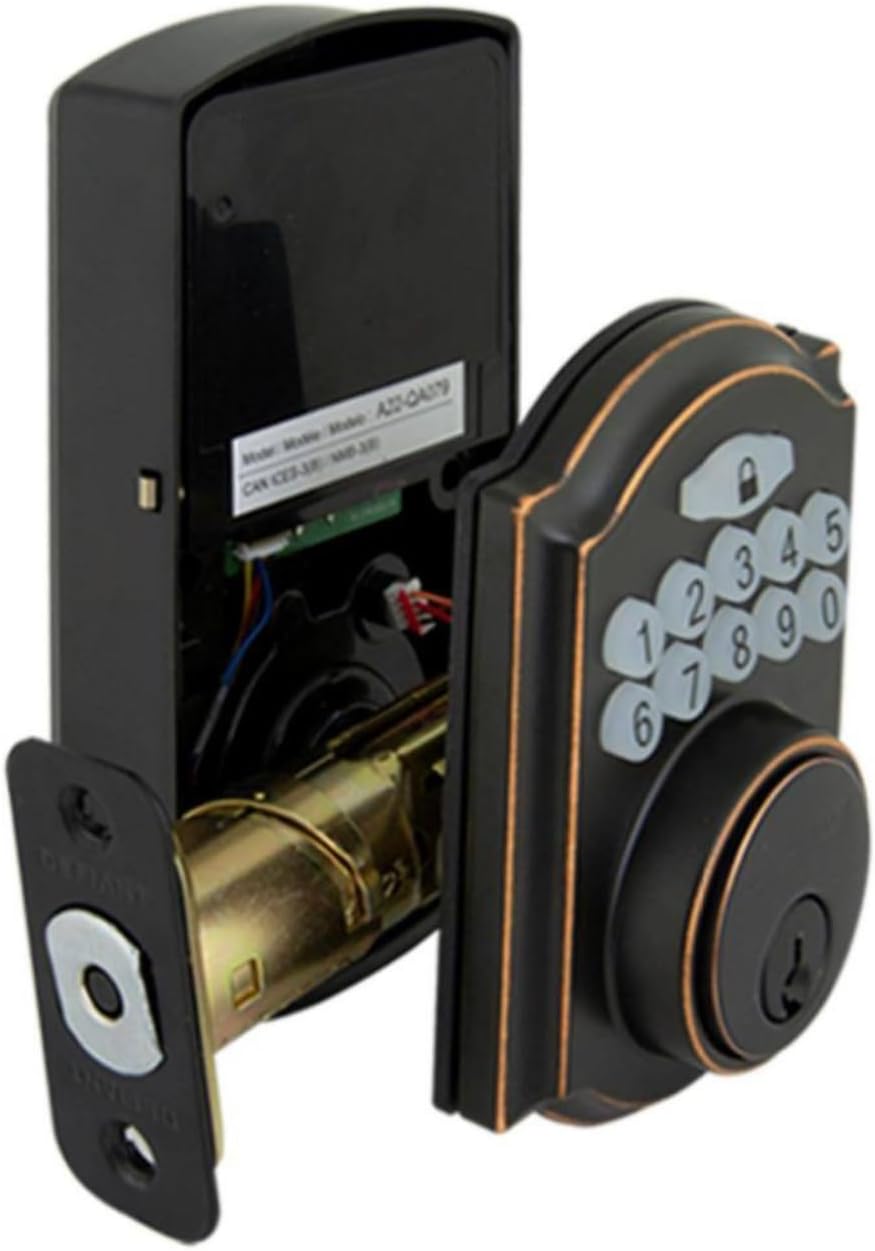
Image: The electronic deadbolt assembly, showing the interior mechanism and exterior keypad.

Сүрөт: сырткы көрүнүш view of the electronic deadbolt installed on a door, showcasing the keypad.
Иштөө нускамалары
Колдонуучу коддорун программалоо
The lock can hold up to 10 user codes and 5 single-entry codes.
- Программалоо режимине кирүү: Locate the program button on the interior assembly (usually on the battery cover or near the battery compartment). Press it once. The keypad will illuminate.
- Жаңы колдонуучу кодун кошуу: Enter your desired 4-digit user code. Press the Lock button (padlock icon) to confirm. The lock will beep to confirm successful programming.
- Колдонуучунун кодун жок кылуу: Enter programming mode. Enter the 4-digit user code you wish to delete. Press the Lock button. The lock will beep to confirm deletion.
Кулпулоо жана Кулпудан чыгаруу
- Кулпуну ачуу үчүн: Enter your 4-digit user code on the keypad. The keypad will illuminate, and the deadbolt will retract after a few seconds.
- To Lock (from outside): Press the Lock button (padlock icon) on the keypad. The deadbolt will extend after a few seconds.
- To Lock (from inside): Ички түзүлүштөгү баш бармак менен буроочу баскычты кулпуланган абалга буруңуз.
Автоматтык кулпу өзгөчөлүгү
The lock features an auto-lock function with an adjustable delay from 10 to 99 seconds. Refer to the full programming guide (usually a separate sheet or detailed section in the manual) for instructions on enabling and adjusting this feature.

Image: Close-up of the electronic keypad for code entry.
Техникалык тейлөө
- Тазалоо: Кулпуну жумшак, d менен тазалаңызamp кездеме. Абразивдүү тазалагычтардан же эриткичтерден алыс болуңуз, алар жасалгага же электрондук компоненттерге зыян келтирет.
- Батареяны алмаштыруу: When the battery indicator light flashes or the lock makes a low battery warning sound, replace all four AA batteries. Use only new, high-quality alkaline batteries.
- Майлоо: Periodically lubricate the deadbolt mechanism with a silicone-based lubricant to ensure smooth operation. Do not lubricate the keypad.
Проблемаларды чечүү
| Көйгөй | Мүмкүн себеп | Чечим |
|---|---|---|
| Баскычтоп күйбөйт. | Өлгөн батареялар же туура эмес орнотуу. | Туура полярдуулукту камсыз кылуу менен батарейкаларды алмаштырыңыз. |
| Lock does not respond to code. | Incorrect code entered, code not programmed, or lock is jammed. | Verify code, reprogram code, check for obstructions in door frame or latch. |
| Дедболт толук узартылбайт/артына тартылбайт. | Misalignment of strike plate or latch, low battery. | Adjust strike plate, replace batteries. |
| Lock тынымсыз сигнал берет. | Батареянын аздыгы жөнүндө эскертүү. | Батареяларды дароо алмаштырыңыз. |
Техникалык шарттар
- Бренд: Дефиант
- Модель номери: 9a843b7d-eaac-472e-b6d2-4b1006f6f6a5
- Кулпу түрү: Электрондук Deadbolt
- Материал: Бронза
- Стиль: Заманбап
- Өзгөчө өзгөчөлүгү: Keyless Entry, Back-up Mechanical Key
- Колдонуучу коддору: 10ге чейин
- Single Entry Codes: 5ге чейин
- Авто-кулпулоо кечигүү: 10-99 секунд (жөндөлүүчү)
- Кубат булагы: 4 АА батарейкалар (киргизилген эмес)
- Элемент Салмагы: 2.26 фунт
- Пакеттин өлчөмдөрү: 7.48 x 5.51 x 4.61 дюйм
- UPC: 050134991163
Кепилдик жана колдоо
For warranty information or technical support, please refer to the official Defiant webсайтка же кардарларды тейлөөгө кайрылыңыз. Кепилдик дооматтар үчүн сатып алуу дүмүрчөгүңүздү сактаңыз.
Онлайн ресурстар: Visit the Defiant website for FAQs, additional guides, and product registration.
Кардарларды тейлөө: Contact Defiant customer support for assistance with installation, programming, or troubleshooting issues.


