1. Киришүү
This manual provides detailed instructions for the installation, operation, and maintenance of the Fortin EVO-AUDT1 Stand-Alone Add-On Remote Start Car Starter System. This system is designed to provide convenient remote engine starting capabilities for compatible Audi Key-Port Vehicles. Please read this manual thoroughly before attempting any installation or operation to ensure proper functionality and safety.
2. Продукт бүтүп калдыview
The Fortin EVO-AUDT1 is an all-in-one universal data bypass and interface module preloaded for specific Audi vehicles. It integrates seamlessly with your vehicle's existing electronics to enable remote start functionality using your original factory key fob.
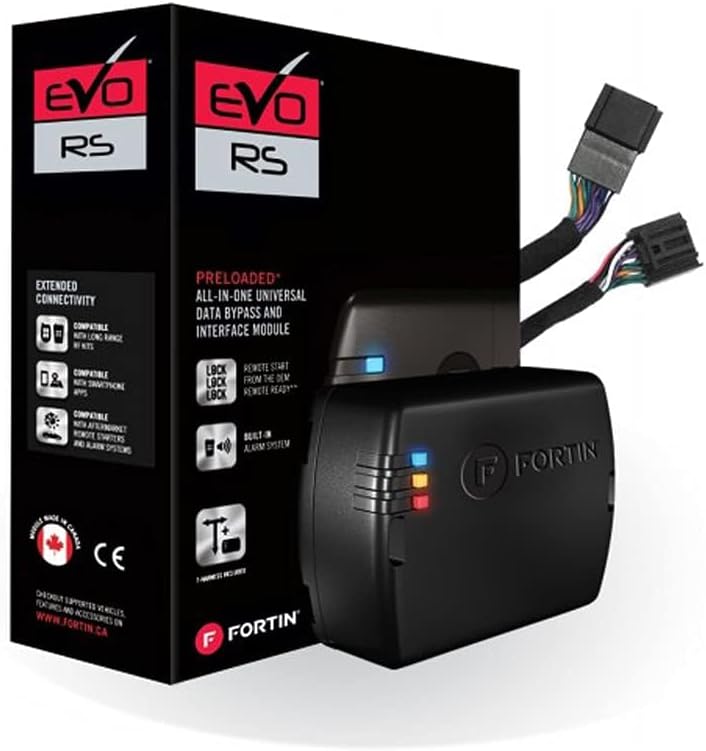
Image: The Fortin EVO-AUDT1 system includes the main module and a preloaded T-Harness for simplified installation, shown here with its retail packaging.
3. Коопсуздук маалыматы
- Always ensure the vehicle is in Park (P) or Neutral (N) with the parking brake engaged before attempting remote start.
- Do not remote start the vehicle in an enclosed area such as a garage, as exhaust fumes can be dangerous.
- Keep hands and clothing clear of moving engine parts when the engine is running.
- Installation should only be performed by qualified technicians to prevent damage to the vehicle's electrical system.
- Орнотууну баштоодон мурун, электр шорт-тыгыз туташууларынан качуу үчүн унаанын аккумуляторун сууруп алыңыз.
4. Пакеттин мазмуну
Орнотууну баштоодон мурун бардык компоненттер бар экендигин текшериңиз:
- Fortin EVO-AUDT1 Module
- Preloaded T-Harness for Audi Key-Port Vehicles
- Орнотуу боюнча колдонмо (бул документ)
5. Орнотуу жана орнотуу
Professional installation is highly recommended for this product due to the complexity of vehicle electrical systems. Incorrect installation can lead to vehicle damage or system malfunction.
5.1 Орнотууга чейинки кадамдар
- Унаа шайкештиги: Confirm your Audi vehicle's year, make, and model are compatible with the EVO-AUDT1 system. Refer to the Fortin website for the most up-to-date compatibility list.
- Модуль программалоо: The EVO-AUDT1 module comes preloaded. However, it may require specific programming or firmware updates using a Fortin Flash Link Updater (sold separately) to match your exact vehicle's specifications. Connect the module to a computer with internet access and use the Fortin software to ensure the latest firmware is installed and configured correctly for your vehicle.
- Куралдар чогултуу: Ensure you have all necessary tools, including wire strippers, electrical tape, zip ties, and a multimeter.
5.2 Физикалык орнотуу
- Батареяны ажыратыңыз: Унааңыздын аккумуляторунун терс терминалын ажыратыңыз.
- Access Ignition Harness: Locate and access the vehicle's ignition harness, typically found behind the steering column or dashboard.
- Connect T-Harness: Connect the provided T-Harness to the vehicle's ignition harness. The T-Harness is designed for a plug-and-play connection, minimizing the need for wire cutting or splicing. Ensure all connections are secure.
- Туташуу модулу: Plug the EVO-AUDT1 module into the T-Harness.
- Коопсуз зымдар: Route and secure all wiring away from moving parts, heat sources, and sharp edges using zip ties.
- Батареяны кайра туташтыруу: Унаанын аккумуляторун кайра туташтырыңыз.
5.3 Module Initialization/Programming (In-Vehicle)
After physical installation, the module needs to be initialized with the vehicle. The exact steps may vary slightly depending on your vehicle model and the module's firmware version. Typically, this involves a sequence of key turns and button presses. Refer to the specific vehicle guide available on the Fortin website for precise instructions for your Audi model.
General Initialization Sequence (Example - refer to specific guide for your vehicle):
- Insert the vehicle's key into the ignition.
- Turn the ignition to the ON position (do not start the engine).
- Observe the LED indicators on the Fortin module for specific flashing patterns.
- Follow the prompts (e.g., turn key OFF, open/close door, press brake pedal) as indicated by the module's LED feedback or the specific vehicle guide.
- Once initialization is complete, the module's LED will typically show a solid green or blue light.
6. Иштөө нускамалары
The Fortin EVO-AUDT1 system utilizes your vehicle's original factory key fob for remote start functionality.
6.1 Remote Starting the Vehicle
To remote start your Audi vehicle:
- Ensure the vehicle is locked and all doors, hood, and trunk are closed.
- Press the LOCK button on your factory key fob three (3) times consecutively within 3 seconds.
- The vehicle's parking lights will flash, and the engine will start after a short delay.
- The engine will run for a preset duration (typically 15 minutes) or until the remote start is cancelled.
6.2 Cancelling Remote Start
To cancel a remote start session:
- Press the LOCK button on your factory key fob three (3) times consecutively within 3 seconds while the engine is running via remote start.
- Alternatively, unlock the vehicle using the key fob, open any door, or turn the ignition to the ON position.
6.3 Entering the Vehicle After Remote Start
Алыстан от алгандан кийин унаага отуруп, айдоо үчүн:
- Unlock the vehicle using your factory key fob.
- Enter the vehicle. Do NOT press the brake pedal until the key is in the ignition and turned to the ON position.
- Insert the key into the ignition and turn it to the ON/RUN position.
- Press the brake pedal. The remote start will disengage, and the vehicle will transfer to normal key operation.
7. Техникалык тейлөө
The Fortin EVO-AUDT1 module is designed to be maintenance-free. However, consider the following:
- Ensure the module and wiring remain securely mounted and free from moisture or excessive heat.
- Avoid exposing the module to extreme temperatures or direct water contact.
- Модулду ачууга же өзгөртүүгө аракет кылбаңыз, анткени бул кепилдикти жокко чыгарат.
8. Кыйынчылыктарды
If you experience issues with your Fortin EVO-AUDT1 system, refer to the following common problems and solutions:
| Көйгөй | Мүмкүн себеп | Чечим |
|---|---|---|
| Алыстан баштоо иштетилбейт. | Doors, hood, or trunk are open; vehicle not in Park; low battery; incorrect key fob sequence; module not properly initialized. | Ensure all vehicle entry points are closed and locked. Verify vehicle is in Park. Check vehicle battery. Re-attempt key fob sequence. Re-initialize module if necessary. |
| Engine starts but immediately shuts down. | Brake pedal pressed; door opened before key inserted; module programming issue; vehicle security system interference. | Ensure brake pedal is not pressed until key is in ignition. Follow proper entry sequence. Verify module programming is correct for your vehicle. Consult a professional installer. |
| Module LEDs are not active. | No power to module; loose connection; faulty module. | Check all wiring connections. Verify power supply to the module. If problem persists, contact Fortin support. |
For advanced troubleshooting or issues not covered here, please contact Fortin technical support or a certified installer.
9. Техникалык шарттар
| Өзгөчөлүк | Деталь |
|---|---|
| Өндүрүүчү | Fortin |
| Бренд | Fortin |
| Элемент Салмагы | 12.6 унция |
| Пакеттин өлчөмдөрү | 6.14 x 6.1 x 2.87 дюйм |
| Элемент моделинин номери | EVO-AUDT1 |
| Өндүрүүчү бөлүгүнүн номери | EVO-AUDT1 |
| ASIN | B07KCVBQGD |
| Дата биринчи жеткиликтүү | 9-ноябрь, 2018-жыл |
10. Кепилдик жана колдоо
Fortin products are covered by a manufacturer's warranty against defects in materials and workmanship. For specific warranty terms and conditions, please refer to the warranty information provided with your product or visit the official Fortin webсайт.
Техникалык колдоо, орнотуу боюнча жардам же кепилдик боюнча дооматтар үчүн Fortin компаниясына түз кайрылыңыз:
- Fortin Webсайт: www.fortin.ca
- караңыз webбайланыш маалыматы, көп берилүүчү суроолор жана кошумча ресурстар үчүн сайт.


