1. Киришүү
Thank you for choosing the Rapoo M300G Multi-Device Wireless Mouse. This manual provides detailed instructions on how to set up, operate, maintain, and troubleshoot your new mouse. Please read this manual carefully before use to ensure optimal performance and longevity of your device.
2. Продукт бүтүп калдыview
Негизги өзгөчөлүктөрү:
- Көп режимдүү байланыш: Supports Bluetooth 3.0, Bluetooth 4.0, and 2.4GHz wireless connections, allowing connection to up to three devices simultaneously.
- Унчукпай чыкылдатуулар: Designed with 90% noise reduction for quiet operation.
- Жөнгө салынуучу DPI: Four adjustable DPI levels (600/1000/1300/1600) for precise control.
- Эргономикалык дизайн: Comfortable design for right-hand users, suitable for extended use.
- Батареянын узак иштөө мөөнөтү: Built-in 1 AA battery provides up to 9 months of battery life under normal conditions.
- High Precision Optical Engine: Works reliably on various surfaces without a mouse pad.
Пакеттин мазмуну:
- Rapoo M300G Multi-Device Wireless Mouse
- USB кабыл алгыч (чычкандын ичинде сакталат)
- 1 AA Alkaline Battery (pre-installed or included)
- Ыкчам баштоо колдонмосу (бул колдонмо)
Mouse Components:

Figure 2.1: Labeled diagram of the Rapoo M300G mouse showing the scroll wheel, DPI switch button, multi-device conversion indicator, right click button, left click button, forward button, and backward button.
- Сол чыкылдатуу баскычы: Стандарттык негизги чыкылдатуу функциясы.
- Оң баскычты чыкылдатуу: Стандарттык кошумча чыкылдатуу функциясы.
- Жылдыруу дөңгөлөгү: Вертикалдуу сыдыруу жана орто баскычты чыкылдатуу функциясы үчүн.
- DPI которуу баскычы: Cycles through DPI settings (600/1000/1300/1600).
- Multi-device Conversion Indicator: Shows current connection mode (Bluetooth A, Bluetooth B, or 2.4GHz).
- Алга баскычы: Алга карай жылдырат web браузерлер же file изилдөөчүлөр.
- Артка баскычы: Артка карай багыт алат web браузерлер же file изилдөөчүлөр.
3. Орнотуу
3.1 Батареяны орнотуу:
The Rapoo M300G mouse uses one AA battery. The battery is typically pre-installed. If not, open the battery compartment on the bottom of the mouse, insert the AA battery with the correct polarity, and close the compartment.

3.1-сүрөт: Төмөнкү view of the Rapoo M300G mouse, illustrating the battery compartment, power switch, and Bluetooth pairing button.
3.2 Күйгүзүү/өчүрүү:
Locate the power switch on the bottom of the mouse. Slide it to the 'ON' position to power on the mouse. Slide it to 'OFF' when not in use to conserve battery life.
3.3 Connecting to Devices:
The M300G mouse supports three connection modes: 2.4GHz wireless via USB receiver, Bluetooth 3.0, and Bluetooth 4.0. You can switch between connected devices using the mode switch button on the bottom of the mouse.
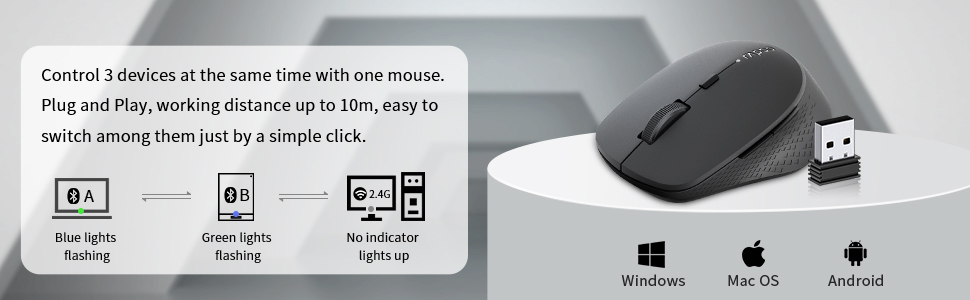
Figure 3.2: The Rapoo M300G mouse can control three devices, with easy switching. It is compatible with Windows, Mac OS, and Android operating systems.
2.4 ГГц зымсыз туташуу:
- Take out the USB receiver from the battery compartment of the mouse.
- USB ресиверди компьютериңиздеги жеткиликтүү USB портуна сайыңыз.
- Turn on the mouse. The mouse will automatically connect to the receiver. No indicator light will illuminate for 2.4GHz mode.
Bluetooth Connection (Device A & B):
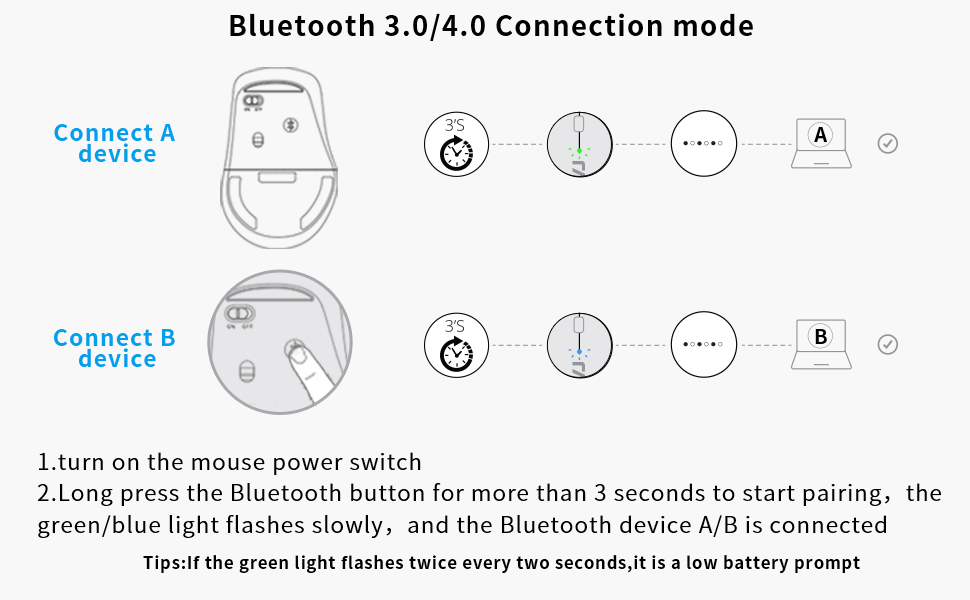
Figure 3.3: Detailed steps for connecting the mouse via Bluetooth 3.0/4.0 to Device A and Device B.
- Turn on the mouse power switch.
- Press the Bluetooth button on the bottom of the mouse to switch to Bluetooth Channel A (blue light flashing) or Bluetooth Channel B (green light flashing).
- Long press the Bluetooth button for more than 3 seconds until the blue or green light flashes slowly. This indicates the mouse is in pairing mode.
- On your device (computer, laptop, tablet), go to Bluetooth settings and search for new devices.
- Select 'Rapoo BT3.0 Mouse' or 'Rapoo BT4.0 Mouse' from the list of found devices to complete the pairing.
- Once connected, the corresponding indicator light will stop flashing and remain solid for a few seconds before turning off.
Кеңеш: If the green light flashes twice every two seconds, it indicates a low battery.
3.4 Switching Between Devices:
Briefly press the Bluetooth button on the bottom of the mouse to cycle through the connected devices (Bluetooth A, Bluetooth B, 2.4GHz). The indicator light will briefly show the active channel.
4. Иштөө нускамалары
4.1 DPI Adjustment:
Press the DPI switch button located behind the scroll wheel to cycle through the four DPI settings: 600, 1000, 1300, and 1600 DPI. Adjust the DPI to match your preference for cursor speed and precision.
4.2 Basic Mouse Functions:
- Сол чыкылдатуу: Буюмдарды тандоо, ачуу үчүн колдонуңуз fileс, жана функцияларды активдештирүү.
- Оң чыкылдатуу: Use for accessing context menus and additional options.
- Жылдыруу дөңгөлөгү: Rotate to scroll vertically through documents and web pages. Press down for middle-click functionality (e.g., opening links in new tabs).
- Алдыга/Артка баскычтары: Located on the side of the mouse, these buttons allow for quick navigation in web браузерлер жана file изилдөөчүлөр.
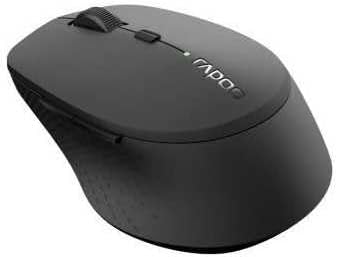
4.1-сүрөт: Бурчтуу view of the Rapoo M300G mouse, highlighting its ergonomic shape and button placement.
5. Техникалык тейлөө
5.1 Тазалоо:
Чычканыңызды тазалоо үчүн, анын бетин жумшак, d менен акырын сүртүңүзamp cloth. Do not use harsh chemicals or abrasive cleaners. Ensure no liquid enters the mouse's internal components.
5.2 Батареяны алмаштыруу:
When the low battery indicator flashes, it's time to replace the AA battery. Open the battery compartment on the bottom of the mouse, remove the old battery, insert a new AA battery with the correct polarity, and close the compartment.
5.3 Сактоо:
When not in use for an extended period, turn off the mouse to conserve battery life. Store the USB receiver inside the mouse's dedicated slot to prevent loss. Keep the mouse in a dry, cool place away from direct sunlight and extreme temperatures.
6. Кыйынчылыктарды
If you encounter issues with your Rapoo M300G mouse, please refer to the following common problems and solutions:
| Көйгөй | Мүмкүн себеп | Чечим |
|---|---|---|
| Чычкан жооп бербей жатат | Low battery; Mouse is off; Incorrect connection mode; USB receiver not plugged in (for 2.4GHz); Bluetooth not paired. | Replace battery; Turn on mouse; Switch to correct connection mode (2.4G, BT A, BT B); Plug in USB receiver; Re-pair Bluetooth. |
| Cursor erratic or not smooth | Кир оптикалык сенсор; Ылайыксыз бет; Батареянын заряды аз. | Оптикалык сенсорду тазалаңыз; жалпак, чагылбаган бетте колдонуңуз; Батареяны алмаштырыңыз. |
| Bluetooth аркылуу туташуу мүмкүн эмес | Mouse not in pairing mode; Device Bluetooth is off; Interference. | Long press Bluetooth button to enter pairing mode; Ensure device Bluetooth is on; Move closer to device; Try re-pairing. |
| Капталдагы баскычтар иштебейт | Application does not support forward/backward functions; Driver issue. | Test in a different application (e.g., web browser); Check for updated drivers for your operating system. |
7. Техникалык шарттар
| Өзгөчөлүк | Спецификация |
|---|---|
| Модель номери | 18048 |
| Байланыш технологиясы | Bluetooth 3.0, Bluetooth 4.0, 2.4GHz Wireless |
| Кыймылды аныктоо технологиясы | Оптикалык |
| DPI деңгээли | 600, 1000, 1300, 1600 |
| Buttons | 6 (Сол, Оң, Айдоо дөңгөлөгү, DPI которуу, Алга, Артка) |
| Батарея түрү | 1 x AA Батарея |
| Болжолдуу батареянын иштөө мөөнөтү | 9 айга чейин |
| Продукциянын өлчөмдөрү | 4.09 x 2.6 x 0.04 дюйм |
| Элемент Салмагы | 2.08 унция |
| Түс | КАРА |
| Биринчи жеткиликтүү күн | 30-ноябрь, 2018-жыл |
8. Кепилдик жана колдоо
8.1 Кепилдик маалыматы:
The Rapoo M300G Multi-Device Wireless Mouse comes with a Бир жылдык кепилдик сатып алынган күндөн тартып. Мындан тышкары, а 30 Days Return and Refund or Replacement policy is offered. This warranty covers manufacturing defects and issues arising from normal use.
8.2 Кардарларды колдоо:
For technical support, warranty claims, or any questions regarding your Rapoo M300G mouse, please contact Rapoo customer service. Refer to the official Rapoo webакыркы байланыш маалыматы үчүн сайтка же продуктунун таңгагына кайрылыңыз.
Онлайн колдоо: Расмий Рапого барыңыз webКөп берилүүчү суроолор, драйверлерди жүктөө жана колдоо булактары үчүн сайт.
Электрондук почта колдоо: [Refer to Rapoo's official website for email contact]
Телефондук колдоо: [Refer to Rapoo's official website for phone contact]


