Introduction
This manual provides detailed instructions for the installation, operation, and maintenance of the Gree XK-60 Wired Programmable Controller. This controller is designed to interface with Gree U-Match air conditioning systems, offering precise control over your indoor climate. Please read this manual thoroughly before installation and operation to ensure proper use and optimal performance.
Продукт бүттүview
The Gree XK-60 is a wired, programmable controller featuring a backlit LCD display and intuitive button controls. It allows users to manage various functions of their U-Match system, including operating modes, temperature settings, fan speeds, and programmable timers.
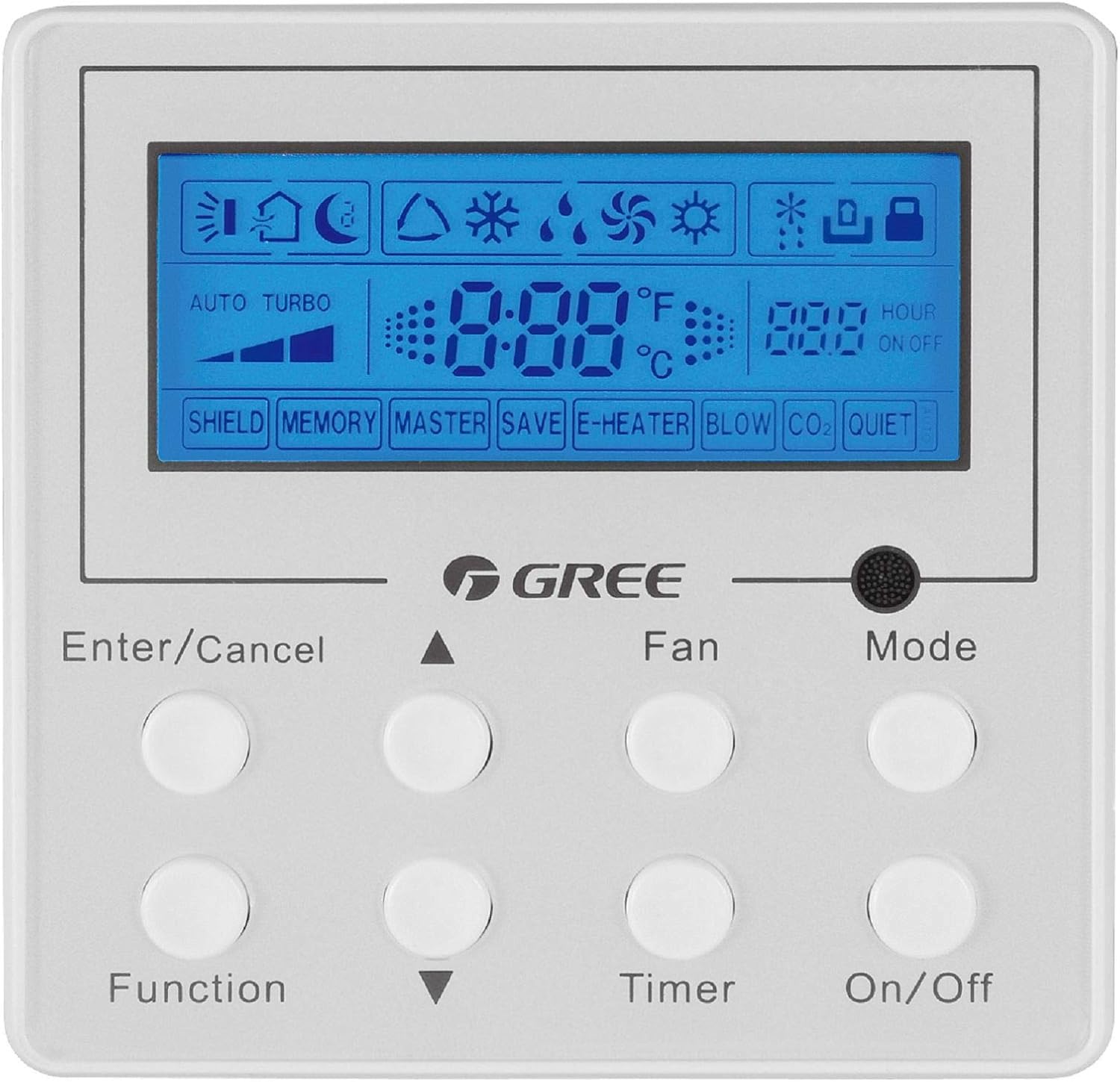
Сүрөттүн сүрөттөлүшү: Алдыңкы бети view of the Gree XK-60 wired programmable controller. The controller is white with a blue backlit LCD screen at the top. Below the screen are eight circular white buttons arranged in two rows of four. Text labels are printed below each button or pair of buttons. The GREE logo is centered between the screen and the buttons. The screen displays various icons for operating modes, fan speed, temperature, and timer settings.
Коопсуздук маалыматы
- Installation must be performed by a qualified and licensed HVAC technician.
- Disconnect all power to the indoor and outdoor units before performing any wiring or maintenance.
- Бардык зымдарды туташтыруу жергиликтүү жана улуттук электр эрежелерине ылайык келишин камсыз кылыңыз.
- Контроллерди өз алдынча оңдоого же өзгөртүүгө аракет кылбаңыз. Квалификациялуу тейлөө кызматкерлерине кайрылыңыз.
- Keep the controller away from water and excessive humidity.
Орнотуу жана орнотуу
Контроллерди орнотуу
The XK-60 controller is designed for wall mounting. Choose a location that is easily accessible, away from direct sunlight, heat sources, and drafts, which could affect temperature readings.
Wiring Instructions
The controller connects to the indoor unit via a wired connection.
- Turn off the main power supply to the U-Match system.
- Open the wiring cover on the indoor unit and locate the control terminal block.
- Connect the communication wires from the XK-60 controller to the designated terminals on the indoor unit's control board. Refer to the U-Match system's indoor unit installation manual for specific wiring diagrams.
- Бардык туташуулардын бекем жана туура поляризацияланганын текшериңиз.
- Close the wiring cover and restore power to the system.
Эскертүү: Incorrect wiring can damage the controller or the U-Match system. If you are unsure, consult a professional technician.
Иштөө нускамалары
The Gree XK-60 controller features an LCD display and eight control buttons.
Баскыч функциялары
- Киргизүү/Жокко чыгаруу: Confirms selections or cancels current operations.
- Up Arrow (▲): Increases temperature, fan speed, or navigates menu options upwards.
- Down Arrow (▼): Decreases temperature, fan speed, or navigates menu options downwards.
- Функциясы: Accesses advanced settings or special functions.
- Күйөрман: Желдеткичтин ылдамдыгын тууралайт (Авто, Төмөн, Орто, Жогорку).
- Таймер: Күйгүзүү/өчүрүү таймерин орнотот.
- Режим: Иш режимдери (Авто, Муздатуу, Кургак, Жылытуу, Желдетүүчү) аркылуу өтөт.
- Күйгүзүү/өчүрүү: Аппаратты күйгүзөт же өчүрөт.
LCD дисплей көрсөткүчтөрү
- Температура дисплейи: Shows the current room temperature or set temperature in °F or °C.
- Operating Mode Icons:
- Sun (Heat)
- Snowflake (Cool)
- Water Drop (Dry)
- Fan Blade (Fan Only)
- Auto (Automatic mode)
- Желдетүүчү ылдамдык көрсөткүчү: Bar graph or specific icon showing current fan speed.
- Таймер көрсөткүчү: "HOUR ON OFF" with numerical display for programmed times.
- Special Function Indicators: "SHIELD", "MEMORY", "MASTER", "SAVE", "E-HEATER", "BLOW", "CO2", "QUIET" indicate active special features.
Негизги операция
- Күйгүзүү/өчүрүү: басыңыз On/Off системаны күйгүзүү же өчүрүү үчүн баскыч.
- Режимди тандоо: басыңыз Mode button repeatedly to cycle through available operating modes (Auto, Cool, Dry, Heat, Fan).
- Температураны коюу: In Cool or Heat mode, use the Өйдө жебе (▲) or Төмөн жебе (▼) каалаган температураны тууралоо үчүн баскычтар.
- Желдетүүчү ылдамдыгын жөндөө: басыңыз Күйөрман button repeatedly to select the desired fan speed (Auto, Low, Medium, High).
- Таймерди коюу: басыңыз Таймер button to enter timer setting mode. Use the Өйдө жебе (▲) or Төмөн жебе (▼) buttons to set the desired ON or OFF time, then press Киргизүү/жокко чыгаруу ырастоо үчүн.
Өркүндөтүлгөн функциялар
To access advanced functions like "SHIELD" or "QUIET" mode, press the Функция button. Use the arrow buttons to navigate through options and Киргизүү/жокко чыгаруу to select or confirm. Refer to the U-Match system's specific feature documentation for detailed explanations of each advanced function.
Техникалык тейлөө
Контроллерди тазалоо
- Контроллердин бетин жумшак, кургак чүпүрөк менен сүртүңүз.
- Абразивдүү тазалоочу каражаттарды, эриткичтерди же химиялык чачыраткычтарды колдонбоңуз, анткени алар пластик жана электрондук компоненттерге зыян келтириши мүмкүн.
- Ensure no liquid enters the controller casing.
System Filter Maintenance
While the controller itself does not require filter maintenance, regular cleaning or replacement of the U-Match indoor unit's air filters is crucial for optimal system performance and air quality. Refer to your U-Match indoor unit manual for filter maintenance instructions.
Проблемаларды чечүү
If you encounter issues with your Gree XK-60 controller, refer to the following common problems and solutions.
| Көйгөй | Мүмкүн себеп | Чечим |
|---|---|---|
| Контроллердин дисплейи бош. | No power to the unit or controller. | Check the main power supply to the U-Match system. Ensure wiring connections are secure. |
| Контроллер баскычты басууга жооп бербей жатат. | Temporary software glitch or communication error. | Turn off power to the system for a few minutes, then restore power. If the issue persists, check wiring. |
| Температураны туура эмес окуу. | Controller located near a heat source or draft. | Relocate the controller if possible, or ensure no external factors are influencing the sensor. |
| System not operating in selected mode. | Communication error with indoor unit or system fault. | Check for error codes on the indoor unit. Consult a qualified technician if the problem persists. |
For complex issues or error codes not listed, contact a qualified HVAC technician or Gree customer support.
Техникалык шарттар
- Модел: Gree XK-60
- Башкаруу түрү: Зымдуу программалоочу контроллер
- Шайкештик: Gree U-Match Systems
- Тtage: 230 вольт
- Өзгөчө өзгөчөлүгү: Programmable, Backlight
- Башкаруу ыкмасы: Control Button
- Пакеттин өлчөмдөрү: Болжол менен 13.62 x 1.54 x 0.98 дюйм
- Элемент Салмагы: Болжол менен 6.7 унция
Кепилдик жана колдоо
For warranty information and technical support, please refer to the documentation provided with your Gree U-Match system or contact Gree customer service directly. Keep your purchase receipt as proof of purchase for warranty claims.
Gree Customer Support: Visit the official Gree website or contact your local distributor for support.


