1. Киришүү
This manual provides detailed instructions for the TRACER GAMEZONE IGNIS AVAGO 3050 4000DPI USB Gaming Mouse. Please read this manual thoroughly before using the product to ensure proper operation and to maximize your gaming experience.
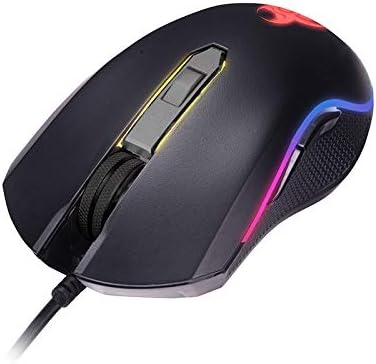
Сүрөт 1.1: Бүттүview of the TRACER GAMEZONE IGNIS AVAGO 3050 Gaming Mouse. This image shows the mouse from a slightly elevated angle, highlighting its ergonomic design, scroll wheel, and the integrated RGB lighting along its sides.
2. Пакеттин мазмуну
Пакетте бардык буюмдар бар экенин текшериңиз:
- TRACER GAMEZONE IGNIS AVAGO 3050 4000DPI USB Gaming Mouse
- Колдонуучунун Колдонмосу (бул документ)
3. Продукциянын өзгөчөлүктөрү
- High Precision Optical Laser: Equipped with an AVAGO 3050 optical sensor for superior tracking accuracy.
- Жөнгө салынуучу DPI: Supports DPI switching up to 4000 DPI for customizable sensitivity.
- 6 Ыңгайлаштырылуучу баскычтар: Provides six programmable buttons for enhanced control during gameplay.
- RGB жарыктандыруу: Integrated internal RGB lighting for a modern and aggressive aesthetic.
- USB туташуу: Standard USB connection for wide compatibility with PC and Mac platforms.
- Sliding Base: Designed for smooth operation on various surfaces, including mouse mats.

Сүрөт 3.1: Каптал view of the gaming mouse, showcasing the ergonomic shape, textured grip on the side, and the vibrant RGB light strip running along the edge.
4. Орнотуу
Follow these steps to set up your TRACER GAMEZONE IGNIS AVAGO 3050 Gaming Mouse:
- Чычканды таңгактан чыгаруу: Чычканды анын таңгагынан кылдаттык менен чыгарыңыз.
- Компьютерге туташуу: Plug the USB connector of the mouse into an available USB port on your PC or Mac.
- Драйверди орнотуу: The mouse is plug-and-play. Your operating system will automatically detect and install the necessary drivers. No additional software installation is typically required for basic functionality.
- Жайгашкан жери: Place the mouse on a flat, clean surface or a mouse pad for optimal performance.

Сүрөт 4.1: Алдыңкы view of the gaming mouse, showing the USB cable extending from the front, the scroll wheel, and the primary left and right click buttons.
5. Иштөө нускамалары
The TRACER GAMEZONE IGNIS AVAGO 3050 Gaming Mouse is designed for intuitive use. Here are the basic operating principles:
5.1. Чычкандын негизги функциялары
- Сол чыкылдатуу: Негизги аракет баскычы.
- Оң чыкылдатуу: Secondary action button, often used for context menus.
- Жылдыруу дөңгөлөгү: Used for vertical scrolling. Can also be pressed as a middle button.
5.2. DPI тууралоо
The mouse features a dedicated DPI button (usually located behind the scroll wheel) to cycle through different sensitivity settings. Press this button to instantly change the DPI (Dots Per Inch) to match your preference or game requirements. The mouse supports multiple DPI levels up to 4000 DPI.
5.3. Баскычты ыңгайлаштыруу
The TRACER GAMEZONE IGNIS AVAGO 3050 mouse has 6 customizable buttons. While basic functionality is plug-and-play, advanced customization (such as remapping buttons or creating macros) typically requires third-party software compatible with generic gaming mice, as Tracer may not provide proprietary software for this model. Refer to your operating system's mouse settings or third-party utility software for advanced configuration options.
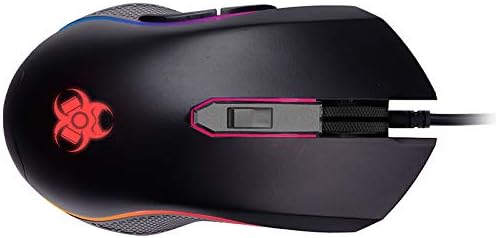
Сүрөт 5.1: жогорудан ылдыйга view of the gaming mouse, clearly showing the scroll wheel, the DPI adjustment button behind it, and the left and right click buttons. The Tracer logo with RGB lighting is visible at the rear.
6. Техникалык тейлөө
Оюн чычканыңыздын узак мөөнөттүү иштешин жана оптималдуу иштешин камсыз кылуу үчүн, төмөнкү техникалык тейлөө көрсөтмөлөрүн аткарыңыз:
- Тазалоо: Чычкандын бетин сүртүү үчүн жумшак, кургак чүпүрөктү колдонуңуз. өжөр кир үчүн, бир аз гampчүпүрөктү суу же жумшак тазалоо эритмеси менен жууп салыңыз. Катуу химиялык заттардан же абразивдүү материалдардан алыс болуңуз.
- Сенсор тазалоо: Periodically clean the optical sensor on the underside of the mouse with a cotton swab lightly dampened with rubbing alcohol. Ensure no lint is left behind.
- Кабельге кам көрүү: Зыяндын алдын алуу үчүн USB кабелин курч ийилүүдөн же ашыкча тартуудан алыс болуңуз.
- Сактагыч: Колдонулбаган учурда чычканды таза, кургак жерде, өтө жогорку температурадан жана түз күн нурунан алыс сактаңыз.
7. Кыйынчылыктарды
If you encounter issues with your TRACER GAMEZONE IGNIS AVAGO 3050 Gaming Mouse, refer to the following common problems and solutions:
| Көйгөй | Мүмкүн себеп | Чечим |
|---|---|---|
| Чычкан жооп бербей жатат | Бош USB туташуу, туура эмес USB порт, драйвер маселеси. |
|
| Курсор туруксуз же жылмакай кыймылдабайт | Dirty optical sensor, unsuitable surface, software interference. |
|
| DPI баскычы сезгичтикти өзгөртпөйт | Баскычтын иштебей калышы, программалык камсыздоонун кагылышуусу. |
|
8. Техникалык шарттар
| Өзгөчөлүк | Деталь |
|---|---|
| Модель аты | GAMEZONE IGNIS AVAGO 3050 4000DPI |
| Элемент моделинин номери | TRAMYS46085 |
| Бренд | Tracer |
| Байланыш технологиясы | USB |
| Кыймылды аныктоо технологиясы | Laser, Optical (AVAGO 3050) |
| DPI диапазону | 4000 XNUMX DPI чейин (жөндөлүүчү) |
| баскычтардын саны | 6 |
| Аппараттык платформа | Mac, PC |
| Элемент Салмагы | 12.3 унция (болжол менен 348.7 грамм) |
| Пакеттин өлчөмдөрү | 7.87 x 5.91 x 1.97 дюйм |
| Өндүрүүчү | TRACER |
| Биринчи жеткиликтүү күн | 4-февраль, 2019-жыл |
9. Кепилдик жана колдоо
For warranty information and technical support, please refer to the official Tracer website or contact your local retailer where the product was purchased. Keep your proof of purchase for warranty claims.
Өндүрүүчү: TRACER