1. Киришүү
About Your TOOLCRAFT USB Microscope
The TOOLCRAFT USB Microscope is a versatile digital microscope designed for detailed observation, photography, and video recording of magnified objects. Featuring a 5-megapixel sensor and up to 150x magnification, it is suitable for various applications from educational and hobby use to industrial surface testing and research. Its dual-axis lens and precisely adjustable stand ensure clear and stable imaging.
Негизги өзгөчөлүктөрү
- 5 Megapixel Camera Sensor
- Up to 150x Digital Magnification
- Precisely Adjustable Stand for Stable Imaging
- Dual-Axis Lens with a Focus Range of 10 mm to 150 mm
- 8 Integrated White LEDs for Object Illumination
- Specialized Software for High-Precision Measurements and Image Management
- USB Connectivity for Direct Transfer to PC/Laptop
2. Пакеттин мазмуну
Сураныч, төмөнкү нерселер үчүн кутучаны белгилеңиз:
- TOOLCRAFT USB Microscope Unit
- Жөнгө салынуучу стенд
- Интегралдык USB кабели
- Программа CD
- Quick Start Guide
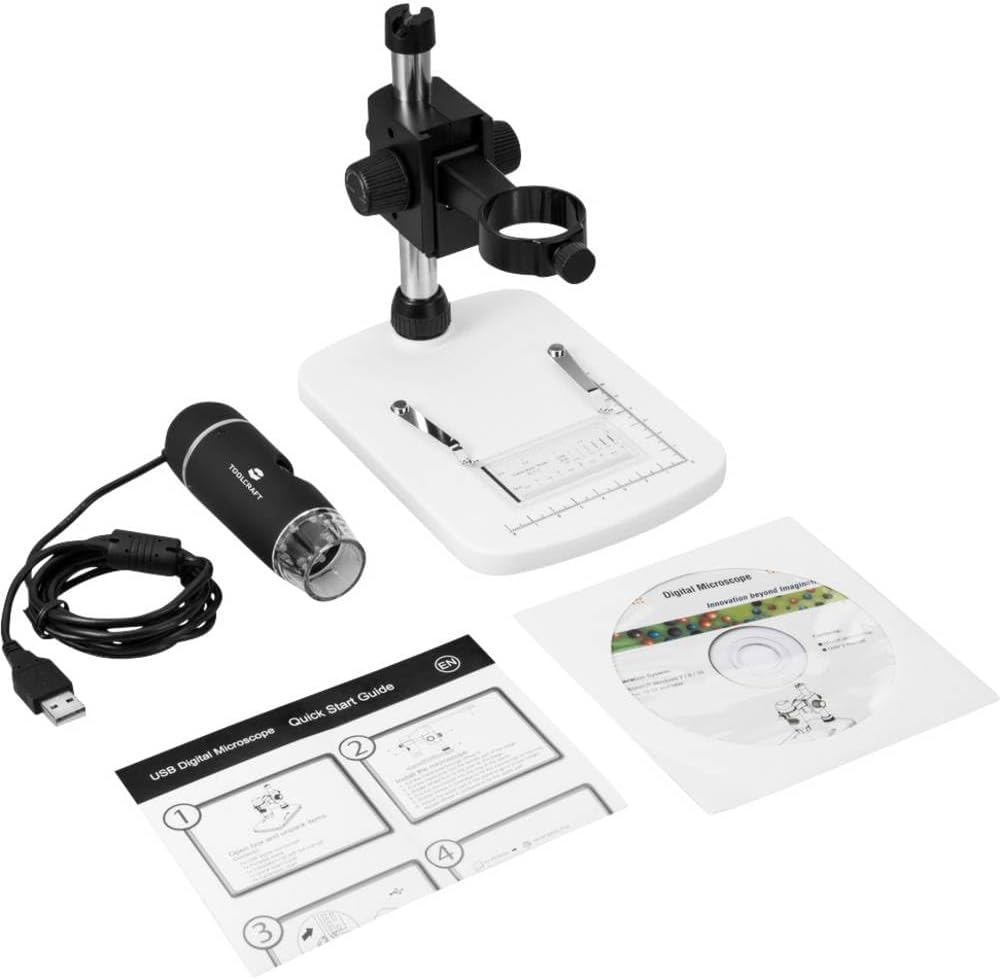
Image: All components included in the package, showing the USB microscope, its adjustable stand, the quick start guide, and the software installation CD.
3. Орнотуу
Аппараттык жабдык
- Бардык компоненттерди таңгактан кылдаттык менен чыгарыңыз.
- Attach the USB microscope unit to the adjustable stand. Ensure it is securely fastened using the provided clamps or screws on the stand.
- Place the assembled microscope on a stable, flat surface.
- Connect the USB cable from the microscope to an available USB port on your computer or laptop.

Image: The TOOLCRAFT USB microscope fully assembled on its white stand, with the USB cable connected and ready for use.
Программалык камсыздоону орнотуу
- Insert the provided software CD into your computer's CD/DVD drive.
- Follow the on-screen instructions to install the microscope's driver and application software.
- If your computer does not have a CD/DVD drive, please visit the TOOLCRAFT support website to download the latest software and drivers.
- Орнотуудан кийин, суралса, компьютериңизди өчүрүп-күйгүзүңүз.
4. Иштөө нускамалары
Connecting and Launching
- Ensure the USB microscope is connected to your computer.
- Launch the installed microscope software from your desktop shortcut or Start Menu.
- The software should automatically detect the microscope and display a live feed. If not, check the device selection within the software settings.
Placing and Focusing Objects
- Place the object you wish to examine on the base plate of the stand, directly beneath the microscope lens.
- Use the focus knob on the microscope body to adjust the clarity of the image. Rotate it slowly until the object appears sharp on your screen.
- For fine adjustments and to change magnification, use the height adjustment knob on the stand to move the microscope closer to or further from the object. The focus range is 10 mm to 150 mm.

Сүрөт: бурчтуу view of the TOOLCRAFT USB microscope on its stand, highlighting the focus and height adjustment knobs for precise control.
Жарыкты жөндөө
The microscope features 8 built-in white LEDs to illuminate your subject. The brightness of these LEDs can typically be adjusted via a control wheel on the microscope body or through the software interface.
Сүрөттөрдү жана видеолорду тартуу
The microscope software allows you to capture still images and record videos.
- Сүрөттөр: Click the "Capture" or "Snapshot" button within the software interface. Images are typically saved in JPEG or BMP format.
- Видео жаздыруу: Click the "Record" button to start recording and click it again to stop. Videos are usually saved in AVI or MP4 format.

Сүрөт: жогорудан ылдыйга view of the TOOLCRAFT USB microscope, illustrating the integrated LED ring around the lens for optimal object illumination.
5. Техникалык тейлөө жана кам көрүү
- Линзаны тазалоо: Use a soft, lint-free cloth specifically designed for optical lenses to gently wipe the microscope lens. Do not use abrasive cleaners or solvents.
- Денени тазалоо: Микроскоптун корпусун сүртүп, кургак же бир аз кургак чүпүрөк менен коюңуз.amp жумшак кездеме.
- Сактагыч: When not in use, store the microscope in a clean, dry, and dust-free environment. Avoid extreme temperatures and direct sunlight.
- Колдонуу: Микроскопту этияттык менен кармаңыз. Аны түшүрүп албаңыз же катуу соккуга дуушар кылбаңыз.
- Программалык камсыздоо жаңыртуулары: Periodically check the TOOLCRAFT website for software and driver updates to ensure optimal performance and compatibility.
6. Кыйынчылыктарды
| Көйгөй | Мүмкүн себеп | Чечим |
|---|---|---|
| No image on screen / Microscope not detected | USB туташуу маселеси | Ensure the USB cable is securely connected to both the microscope and the computer. Try a different USB port. |
| No image on screen / Microscope not detected | Driver/Software not installed or corrupted | Install the software from the CD or download the latest drivers from the TOOLCRAFT website. Reinstall the software if necessary. |
| Сүрөт бүдөмүк | Туура эмес фокус | Adjust the focus knob on the microscope body. |
| Сүрөт бүдөмүк | Туура эмес иштөө аралыгы | Adjust the height of the microscope on the stand to change the distance to the object. |
| Сүрөт өтө караңгы | LEDs are off or dim | Check the LED brightness control on the microscope or within the software. |
| Программалык камсыздоо иштебей калат же тоңуп калат | Software incompatibility or system resources | Close other applications. Update the software to the latest version. Ensure your computer meets the minimum system requirements. |
7. Техникалык шарттар
| Өзгөчөлүк | Деталь |
|---|---|
| Модель аты | ТО-5139594 |
| сенсор токтому | 5.0 мегапиксел |
| Макс. Чоңойтуу | 150x |
| Фокус диапазону | 10 мм - 150 мм |
| Жарыктандыруу | 8 ак диоддор |
| Объективдүү линза | Жогорку сапаттагы линза |
| Байланыш | USB |
| Түс | Кара |
| Пакеттин өлчөмдөрү | 22.4 x 18.3 x 8.5 см |
| Өндүрүүчү | TOOLCRAFT |
| Биринчи жеткиликтүү күн | 11-декабрь, 2018-жыл |
8. Кепилдик жана колдоо
For warranty information, technical support, or to download the latest drivers and software, please visit the official TOOLCRAFT webсайтка же кардарларды тейлөөгө кайрылыңыз. Сатып алганыңыздын далили катары сатып алуу дүмүрчөгүңүздү сактаңыз.


