1. Киришүү
This user manual provides comprehensive instructions for the setup, operation, and maintenance of your SHARP LC-32HI5012E HD Ready Smart LED TV. Please read this manual thoroughly before using your television to ensure proper functionality and safety.
The SHARP LC-32HI5012E is an 81 cm (32-inch) HD Ready Smart LED TV featuring Active Motion 200 technology for enhanced picture quality and a Triple Tuner for versatile reception options. It includes integrated Wi-Fi and a Harman/Kardon sound system for a complete entertainment experience.
2. Пакеттин мазмуну
Пакетти ачкандан кийин, төмөнкү нерселердин бардыгы камтылганын текшериңиз:
- SHARP LC-32HI5012E Main Unit
- Алыстан башкаруу (батареялар менен)
- Колдонуучунун Колдонмосу (бул документ)

Сүрөт: алдыңкы view of the SHARP LC-32HI5012E television, displaying a vibrant city skyline on its screen. This image shows the slim bezel design and the central SHARP logo.
3. Орнотуу
3.1 Стендди чогултуу
Carefully place the TV screen-down on a soft, flat surface to prevent damage. Attach the two stand feet to the designated slots at the bottom of the TV, securing them with the provided screws. Ensure the stand is firmly attached before proceeding.
3.2 Перифериялык түзүлүштөрдү туташтыруу
Your TV offers various connection options for external devices:
- HDMI порттору (x3): Blu-ray ойноткучтарын, оюн консолдорун же приставкаларды туташтырыңыз.
- USB порттору (x2): USB дисктерден медиа ойнотуу үчүн.
- Antenna In (RF): Connect your terrestrial antenna for DVB-T/T2HD reception.
- Sat In: Connect your satellite dish for DVB-S/S2 reception.
- RJ45 (LAN): Зымдуу интернет байланышы үчүн.
- CI+ Port: For conditional access modules (CAM) to view шифрленген каналдар.
- Mini Component/YPbPr, Mini AV Composite: Эски аналогдук түзмөктөр үчүн.
- Санариптик оптикалык аудио чыгышы: Тышкы аудио системаларына туташуу үчүн.
- Audio out / Headphone: Наушник же тышкы динамиктер үчүн.

Сүрөт: Арткы view of the SHARP LC-32HI5012E television, highlighting the arrangement of various input and output ports for connecting external devices.
3.3 Алгачкы күйгүзүү жана биринчи жолу орнотуу
After connecting all necessary cables, plug the power cord into an electrical outlet. Press the power button on the remote control or the TV. The first-time setup wizard will guide you through:
- Тил тандоо.
- Тармактык туташуу (Wi-Fi же зымдуу LAN).
- Channel scanning for DVB-C, DVB-S/S2, or DVB-T/T2HD.
- Убакыт алкагы жана башка негизги жөндөөлөр.
4. Иштөө нускамалары
4.1 Телевизордун негизги функциялары
- Күйгүзүү/өчүрүү: Пульттагы же телевизордогу кубат баскычын колдонуңуз.
- Үндү көзөмөлдөө: VOL +/- баскычтарын колдонуңуз.
- Канал тандоо: Use CH +/- or number buttons.
- Киргизүү булагы: Press the SOURCE button to switch between HDMI, AV, TV, etc.
- Меню навигациясы: Use arrow keys and OK button to navigate menus.
4.2 Smart TV өзгөчөлүктөрү
Your SHARP LC-32HI5012E is equipped with integrated Wi-Fi and offers access to various smart features:
- Алдын ала орнотулган колдонмолор: Access popular streaming services like Netflix and YouTube directly.
- Web Браузер: Интернетти сыналгыңыздан түз карап көрүңүз.
- Aquos Net+: Access additional online content and services provided by Sharp.
Ensure your TV is connected to the internet for full Smart TV functionality.
4.3 Аудио системасы
The integrated Harman/Kardon sound system provides a high-quality audio experience with excellent dynamics and clarity. Adjust audio settings in the TV menu to customize your sound preferences.
5. Техникалык тейлөө
5.1 Экранды тазалоо
Экранды тазалоо үчүн аны жумшак, түксүз чүпүрөк менен акырын сүртүңүз. өжөр белгилери үчүн, бир аз гampчүпүрөккө суу же атайын экран тазалоочу каражат. Жок суюктукту түз эле экранга чачыңыз.
5.2 Жалпы кам көрүү
- Телевизорду күн нурунан жана жылуулук булактарынан алыс кармаңыз.
- Телевизордун айланасында жетиштүү желдетүүнү камсыз кылыңыз.
- Чагылганда же узак убакыт бою кароосуз калганда телевизорду розеткадан сууруп алыңыз.
6. Кыйынчылыктарды
If you encounter any issues with your TV, please refer to the following common problems and solutions before contacting support.
| Көйгөй | Мүмкүн себеп | Чечим |
|---|---|---|
| Күч жок | Power cord unplugged, power outlet issue. | Электр шнурунун туташуусун текшериңиз. Башка розетканы колдонуп көрүңүз. |
| Сүрөт жок, бирок Үн бар | Туура эмес киргизүү булагы, бузулган кабель. | Туура киргизүү булагын текшериңиз. HDMI/AV кабелинин туташууларын текшериңиз. |
| Үн жок | Үндүн үнүн өчүрүлгөн же өтө төмөн, тышкы аудио тутумунун көйгөйү. | Unmute volume, increase volume. Check external audio connections. |
| Wi-Fi'га туташпай жатат | Incorrect password, router issue, TV too far from router. | Re-enter password. Restart router. Move TV closer or use wired connection. |
7. Техникалык шарттар
| Өзгөчөлүк | Деталь |
|---|---|
| Бренд | SHARP |
| Модель номери | LC-32HI5012E |
| Экран технологиясы | LED |
| Резолюция | HD даяр (1366 x 768 пиксел) |
| Экран диагоналы | 81.3 см (32 дюйм) |
| Жаңыртуу ылдамдыгы | 60 Гц |
| Өзгөчө өзгөчөлүк | Интернет (Smart TV) |
| Колдоого алынган Интернет кызматтары | Netflix, YouTube, Browser |
| Байланыш технологиясы | USB, HDMI, LAN, Wi-Fi |
| Түнерлер | DVB-C, DVB-S/S2, DVB-T/T2HD |
| Аудио системасы | Харман/Кардон |
| Өнүмдүн Өлчөмдөрү (Ж x Y x D) | 74 x 49.1 x 18 см (стенд менен) |
| Салмагы | 4.8 килограмм |
| Монтаж түрү | Стол орнотуу |
7.1 Энергияны үнөмдөө
The SHARP LC-32HI5012E has an energy efficiency rating of F. For detailed energy consumption information, please refer to the energy label and product information sheet.

Image: Energy efficiency label for the SHARP LC-32HI5012E television, showing its energy class F and power consumption details.
Көбүрөөк маалымат алуу үчүн EPREL расмий маалымат базасына баш багыңыз: https://eprel.ec.europa.eu/qr/402565
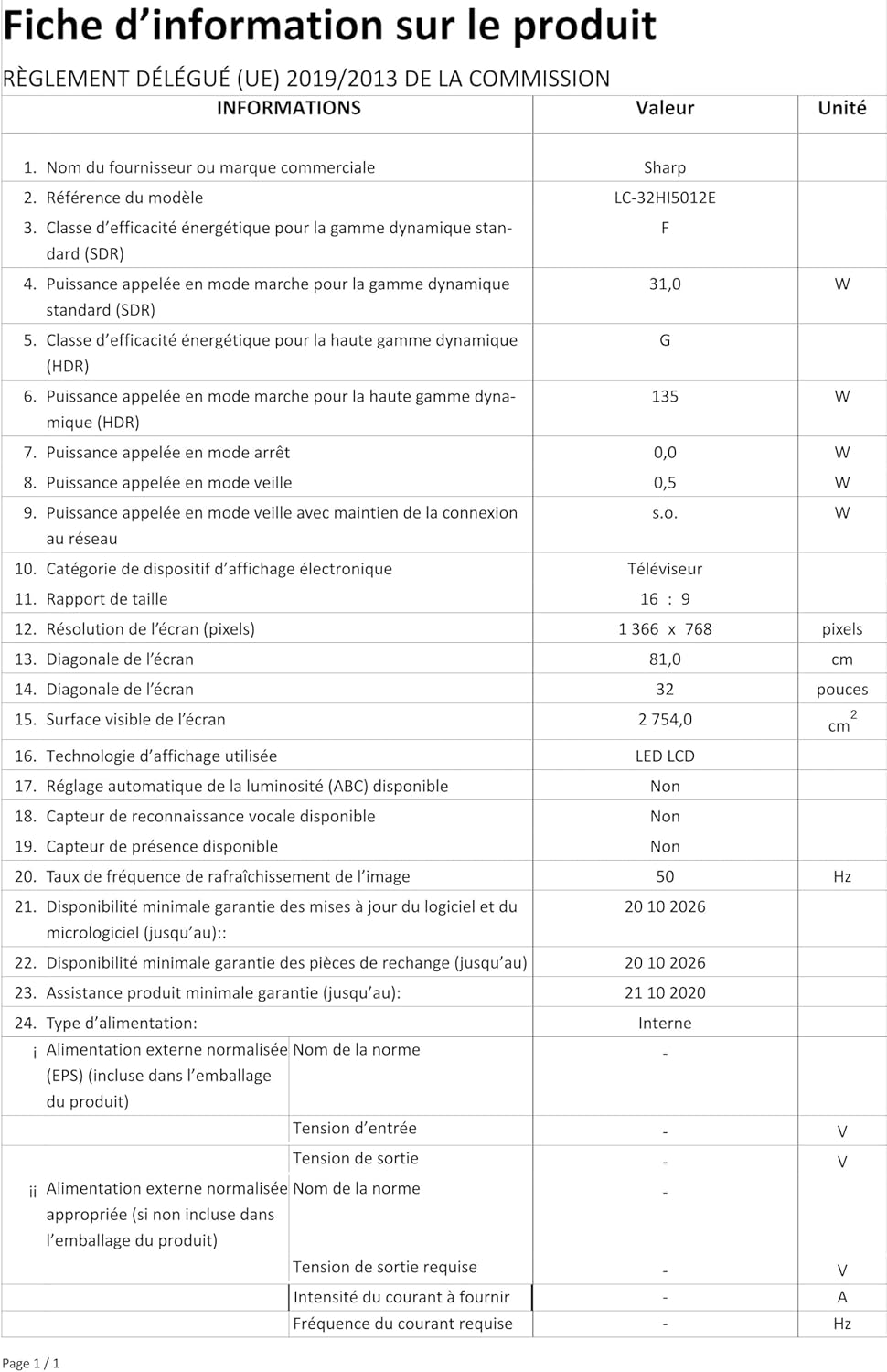
Image: Product information sheet detailing technical specifications and compliance information for the SHARP LC-32HI5012E television.
8. Кепилдик жана колдоо
For warranty information, please refer to the warranty card included with your product or visit the official SHARP webсайт. Сатып алуу квитанциясын кепилдик дооматтары үчүн сатып алуунун далили катары сактаңыз.
For technical support or service inquiries, please contact SHARP customer service. Contact details can typically be found on the SHARP official webсайтында же продуктунун таңгагында.


