1. Киришүү
Thank you for choosing the Antec P101S Silent Performance Mid-Tower PC Case. This manual provides essential information for the proper installation, operation, and maintenance of your new computer case. Please read this manual thoroughly before beginning assembly to ensure optimal performance and longevity of your system.
The Antec P101S is engineered for quiet computing, featuring sound-dampening panels and efficient cooling solutions, making it ideal for users who prioritize a silent and high-performance computing environment.
2. Негизги өзгөчөлүктөрү
- Тынч операция: Equipped with sound-dampening top, front, and side panels for quiet computing.
- Extensive Drive Bays: Supports 11 drive bays, including 1 x 5.25" ODD bay, 8 x 3.5" HDD/2.5" SSD removable bays, and 2 x dedicated 2.5" SSD bays.
- Өркүндөтүлгөн муздатуу: Includes 4 pre-installed 120/140mm cooling fans (3 front, 1 rear). Supports up to 4 fan mounts with a maximum of 360mm radiator support for enhanced cooling.
- Convenient I/O Panel: Features power/reset buttons, a fan speed controller (High/Stop/Low), Audio/Mic ports, 2 x USB 2.0, and 2 x USB 3.0 ports with white LED lighting.
- Broad Motherboard Compatibility: Supports E-ATX, ATX, Micro-ATX, and ITX motherboards.
- Generous Component Clearance: Accommodates CPU coolers up to 180mm, graphics cards up to 450mm, and PSUs up to 290mm in length.
3. Пакеттин мазмуну
Пакетиңизде бардык буюмдар бар экенин текшериңиз:
- Antec P101S Mid-Tower PC Case
- 3 x 120mm Front Fans (Pre-installed)
- 1 x 140mm Rear Fan (Pre-installed)
- Accessory Box (screws, cable ties, user manual)
4. Component Overview
Familiarize yourself with the various parts of your Antec P101S case.

Figure 1: Front, Back, Left, and Right views of the Antec P101S case, illustrating its external design and panel layout.

2-сүрөт: Интерьер view of the Antec P101S, showing the spacious layout, drive bays, and fan mounts.

Figure 3: Close-up of the top I/O panel, highlighting the power, reset, fan speed controller, audio, USB 2.0, and USB 3.0 ports.
5. Орнотуу жана орнотуу
Follow these steps to install your components into the Antec P101S case.
5.1 Ишти даярдоо
- Каптал панелдерин алып салуу: Unscrew the thumbscrews on the rear of the side panels and slide them backward to remove.
- Access Interior: The interior is now accessible for component installation.
5.2 Motherboard орнотуу
- Standoffs орнотуу: Ensure the correct motherboard standoffs are installed for your motherboard form factor (ATX, Micro-ATX, ITX, E-ATX).
- Place Motherboard: Carefully align your motherboard with the standoffs and I/O shield opening.
- Коопсуз Motherboard: Fasten the motherboard with the provided screws.
5.3 Дискти орнотуу
The P101S offers versatile drive mounting options.
5.3.1 3.5" HDD / 2.5" SSD Removable Bays

Figure 4: Illustration of the various drive bay locations within the Antec P101S case.
- Remove Drive Tray: Pull out an empty 3.5" drive tray from the drive cage.
- Drive орнотуу: For a 3.5" HDD, flex the tray and insert the drive. For a 2.5" SSD, secure it to the bottom of the tray with screws.
- Салгычты кайра салыңыз: Slide the loaded tray back into the drive cage until it clicks into place.
5.3.2 Dedicated 2.5" SSD Bays
Two dedicated 2.5" SSD mounts are located behind the motherboard tray.
- Коопсуз SSD: Attach your 2.5" SSD to the dedicated mounting bracket using screws.
- Кронштейн: Secure the bracket with the SSD to the chassis behind the motherboard tray.
5.3.3 5.25" ODD Bay
- Remove Front Bezel: Gently remove the 5.25" bay cover from the front bezel.
- Insert ODD: Slide your optical disc drive into the bay from the front until it aligns with the screw holes.
- Secure ODD: Fasten the ODD with screws.
5.4 Видеокартаны жана кеңейтүү картасын орнотуу
- PCIe уячасынын капкактарын алып салыңыз: Unscrew and remove the necessary PCIe slot covers from the rear of the case.
- Картаны кыстаруу: Carefully insert your graphics card or other expansion card into the appropriate PCIe slot on the motherboard.
- Коопсуз карта: Fasten the card with screws.
5.5 Электр менен камсыздоо блогун (PSU) орнотуу
- Кызмат орду: PSU Кубат блогун корпустун арткы астыңкы жагындагы атайын бөлүмгө жылдырыңыз.
- Коопсуз PSU: Fasten the PSU to the rear of the chassis with screws.
5.6 Кабелди башкаруу
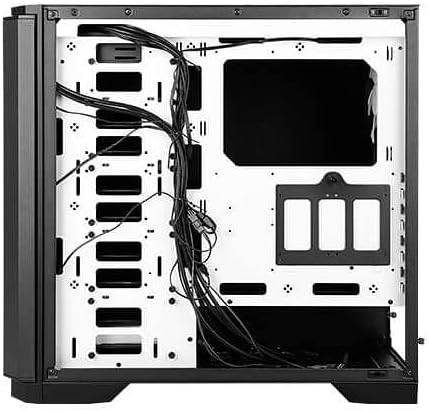
5-сүрөт: Арткы view of the motherboard tray, showing cable routing channels and tie-down points for organized cable management.
Utilize the cable routing holes and tie-down points behind the motherboard tray to organize cables for improved airflow and aesthetics.
6. Компьютериңизди иштетүү
6.1 Күйгүзүү/өчүрүү
Press the large power button on the top I/O panel to turn your system on or off.
6.2 желдеткич ылдамдыгын көзөмөлдөө
Use the fan speed controller switch on the top I/O panel to adjust the speed of the pre-installed fans:
- Жогорку: Оптималдуу муздатуу үчүн максималдуу желдеткич ылдамдыгы.
- Төмөн: Тынчыраак иштөө үчүн желдеткичтин ылдамдыгы азайтылган.
- Токтотуу: Fans are turned off.
7. Техникалык тейлөө
7.1 Чаң чыпкаларын тазалоо
Regularly clean the dust filters located at the front, top, and bottom of the case to maintain optimal airflow and prevent dust buildup. The front filter is easily removable for cleaning.
7.2 Жалпы тазалоо
Use a soft, dry cloth to clean the exterior of the case. For stubborn marks, a slightly damp кездемени колдонсо болот, андан кийин кургатыңыз. Абразивдүү тазалоочу каражаттардан же эриткичтерден алыс болуңуз.
8. Кыйынчылыктарды
- Система күйбөй жатат: Double-check all power connections, including the 24-pin ATX, 8-pin CPU, and GPU power cables. Ensure the PSU switch is in the 'On' position.
- Айланбаган күйөрмандар: Verify that the fan speed controller on the I/O panel is not set to 'Stop'. Check fan connections to the motherboard or fan hub.
- Ашыкча ысып кетүү: Ensure all fans are spinning correctly and dust filters are clean. Verify proper component installation and thermal paste application.
- USB порттору иштебейт: Check the internal USB header connections from the I/O panel to the motherboard.
9. Техникалык шарттар
| Өзгөчөлүк | Деталь |
|---|---|
| Модель аты | P101S Silent |
| Иштин түрү | Орто мунара |
| Motherboard шайкештиги | E-ATX, ATX, Micro-ATX, ITX |
| Өлчөмдөрү (LxWxH) | 20.74 x 9.13 x 19.92 дюйм |
| Элемент Салмагы | 26.1 фунт |
| Материал | Эритме болот |
| Drive Bays | 1 x 5.25" ODD, 8 x 3.5" HDD/2.5" SSD, 2 x 2.5" SSD |
| Алдын ала орнотулган күйөрмандар | 3 x 120mm Front, 1 x 140mm Rear |
| Радиатор колдоо | Front: Up to 360mm, Rear: Up to 140mm |
| CPU муздаткычтын максималдуу бийиктиги | 180мм |
| Максималдуу GPU узундугу | 450мм |
| Максималдуу PSU узундугу | 290мм |
| Алдыңкы I / O порттору | 2 x USB 2.0, 2 x USB 3.0, Audio/Mic, Power, Reset, Fan Speed Controller |
10. Кепилдик жана колдоо
For warranty information and technical support, please refer to the official Antec website or contact your local Antec distributor. Keep your proof of purchase for warranty claims.
Antec расмий Webсайт: www.antec.com


