1. Киришүү
The Ajazz AK50 is a high-performance mechanical keyboard designed for both gaming and general use. It features durable Blue mechanical switches, a 104-key standard layout, and customizable yellow LED backlighting. This manual provides detailed instructions for setting up, operating, maintaining, and troubleshooting your keyboard to ensure optimal performance and longevity.
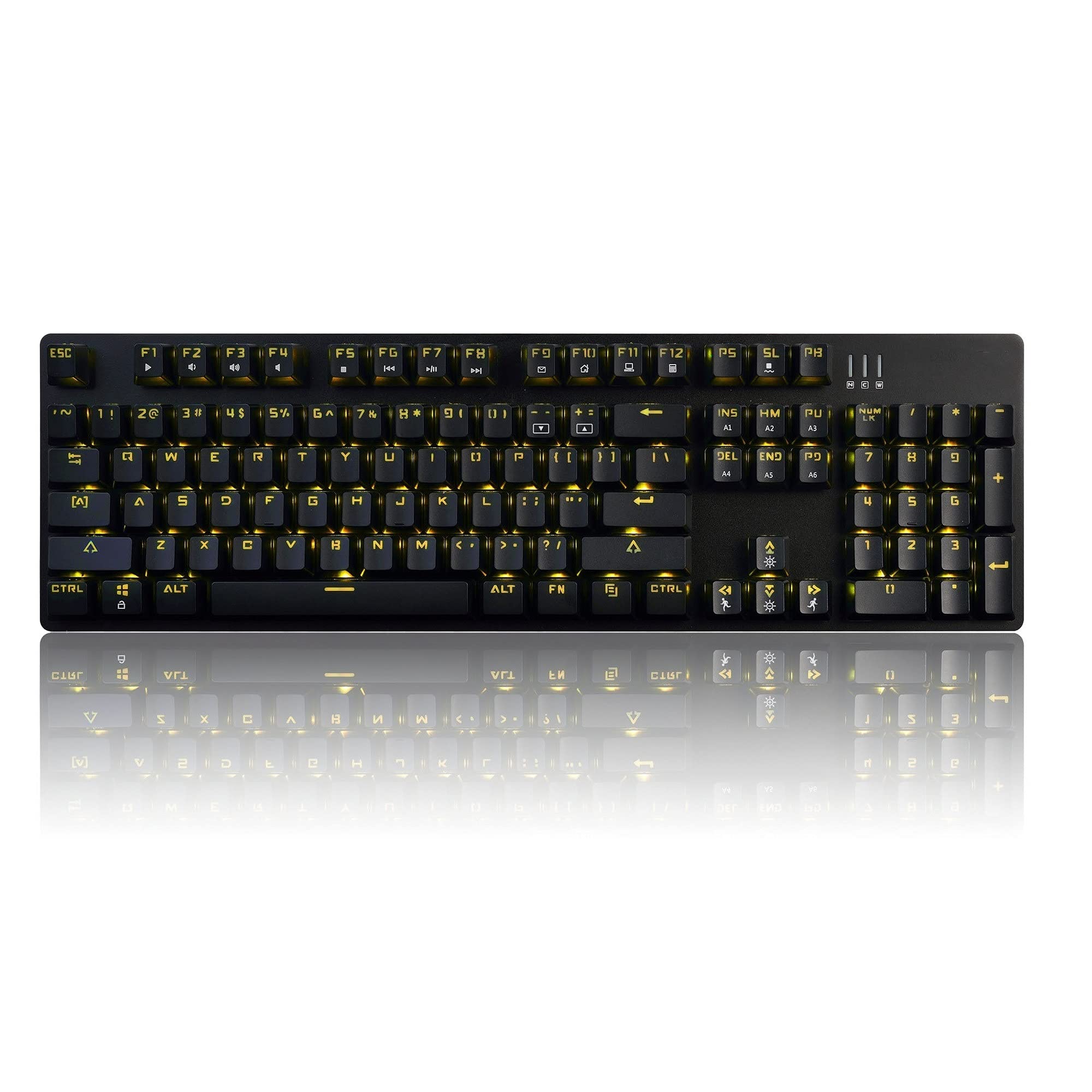
Image 1.1: The Ajazz AK50 Mechanical Keyboard, showcasing its full layout and yellow LED backlighting.
2. Пакеттин мазмуну
Пакетиңизде бардык буюмдар бар экенин текшериңиз:
- Ajazz AK50 Mechanical Keyboard
- USB кабели (тиркелген)
- Колдонуучунун Колдонмосу (бул документ)
3. Орнотуу нускамалары
- Баскычтопту туташтыруу: Locate an available USB 2.0 port on your computer. Insert the USB connector of the keyboard cable into the USB port.

Image 3.1: The Ajazz AK50 keyboard ready for connection to a computer via its USB cable.
- Драйверди орнотуу: The Ajazz AK50 is a plug-and-play device. Your operating system (Windows 10/8/7 XP Vista, Mac OS, Linux) will automatically detect and install the necessary drivers. No additional software installation is required for basic functionality.
- Жайгашкан жери: Position the keyboard comfortably on your desk. The keyboard features adjustable feet on the underside to change the typing angle if desired.
4. Иштөө нускамалары
4.1 Key Features and Layout
The Ajazz AK50 features a 104-key standard layout with Blue mechanical switches, providing tactile feedback and an audible click. The ergonomic R5 key design aims to reduce fatigue during extended use.

Сүрөт 4.1: Бурчтуу view of the keyboard, highlighting the keycap profile and layout.
The keyboard supports 100% anti-ghosting across all 104 keys, ensuring that every keystroke is registered accurately, even during rapid input.
4.2 Жарыкты башкаруу
The keyboard features yellow LED backlighting with multiple modes and customization options.
- Default Backlight Modes: The keyboard comes with 8 pre-set backlight modes. Use the FN + INS key combination to cycle through these modes.
- Custom Backlight Modes: 5 custom backlight modes are available for personalized lighting effects. Refer to the specific key combinations for programming these modes (usually involving FN + a specific key to enter programming mode, then selecting keys to light up, and FN + the same key to save).
- Жарыктыкты жөндөө: Adjust the backlight brightness using dedicated function keys or combinations (e.g., FN + Up/Down Arrow).
- Ылдамдыкты жөндөө: Adjust the speed of dynamic backlight effects using dedicated function keys or combinations (e.g., FN + Left/Right Arrow).

Сүрөт 4.2: Жакын план view of the keyboard's keys, illustrating the yellow LED backlighting and keycap design.
4.3 Мультимедиа жана функция баскычтары
The F1-F12 keys, when combined with the FN key, provide access to various multimedia and system functions. Specific functions are typically indicated by icons on the keycaps.
| Ачкыч айкалышы | Функция |
|---|---|
| FN + F1 | Менин компьютерим |
| FN + F2 | издөө |
| FN + F3 | Калькулятор |
| FN + F4 | Медиа ойноткуч |
| FN + F5 | Мурунку трек |
| FN + F6 | Кийинки трек |
| FN + F7 | Ойнотуу/Тыныгуу |
| FN + F8 | Токто |
| FN + F9 | Үнсүз |
| FN + F10 | Үндү төмөндөтүү |
| FN + F11 | Үндү көтөрүү |
| FN + F12 | Баскычтопту кулпулоо |
| FN + WIN | Windows ачкычын кулпулоо/ачуу |
5. Техникалык тейлөө жана кам көрүү
Proper maintenance ensures the longevity and performance of your Ajazz AK50 keyboard.
- Баскычтопту тазалоо:
- Тазалоодон мурун клавиатураны компьютерден ажыратыңыз.
- Бир аз жумшак, түксүз кездемени колдонуңуз dampened with water or a mild cleaning solution to wipe the keycaps and frame. Avoid excessive moisture.
- Ачкычтардын ортосундагы чаң жана таштанды үчүн кысылган абаны колдонуңуз.
- The keyboard features a removable bezel cover, which can be detached for easier cleaning of the keyboard base and keycaps. Gently pry it off from the edges.
- Төгүлгөндөн сактаныңыз: Ички компоненттерге зыян келтирбөө үчүн клавиатурадан суюктуктарды алыс кармаңыз.
- Сактагыч: Клавиатураны көпкө чейин колдонбогон учурда, аны таза, кургак жерде сактаңыз.
6. Кыйынчылыктарды
If you encounter issues with your Ajazz AK50 keyboard, refer to the following common solutions:
| Көйгөй | Мүмкүн болгон чечимдер(дер) |
|---|---|
| Баскычтоп жооп бербей жатат. |
|
| Арткы жарык иштебей жатат же тыгылып калган. |
|
| Баскычтар катталбай жатат же эки жолу терилбей жатат. |
|
7. Техникалык шарттар
| Өзгөчөлүк | Деталь |
|---|---|
| Бренд | Ajazz (FIRSTBLOOD ONLY GAME.) |
| Модел | AK50 Blue Switches |
| Баскычтоптун түрү | Механикалык оюн баскычтобу |
| Которуу түрү | Blue Switches (50 million keystroke lifespan) |
| Ачкычтын жайгашуусу | 104 Стандарттык ачкычтар |
| Anti-Ghosting | 100% Anti-Ghosting |
| Арткы жарыктандыруу | Yellow LED Backlit (8 default modes, 5 custom modes) |
| Байланыш | USB 2.0 (Wired, 1.8m braided cable) |
| Операциялык системанын шайкештиги | Windows 10/8/7 XP Vista, Mac OS, Linux |
| Өлчөмдөрү (LxWxH) | 43.41 x 12.29 x 3.61 см |
| Салмагы | 780 г |
| Материал | Aluminum and ABS Construction |
| Өзгөчөлүктөр | Ergonomic R5 key design, Removable bezel |
8. Кепилдик жана колдоо
The Ajazz AK50 Mechanical Keyboard comes with a 1 жылдык өндүрүүчүнүн кепилдиги. Мындан тышкары, а 30 күндүк акчаны кайтаруу кепилдиги сатып алынган күндөн тартып сунушталат.
For technical support, warranty claims, or any product-related inquiries, please contact your retailer or the manufacturer directly through their official support channels. Please retain your proof of purchase for warranty validation.