Продукт бүттүview
The PHOENIX CONTACT UTME 6 is a high-quality test disconnect terminal block designed for reliable electrical connections in industrial applications. Featuring 2 connections, it is rated for 30 Amps and 500 Volts, accommodating wires up to 6 MM². Its screw connection method ensures secure and durable wiring. This terminal block is ideal for circuits requiring easy testing and disconnection without interrupting the main circuit flow.
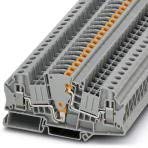
Figure 1: PHOENIX CONTACT UTME 6 Test Disconnect Terminal Block, showing its compact design and screw terminals.
Коопсуздук маалыматы
- Always disconnect power before installing, servicing, or removing the terminal block.
- Installation should only be performed by qualified personnel in accordance with local and national electrical codes.
- Ensure proper wire gauge and insulation are used for the specified current and voltage рейтинги.
- Do not exceed the maximum current (30A) or voltage (500V) рейтингдери.
- Verify all connections are secure to prevent loose contacts and potential hazards.
- Protect the terminal block from moisture, dust, and extreme temperatures.
Орнотуу жана орнотуу
Follow these steps for proper installation of the UTME 6 terminal block:
- Пакеттен чыгаруу: Carefully remove the terminal block from its packaging. Inspect for any visible damage.
- Монтаждоо: The UTME 6 is designed for DIN rail mounting. Snap the terminal block onto a standard DIN rail (e.g., NS 35/7.5 or NS 35/15) by pressing it down firmly until it clicks into place.
- Зымды даярдоо: Strip approximately 9-10 mm of insulation from the end of the wire. For stranded wires, it is recommended to use ferrules for optimal connection integrity.
- Зымдарды туташтыруу:
- Using a suitable screwdriver, open the screw clamp терминалдык блокто.
- Insert the prepared wire fully into the clampинг бирдиги.
- Tighten the screw firmly to secure the wire. Ensure no bare wire strands are exposed outside the clampинг бирдиги.
- Repeat for all necessary connections.
- Сыноо: After all connections are made, perform continuity and insulation resistance tests as required by local regulations before applying power.
Иштөө нускамалары
The UTME 6 features a test disconnect function, allowing for easy isolation of circuits for testing or maintenance without disturbing the main wiring.
- Кадимки операция: In its standard configuration, the terminal block provides a continuous electrical path.
- Disconnecting for Test: To disconnect the circuit, simply open the disconnect knife or lever (if applicable to the specific variant, for UTME 6, it's typically a screw-operated disconnect). This isolates the circuit section connected to the terminal block.
- Кайра туташуу: To restore the connection, close the disconnect knife or lever. Ensure it is fully engaged for proper electrical contact.
Note: Always ensure power is off before performing any disconnect or reconnect operations if there is a risk of arc flash or other electrical hazards.
Техникалык тейлөө
Regular maintenance ensures the longevity and reliable performance of your UTME 6 terminal block.
- Тазалоо: Periodically clean the terminal block using a dry, lint-free cloth. Avoid using solvents or abrasive cleaners that could damage the plastic housing.
- Текшерүү: Visually inspect the terminal block for any signs of damage, discoloration, or loose connections. Check for corrosion on metal parts.
- Кайра бекемдөөчү бурамалар: Over time, screw connections can loosen due to vibration or thermal cycling. Periodically retighten the screw connections to the recommended torque (refer to PHOENIX CONTACT technical documentation for specific torque values, generally 0.5-0.8 Nm for M3 screws).
Проблемаларды чечүү
If you encounter issues with your UTME 6 terminal block, consider the following common problems and solutions:
| Көйгөй | Мүмкүн себеп | Чечим |
|---|---|---|
| No continuity through the block |
|
|
| Overheating/Discoloration |
|
|
| Зымды киргизүүдөгү кыйынчылык |
|
|
Техникалык шарттар
| Модель номери | UTME 6 |
| Бренд | PHOENIX CONTACT |
| Учурдагы рейтинг | 30 Amps |
| Тtage Рейтинг | 500 вольт |
| Зым кесилиши | 6 MM² (approx. 8 AWG) |
| Туташуулардын саны | 2 |
| Туташтыргыч түрү | Бурама |
| Поляктардын саны | 2 |
| Шайкештик | RoHS |
| Пакеттин өлчөмдөрү | 2 x 2 x 2 дюйм |
| Элемент Салмагы | 1.47 фунт |
Кепилдик маалымат
PHOENIX CONTACT products are manufactured to the highest quality standards. This product is covered by the standard manufacturer's warranty against defects in materials and workmanship. For specific warranty terms and conditions, please refer to the official PHOENIX CONTACT webсайтка же түздөн-түз кардарларды колдоо менен байланышыңыз. Сатып алганыңыздын далили катары сатып алуу дүмүрчөгүңүздү сактаңыз.
Кардарларды колдоо
For technical assistance, product inquiries, or support, please contact PHOENIX CONTACT customer service:
- Webсайт: Visit the official PHOENIX CONTACT website for comprehensive product documentation, FAQs, and contact information. www.phoenixcontact.com
- Техникалык колдоо: караңыз website for regional technical support contact details (phone numbers, email addresses).


