1. Киришүү
The D-Link DWR-930M 4G/LTE Mobile Router is a portable wireless device designed to provide high-speed internet access on the go. It functions as a 4G LTE Cat4 mobile hotspot, enabling you to share a broadband wireless WAN (WWAN) connection via Wi-Fi. This device supports internet speeds up to 150Mbps for downloads and 50Mbps for uploads, allowing up to 8 Wi-Fi devices to connect simultaneously.
Its compact size and rechargeable 3000 mAh Li-ion battery make it suitable for travel and situations requiring an impromptu network. The DWR-930M incorporates a built-in firewall and supports WPA/WPA2 security protocols to protect your data. Charging is facilitated via a Micro-USB port, and device management can be performed using a mobile application.
2. Пакеттин мазмуну
Пакетиңизде төмөнкү заттар бар экенин текшериңиз:
- D-Link DWR-930M 4G/LTE Mobile Router
- Кайра заряддалуучу литий-иондук батарейка
- Micro-USB заряддоо кабели
- Тез орнотуу боюнча колдонмо (эгер кошулган болсо)
Эгерде кандайдыр бир буюмдар жок же бузулуп калса, сатуучуга кайрылыңыз.
3. Продукт бүтүп калдыview
Familiarize yourself with the physical components and indicator lights of your DWR-930M Mobile Router.
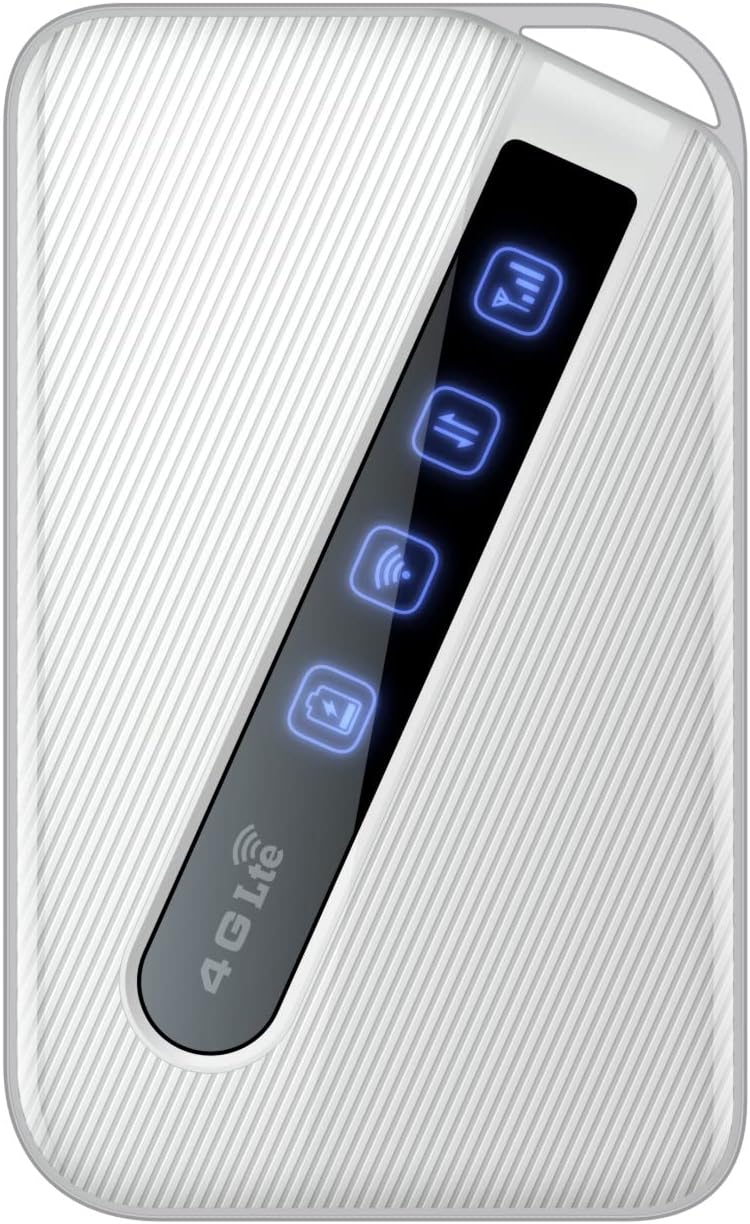
An image of the D-Link DWR-930M 4G/LTE Mobile Router, showing its compact white design and the illuminated indicator panel for signal, network, Wi-Fi, and battery status.
Индикатор жарыктары:
- Сигнал күчү көрсөткүчү: Displays the strength of the 4G/LTE network signal.
- Network Type Indicator: Shows the current network connection status (e.g., 4G LTE).
- Wi-Fi статусунун көрсөткүчү: Indicates if the Wi-Fi hotspot is active.
- Батареянын абалынын көрсөткүчү: Учурдагы батареянын заряд деңгээлин көрсөтөт.
Ports and Slots:
- SIM карта слоту: For inserting your data-enabled SIM card.
- Микро-USB порту: Аппаратты заряддоо үчүн колдонулат.
- Кубат баскычы: Аппаратты күйгүзүү же өчүрүү үчүн.
4. Орнотуу
4.1. SIM картаны салуу
- DWR-930M өчүк экенин текшериңиз.
- Locate the SIM card slot, typically found under the battery cover or on the side of the device.
- Carefully insert your data-enabled SIM card into the slot with the gold contacts facing down and the notched corner aligned correctly.
- Close the SIM card slot cover or replace the battery cover.
4.2. Аппаратты заряддоо
- Micro-USB кубаттоочу кабелин DWR-930M түзмөгүндөгү Micro-USB портуна туташтырыңыз.
- Connect the other end of the cable to a USB power adapter (not always included) or a computer's USB port.
- The battery indicator light will show charging status. Allow the device to fully charge before first use.
4.3. Күйгүзүү / Өчүрүү
- Күйгүзүү үчүн: Индикатор жарыктары күйгүчө кубат баскычын басып, кармап туруңуз.
- Өчүрүү үчүн: Индикатор жарыктары өчкөнгө чейин Кубат баскычын басып, кармап туруңуз.
5. Операция
5.1. Түзмөктөрдү Wi-Fiга туташтыруу
- Ensure the DWR-930M is powered on and the Wi-Fi indicator is active.
- On your Wi-Fi enabled device (smartphone, tablet, laptop), open the Wi-Fi settings.
- Жеткиликтүү Wi-Fi тармактарын издөө.
- Select the network name (SSID) of your DWR-930M (usually printed on a label inside the battery compartment or on the device itself).
- Enter the Wi-Fi password (WPA/WPA2 key), also found on the device label.
- Your device should now be connected to the internet via the DWR-930M.
5.2. кирүү Web Башкаруу интерфейси
For advanced settings and configuration, you can access the router's web- негизделген башкаруу интерфейси.
- Түзмөгүңүздү DWR-930M'дин Wi-Fi тармагына туташтырыңыз.
- ачуу а web браузер (мисалы, Chrome, Firefox, Edge).
- Дарек тилкесине роутердин демейки IP дарегин териңиз (адатта
192.168.0.1or192.168.1.1) and press Enter. Refer to your device's label or quick start guide for the exact IP address. - Демейки колдонуучу атын жана паролду киргизиңиз (көбүнчө
adminfor both, or specified on the device label). - You can now configure settings such as Wi-Fi name, password, security, and network preferences.
6. Техникалык тейлөө
6.1. Батареяга кам көрүү
- Аппаратты экстремалдык температурага тийгизүүдөн сактаңыз.
- Батареяны узак убакытка толук зарядсыз калтырбаңыз.
- For optimal battery life, charge the device regularly.
6.2. Микропрограмманы жаңыртуу
Мезгил-мезгили менен D-Link колдоосун текшерип туруңуз website for firmware updates for your DWR-930M. Firmware updates can improve performance, add new features, and enhance security. Follow the instructions provided with the firmware update carefully.
6.3. Тазалоо
Use a soft, dry cloth to clean the exterior of the device. Do not use liquid cleaners or aerosols, as they may damage the device.
7. Кыйынчылыктарды
This section addresses common issues you might encounter with your DWR-930M Mobile Router.
| Көйгөй | Мүмкүн чечим |
|---|---|
| Интернет байланышы жок |
|
| Wi-Fi'га туташпай жатат |
|
| Жай интернет ылдамдыгы |
|
| Батарея заряддалбай жатат |
|
8. Техникалык шарттар
Key technical specifications for the D-Link DWR-930M 4G/LTE Mobile Router:
| Өзгөчөлүк | Деталь |
|---|---|
| Модель аты | DWR-930M |
| Байланыш технологиясы | USB, Wi-Fi |
| Зымсыз байланыш стандарты | 802.11b, 802.11g, 802.11n |
| Жыштык тилкесинин классы | Кош тилкелүү |
| Маалымат ылдамдыгы | Up to 150Mbps Downlink, 50Mbps Uplink (4G LTE Cat4) |
| Батарея | 1 Lithium Ion battery required (included), 3000 mAh |
| Продукциянын өлчөмдөрү | 10.3 x 1.3 x 6.3 см |
| Салмагы | 360 г |
| Шайкеш түзмөктөр | Ноутбук, персоналдык компьютер, смартфон, планшет |
| Сунушталган Колдонуулар | Саякат, сыртта |
9. Кепилдик жана колдоо
D-Link products are backed by a limited warranty. For specific warranty terms and conditions applicable to your region, please refer to the warranty card included with your product or visit the official D-Link webсайт.
Техникалык колдоо, өнүмдөрдү каттоо же акыркы драйверлерди жана микропрограммаларды жүктөп алуу үчүн D-Link колдоо порталына кириңиз:
When contacting support, please have your product model number (DWR-930M) and serial number ready.