Introduction
This manual provides essential instructions for the safe and efficient use of your Smart Kingfisher Rechargeable Lithium Battery and USB Charger. Please read this manual thoroughly before use and retain it for future reference.
Коопсуздук маалыматы
- Эскертүү: Кайра заряддалбаган батарейкаларды заряддоого аракет кылбаңыз.
- Эскертүү: Do not charge batteries from other suppliers unless explicitly stated as compatible.
- Keep the charger and batteries away from water and moisture.
- Do not disassemble, crush, or puncture the batteries or charger.
- Avoid exposing batteries to extreme temperatures or direct sunlight.
- Батареяларды жергиликтүү эрежелерге ылайык таштаңыз.
Пакеттин мазмуну
Пакетиңизде бардык буюмдар бар экенин текшериңиз:
- 2 x 425 Rechargeable Lithium Batteries
- 1 x Dual-Port USB Charger
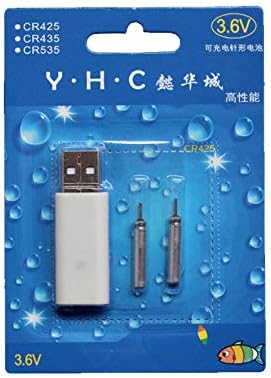
Image: Retail packaging showing the USB charger and two 425 rechargeable batteries.

Image: A pair of Smart Kingfisher 425 rechargeable lithium batteries.
Жайгашуу
The Smart Kingfisher USB charger is designed for ease of use. No complex setup is required.
- Identify the USB charger and the 425 rechargeable batteries.
- Connect the USB charger to a compatible power source (see "Operating Instructions" for options).

Image: The USB charger unit with its two charging pins visible.
Иштөө нускамалары
Батареяларды заряддоо
The charger features two ports, allowing for simultaneous charging of two batteries.
- Insert the 425 rechargeable batteries into the charging ports of the USB charger. Ensure a secure connection.
- Connect the USB charger to a power source. Compatible power sources include:
- USB power adapter (wall charger)
- Power банк
- Унаа заряддагыч
- Laptop or PC USB port
- Observe the LED indicator on the charger:
- A жашыл LED батареялар учурда заряддалып жатканын көрсөтүп турат.
- A кызыл LED indicates that the batteries are fully charged.
- Толук заряддоо үчүн, адатта, болжол менен 3 саат талап кылынат.
- Once fully charged, disconnect the charger from the power source and remove the batteries.
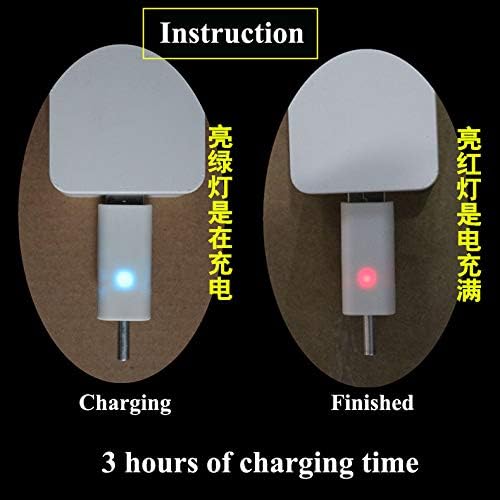
Image: Visual guide for charging status: green light for charging, red light for fully charged. Indicates a 3-hour charging time.

Image: Diagram illustrating multiple methods for charging the device, including car chargers, wall adapters, power banks, and laptops.
Техникалык тейлөө
- Clean the charger and batteries with a dry, soft cloth. Do not use liquids or abrasive cleaners.
- Store the batteries and charger in a cool, dry place when not in use.
- Avoid storing fully discharged batteries for extended periods to prolong their lifespan.
Проблемаларды чечүү
| Көйгөй | Мүмкүн себеп | Чечим |
|---|---|---|
| Batteries not charging (no LED indication) |
|
|
| Charging takes longer than 3 hours |
|
|
| Red LED does not turn on after extended charging |
|
|
Техникалык шарттар
- Материал: Пластик
- Продукт Салмагы: 20 g (total for charger and batteries)
- Батарея түрү: 425 Rechargeable Lithium Battery (compatible with CR425, CR435, CR535)
- Заряддагыч түрү: Кош порттуу USB кубаттагыч
- Киргизүү: USB (compatible with various USB power sources)
- Заряддоо көрсөткүчү: Green LED (charging), Red LED (fully charged)
- Болжолдуу заряддоо убактысы: 3 саат
Кепилдик жана колдоо
For warranty information or technical support, please refer to the retailer's return policy or contact the manufacturer directly. Keep your purchase receipt as proof of purchase.
Кошумча жардам алуу үчүн, сиз иш сапары менен болот product page on Amazon.com.mx.


