1. Киришүү
The Alctron UM900 is a professional USB condenser microphone designed for high-quality audio recording. Featuring a cardioid pickup pattern and a standard USB interface, it offers plug-and-play compatibility with Windows and Mac operating systems without requiring additional driver installations. Its 16mm back electret capsule ensures vivid and natural sound reproduction, making it suitable for various applications including podcasting, voiceovers, music recording, and multimedia presentations.
2. Коопсуздук маалыматы
- Микрофонду экстремалдык температурага, нымдуулукка же түз күндүн нуруна дуушар кылбаңыз.
- Микрофонду түшүрүүдөн же катуу тийүүдөн сактаныңыз.
- Do not attempt to disassemble or modify the microphone. This may void the warranty and cause damage.
- Keep the microphone away from strong electromagnetic fields.
- Clean the microphone with a soft, dry cloth only. Do not use liquid cleaners.
3. Пакеттин мазмуну
Пакетиңизде бардык буюмдар бар экенин текшериңиз:
- Alctron UM900 USB Condenser Microphone
- USB кабели
- Шок тоо
4. Продукт бүтүп калдыview
The Alctron UM900 microphone is designed for ease of use and high-fidelity audio capture. It features a robust metal body and an integrated shock mount to minimize handling noise and vibrations.
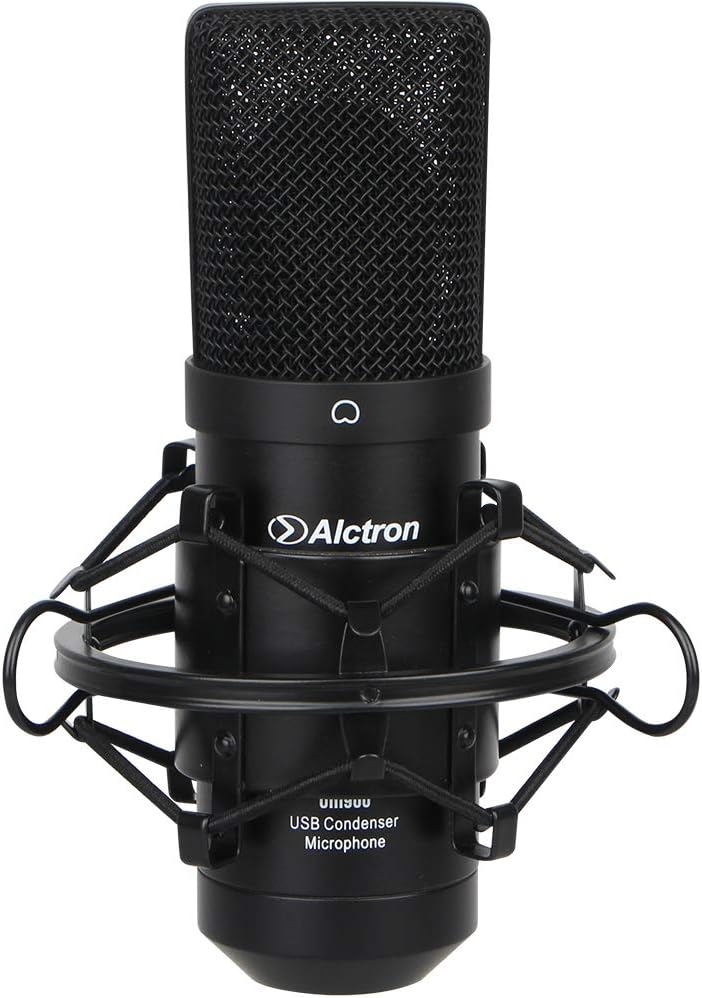
Figure 1: Alctron UM900 USB Condenser Microphone with included shock mount.
The microphone's design focuses on capturing clear and natural sound, making it suitable for both vocal and instrument recording.

Сүрөт 2: Алдыңкы view of the Alctron UM900 USB Condenser Microphone, showing the grille and Alctron logo.
5. Орнотуу
Follow these steps to set up your Alctron UM900 microphone:
- Шок монтажын тиркөө: Securely attach the provided shock mount to a microphone stand (not included). The shock mount helps isolate the microphone from vibrations and handling noise.
- Микрофонду киргизүү: Carefully place the Alctron UM900 microphone into the shock mount. Ensure it is firmly seated.
- USB кабелин туташтыруу: Plug one end of the supplied USB cable into the USB port at the base of the microphone.
- Компьютерге туташуу: Plug the other end of the USB cable into an available USB port on your Windows or Mac computer.
- Автоматтык драйверди орнотуу: The microphone is plug-and-play. Your operating system (Windows or Mac) will automatically detect and install the necessary drivers. This process may take a few moments.
- Киргизүү түзмөгү катары тандаңыз: Once installed, navigate to your computer's sound settings (e.g., 'Sound' in Windows Control Panel or 'Sound Preferences' in macOS System Settings) and select the Alctron UM900 as your default audio input device.
6. Иштөө
The Alctron UM900 features a cardioid pickup pattern, which means it is most sensitive to sound coming from the front of the microphone and less sensitive to sounds from the sides and rear. This helps in isolating the desired sound source and reducing background noise.
- Микрофондун жайгашуусу: For optimal sound quality, position the front of the microphone (where the Alctron logo is visible) directly towards the sound source (e.g., your mouth for vocals, or an instrument).
- Жазуу программасы: Open your preferred audio recording software (e.g., Audacity, GarageBand, OBS Studio). Ensure that the Alctron UM900 is selected as the input device within the software's audio settings.
- Монитордун деңгээлдери: Before recording, perform a test recording and monitor your input levels. Adjust the gain settings in your software or operating system to prevent clipping (distortion) while ensuring a strong signal.
- Аралык: Experiment with the distance between the microphone and the sound source. Generally, a distance of 6-12 inches (15-30 cm) is a good starting point for vocals.
7. Техникалык тейлөө
Proper maintenance will ensure the longevity and performance of your microphone:
- Тазалоо: Use a soft, dry, lint-free cloth to wipe the exterior of the microphone. Do not use abrasive cleaners, solvents, or chemical sprays.
- Сактагыч: When not in use, store the microphone in a clean, dry environment, preferably in its original packaging or a protective case, to prevent dust accumulation and physical damage.
- Кабельге кам көрүү: Avoid bending or kinking the USB cable excessively. Always grasp the plug, not the cable, when disconnecting.
8. Кыйынчылыктарды
If you encounter issues with your Alctron UM900 microphone, refer to the following common solutions:
- Үн чыгышы жок:
- Ensure the USB cable is securely connected to both the microphone and the computer.
- Verify that the Alctron UM900 is selected as the default input device in your computer's sound settings and within your recording software.
- Check the input volume levels in your computer's sound settings and recording software.
- Микрофонду компьютериңиздин башка USB портуна туташтырып көрүңүз.
- Компьютериңизди өчүрүп күйгүзүңүз.
- Үн сапатынын начардыгы / бурмалоо:
- Reduce the input gain or microphone sensitivity in your software or operating system settings to prevent clipping.
- Ensure the microphone is positioned correctly, facing the sound source.
- Check for environmental noise that might be picked up by the microphone.
- Ensure the microphone is not too close to the sound source, which can cause proximity effect or distortion.
- Микрофон таанылбайт:
- USB кабелин ажыратып, кайра туташтырыңыз.
- Башка USB портун колдонуп көрүңүз.
- Иштөө тутумуңуз жаңыртылганын текшериңиз.
- Эгер USB хабын колдонсоңуз, компьютерге түз туташып көрүңүз.
9. Техникалык шарттар
| Өзгөчөлүк | Спецификация |
|---|---|
| Микрофон форма фактору | Колдук |
| Полярдык үлгү | Бир багыттуу (Кардиоид) |
| Power Source | USB конденсатор |
| Байланыш технологиясы | USB |
| Туташтыргыч түрү | USB |
| Аппараттык платформа | PC |
| Шайкеш түзмөктөр | Персоналдык компьютер |
| Ызы-чуунун катышы | 68 дБ |
| Аудио сезгичтиги | 32 децибел |
| Элемент Салмагы | 3.59 фунт |
| Продукциянын өлчөмдөрү (L x W x Y) | 12.2 x 9.3 x 3.5 дюйм |
| Сунушталган Колдонуулар | Voice Recording, Video Recording |
10. Кепилдик жана колдоо
For warranty information and technical support, please refer to the documentation provided with your purchase or visit the official Alctron webсайт. Ар кандай кепилдик дооматтары үчүн сатып алганыңыздын далилин сактаңыз.


