Introduction
Сатып алганыңыз үчүн рахматasing the Supersonic IQ-1525BT Wireless Bluetooth Speaker. This manual provides essential information for the safe and efficient operation of your device. Please read it thoroughly before use and retain it for future reference.

Сүрөт 1: Алдыңкы view of the Supersonic IQ-1525BT Wireless Bluetooth Speaker.
Пакеттин мазмуну
Төмөндө тизмеленген нерселердин баары пакетиңизге камтылганын текшериңиз:
- Supersonic IQ-1525BT Wireless Bluetooth Speaker
- USB кабели
- AUX кабели
- Ташуу боосу
- Көрсөтмө (бул документ)
Продукт бүттүview
Башкаруу панели жана порттор

2-сүрөт: Детальдуу view of the control panel, showing input ports and control knobs.
The front panel of the speaker features the main controls and input ports:
- IQ Sound Display: Digital display for mode, frequency, and other indicators.
- Микро SD карта слоту: Micro SD картадан аудио ойнотуу үчүн.
- USB порт: USB флэш-дискинен аудио ойнотуу үчүн.
- AUX киргизүү: Тышкы аудио түзүлүштөрдү туташтыруу үчүн 3.5 мм уяча.
- MIC киргизүү: Микрофонду туташтыруу үчүн 6.35 мм уяча.
- DC 5V киргизүү: Динамикти кубаттоо үчүн кубат киргизүү.
- Басс баскычы: Басс деңгээлин тууралайт.
- Volume Knob (OFF/VOL/ON): Turns the speaker on/off and adjusts the master volume.
- Режим баскычы (M): Киргизүү режимдеринин ортосунда которулат (Bluetooth, FM, USB, Micro SD, AUX).
- Мурунку/Артка түрүү баскычы: Skips to the previous track or rewinds.
- Ойнотуу/тындыруу баскычы: Аудиону ойнотот же тындырат.
- Кийинки/Алдыга жылдыруу баскычы: Skips to the next track or fast forwards.
Speakers and LED Lighting
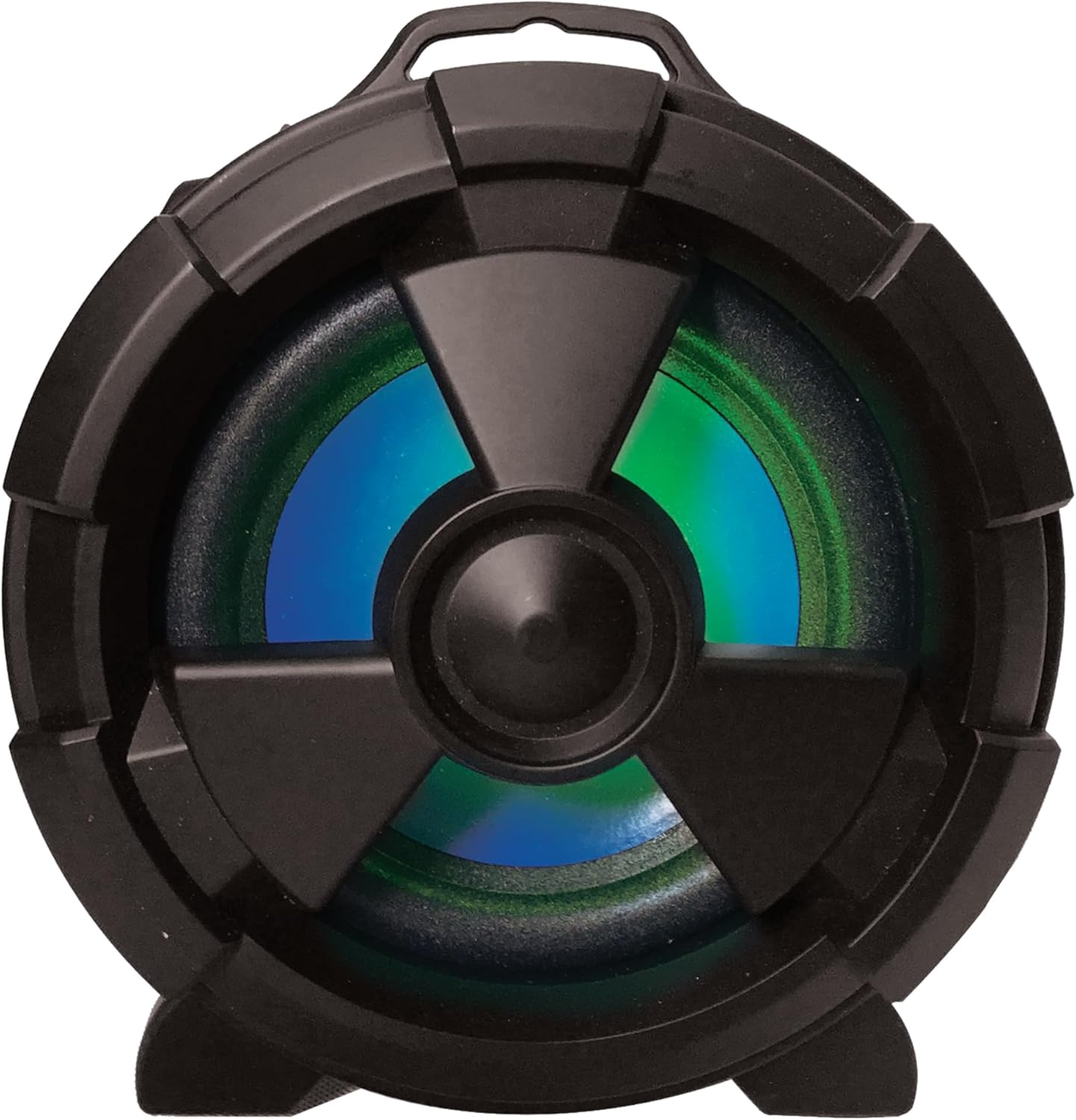
3-сүрөт: Каптал view highlighting the main speaker and its integrated LED lighting.
The speaker features one 5-inch main speaker and two 2-inch built-in speakers for stereo sound. The main speaker on the side includes integrated LED lighting that changes colors during operation.
Portability Features

Figure 4: The speaker's design allows for easy transport and use in various settings.
The IQ-1525BT is designed for portability, featuring a lightweight construction and a carrying strap for convenient transport.
Жайгашуу
Спикерди заряддоо
- Connect the provided USB cable to the DC 5V input port on the speaker.
- Connect the other end of the USB cable to a compatible USB power adapter (not included) or a USB port on a computer.
- The charging indicator will illuminate. Allow sufficient time for a full charge before first use.
Күйгүзүү/өчүрүү
- To turn on the speaker, rotate the Volume knob clockwise until it clicks and the display illuminates.
- To turn off the speaker, rotate the Volume knob counter-clockwise until it clicks and the display turns off.
Иштөө нускамалары
Bluetooth Жупташтыруу

Figure 5: Illustrates connecting a device via Bluetooth to the speaker.
- Turn on the speaker. It will automatically enter Bluetooth pairing mode, indicated by a flashing "BLUE" on the display and an audible prompt.
- Bluetooth иштетилген түзмөгүңүздө (мисалы, смартфон, планшет) Bluetooth'ду иштетиңиз жана жеткиликтүү түзмөктөрдү издеңиз.
- Select "IQ-1525BT" from the list of devices.
- Once paired, the speaker will emit an audible confirmation, and "BLUE" on the display will stop flashing.
- Эми сиз түзмөгүңүздөн аудиону динамик аркылуу ойной аласыз.
FM радиосунун иштеши
- Turn on the speaker. Press the "M" (Mode) button repeatedly until "FM" appears on the display.
- FM станцияларын автоматтык түрдө издөөнү баштоо үчүн "Ойнотуу/Тындыруу" баскычын басып, кармап туруңуз. Динамик табылган бардык станцияларды сактап калат.
- Use the Previous/Rewind and Next/Fast Forward buttons to navigate between saved stations.
USB/Micro SD ойнотуу
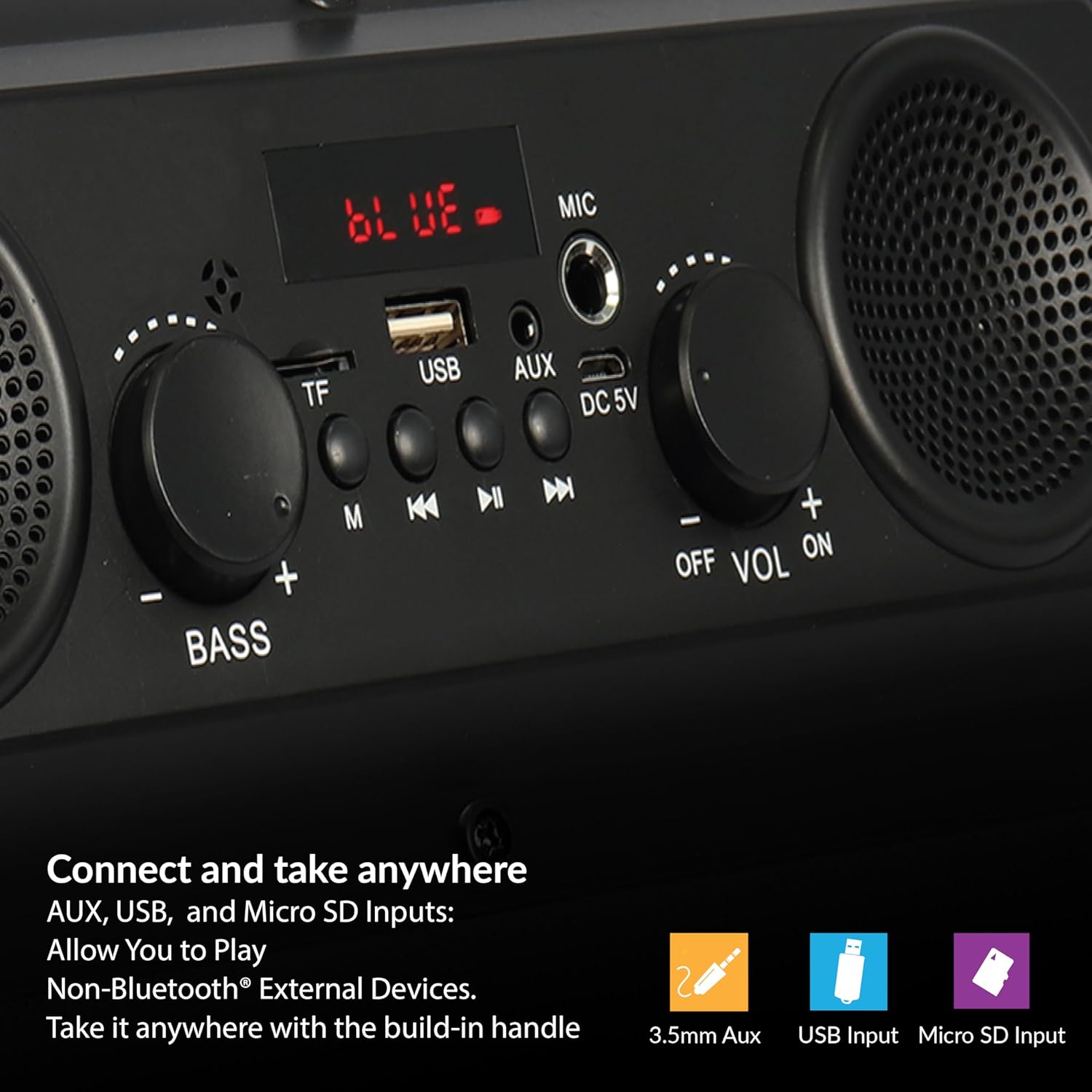
Figure 6: The speaker supports various input options for versatile audio playback.
- Insert a USB flash drive or Micro SD card (with pre-loaded audio fileс) тиешелүү портко.
- The speaker will automatically switch to USB or Micro SD mode and begin playback. If not, press the "M" (Mode) button to select the correct mode.
- Use the Play/Pause, Previous/Rewind, and Next/Fast Forward buttons to control playback.
AUX киргизүү
- Connect one end of the provided AUX cable to the AUX input port on the speaker.
- Connect the other end of the AUX cable to the audio output jack of your external device.
- Press the "M" (Mode) button until "AUX" appears on the display.
- Control audio playback from your external device.
Микрофонду колдонуу
- Connect a microphone (not included) to the MIC input port.
- Adjust the main volume using the Volume knob.
Adjusting Bass and Volume
- айлантыңыз Көлөм жалпы үн деңгээлин жогорулатуу же төмөндөтүү үчүн баскычты басыңыз.
- айлантыңыз Бас knob to adjust the low-frequency sound output.
Техникалык тейлөө
- Тазалоо: Динамиктин сыртын тазалоо үчүн жумшак, кургак чүпүрөктү колдонуңуз. Суюк тазалоочу каражаттарды же абразивдүү материалдарды колдонбоңуз.
- Сактагыч: Узак мөөнөткө колдонулбаганда, динамикти күн тийбеген жана өтө температурадан алыс, салкын, кургак жерде сактаңыз.
- Батареяга кам көрүү: To prolong battery life, avoid fully discharging the battery frequently. Recharge the speaker regularly, even if not in active use.
- Суу таасири: Бул динамик суу өткөрбөйт. Суунун же ашыкча нымдуулуктун таасиринен алыс болуңуз.
Проблемаларды чечүү
| Көйгөй | Мүмкүн себеп | Чечим |
|---|---|---|
| Динамик күйбөйт. | Батарея түгөнүп калды. | Берилген USB кабелин колдонуп динамикти заряддаңыз. |
| Үн жок. | Үн өтө төмөн же үнсүз. Туура эмес киргизүү режими. | Increase the volume. Press the 'M' button to select the correct input mode. |
| Bluetooth түзмөгү жупташкан жок. | Динамик жупташтыруу режиминде эмес. Түзмөк өтө алыс. | Ensure speaker is in Bluetooth mode (flashing 'BLUE'). Move device closer (within 10 meters). |
| FM кабыл алуу начар. | Алсыз сигнал. | Reposition the speaker to improve signal reception. |
| USB/Micro SD ойнотулбай жатат. | Туура эмес file format. Corrupted media. | аудиону камсыз кылуу files are in a compatible format. Try a different USB drive or Micro SD card. |
Техникалык шарттар
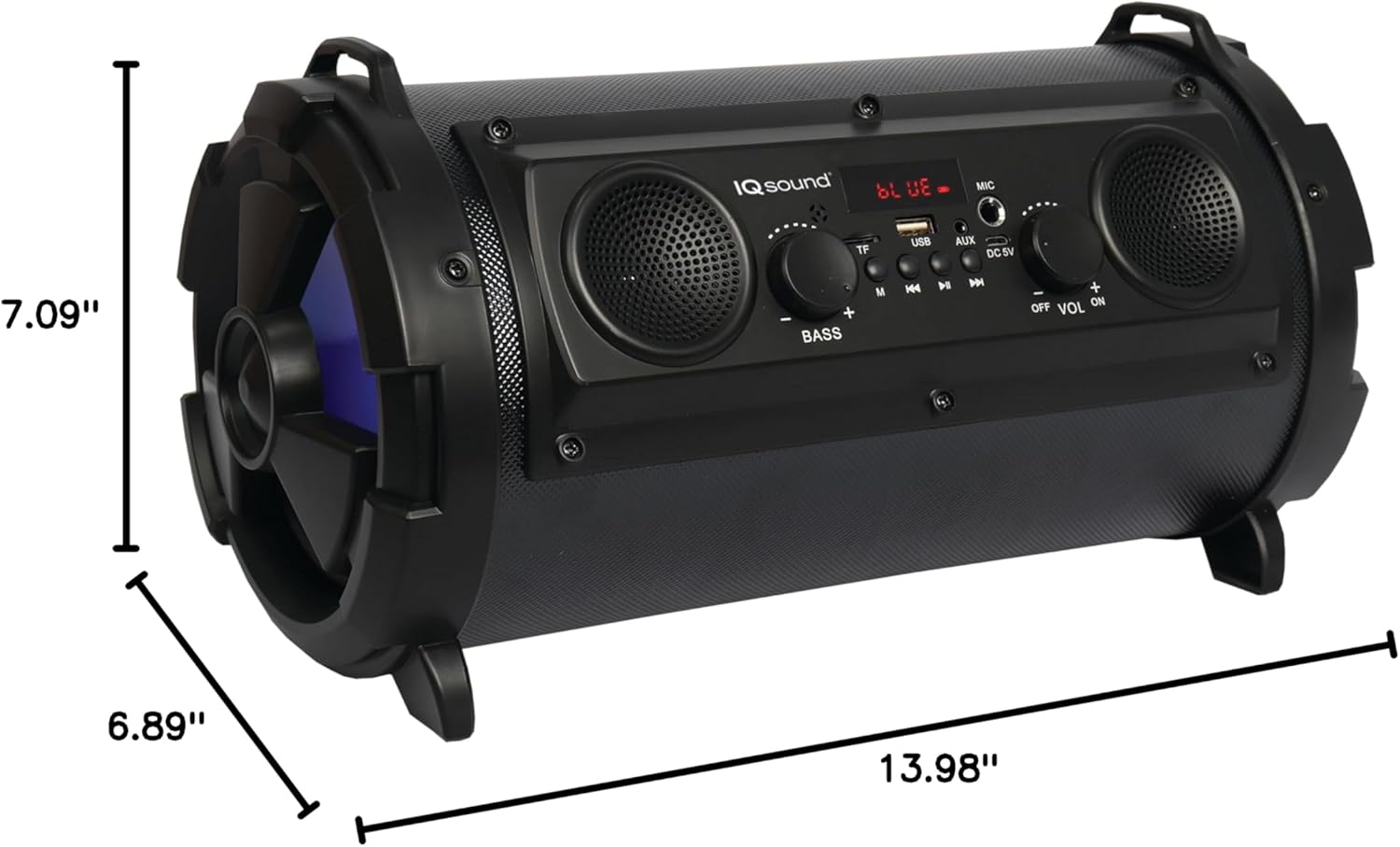
Figure 7: Product dimensions for the IQ-1525BT speaker.
| Өзгөчөлүк | Деталь |
|---|---|
| Модель аты | IQ-1525BT |
| Бренд | Supersonic |
| Динамик түрү | Портативдик Bluetooth динамиги |
| Чыгуу күчү | 16 Ватт |
| Динамик конфигурациясы | One 5-inch, Two 2-inch built-in speakers |
| Bluetooth версиясы | V4.0 |
| Зымсыз диапазон | 10 метрге чейин (32.8 фут) |
| Frequency Response | 100 Гцден 20 кГцге чейин |
| Киргизүү көлөмүtage | DC 5 вольт |
| Батарея | 3.7-volt, 2,400 mAh rechargeable battery |
| Киргизүүлөр | USB, Micro SD, AUX, Microphone |
| Өзгөчөлүктөр | FM Tuner (87.5 - 108.0MHz), Extra Bass (Passive Radiator), LED Lighting |
| Продукциянын өлчөмдөрү (D x W x Y) | 6.89" x 7.09" x 13.98" |
| Элемент Салмагы | 1 фунт |
| Материал | Пластик |
Кепилдик маалымат
This product comes with a Limited Warranty. For specific details regarding warranty coverage, terms, and conditions, please refer to the warranty card included in your product packaging or visit the official Supersonic webсайт. Кепилдик дооматтар үчүн сатып алганыңыздын далилин сактаңыз.
Колдоо
If you encounter any issues or have questions not covered in this manual, please contact Supersonic customer support for assistance. Contact information can typically be found on the product packaging or the official Supersonic webсайт.


