1. Продукт бүтүп калдыview
The Transcend TS512GMTE220S is a 512GB M.2 NVMe PCIe Gen3x4 Solid State Drive designed for high-performance computing. It utilizes the PCIe Gen3 x4 interface and NVMe 1.3 standard to deliver fast data transfer speeds, making it suitable for demanding applications and system upgrades. This SSD incorporates 3D NAND Flash memory and a DDR3 DRAM cache for enhanced performance and reliability.
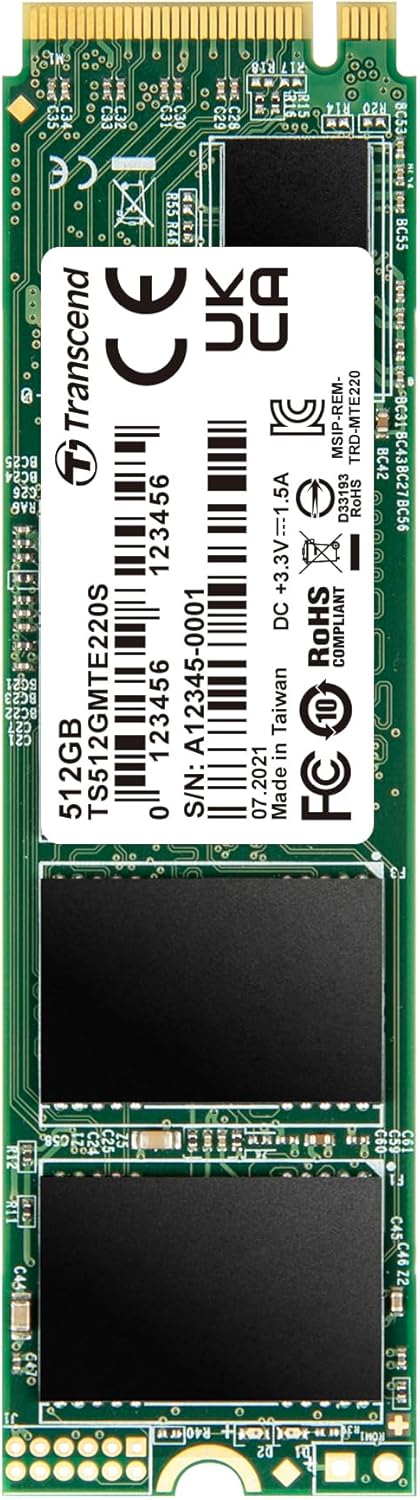
Негизги өзгөчөлүктөрү:
- PCIe Gen3 x4 interface and NVMe 1.3 standard.
- Up to 3,500 MB/s Read and 2,800 MB/s Write speeds.
- 3D NAND Flash memory and DDR3 DRAM cache.
- LDPC (Low-Density Parity Check) coding for data integrity.
- Built-in SLC caching technology for exceptional transfer speeds.
- Dynamic thermal throttling mechanism for stable performance.
2. Understanding PCIe and NVMe
The Transcend MTE220S SSD leverages advanced technologies for superior performance.
2.1. PCIe интерфейси
PCIe (or PCI Express®) is a high-speed serial computer expansion bus standard. It is a much faster interface than SATA (Serial ATA) for connecting a host computer to solid-state storage devices. PCIe uses lanes, each consisting of one transmit and one receive serial interface, allowing it to meet modern performance requirements.

2.2. NVMe Standard
NVMe (or NVM Express®) is a host controller interface standard specifically designed to address the needs of enterprise and client applications that utilize PCI Express-based solid-state storage. NVMe offers better performance vectors than AHCI (Advanced Host Controller Interface), including scalable bandwidth, increased IOPS (Input/Output Operations Per Second), and reduced latency.

3. Орнотуу жана орнотуу
Installing the Transcend TS512GMTE220S SSD requires a compatible M.2 slot on your motherboard that supports PCIe Gen3 x4 NVMe SSDs. Always ensure your system is powered off and unplugged before beginning installation.
3.1. Орнотууга чейинки текшерүү тизмеси:
- A compatible motherboard with an available M.2 slot (Key M, 2280 form factor).
- A small Phillips head screwdriver.
- An anti-static wrist strap (recommended).
- Белгилүү M.2 уячасынын жайгашкан жери жана орнотуу көрсөтмөлөрү үчүн сиздин компьютериңиздин колдонуучу нускамасы.
3.2. Орнотуу кадамдары:
- Өчүрүү: Shut down your computer completely and disconnect the power cable.
- Ачык иш: Эне платага кирүү үчүн компьютериңиздин корпусун ачыңыз.
- M.2 уячасын табыңыз: Identify an available M.2 slot on your motherboard. It typically has a small screw stand-off nearby.
- SSD салыңыз: Gently insert the Transcend MTE220S SSD into the M.2 slot at a slight angle. The gold contacts should slide in smoothly.
- Коопсуз SSD: Once fully seated, push the SSD down towards the motherboard and secure it with the small screw provided with your motherboard or the SSD.
- Ишти жабуу: Компьютериңиздин корпусун жаап, электр кабелин кайра туташтырыңыз.
- BIOS/UEFI конфигурациясы: Power on your computer. You may need to enter your system's BIOS/UEFI settings to ensure the new SSD is recognized and configured as a boot device if you intend to install an operating system on it.
- Операциялык системаны орнотуу/көчүрүү: Install your operating system or migrate existing data to the new SSD.

4. Иштөө принциптери
The Transcend MTE220S SSD is engineered with several technologies to ensure optimal performance and longevity.
4.1. 3D NAND Flash Memory
Unlike planar NAND memory, 3D NAND flash features memory cells stacked vertically in multiple layers. This technology overcomes density limitations of 2D planar NAND, delivering higher levels of performance, endurance, and larger capacities.

4.2. Endurance and Reliability
The MTE220S is engineered with LDPC (Low-Density Parity Check) coding, a powerful ECC (Error Correcting Code) algorithm, to ensure data integrity during transfers and storage. Coupled with high-quality 3D NAND flash chips and a dynamic thermal throttling mechanism, the SSD maintains superior endurance and stability, even under heavy workloads.

5. Maintenance and Software
To ensure your Transcend SSD operates at its best, Transcend provides the SSD Scope software.
5.1. Transcend SSD Scope Software
Transcend SSD Scope is a user-friendly software suite designed to help you maintain the health and optimize the performance of your Transcend SSD. It allows you to monitor the drive's condition, perform diagnostic scans, and manage various settings.

5.2. Key Functions of SSD Scope:
- Статусу: Displays drive information, S.M.A.R.T. status, capacity used, and wear-out indicator.
- Курал: Includes speed test, secure erase, and diagnostic scan functionalities.
- System Clone: Migrates all data from your original drive to a new Transcend SSD.
- Орнотулган программаны жаңыртуу: Updates your Transcend SSD to the latest firmware version.
- Орнотуулар: Allows you to enable/disable TRIM, minimize startup software, or start software at Windows startup.
For detailed instructions on downloading and using SSD Scope, please visit the official Transcend webсайт.
6. Кыйынчылыктарды
If you encounter issues with your Transcend TS512GMTE220S SSD, consider the following troubleshooting steps:
6.1. SSD Not Detected:
- Физикалык байланышты текшерүү: SSD M.2 уячасына туура орнотулганын жана бекитилгенин текшериңиз.
- BIOS/UEFI Орнотуулары: Verify that the M.2 slot is enabled in your system's BIOS/UEFI settings. Some motherboards may require specific configurations for M.2 NVMe drives.
- Драйверди орнотуу: Ensure your operating system has the necessary NVMe drivers. Windows 10 and newer typically include native NVMe support.
- Motherboard шайкештиги: Confirm your motherboard's M.2 slot supports PCIe NVMe SSDs, not just SATA M.2 SSDs.
6.2. Slow Performance:
- TRIM иштетилген: Ensure TRIM is enabled in your operating system. TRIM helps maintain SSD performance over time.
- Орнотулган программаны жаңыртуу: Check for and install the latest firmware for your SSD using Transcend SSD Scope.
- Системалык ресурстар: Close unnecessary background applications that might be consuming system resources.
- Термикалык жөнгө салуу: Ensure adequate airflow within your computer case to prevent the SSD from overheating and engaging thermal throttling.
- PCIe Lane Configuration: Verify that the M.2 slot is operating at its full PCIe Gen3 x4 speed. Refer to your motherboard manual.
6.3. Data Corruption/Errors:
- Run Diagnostic Scan: Use Transcend SSD Scope to perform a diagnostic scan on the drive.
- Check S.M.A.R.T. Status: Monitor the S.M.A.R.T. status via SSD Scope for any indicators of drive degradation.
- Operating System Integrity: Ensure your operating system is stable and free from malware or system file коррупция.
7. Техникалык шарттар
The following table outlines the technical specifications for the Transcend TS512GMTE220S 512GB M.2 NVMe SSD:
| Өзгөчөлүк | Спецификация |
|---|---|
| Модель номери | TS512GMTE220S |
| Санариптик сактоо сыйымдуулугу | 512 ГБ |
| Катуу диск интерфейси | PCIE x 4 |
| Байланыш технологиясы | USB (for external enclosures, not direct drive interface) |
| Бренд | Transcend |
| Өзгөчө өзгөчөлүк | Portable (when used with compatible external enclosure) |
| Катуу диск форма фактору | M.2 2280 |
| Hard Disk Description | Катуу абалдагы катуу диск |
| Шайкеш түзмөктөр | Desktop computers with compatible M.2 slots |
| Орнотуу түрү | Ички катуу диск |
| Окуу ылдамдыгы (макс) | 3,500 МБ/сек чейин |
| Жазуу ылдамдыгы (макс.) | 2,800 МБ/сек чейин |
| NAND Flash | 3D NAND Flash |
| DRAM кэш | DDR3 DRAM Cache |

8. Сапатты камсыздоо
Transcend SSDs undergo rigorous testing to ensure the highest level of quality and reliability. This includes comprehensive tests at all stages of production, covering aspects such as vibration resistance, temperature and humidity tolerance, speed performance, and overall functionality.

9. Кепилдик жана колдоо
Transcend products are backed by a limited warranty. For specific warranty terms and conditions applicable to your region and product, please refer to the official Transcend webсайт же сатып алууда камтылган кепилдик картасы.
9.1. Техникалык колдоо:
If you require technical assistance, have questions about installation, or need help with troubleshooting, please visit the official Transcend support website. You can find drivers, firmware updates, FAQs, and contact information for customer service.
- Transcend Official Webсайт: www.transcend-info.com
- Колдоо баракчасы: расмий колдоо бөлүмүн карагыла website for product-specific assistance.


