Introduction
This manual provides detailed instructions for the installation, operation, and maintenance of the Hanwha Techwin HCV-6070R 2MP Outdoor Vandal-Resistant Dome Camera. This camera is designed for outdoor security surveillance, offering 2-megapixel resolution, a 2.8-12mm manual varifocal lens, and night vision capabilities with a BNC connection.
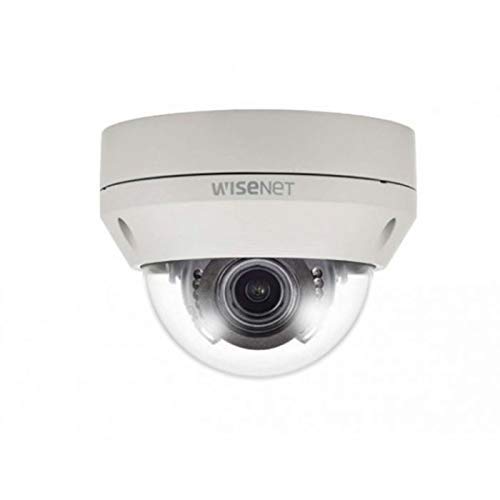
Figure 1: Hanwha Techwin HCV-6070R 2MP Outdoor Vandal-Resistant Dome Camera.
Коопсуздук маалыматы
Please read all safety instructions carefully before installing or operating the camera. Keep this manual for future reference.
- Ensure the power supply matches the camera's requirements to prevent electrical shock or fire.
- Камераны өтө жогорку температурага, нымдуулукка же коррозиялуу чөйрөлөргө дуушар кылбаңыз.
- Орнотуу жергиликтүү электр эрежелерине ылайык квалификациялуу кызматкерлер тарабынан аткарылышы керек.
- Линзаны күчтүү жарык булактарына узак убакытка түз тийгизүүдөн алыс болуңуз.
- Камераны бөлүктөргө бөлүүгө же өзгөртүүгө аракет кылбаңыз. Бул кепилдикти жокко чыгарат.
Пакеттин мазмуну
Пакетте бардык буюмдар бар экенин текшериңиз:
- Hanwha Techwin HCV-6070R Dome Camera (1 unit)
- Монтаждоо бурамалар жана анкерлер
- Орнотуу шаблону
- Quick Start Guide
- Waterproof Cap (if applicable)
Жайгашуу
1. Камераны орнотуу
The HCV-6070R is designed for wall mounting. Choose a suitable outdoor location that provides the desired surveillance coverage and is protected from direct impact.
- Use the provided installation template to mark the drilling holes on the wall.
- Drill holes according to the template and insert the wall anchors.
- Secure the camera base to the wall using the mounting screws.
- Камераны тууралаңыз viewing angle as needed before tightening all screws.
2. Зымдар жана байланыштар
The camera utilizes a BNC connection for video output and requires a separate power supply. Ensure all connections are secure and weatherproof for outdoor use.
- Видео туташуу: Connect a BNC cable from the camera's BNC port to the video input of your DVR (Digital Video Recorder).
- Кубат туташуу: Connect a 12V DC power adapter (not included) to the camera's power input. The camera operates at 8 watts.
- Зымсыз туташуу: The camera supports Wi-Fi for remote control and monitoring. Refer to the operating section for initial Wi-Fi setup.

2-сүрөт: Мисample of a BNC coaxial cable for video connection. Ensure a secure connection to the camera and DVR.
3. Баштапкы конфигурация
After physical installation and power-up, access the camera settings via your connected DVR or a compatible mobile application (Android controller type specified).
- Күн менен убакытты коюңуз.
- Configure network settings for Wi-Fi connectivity.
- Adjust video quality and recording preferences.
Камераны иштетүү
1. Видео мониторинг жана жаздыруу
The camera provides 2MP effective video resolution, capturing video at 1080p and a frame rate of 30 fps. Video is typically recorded in MPEG-4 format.
- Түз эфирге кирүү view жана жаздырылган тамак-ашtage through your connected DVR or the remote control application.
- Ensure your DVR is configured to record from the correct channel.
2. Adjusting Focus and Zoom
The HCV-6070R features a 2.8-12mm manual varifocal lens with optical zoom. Adjustments are made manually on the camera body.
- Loosen the focus and zoom locking screws on the camera lens assembly.
- Adjust the zoom ring to achieve the desired field of view.
- Adjust the focus ring until the image is clear and sharp.
- Tighten the locking screws to secure the settings.
3. Night Vision and Low Light Performance
Equipped with night vision and "Night Color" low light technology, the camera automatically switches to infrared mode in low light conditions to provide clear surveillance footage. The light source type is LED.
- Ensure no obstructions block the infrared LEDs on the camera.
- The camera will automatically activate its infrared illuminators when ambient light levels drop.
4. Motion Detection
The camera supports motion-only alerts. Configure motion detection zones and sensitivity settings through your DVR or the remote control application.
- Камеранын ичинде белгилүү бир аймактарды аныктаңыз view кыймылды аныктоо үчүн.
- Set the sensitivity level to minimize false alarms.
- Configure alert notifications (e.g., email, push notifications) via your DVR or application.
5. Алыстан башкаруу
The camera can be controlled remotely using a compatible Android application. Ensure the camera is connected to your Wi-Fi network.
- Download and install the Hanwha Techwin mobile application on your Android device.
- Follow the in-app instructions to add and connect to your HCV-6070R camera.
- Колдонмо аркылуу сиз жасай аласыз view жаша фооtage, access recordings, and adjust certain camera settings.
Техникалык тейлөө
Үзгүлтүксүз тейлөө камераңыздын оптималдуу иштешин жана узак иштөөсүн камсыздайт.
- Линзаны тазалоо: Gently wipe the camera lens with a soft, clean, lint-free cloth. For stubborn dirt, use a lens cleaning solution specifically designed for optical surfaces.
- Турак жайды тазалоо: Clean the camera's exterior housing with a damp кездеме. Катуу химиялык заттарды же абразивдүү тазалагычтарды колдонбоңуз.
- Кабелдик текшерүү: Periodically check all cables and connections for signs of wear, damage, or corrosion, especially for outdoor installations.
- Программалык камсыздоонун жаңыртуулары: Check the Hanwha Techwin website for any available firmware updates to ensure your camera has the latest features and security patches.
Проблемаларды чечүү
| Көйгөй | Мүмкүн себеп | Чечим |
|---|---|---|
| Видео чыгаруу жок | No power; Loose BNC connection; Incorrect DVR input selected. | Check power supply; Secure BNC cable; Select correct channel on DVR. |
| бүдөмүк же бүдөмүк сүрөт | Lens out of focus; Dirty lens. | Manually adjust focus (refer to Operating section); Clean the lens. |
| Түнкү көрүнүш иштебейт | IR LEDs blocked; Insufficient power; Camera stuck in day mode. | Clear obstructions; Verify power supply; Restart camera. |
| Кыймылды аныктоо иштебей жатат | Incorrect sensitivity settings; Motion detection zone not configured. | Adjust sensitivity; Configure motion detection zones in DVR/app. |
| Cannot connect via Wi-Fi | Incorrect Wi-Fi password; Camera out of range; Network issues. | Verify Wi-Fi credentials; Move camera closer to router; Check network status. |
Техникалык шарттар
| Модел | HCV-6070R |
| Бренд | HANWHA Techwin |
| Натыйжалуу Video Resolution | 2 MP (1080p) |
| Frame Rate | 30 кадр/сек |
| Линзанын түрү | 2.8-12mm Manual Varifocal Lens |
| Фокус түрү | Manual Focus |
| Чоңойтуу түрү | Оптикалык масштаб |
| Байланыш технологиясы | Wireless (Wi-Fi), BNC Connection |
| Power Source | Manual (requires external 12V DC power adapter) |
| Ватtage | 8 ватт |
| Ички/тышкы колдонуу | Сыртта |
| Өзгөчө өзгөчөлүк | Night Vision (Night Color low light technology) |
| Форма фактору | Купол |
| Монтаж түрү | Дубалга орнотуу |
| Шайкеш түзмөктөр | DVR |
| Башкаруу ыкмасы | Remote (Android Controller Type) |
| Эл аралык коргоо рейтинги | IP54 |
| Фото сенсор технологиясы | CMOS |
| Видео тартуу форматы | MPEG-4 |
| Эскертүү түрү | Кыймыл гана |
Кепилдик жана колдоо
Кепилдик жөнүндө маалымат жана техникалык колдоо алуу үчүн, расмий Hanwha Techwin компаниясына кайрылыңыз webсайтка же түздөн-түз кардарларды тейлөөгө кайрылыңыз. Сатып алуу квитанциясын кепилдик дооматтары үчүн сатып алуунун далили катары сактаңыз.
Өндүрүүчү: Hanwha
Биринчи жеткиликтүү болгон күнү: 19-февраль, 2019-жыл


