1. Киришүү
This manual provides essential information for the safe and efficient operation of your APC Smart-UPS 1500VA UPS Battery Backup, model SMT1500. This Uninterruptible Power Supply (UPS) is designed to provide reliable power protection for your electronic equipment, safeguarding against power outages, surges, and fluctuations. It features a pure sine wave output for compatibility with sensitive electronics and active PFC power supplies.
2. Коопсуздук маалыматы
Please read and understand all safety instructions before installing, operating, or maintaining the UPS. Failure to follow these instructions may result in equipment damage, personal injury, or death.
- Электр коопсуздугу: The UPS contains internal batteries and may present a shock hazard even when disconnected from the AC power source.
- Салмагы боюнча эскертүү: This unit is heavy. Always use proper lifting techniques and ensure adequate support when moving or installing. The item weighs approximately 60 pounds.
- Батареянын коопсуздугу: Do not dispose of batteries in a fire. Batteries may explode. Do not open or mutilate batteries. Released electrolyte is harmful to the skin and eyes. It may be toxic.
- Вентиляция: UPSтин айланасында жетиштүү желдетүүнү камсыз кылыңыз. Вентиляция тешиктерин жаап албаңыз.
- Үй ичинде гана колдонуу: This UPS is intended for indoor use only. Do not install the UPS where there is excessive dust, humidity, or extreme temperatures.
For detailed safety guidelines, refer to the official APC safety documentation.
3. Продукт бүтүп калдыview
The APC Smart-UPS 1500VA (SMT1500) is a high-performance Uninterruptible Power Supply designed to protect your valuable electronics from power disturbances. Key features include:
- 1500VA / 1000W capacity for robust power backup.
- Pure Sine Wave output for compatibility with sensitive equipment.
- 8 battery backup and surge protector outlets.
- LCD display for real-time status and configuration.
- Network-grade power conditioning and Automatic Voltage Regulation (AVR).
- Network manageable via serial, USB, or optional Ethernet.
3.1 алдыңкы панели

Сүрөт 3.1: Алдыңкы view of the APC Smart-UPS 1500VA, showing the LCD display and control buttons.
The front panel features an LCD display that provides critical information about the UPS status, battery charge, load, and various operational parameters. Control buttons allow for navigation through menus and configuration adjustments.
3.2 Арткы панель
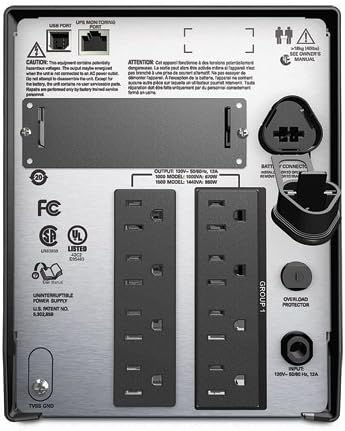
3.2-сүрөт: Арткы view of the APC Smart-UPS 1500VA, displaying the 8 outlets, USB port, and network management port.
The rear panel includes 8 outlets for connecting your devices, a USB port for communication with a computer, and a slot for an optional network management card. It also has the main power input and a ground screw.

3.3-сүрөт: Арткы view of the APC Smart-UPS 1500VA with the power cord connected, illustrating the input and output connections.
This image further illustrates the rear panel, specifically showing the attached power cord for the UPS input, and the arrangement of the output receptacles.
4. Орнотуу
Follow these steps to set up your APC Smart-UPS:
- Таңылганын ачуу: UPSти кылдаттык менен таңгактан чыгарып, аны жеткирүүнүн бузулушуна текшериңиз.
- Позициялоо: Place the UPS on a flat, stable surface in a well-ventilated area, away from direct sunlight, excessive heat, or moisture.
- Батареяны туташтыруу: The UPS battery may be disconnected for shipping. Refer to the battery connection instructions, typically found on the unit or in a quick-start guide. Ensure the battery is securely connected.
- Электр тогуна туташуу: Plug the UPS power cord into a grounded 120V AC outlet. The UPS will begin charging its battery. Allow the battery to charge for at least 24 hours before initial use to ensure full runtime capability.
- Жабдууларды туташтыруу: Plug your critical electronic equipment (computers, monitors, network devices) into the "Battery Backup + Surge Protection" outlets on the rear of the UPS. For non-critical devices that only require surge protection, use the "Surge Only" outlets if available.
- Байланыш кабелдерин туташтыруу: Connect the supplied USB cable from the UPS to your computer for power management software communication. An optional network management card can be installed for network monitoring.
- Күйгүзүү: Press the power button on the front panel to turn on the UPS.
5. UPSти иштетүү
5.1 Күйгүзүү/өчүрүү
- Күйгүзүү үчүн: Алдыңкы панелдеги кубат баскычын LCD күйгөнгө чейин басып туруңуз.
- Өчүрүү үчүн: Press and hold the power button until the LCD indicates "Power Off" or the unit shuts down.
5.2 ЖК дисплей багыттоо
The LCD display provides real-time information and allows for configuration. Use the navigation buttons (up, down, enter, escape) to browse through menus and adjust settings such as output voltage, sensitivity, and alarm options.
5.3 PowerChute Software
For advanced management and graceful shutdown of connected computers during extended power outages, install APC PowerChute software. This software can be downloaded from the official APC website. It provides monitoring, configuration, and event logging capabilities.
6. Техникалык тейлөө
6.1 Батареяны алмаштыруу
The UPS battery is a sealed lead-acid, AGM type and has a typical lifespan of 3-5 years, depending on usage and environmental conditions. When the battery needs replacement, the UPS will typically indicate this on the LCD or through an audible alarm. Only replace the battery with an APC-approved replacement battery cartridge (RBC).
- Always power off the UPS and disconnect it from the AC power source before attempting battery replacement.
- Follow the specific battery replacement instructions provided with your replacement battery or on the APC support webсайт.
- Эски батареяларды жоопкерчилик менен кайра иштетиңиз.
6.2 Тазалоо
Clean the exterior of the UPS with a soft, dry cloth. Do not use liquid cleaners or aerosol cleaners. Ensure ventilation openings are free from dust and debris.
7. Кыйынчылыктарды
This section provides solutions to common issues you may encounter with your APC Smart-UPS. For more complex problems, contact APC technical support.
| Көйгөй | Мүмкүн себеп | Чечим |
|---|---|---|
| UPS күйбөйт. | Battery not connected; UPS not plugged into AC; Low battery charge. | Ensure battery is fully connected. Plug UPS into a live AC outlet. Allow battery to charge for 24 hours. |
| UPS тынымсыз сигнал берет. | Батарея менен иштейт; Ашыкча жүктөлүү; Батареянын заряды аз. | Check AC input. Reduce connected load. Allow battery to charge. |
| "Overload" message on LCD. | Өтө көп түзмөк туташты. | Disconnect non-essential equipment until the overload warning clears. |
| "Replace Battery" message. | Батареянын иштөө мөөнөтү бүттү. | Order and install a new APC replacement battery cartridge (RBC). |
8. Техникалык шарттар
| Өзгөчөлүк | Деталь |
|---|---|
| Модел | SMT1500 |
| Кубаттуулугу | 1500VA / 1000W |
| Киргизүү көлөмүtage | 120 вольт |
| Output Waveform | Таза синус толкуну |
| Соода түйүндөрү | 8 (Battery Backup & Surge Protection) |
| Батарея түрү | Коргошун-кислота, AGM |
| Продукциянын өлчөмдөрү (Ж x В x D) | 8.62 x 6.73 x 17.28 дюйм |
| Элемент Салмагы | 60 фунт |
| Түс | Кара |
| Материал | Metal (Steel or Aluminum) |
9. Кепилдик жана колдоо
9.1 Amazon жаңыланган кепилдик
This product is part of the Amazon Renewed program. It has been professionally inspected and tested to work and look like new by Amazon-qualified suppliers. If not satisfied with the purchase, renewed products are eligible for replacement or refund under the Amazon Renewed Guarantee. Please refer to the Amazon Renewed Guarantee terms and conditions for full details.
9.2 Техникалык колдоо
For technical assistance, product registration, or further information, please visit the official APC website or contact APC customer support. Have your product model number (SMT1500) and serial number ready when contacting support.


