1. Киришүү
The ANCEL EU510 is a powerful and user-friendly OBD2 diagnostic scanner designed for both professional mechanics and home users. It provides comprehensive diagnostic functions for engine systems and includes an advanced battery test feature. This manual will guide you through the setup, operation, and maintenance of your ANCEL EU510 scanner.

Figure 1.1: ANCEL EU510 OBD2 Scanner, showing its compact design and clear display.
2. Продукт бүтүп калдыview
The ANCEL EU510 features a genuine 2.8-inch color TFT screen and a robust design for ease of use. Key components and controls are detailed below:
- Дисплей экраны: 2.8-inch color TFT screen for clear data display.
- OBDII туташтыргычы: Standard 16-pin connector for vehicle connection.
- ESC баскычы: Мурунку менюга кайтарат же операцияны жокко чыгарат.
- I/M баскычы: Quick access to I/M Readiness status for emissions checks.
- Help Button (i): Provides detailed explanations for diagnostic trouble codes (DTCs) and other functions.
- Жөнөтүүчү/өчүрүүчү баскычтар (Өйдө/Төмөн/Сол/Оң): Менюларда навигация жана тандоо үчүн колдонулат.
- OK баскычы: Тандоолорду ырастайт же кошумча менюга кирет.
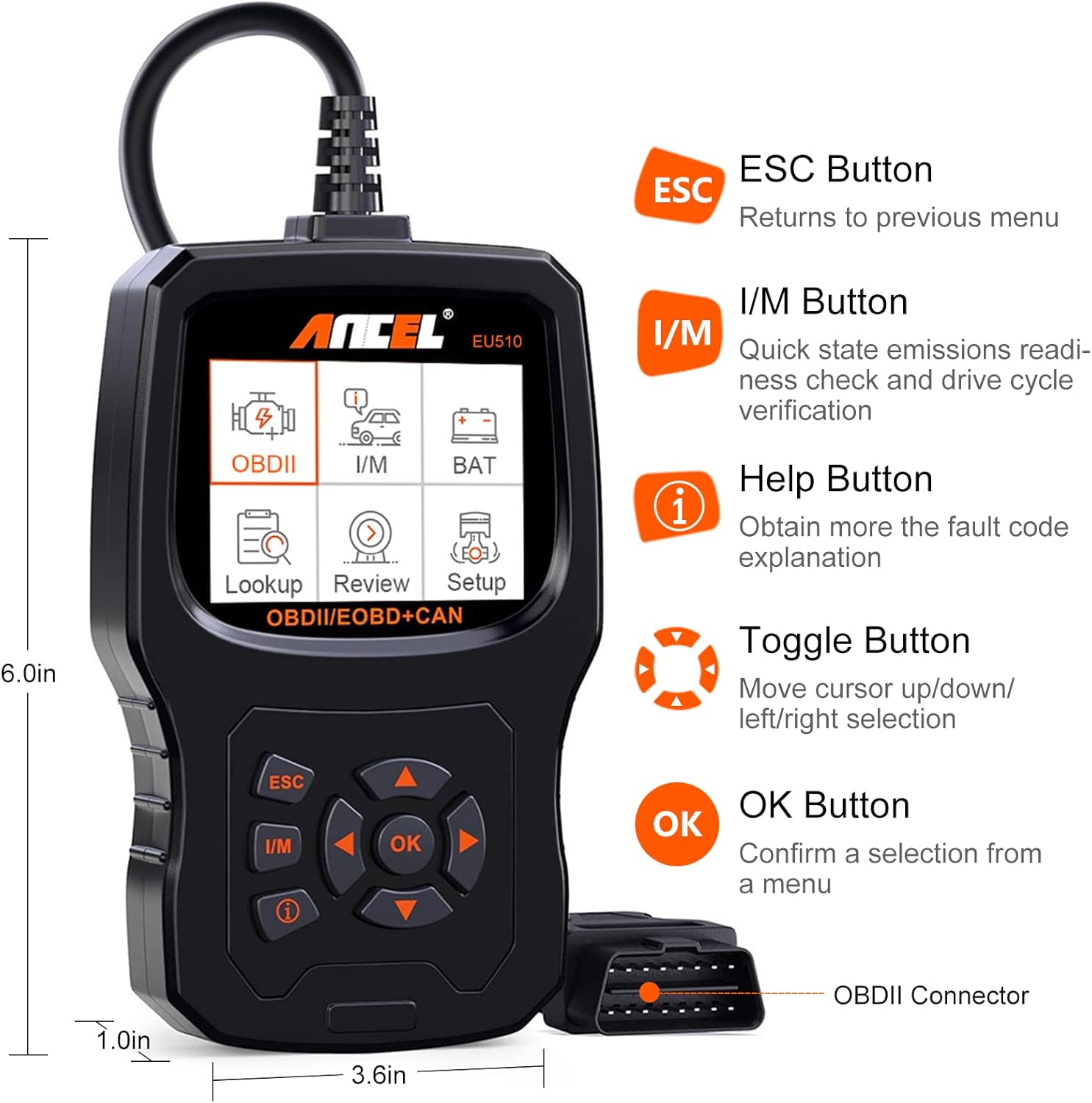
2.1-сүрөт: Детальдуу view of the ANCEL EU510, highlighting its buttons and approximate dimensions.
3. Баштоо (Орнотуу)
To begin using your ANCEL EU510 scanner, follow these simple steps:
- OBDII портун табыңыз: The OBDII port is typically located under the dashboard on the driver's side of the vehicle. Refer to your vehicle's owner's manual if you cannot find it.
- Сканерди туташтыруу: Plug the ANCEL EU510's OBDII connector firmly into the vehicle's OBDII port. The scanner will power on automatically.
- От алдырууну күйгүзүү: Унаанын от алдыруучу системасын "ON" абалына коюңуз (кыймылдаткыч өчүрүлгөн).
- Диагнозду баштоо: The scanner is now ready to perform diagnostic functions.
4. Иштөө нускамалары
The ANCEL EU510 offers a variety of diagnostic functions accessible through its intuitive menu system.
4.1. Негизги меню навигациясы
колдонуу Toggle Buttons (Up/Down/Left/Right) to navigate through the main menu options displayed on the screen. Press the OK баскычы to select an option or enter a sub-menu. Press the ESC баскычы мурунку экранга кайтуу үчүн.
4.2. Кыйынчылык коддорун окуу жана тазалоо
This is the primary function for diagnosing engine issues. The scanner can read both pending and permanent Diagnostic Trouble Codes (DTCs).
- Негизги менюдан тандаңыз "OBDII".
- Тандоо "Коддорду окуу" чейин view учурдагы, күтүлүп жаткан жана туруктуу DTCлер.
- Коддорду тазалоо үчүн, тандаңыз "Коддорду өчүрүү". Note: Clearing codes will turn off the Malfunction Indicator Lamp (MIL) but will not fix the underlying issue. Ensure the problem is resolved before clearing codes.
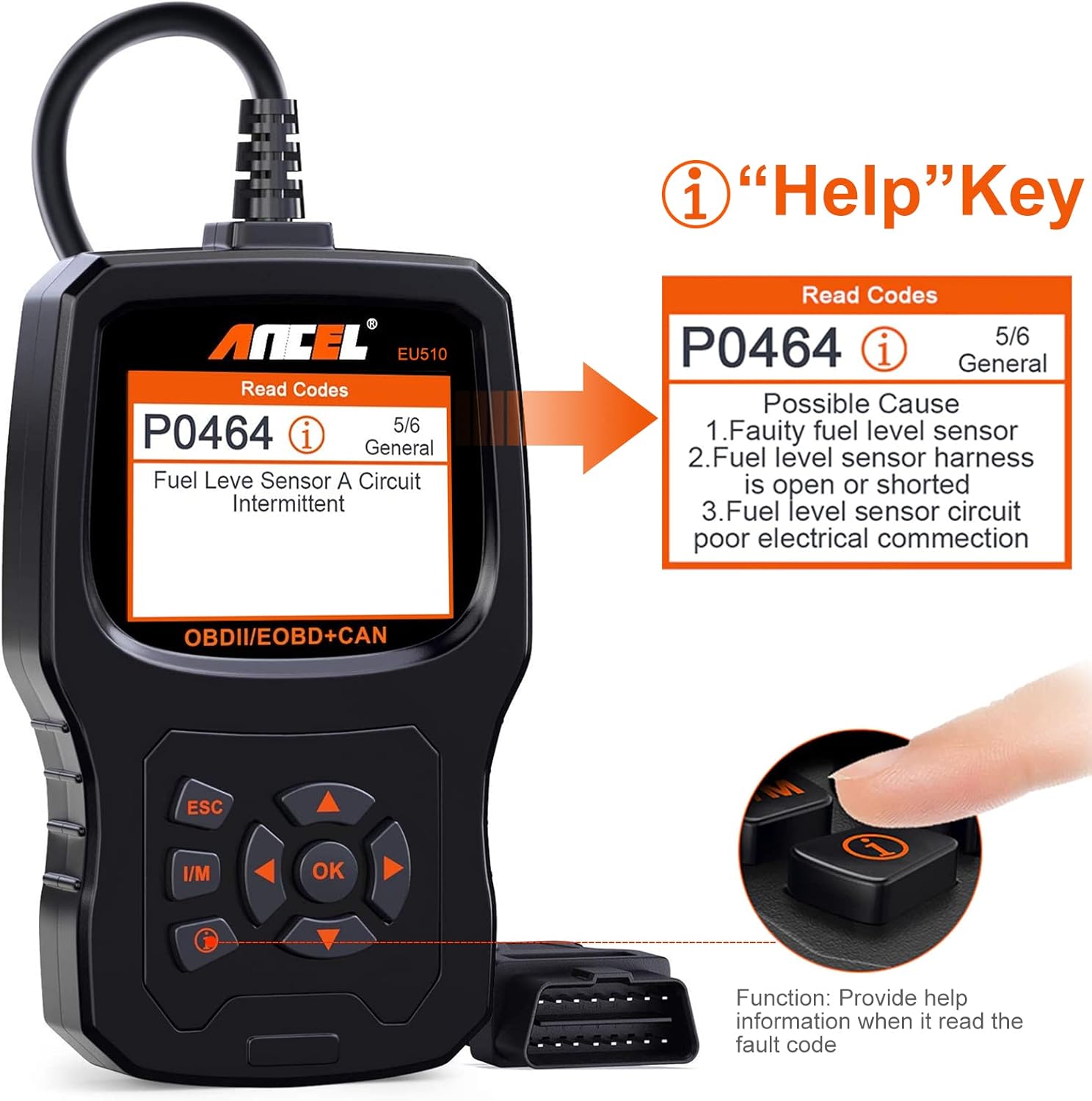
Figure 4.1: The 'Help' button provides detailed explanations for diagnostic trouble codes, aiding in understanding the root cause of issues.
4.3. I/M даярдык абалы
The I/M Readiness function checks the status of the vehicle's emission-related monitoring systems. This is crucial for passing emission tests.
- Негизги менюдан тандаңыз "I/M".
- The screen will display the status of various monitors (e.g., Misfire, Fuel System, O2 Sensor). A green checkmark indicates a complete test, while an orange 'X' indicates an incomplete test.

Figure 4.2: I/M Readiness screen indicating the status of various vehicle monitors for emissions testing.
4.4. Батареянын абалын текшерүү
The ANCEL EU510 includes an upgraded graphing battery test function, allowing you to monitor the real-time status of your vehicle's battery.
- Негизги менюдан тандаңыз "BAT".
- Сканер батареянын кубаттуулугун көрсөтөтtage and status, often in a graphical format for easier interpretation.
4.5. Түз эфирдеги маалымат агымы
View real-time data from the vehicle's sensors, such as engine RPM, vehicle speed, oxygen sensor readings, and more. This data can be displayed in text or graph format.
- From the OBDII menu, select "Маалыматтар агымы".
- Choose the parameters you wish to monitor.
4.6. Other OBDII Functions
The EU510 supports a full suite of OBDII functions:
- Фреймди тоңдуруу: Displays a snapshot of vehicle conditions when a fault code is stored.
- O2 сенсор тести: Retrieves oxygen sensor monitor test results.
- EVAP системасы сыноо: Буулануучу эмиссия системасын сыноодон өткөрөт.
- Борттогу мониторинг сыноосу: Белгилүү бир компоненттердин/тутумдардын борттогу диагностикалык мониторинг сыноолорунун жыйынтыктарын алат.
- Унаа жөнүндө маалымат: Унаа идентификациялык номерин (VIN), калибрлөө ID (CALID) жана калибрлөө текшерүү номерин (CVN) чыгарат.
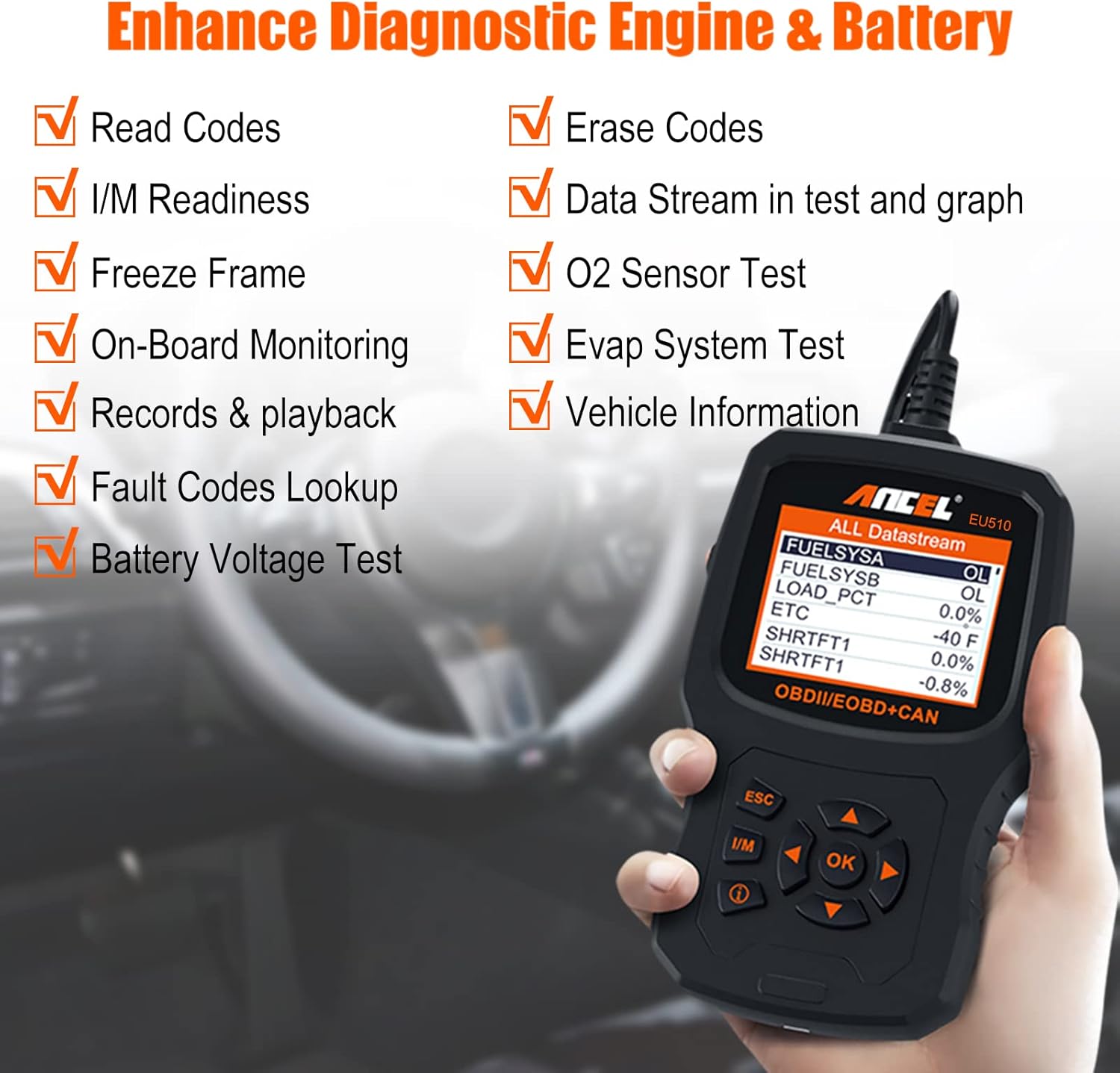
Figure 4.3: ашыкview of enhanced diagnostic features available on the ANCEL EU510.

Figure 4.4: Visual representation of the main functions accessible from the ANCEL EU510's interface.
4.7. Тил жөндөөлөрү
The ANCEL EU510 supports 16 languages, including English, German, French, Spanish, Italian, and more.
- Негизги менюдан тандаңыз "Setup".
- Тандоо "Тил" жана каалаган тилди тандаңыз.

Figure 4.5: The ANCEL EU510 supports multiple languages for user convenience.
4.8. Продукт видеосу бүттүview
For a visual guide on the ANCEL EU510's features and operation, please watch the official product video below:
Видео 4.1: Аткаминер бүттүview of the ANCEL EU510 Vehicle OBD2 Scanner, demonstrating its key diagnostic and code reading capabilities.
5. Техникалык тейлөө
To ensure the longevity and optimal performance of your ANCEL EU510 scanner, follow these maintenance guidelines:
- Тазалоо: Сканердин сыртын тазалоо үчүн жумшак, кургак чүпүрөктү колдонуңуз. Абразивдүү тазалоочу каражаттарды же эриткичтерди колдонуудан алыс болуңуз.
- Сактагыч: Store the device in a clean, dry environment away from extreme temperatures, direct sunlight, and excessive dust.
- Программалык камсыздоо жаңыртуулары: ANCEL provides lifetime free software updates. Regularly check the official ANCEL website for the latest software versions to ensure compatibility with newer vehicle models and improved functionality.
6. Кыйынчылыктарды
If you encounter issues while using your ANCEL EU510, consider the following common troubleshooting steps:
- Кубат жок: Ensure the OBDII connector is securely plugged into the vehicle's port and the vehicle's ignition is in the 'ON' position. Check the vehicle's fuse for the OBDII port if the issue persists.
- Шилтеме катасы: If the scanner fails to link with the vehicle, verify that the vehicle supports the OBDII protocol (most vehicles sold in the UK since 2000 do). Check for a stable connection and ensure the ignition is on.
- Код табылган жок: If a specific code is not found in the database, ensure your scanner's software is up to date. Use the "Help" button (i) for immediate on-screen explanations of complex professional vocabulary and repair advice.
- Slow Operation: The EU510 uses a 32MB flash memory chip for fast processing. If you experience slow operation, ensure no other diagnostic tools are connected to the vehicle's OBDII port.
7. Техникалык шарттар
| Өзгөчөлүк | Description |
|---|---|
| Бренд | ANCEL |
| Модель номери | EU510 |
| Тtage | 12 вольт |
| Элемент Салмагы | 480 г |
| Пакеттин өлчөмдөрү | 25.9 x 18 x 4.3 см |
| Дисплей | 2.8 дюймдук түстүү TFT экран |
| Эс | 32 MB Flash Chip |
| Колдоого алынган протоколдор | ISO9141, KWP2000, J1850 PWM, J1850 VPW, CAN |
| Колдоого алынган тилдер | 16 languages (English, German, French, Spanish, Italian, etc.) |
8. Кепилдик жана колдоо
ANCEL is committed to providing excellent products and quality services. Your ANCEL EU510 comes with:
- Өмүр бою акысыз жаңыртуулар: The technical team continuously updates the database and software to ensure optimal performance and compatibility.
- Кардарларды колдоо: For any inquiries or technical assistance, please contact ANCEL customer support via email.



