1. Киришүү
This manual provides detailed instructions for the installation, configuration, and operation of the Ubiquiti UAP-IW-HD UniFi in-Wall 802.11ac Wave2 Wi-Fi Access Point. The UAP-IW-HD is designed to deliver high-performance Wi-Fi coverage within indoor environments, integrating discreetly into standard in-wall electrical junction boxes. It supports the latest 802.11ac Wave2 Wi-Fi standard, offering fast wireless speeds and improved efficiency.
2. Коопсуздук маалыматы
Бул көрсөтмөлөрдү окуп, аткарып жана сактап коюңуз. Бардык эскертүүлөргө көңүл буруңуз. Өндүрүүчү көрсөткөн тиркемелерди/кошумча жабдууларды гана колдонуңуз.
- Вентиляция: Эч кандай желдетүүчү тешиктерди жаап албаңыз. Өндүрүүчүнүн көрсөтмөлөрүнө ылайык орнотуу.
- Кубат булагы: Only use power supplies specified by the manufacturer. This device is designed to be powered by Power over Ethernet (PoE).
- Орнотуу: Installation should be performed by qualified personnel. Ensure proper grounding.
- Курчап турган чөйрө: Радиаторлор, жылуулук регистрлери, мештер же башка аппараттар (анын ичинде) сыяктуу жылуулук булактарынын жанына орнотпоңуз amplifiers) that produce heat. Do not expose to dripping or splashing.
3. Пакеттин мазмуну
Сиздин пакетиңизде төмөнкү заттар бар экенин текшериңиз:
- Ubiquiti UAP-IW-HD UniFi in-Wall 802.11ac Wave2 Wi-Fi Access Point
- Монтаждоо плитасы
- Бурамалар жана дубал анкерлери
- Ыкчам баштоо колдонмосу (бул санариптик колдонмодо камтылган эмес)
4. Продукт бүтүп калдыview
The UAP-IW-HD is designed for discreet in-wall installation, providing robust Wi-Fi and wired connectivity.

Сүрөт 1: Алдыңкы View. This image displays the front of the UAP-IW-HD, featuring its clean white design, a subtle blue LED indicator at the top, and the UniFi logo.

2-сүрөт: Бурчтуу View. An angled perspective of the device, highlighting its slim profile and the location of the reset button on the side.
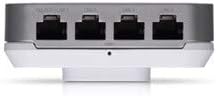
3-сүрөт: Төмөнкү порттор. This image shows the bottom edge of the UAP-IW-HD, revealing four Gigabit Ethernet ports. One port supports PoE Passthrough (PoE OUT/LAN1), while the others are standard LAN ports.

4-сүрөт: Арткы View. The back of the device, illustrating the mounting points and the primary 'PoE IN + DATA' Ethernet port used for power and uplink connection.
LED көрсөткүчүнүн абалы
- Көк: Device is powered on and operating correctly.
- Жаркылдаган көк: Device is booting up or being located in the UniFi Controller.
- Өчүк: Device is powered off or LED is disabled in UniFi Controller.
5. Орнотуу жана орнотуу
The UAP-IW-HD is designed for in-wall installation, replacing a standard wall plate.
5.1. Пререквизиттер
- A standard single-gang or double-gang electrical junction box in the wall.
- An Ethernet cable run to the junction box, connected to a PoE+ (802.3at) compliant switch or PoE injector.
- A computer with the UniFi Network Controller software installed (available from ui.com/download/unifi).
5.2. Аппараттык камсыздоону орнотуу
- Жупташтыруу кутучасын даярдаңыз: Ensure power to the junction box is off. Remove the existing wall plate.
- Ethernet туташуусу: Connect the Ethernet cable from your PoE+ source to the 'PoE IN + DATA' port on the back of the UAP-IW-HD (refer to Figure 4).
- Аппаратты орнотуу: Align the UAP-IW-HD with the junction box. Secure it using the provided screws. Ensure the device is flush with the wall.
- Күйгүзүү: Restore power to the junction box. The LED indicator on the UAP-IW-HD should illuminate blue (possibly flashing initially).
5.3. Software Configuration (UniFi Network Controller)
- Launch Controller: Open the UniFi Network Controller software on your computer.
- Түзмөктү табуу: The UAP-IW-HD should appear in the 'Devices' section as 'Pending Adoption'.
- Adopt Device: Click 'Adopt' next to the UAP-IW-HD. The controller will provision the device. This may take a few minutes.
- Wi-Fi'ды конфигурациялоо: Once adopted, navigate to 'Settings' > 'Wi-Fi' to create or modify your wireless networks (SSIDs).
- Configure LAN Ports: The LAN ports on the bottom of the UAP-IW-HD can be configured for network access. The 'PoE OUT/LAN1' port can provide PoE passthrough to power another device (e.g., a VoIP phone).
6. Кирүү чекитин иштетүү
Once configured, the UAP-IW-HD operates as a high-performance Wi-Fi access point and a wired network switch.
- Кош тилкелүү операция: The device simultaneously broadcasts Wi-Fi networks on both 2.4 GHz and 5 GHz frequencies, allowing client devices to connect to the optimal band for performance.
- Зымдуу туташуу: The four Gigabit Ethernet ports provide wired network access for devices such as computers, smart TVs, or other network-enabled equipment.
- PoE Passthrough: The 'PoE OUT/LAN1' port can deliver Power over Ethernet to compatible devices, simplifying cabling for certain installations.
- Башкаруу: All operational aspects, including Wi-Fi settings, client monitoring, and firmware updates, are managed through the UniFi Network Controller.
7. Техникалык тейлөө
Regular maintenance ensures optimal performance and longevity of your UAP-IW-HD.
- Программалык камсыздоонун жаңыртуулары: Regularly check for and apply firmware updates via the UniFi Network Controller to ensure security and access to new features.
- Тазалоо: Gently wipe the exterior of the device with a soft, dry cloth. Do not use liquid cleaners or aerosol sprays.
- Экологиялык текшерүү: Ensure the area around the device remains free from obstructions to maintain proper ventilation.
8. Кыйынчылыктарды
If you encounter issues with your UAP-IW-HD, refer to the following common solutions:
- Түзмөк күйбөй жатат:
- Verify the Ethernet cable is securely connected to the 'PoE IN + DATA' port.
- Ensure the PoE source (switch or injector) is providing 802.3at compliant power.
- Check the power supply to the PoE source.
- Device Not Adopted in Controller:
- Ensure the UAP-IW-HD and the UniFi Controller are on the same network segment or that routing is correctly configured.
- Try restarting the UniFi Network Controller software.
- Perform a factory reset on the UAP-IW-HD by pressing and holding the reset button (refer to Figure 2) for approximately 10 seconds.
- Wi-Fi начар иштеши:
- Check for potential interference from other wireless devices or networks.
- Түзмөктүн микропрограммасы жаңыртылганын текшериңиз.
- Adjust Wi-Fi channel and power settings in the UniFi Controller.
9. Техникалык шарттар
| Модель аты | UAP-IW-HD-US |
| Бренд | Ubiquiti |
| Байланыш технологиясы | 802.11ac, Ethernet, Wi-Fi |
| Зымсыз байланыш стандарты | 2.4 GHz Radio Frequency, 5 GHz Radio Frequency, 802.11ac Wave2 |
| Жыштык тилкесинин классы | Кош тилкелүү |
| Антенна түрү | Ички |
| Ethernet порттору | 4 x Gigabit Ethernet (1 x PoE IN + Data, 3 x LAN, 1 x PoE OUT/LAN1) |
| Өзгөчөлүктөр | Access Point Mode, WPS (Wi-Fi Protected Setup) |
| Камтуу | Indoor single-room coverage |
| Күч ыкмасы | 802.3at PoE+ |
| Операция системасы | UniFi OS |
| Өлчөмдөрү (H x W x D) | Approximately 4 in x 3.5 in x 1.5 in (102.9 x 89.5 x 32.2 mm) |
| Салмагы | Болжол менен 0.5 фунт (8 унция) |
10. Кепилдик жана колдоо
Ubiquiti products are covered by a limited warranty. For detailed warranty information, please refer to the official Ubiquiti website. For technical support, documentation, and community forums, visit community.ui.com or help.ui.com.


