1. Киришүү
The WAVLINK-AC1200 WN575A3 is a versatile networking device designed to enhance your wireless network coverage and performance. It functions as a WiFi Range Extender (Repeater), Wireless Access Point (AP), and Wireless Router, offering flexible solutions for various networking needs. With dual-band technology (2.4GHz and 5GHz) and a combined speed of up to 1200Mbps, it provides a stable and high-speed internet connection for your devices.
2. Продукт бүтүп калдыview
2.1 Негизги өзгөчөлүктөрү
- Dual-Band AC1200: Simultaneous 2.4GHz (300Mbps) and 5GHz (867Mbps) for a total of 1200Mbps Wi-Fi speed.
- 3-ин-1 Функциясы: Supports Repeater, Access Point, and Router modes to meet diverse networking requirements.
- High Power Design: Equipped with four external antennas for extended Wi-Fi coverage and improved signal penetration.
- Оңой орнотуу: Simple configuration via web браузер же WPS баскычы.
- Ethernet порттору: Includes two 10/100Mbps Ethernet ports for wired connections.
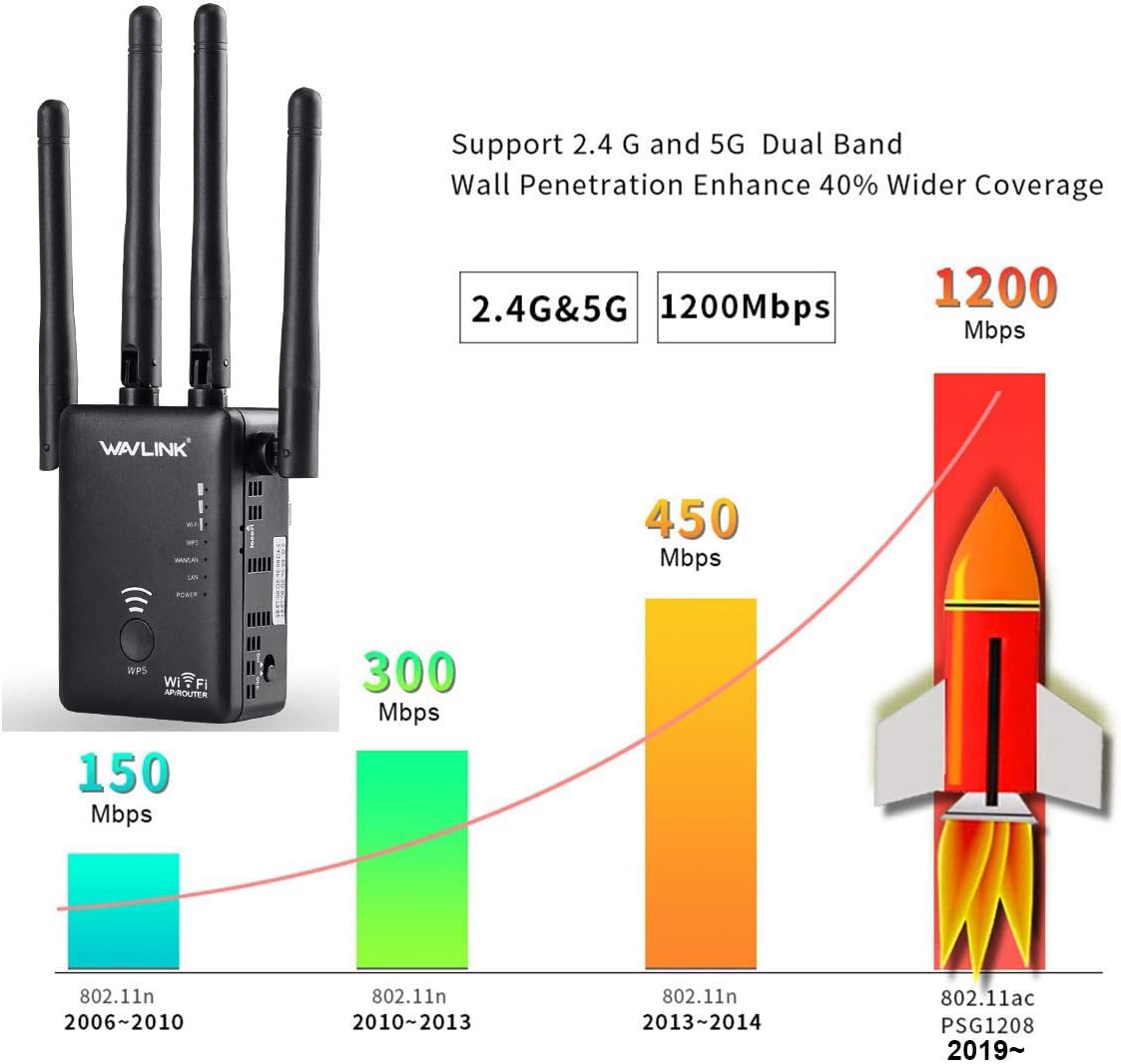
Image: The WAVLINK-AC1200 WN575A3 device highlighting its dual-band capabilities (2.4G and 5G) and speed performance up to 1200Mbps, demonstrating its ability to enhance network speed and coverage.
2.2 Пакеттин мазмуну
- 1 x WAVLINK-AC1200 WN575A3 WiFi Range Extender
- 1 x RJ45 Networking Cable
- 1 x Ыкчам орнотуу колдонмосу
2.3 Түзмөктүн жайгашуусу

Сүрөт: алдыңкы view of the WAVLINK-AC1200 WN575A3 WiFi Range Extender, showing the WPS button and various LED indicators for power, Wi-Fi, LAN, and WAN status.
The device features several LED indicators and ports:
- Power LED: Кубаттын абалын көрсөтөт.
- WPS баскычы: For quick and secure connection to a router.
- Wi-Fi LED жарыктары: Indicate 2.4GHz and 5GHz Wi-Fi activity.
- LAN/WAN Ports: Two Ethernet ports for wired connections, functioning as LAN or WAN depending on the operating mode.
- Калыбына келтирүү баскычы: Заводдун демейки жөндөөлөрүн калыбына келтирүү үчүн колдонулат (көбүнчө кичинекей тешик баскычы).
3. Орнотуу
Before starting, ensure your main router is powered on and functioning correctly. The WAVLINK-AC1200 WN575A3 can be set up via a web browser or using the WPS function.
3.1 Күйгүзүү жана баштапкы туташуу
- Plug the WAVLINK-AC1200 WN575A3 into a power outlet.
- Кубат индикатору туруктуу күйгүчө күтө туруңуз.
- Connect your computer or mobile device to the extender's default Wi-Fi network (e.g., "WAVLINK_EXT" or similar, check the device label). No password is required for the initial connection.
3.2 Repeater Mode Setup (Extending Existing Wi-Fi)
Repeater mode extends the coverage of your existing wireless network.
- After initial connection, open a web браузерди жана демейки IP даректи киргизиңиз (мисалы, http://192.168.10.1) же домендик аталыш (мисалы, http://ap.setup) түзмөктүн этикеткасында табылган.
- Log in with the default username and password (usually 'admin' for both).
- Орнотуу чеберинен "Кайталоо режимин" тандаңыз.
- The device will scan for available Wi-Fi networks. Select your main router's Wi-Fi network (SSID) from the list.
- Негизги роутериңиздин Wi-Fi тармагы үчүн сырсөздү киргизиңиз.
- You can choose to keep the same SSID for the extended network or create a new one.
- Confirm settings and wait for the device to restart.
- Relocate the extender to an optimal position between your router and the desired coverage area. Ensure the signal strength from your main router is at least 70% (3 bars) at the extender's location for best performance.

Image: A diagram illustrating the recommended placement for the WiFi repeater. It shows that the repeater should be positioned between the main router and the weak signal area, ideally where it can receive at least three bars of Wi-Fi signal from the router.
3.3 Access Point (AP) Mode Setup (Creating a New Wi-Fi Network)
AP режими зымдуу интернет байланышын зымсыз тармакка айландырат.
- Connect the WAVLINK-AC1200 WN575A3 to your modem or router using an Ethernet cable plugged into the LAN/WAN port.
- Follow steps 1-2 from Repeater Mode Setup to access the web интерфейс.
- Орнотуу чеберинен "AP режимин" тандаңыз.
- Configure the new Wi-Fi network's SSID (name) and password.
- Confirm settings and wait for the device to restart.
3.4 Router Mode Setup (Primary Router Functionality)
Router mode allows the device to act as a primary router, connecting directly to your modem.
- Connect the WAVLINK-AC1200 WN575A3 to your modem using an Ethernet cable plugged into the LAN/WAN port.
- Follow steps 1-2 from Repeater Mode Setup to access the web интерфейс.
- Select "Router Mode" from the setup wizard.
- Choose your internet connection type (e.g., PPPoE, Dynamic IP, Static IP) and enter the required details provided by your ISP.
- Configure the new Wi-Fi network's SSID (name) and password.
- Confirm settings and wait for the device to restart.
4. Иштөө режимдери
4.1 Repeater Mode
In Repeater mode, the device wirelessly connects to your existing router and re-broadcasts its signal, effectively extending the Wi-Fi coverage to areas with weak or no signal. This mode is ideal for eliminating Wi-Fi dead zones in your home or office.
4.2 Кирүү чекитинин (AP) режими
AP mode transforms a wired network connection into a wireless one. If you have an Ethernet port in a room but no Wi-Fi, you can connect the WN575A3 to the Ethernet port, and it will create a new Wi-Fi hotspot, allowing wireless devices to connect.
4.3 Маршрутизатор режими
In Router mode, the WN575A3 acts as a standalone wireless router. It connects directly to your modem via an Ethernet cable and creates a new private network, providing internet access to all connected devices, both wired and wireless. This is suitable for small offices or homes without an existing router.
5. Техникалык тейлөө
- Оптималдуу жайгаштыруу: Place the extender in an open area, away from obstructions like thick walls, metal objects, and large electrical appliances that can interfere with Wi-Fi signals.
- Программалык камсыздоонун жаңыртуулары: Regularly check the WAVLINK official webмикропрограммаларды жаңыртуу үчүн сайт. Микропрограмманы жаңыртуу ишти жакшыртууга, жаңы функцияларды кошууга жана мүчүлүштүктөрдү оңдоого жардам берет.
- Тазалоо: Түзмөктү таза жана чаңсыз кармаңыз. Тазалоо үчүн жумшак, кургак чүпүрөк колдонуңуз. Суюк тазалоочу каражаттарды колдонбоңуз.
- Вентиляция: Ensure the device has adequate ventilation to prevent overheating. Do not cover the ventilation holes.
- Коопсуздук: Use strong, unique passwords for your Wi-Fi network and the extender's administration page.
6. Кыйынчылыктарды
6.1 Орнотулгандан кийин Интернетке кирүү мүмкүн эмес
- Негизги роутерди текшерүү: Негизги роутериңизде активдүү интернет байланышы бар экенин текшериңиз.
- Re-configure: Re-run the setup wizard, ensuring you select the correct Wi-Fi network and enter the correct password for your main router.
- Сигнал күчү: In Repeater mode, ensure the extender is placed within a good signal range of your main router (at least 3 bars).
- IP дареги чатак: If using Router mode, ensure there is no IP address conflict with your modem.
6.2 Weak or Unstable Signal
- Кеңейтүүчүнү көчүрүү: Move the extender closer to your main router, ensuring it's still halfway between the router and the desired coverage area.
- Интерференцияны болтурбоо: Keep the extender away from devices that emit strong electromagnetic interference (e.g., microwaves, cordless phones).
- Антенналарды тууралоо: Try adjusting the position of the external antennas for better signal reception.
6.3 Кирүү мүмкүн эмес Web Башкаруу барагы
- Байланышты текшерүү: Ensure your device is connected to the extender's Wi-Fi network or via an Ethernet cable.
- Correct IP/Domain: IP дарегин же домен атын эки жолу текшериңиз (мисалы, http://192.168.10.1 or http://ap.setup).
- Браузер кэшин тазалоо: Өзүңүздү тазалаңыз web браузердин кэшин жана cookie файлдарын же башка браузерди колдонуп көрүңүз.
- Түзмөктү баштапкы абалга келтирүү: If all else fails, perform a factory reset by pressing and holding the Reset button for 5-10 seconds while the device is powered on. This will revert all settings to default, and you will need to reconfigure the device.
7. Техникалык шарттар
| Өзгөчөлүк | Description |
|---|---|
| Модель номери | WN-575A3 |
| Зымсыз стандарт | 802.11a/b/g/n/ac |
| Frequency Band | Кош тилкелүү (2.4 ГГц жана 5 ГГц) |
| Маалыматтарды өткөрүү ылдамдыгы | Up to 1200 Mbps (300Mbps 2.4GHz + 867Mbps 5GHz) |
| Антенналар | 4 х тышкы антенналар |
| Ethernet порттору | 2 x 10/100Mbps LAN/WAN Ports |
| Продукциянын өлчөмдөрү | 4.75 x 3.75 x 5 дюйм |
| Элемент Салмагы | 8 унция |
8. Кепилдик жана колдоо
WAVLINK products typically come with a manufacturer's warranty. Please refer to the warranty card included in your package or visit the official WAVLINK website for detailed warranty terms and conditions. For technical support, troubleshooting assistance, or further inquiries, please contact WAVLINK customer support through their official webсайт же продукт документациясында көрсөтүлгөн байланыш маалыматы.
Расмий WAVLINK Webсайт: www.wavlink.com


