1. Киришүү
The CHACON DiO 1.0 Nano On/Off Plugs and 3-Channel Remote Control system allows you to wirelessly control your lamps and electrical appliances. This system offers individual, centralized, or automatic control via the included remote control, a compatible switch, or a smartphone when integrated with a home automation hub. This manual provides essential information for safe and effective use of your device.
2. Пакеттин мазмуну
Пакетиңизде бардык буюмдар бар экенин текшериңиз:
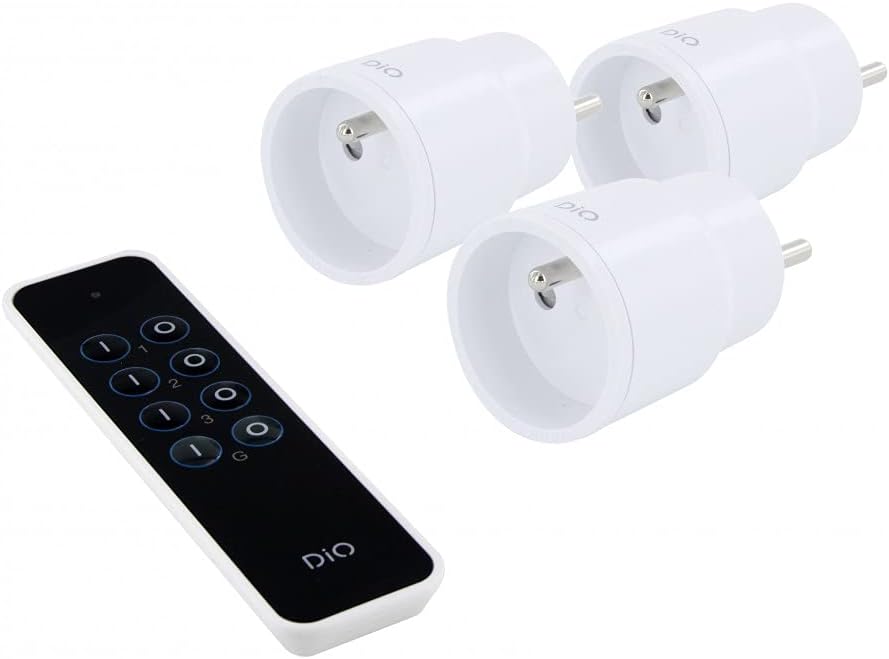
- 3 x DiO 1.0 Nano On/Off Plugs
- 1 x 3-Channel Remote Control
- 1 x CR2032 - 3V Battery (for remote control)

1-сүрөт: Contents of the CHACON DiO 1.0 Nano Plugs and Remote Control package. Shows three compact white plugs and a sleek black remote control.
3. Техникалык шарттар
| Бренд | ЧАКОН |
| Модель номери | 54895 |
| Байланыш технологиясы | Радио жыштыгы (RF) |
| Жыштык | 433.92 MHz (DiO 1.0) |
| Максималдуу диапазон | 30 метрге чейин (тоскоолдуксуз) |
| Power Supply (Plugs) | 230VAC / 50Hz |
| Maximum Load (Plugs) | 2300 Вт |
| Шайкеш лампа түрлөрү | LED, Halogen, Energy-saving, Incandescent |
| Алыстан башкаруунун батареясы | 1 x CR2032 (3V) Lithium Manganese Dioxide |
| Number of Channels (Remote) | 3 channels + 1 group |
| Maximum Emitters Supported | Up to 32 commands |
| Өлчөмдөрү (болжолдуу) | 16cm (L) x 9cm (W) x 5cm (H) (Package) |
| Салмагы (болжол менен) | 250g (Package) |

2-сүрөт: Illustration of the wireless connection between a DiO plug and the remote control, highlighting the 230VAC/50Hz power and CR2032 3V battery for the remote.
4. Орнотуу
4.1. Алыстан башкаруунун батареясын орнотуу
- Пульттун артындагы батарея отсегин табыңыз.
- Бөлүмдүн капкагын ачыңыз.
- Insert the CR2032 3V battery, ensuring the correct polarity (+/-).
- Батарея уясынын капкагын бекем жабыңыз.
4.2. Pairing Plugs with the Remote Control
Each plug needs to be paired with the remote control to establish communication. Follow these steps for each plug:
- Plug the DiO Nano On/Off Plug into a standard wall socket. The LED indicator on the plug will flash slowly.
- Within 5 seconds of plugging in the device, press the ON button for the desired channel (1, 2, or 3) on your remote control.
- The LED indicator on the plug will flash rapidly to confirm successful pairing.
- Repeat this process for each plug, assigning each to a different channel (or the same channel if you wish to control multiple plugs simultaneously).
Эскертүү: If the pairing is not successful within 5 seconds, unplug the device and try again. Each plug can be linked to up to 32 different DiO 1.0 transmitters.
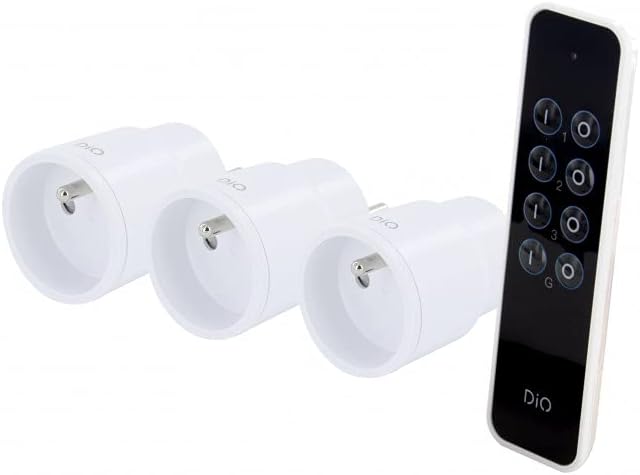
3-сүрөт: The remote control and three nano plugs, ready for pairing and use.
5. Иштөө
Once paired, you can control your appliances using the remote control.
5.1. Individual Control
- To turn on an appliance connected to a specific plug, press the ON button corresponding to its assigned channel (1, 2, or 3).
- To turn off an appliance, press the ӨЧҮРҮҮ button corresponding to its assigned channel (1, 2, or 3).

4-сүрөт: A hand operating the DiO remote control to switch an appliance on or off.
5.2. Топтук көзөмөл
The remote control includes a group function to control all paired plugs simultaneously.
- To turn on all paired appliances, press the G ON баскычы.
- To turn off all paired appliances, press the G OFF баскычы.
5-сүрөт: A user comfortably controlling home lighting with the DiO remote control from a sofa.
6. Техникалык тейлөө
- Тазалоо: Use a soft, dry cloth to clean the plugs and remote control. Do not use liquid cleaners or abrasive materials.
- Батареяны алмаштыруу: Replace the CR2032 battery in the remote control when its range decreases or it stops responding. Ensure proper disposal of used batteries according to local regulations.
- Сактагыч: Түзмөктөрдү узак убакыт бою колдонбогон учурда салкын, кургак жерде, күндүн түз тийген нурларынан жана өтө жогорку температурадан алыс сактаңыз.
7. Кыйынчылыктарды
| Көйгөй | Мүмкүн себеп | Чечим |
|---|---|---|
| Plug does not respond to remote control. |
|
|
| LED on plug does not flash during pairing. |
|
|
| Алыстан башкаруу пульту азайды. |
|
|
8. Коопсуздук маалыматы
- Аппаратты ажыратпаңыз же өзгөртпөңүз.
- Түзмөктөрдү сууга, нымдуулукка же өтө жогорку температурага дуушар кылбаңыз.
- Ensure the total load of connected appliances does not exceed 2300W.
- Балдар жетпеген жерде сактаңыз.
- Үй ичинде гана колдонуңуз.
- Dispose of electronic waste and batteries responsibly according to local regulations.
9. Кепилдик жана колдоо
This product comes with a 2-year warranty. For technical support or warranty claims, please contact your retailer or the manufacturer directly. Information regarding spare parts availability is not provided.
Manufacturer: Chacon


