Introduction
This manual provides essential information for the safe and efficient operation of your Pioneer VSX-834 7.2-Channel AV Receiver. Please read these instructions thoroughly before use and retain them for future reference.
Коопсуздук маалыматы
ЭСКЕРТҮҮ: Бул продукт сизге химиялык заттардын, анын ичинде Коргошундун таасирин тийгизиши мүмкүн, ал Калифорния штатында рак жана тубаса кемтик же башка репродуктивдүү зыян алып келээри белгилүү. Көбүрөөк маалымат алуу үчүн өтүңүз www.P65Warnings.ca.gov.
- Бул шайманды жамгырга же нымга тийгизбеңиз.
- Вентиляция тешиктерин жаап албаңыз. Өндүрүүчүнүн көрсөтмөлөрүнө ылайык орнотуу.
- Радиаторлор, жылуулук регистрлери, мештер же башка аппараттар (анын ичинде) сыяктуу жылуулук булактарынын жанына орнотпоңуз ampкөтөргүчтөр) жылуулукту пайда кылуучу.
- Өндүрүүчү тарабынан көрсөтүлгөн тиркемелерди/аксессуарларды гана колдонуңуз.
- Бардык тейлөөлөрдү квалификациялуу тейлөө кызматкерлерине тапшырыңыз.
Продукт бүттүview
The Pioneer VSX-834 is a 7.2-channel AV receiver designed to deliver an immersive home theater experience. It supports the latest audio and video formats, offering versatile connectivity and advanced sound calibration features.
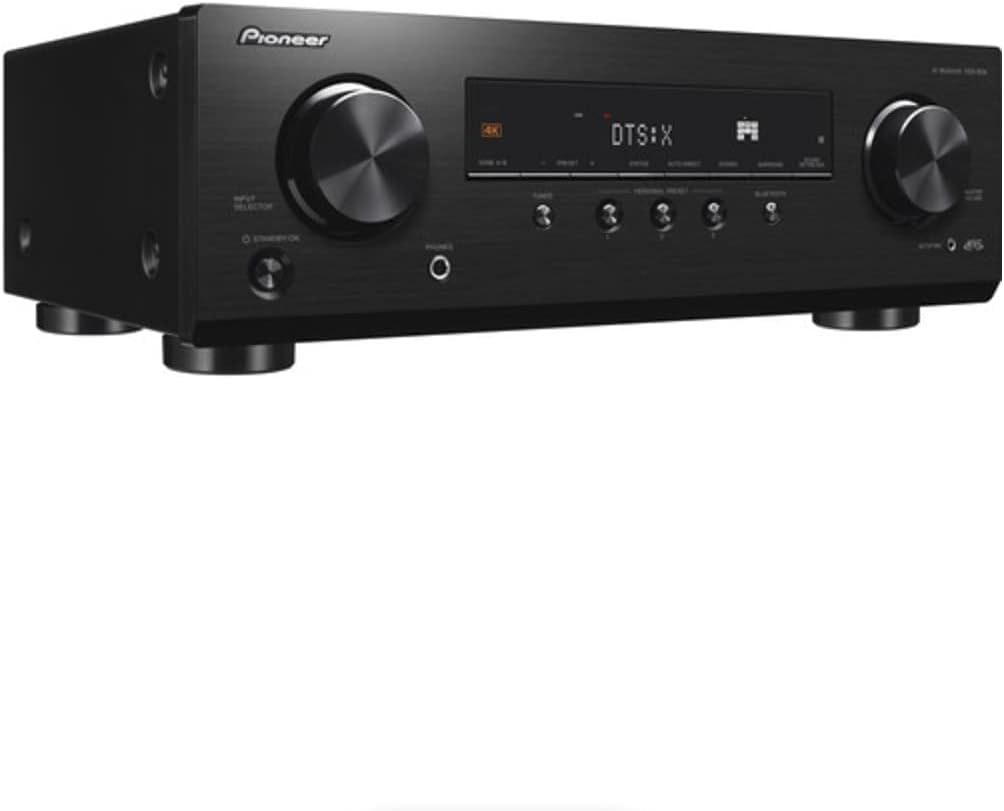
Сүрөт 1: Алдыңкы view of the Pioneer VSX-834 AV Receiver.
Негизги өзгөчөлүктөрү
- 4K видео колдоо: Supports pass-through for HDR10, HLG (Hybrid Log-Gamma), and Dolby Vision signals. All HDMI terminals support 4K (60p/4:4:4/24-bit), wide color gamut (BT.2020), and HDCP 2.2.
- Иммерсивдүү аудио: Compatible with Dolby Atmos and DTS:X audio formats, including Dolby Atmos Height Virtualizer and DTS Virtual:X for virtual surround effects without physical height or surround speakers.
- MCACC (Multi-Channel Acoustic Calibration System): Pioneer's proprietary system automatically compensates for differences in speaker size, level, and distance, and equalizes response for optimal acoustic environment.
- Zone B Audio Output: Expand main zone sound by connecting wireless headphones, allowing music playback in another room.
- Камтылган Bluetooth: Stream audio wirelessly from compatible devices (Ver. 4.2 + LE) with A2DP/AVRCP profiles and SBC/AAC codecs.
- Жеке алдын ала орнотуу: Save up to three preferred settings (volume, listening mode) for quick recall via the front panel button or remote control.
Жайгашуу
1. таңгактан чыгаруу
Carefully remove the AV Receiver and all accessories from the packaging. The box should contain the AC Receiver, remote control, setup microphone, and FM/AM antennas.
2. Байланыштар
Ensure the receiver is powered off and unplugged before making any connections.

Figure 2: Rear panel connections for the Pioneer VSX-834 AV Receiver.
- HDMI туташуулары: Connect your source devices (Blu-ray player, game console, streaming device) to the HDMI IN ports. Connect your TV or projector to the HDMI OUT port.
- Динамик байланыштары: Connect your speakers to the corresponding terminals on the rear panel. Pay attention to polarity (+/-) for each speaker. The receiver supports 5.1ch or 7.1/5.1.2ch configurations.
- Антенна туташуулары: Радио кабыл алуу үчүн берилген FM жана AM антенналарын туташтырыңыз.
- Күч: Once all connections are made, plug the power cord into an AC outlet.
3. Initial Configuration (MCACC)
Use the supplied setup microphone and the MCACC system to automatically calibrate your speakers for optimal sound performance in your listening environment. Follow the on-screen instructions displayed on your connected TV.
Иштөө нускамалары
1. Негизги операция
- Күйгүзүү/өчүрүү: басыңыз STANDBY/ON алдыңкы панелдеги же алыстан башкаруудагы баскыч.
- Киргизүүнү тандоо: колдонуу КИРГИЗГИЧ ТАНДООЧУ knob on the front panel or the input buttons on the remote control to choose your desired source (e.g., BD/DVD, GAME, CBL/SAT).
- Үндү көзөмөлдөө: тууралаңыз МАСТЕР ТОМУ алдыңкы панелдеги баскыч же VOLUME +/- алыстан башкаруудагы баскычтар.
2. Өркүндөтүлгөн функциялар
- Bluetooth агымы: басыңыз BLUETOOTH button on the front panel to activate Bluetooth mode. Pair your device with the receiver to stream audio.
- Personal Presets: To save current settings, press and hold the PERSONAL PRESET button for three seconds. To recall, press the button briefly. Up to three presets can be stored.
- Zone B Аудио: Connect wireless headphones to the Zone B audio output terminals to enjoy audio from the main zone in a separate location.
Техникалык тейлөө
- Тазалоо: Агрегатты жумшак, кургак чүпүрөк менен сүртүңүз. Абразивдүү тазалагычтарды же эриткичтерди колдонбоңуз.
- Вентиляция: Ensure adequate ventilation around the receiver to prevent overheating. Do not block any vents.
- Электр кабели: Электр шнурунун бузулушу бар-жоктугун дайыма текшерип туруңуз.
Проблемаларды чечүү
- Кубат жок: Электр шнурунун бекем сайылганын жана розетка иштеп жатканын текшериңиз.
- Үн жок: Verify speaker connections, input selection, and volume level. Ensure the mute function is not active.
- Видео жок: Check HDMI cable connections between the source, receiver, and TV. Confirm correct input selection on both the receiver and TV.
- Bluetooth туташуу маселелери: Ensure the receiver is in Bluetooth mode and your device is in pairing mode. Check for interference from other wireless devices.
For more detailed troubleshooting, refer to the comprehensive online manual available on the Pioneer support webсайт.
Техникалык шарттар
| Продукциянын өлчөмдөрү | 17.1 x 12.6 x 6.8 дюйм |
| Элемент Салмагы | 19 фунт |
| Модель номери | VSX834 |
| Байланыш технологиясы | Bluetooth |
| Жалпы HDMI порттору | 5 |
| Аудио коддоо | DTS |
| Аудио чыгаруу режими | Курчап |
| Көлөмдүү үн каналынын конфигурациясы | 7.2 канал |
| Өндүрүүчү | Пионер |
Кепилдик жана колдоо
For warranty information and customer support, please visit the official Pioneer website or contact your local dealer. Keep your purchase receipt as proof of purchase for warranty claims.
Online resources and additional support can be found at: Пионердик колдоо


