1. Киришүү
The myTouchSmart In-Wall Push-Button Countdown Timer Switch (Model 40953) is designed to simplify your routine by providing convenient automation for indoor or outdoor lighting and various appliances. This timer replaces any standard single-pole light switch and offers preset countdown times to automatically turn off connected devices. It is compatible with LED, CFL, incandescent, and halogen bulbs.

The product packaging displays the in-wall digital countdown timer switch, highlighting its key features such as preset countdown times and compatibility with various bulb types.
2. Коопсуздук маалыматы
Before beginning installation, read all instructions carefully. Improper installation can result in electrical shock or fire. Always consult a qualified electrician if you are unsure about any part of the installation process.
- КУЧТУ ӨЧҮРҮҮ at the circuit breaker or fuse box before wiring.
- Бул аппарат Улуттук электр кодексине жана жергиликтүү эрежелерге ылайык орнотууга арналган.
- Жез зымды гана колдонуңуз.
- NEUTRAL WIRE REQUIRED операция үчүн.
3. Орнотуу
3.1 Керектүү куралдар
- Бурагыч (Phillips жана Flathead)
- Wire Strippers
- Электр лентасы
- Тtage Сыноочу (сунушталат)
3.2 Электр зымдары боюнча нускамалар
- Электр кубатын өчүрүңүз to the switch location at the circuit breaker or fuse box. Verify power is off using a voltage сыноочу.
- Remove the existing wall plate and switch from the wall box.
- Carefully disconnect the wires from the old switch. Identify and label the LINE (hot), LOAD, NEUTRAL, and GROUND wires. The timer requires a neutral wire for proper operation.
- Connect the wires to the myTouchSmart timer using the screw terminals:
- туташтыруу LINE (hot) wire to the terminal labeled 'LINE'.
- туташтыруу LOAD wire (to the light/appliance) to the terminal labeled 'LOAD'.
- туташтыруу БЕЙТРАЛ wire (typically white) to the terminal labeled 'NEUTRAL'.
- туташтыруу ЖЕР wire (typically bare copper or green) to the terminal labeled 'GROUND'.
- Бардык зым байланыштары коопсуз экенин текшериңиз.
- Зымдуу таймерди дубал кутучасына этияттык менен киргизиңиз.
- Mount the timer to the wall box using the provided screws.
- Attach the desired color faceplate (White or Light Almond included, wallplate not included).
- Автоматтык өчүргүчтөгү кубаттуулукту калыбына келтириңиз.

арткы view of the timer, displaying the screw terminals for Line, Load, Neutral, and Ground connections, essential for proper installation.

А тарап проfile of the timer, showing its depth and how it fits into a standard electrical wall box, with wiring connections visible.
4. Иштөө нускамалары
The myTouchSmart timer features an ON/OFF door panel that conceals preset buttons and LEDs when closed. Opening the door provides access to all countdown options.
4.1 Activating a Countdown
- Open the front door panel to reveal the preset buttons.
- Press the desired countdown button: 5 Min, 10 Min, 30 Min, 60 Min, 2 Hour, or 4 саат.
- A blue LED indicator light next to the selected button will illuminate, confirming the countdown is active. The connected device will turn on and remain on for the selected duration, then automatically turn off.
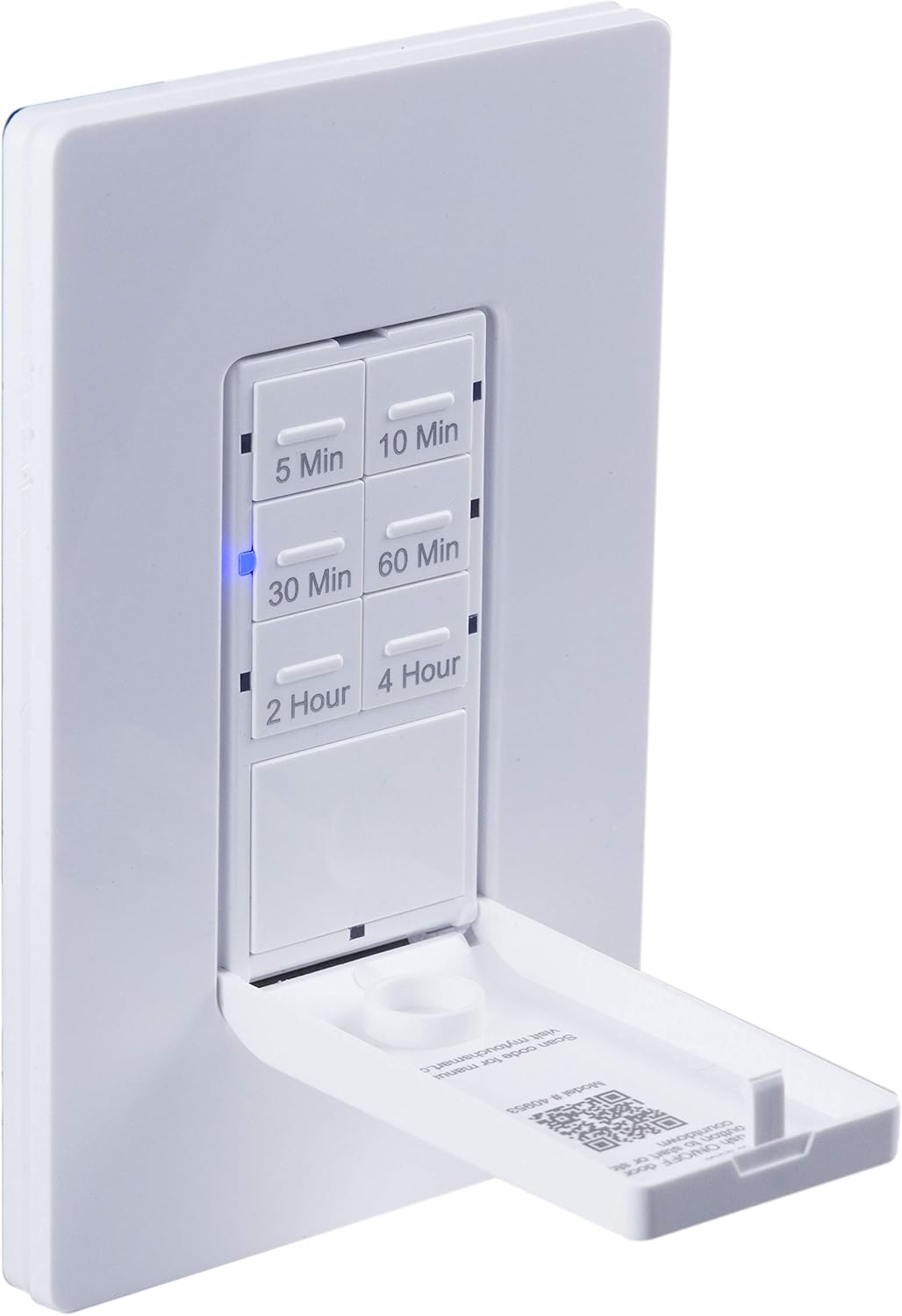
Жакын план view of the timer with its front door panel open, exposing the six preset countdown buttons (5, 10, 30, 60 minutes, 2, and 4 hours) and the manual ON/OFF button.

The in-wall timer with its door open, showing the preset buttons and a blue LED illuminated next to the '30 Min' button, indicating an active countdown.

A hand pressing one of the preset countdown buttons on the timer, demonstrating user interaction.
4.2 Manual ON/OFF Override
- To manually turn the connected device ON or OFF at any time, press the large ON/OFF button located at the bottom of the timer (this button is also the door panel when closed).
- Pressing this button will override any active countdown. If no countdown is active, it functions as a standard ON/OFF switch.
4.3 Тиркемелер
This timer is suitable for a variety of applications, including:
- Ички жана тышкы жарыктандыруу
- Чыгаруучу желдеткичтер
- Жылыткычтар
- Other compatible appliances

An image illustrating various applications for the timer, including controlling indoor/outdoor lights, ceiling fans, and exhaust fans.
5. Техникалык тейлөө
The myTouchSmart timer requires minimal maintenance. Follow these guidelines:
- Тазалоо: Disconnect power at the circuit breaker before cleaning. Wipe the surface with a soft, damp кездеме. Катуу химиялык заттарды же абразивдүү тазалагычтарды колдонбоңуз.
- Текшерүү: Periodically check for any loose connections or damage to the switch. If any damage is observed, discontinue use and consult a qualified electrician.
6. Кыйынчылыктарды
If you experience issues with your myTouchSmart timer, refer to the following common problems and solutions:
| Көйгөй | Мүмкүн себеп | Чечим |
|---|---|---|
| Таймер күйбөйт/өчпөй жатат. | No power to the switch; Incorrect wiring (Line/Load reversed); Loose connections. | Check circuit breaker. Verify wiring connections (Line to Line, Load to Load, Neutral, Ground). Ensure all wires are securely fastened. |
| Countdown does not activate. | Button not fully pressed; Faulty unit. | Ensure the desired countdown button is pressed firmly until the blue LED illuminates. If issue persists, contact customer support. |
| LED indicators not working. | No power; Unit malfunction. | Check power supply. If the timer functions but LEDs do not, contact customer support. |
| Үзгүлтүксүз иштөө. | Loose wiring; Overload. | Check all wiring connections for tightness. Ensure the connected load does not exceed the timer's electrical ratings. |
Эгер көйгөйдү чечүү кадамдары көйгөйдү чечпесе, кардарларды колдоо менен байланышыңыз.
7. Техникалык шарттар
| Өзгөчөлүк | Спецификация |
|---|---|
| Модель номери | 40953 |
| Иштөө режими | Automatically, Off, Push Button |
| Учурдагы рейтинг | 15 Amps |
| Operating Voltage | 120 VAC, 60 Гц |
| Резистивдик жүк | 15A |
| Вольфрам жүк | 1200 Вт |
| Мотор рейтинги | 1 / 2 HP |
| Шайкеш лампалар | LED, CFL, ысытуу, галоген |
| Монтаж түрү | Дубалга орнотуу |
| Өлчөмдөрү (L x W x Y) | 2.75 x 4.85 x 6.85 дюйм |
| Элемент Салмагы | 5.9 унция |
| Нейтралдуу зым | Талап кылынат |
| Камтылган компоненттер | In-Wall Timer, White/Light Almond Door Panels |
8. Кепилдик жана колдоо
Кепилдик жөнүндө маалымат жана техникалык колдоо алуу үчүн, өндүрүүчүнүн расмий өкүлүнө кайрылыңыз webсайтка же кардарларды тейлөө бөлүмүнө кайрылыңыз. Сатып алганыңыздын далили катары сатып алуу дүмүрчөгүңүздү сактаңыз.
Өндүрүүчү: myTouchSmart
UPC: 030878409537
Webсайт: www.mytouchsmart.com (Сураныч, расмий текшерүү webэң акыркы колдоо маалыматы үчүн сайт.)


