1. Киришүү
This manual provides detailed instructions for the installation, operation, and maintenance of your Renogy MPPT 30A Solar Charge Controller. Designed for 12V/24V DC systems, this controller optimizes power harvesting from your solar panels and efficiently charges various battery types, including Lithium, AGM, and Gel. Please read this manual thoroughly before installation and use to ensure optimal performance and safety.
2. Продукт бүтүп калдыview
Негизги өзгөчөлүктөрү:
- Innovative MPPT Design: Die-cast aluminum design ensures excellent heat dissipation. Renogy's Maximum Power Point Tracking technology offers up to 99% tracking efficiency and 98% peak conversion efficiency, providing optimal charging even in cloudy conditions.
- Automatic 12V/24V Detection: 12V же 24V DC системасын автоматтык түрдө аныктайтtages. The LCD screen and multiple LED indicators display solar charging information, battery operation, customizable parameters, and error codes.
- Comprehensive System Protection: Features self-diagnostic capabilities to protect against reverse polarity, battery overcharge, battery over-discharge, overload, short circuit, and reverse current.
- Advanced 4-Stage Заряддоо: Provides 4-stage charging (Bulk, Absorption, Float, and Equalization) for lead-acid batteries and 2-stage charging (Bulk and Absorption) for Lithium batteries, including Lithium reactivation.
- Versatile Load Control: Connect DC appliances directly to optional load terminals to monitor consumption or configure timed controls directly from the controller.
- Алыстан байкоо: The RS232 communication port allows the Renogy Rover to connect with the Renogy BT-1 Bluetooth module (recommended, not included) for monitoring system status and productivity via the Renogy DC Home App.
Продукт компоненттери:
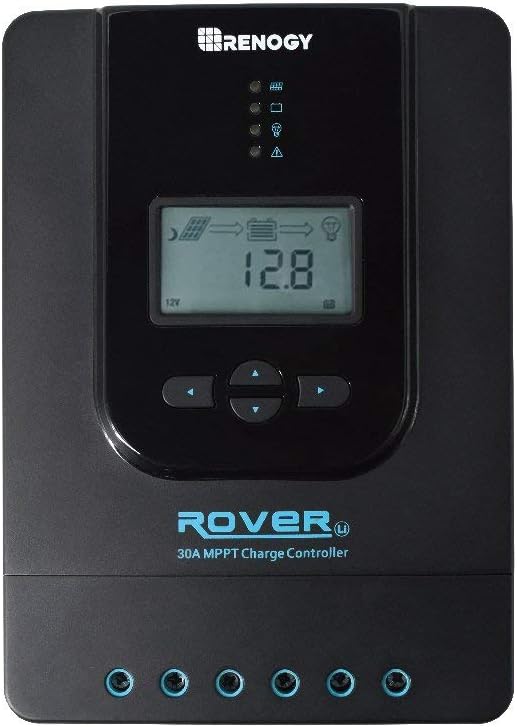
Сүрөт 1: Алдыңкы view of the Renogy MPPT 30A Solar Charge Controller, showing the LCD display, control buttons, and LED indicators.

Figure 2: Dimensions of the Renogy MPPT 30A Solar Charge Controller (238mm x 173mm x 72.5mm, Weight: 2.0kg).

Figure 3: Key features of the Renogy MPPT 30A Solar Charge Controller, including MPPT Technology, Electronic Protection, Reverse Protection, 4 Charging Stages, Max Input 100VDC, and RS232 Communication Port.
3. Орнотуу жана орнотуу
Proper installation is crucial for the safe and efficient operation of your solar charging system. Follow these steps carefully.
Зымдар диаграммасы:

Figure 4: General wiring diagram showing connections between solar panel, charge controller, battery, and optional inverter/load. Ensure correct polarity for all connections.
Connection Sequence:
- Батареяны заряд контроллерине туташтырыңыз.
- Күн панелин заряддоо контроллерине туташтырыңыз.
- Connect the DC load (if applicable) to the charge controller.
Маанилүү: Always connect the battery first and disconnect the solar panel first when disassembling the system. This prevents damage to the controller.
Video Guide: Installation and Basic Operation
Video 1: A comprehensive guide demonstrating the unboxing, component overview, connection sequence, and initial setup of a similar MPPT solar charge controller. This video provides visual instructions for connecting the battery, solar panel, and load, as well as navigating the display and setting basic parameters.
4. Иштөө нускамалары
The Renogy MPPT 30A Solar Charge Controller features an intuitive LCD display and control buttons for easy operation and monitoring.
LCD дисплей интерфейси:

Figure 5: ашыкview of the LCD display, showing various parameters such as main screen, solar panel voltage, charging current, battery capacity, battery voltage, load current, ambient temperature, discharged Ah, and accumulated Ah.
Use the "SELECT" and "ENTER" buttons to navigate through the display screens and adjust settings.
Батарея түрү жөндөөлөрү:
The controller supports various battery types. To select your battery type:
- Press the "SELECT" button to navigate to the battery type interface.
- Long press the "ENTER" button until the battery type number flashes.
- Use the "SELECT" button to cycle through the available battery types (Sealed, Gel, Flooded, Lithium, User).
- Press "ENTER" to confirm your selection.

Figure 6: Display showing different battery type options: Sealed (default), Gel, Flooded, Li (Lithium), and User-defined.
Load Mode Settings:
The controller offers various load operating modes. To adjust the load mode:
- Press the "SELECT" button to navigate to the load mode interface.
- Long press the "ENTER" button until the load mode number flashes.
- Use the "SELECT" button to cycle through the available load modes (e.g., 24-hour, dusk-to-dawn, timed, manual).
- Press "ENTER" to confirm your selection.
For manual load control, you can activate/deactivate the load directly via the ENTER button when in manual load mode.
Advanced Voltage Parameters (User-Defined Battery Type):
If you select the "User" battery type, you can customize various voltage parameters. This is typically for advanced users or specific battery chemistries not covered by the default settings. Refer to your battery manufacturer's specifications for appropriate values.
Томду тууралоо үчүнtage параметрлери:
- Ensure the battery type is set to "User".
- Navigate to the desired voltage parameter screen using the "SELECT" button.
- Long press the "ENTER" button until the value flashes.
- Use the "SELECT" button to adjust the value.
- Press "ENTER" to confirm the new value.
Эскертүү: Туура эмес томtage settings can damage your battery. Consult your battery's specifications or a qualified professional before making adjustments.
5. Техникалык тейлөө
Regular maintenance ensures the longevity and optimal performance of your Renogy MPPT 30A Solar Charge Controller.
- Тазалык: Контроллерди чаңдан жана таштандыдан таза жана таза кармаңыз. Тазалоо үчүн кургак чүпүрөктү колдонуңуз.
- Байланыштары: Periodically check all wiring connections for tightness and corrosion. Loose connections can cause overheating and damage.
- Вентиляция: Ensure adequate airflow around the controller for proper heat dissipation. Do not block ventilation openings.
- Батареяны текшерүү: Regularly inspect your batteries for any signs of damage, swelling, or leakage. Ensure battery terminals are clean and secure.
- Программалык камсыздоонун жаңыртуулары: Check the Renogy website for any available firmware updates for your controller model.
6. Кыйынчылыктарды
If you encounter issues with your solar charging system, refer to the following common troubleshooting steps:
- Дисплей/кубат жок:
- Батарея туташууларын текшерип, алардын бекем жана туура поляризацияланганын текшериңиз.
- Батареянын көлөмүн текшериңизtage is within the controller's operating range (12V/24V).
- Inspect fuses or circuit breakers in the battery circuit.
- Күн панелдеринен заряддоого болбойт:
- Ensure solar panel connections are secure and correctly polarized.
- Check for sufficient sunlight reaching the solar panels.
- Күн панелинин көлөмүн текшерүүtage контроллердин киргизүү диапазонунда.
- Inspect any inline fuses or circuit breakers in the solar panel circuit.
- Жүктөө иштебей жатат:
- Check load connections and ensure they are secure and correctly polarized.
- Verify the load mode setting on the controller.
- Check for overcurrent or short circuit on the load terminals.
- Батареянын көлөмүн камсыз кылууtage төмөнкү көлөмдөн жогоруtage disconnect (LVD) setting.
- Ката коддору:
- Refer to the controller's LCD display (Figure 5) for any error codes. Consult the full product manual (if provided separately) for specific error code definitions and solutions.
If the issue persists after following these steps, contact Renogy customer support for further assistance.
7. Техникалык шарттар
| Атрибут | Нарк |
|---|---|
| Бренд | Renogy |
| Модель номери | RNG-CTRL-RVR30-FBA |
| UPC | 810009711612 |
| Өлчөмдөрү (L x W x Y) | 23.8 x 17.2 x 7.73 см |
| Салмагы | 2 килограмм |
| Материал | Алюминий |
| Тtage | 12 Volts (12V/24V Auto-detect) |
| Дисплей түрү | LCD |
| Түс | Blue/Black/Green/White |
8. Кепилдик жана колдоо
For warranty information and technical support, please refer to the official Renogy webсайтка же түздөн-түз кардарларды тейлөөгө кайрылыңыз. Сатып алуу квитанциясын кепилдик дооматтары үчүн сатып алуунун далили катары сактаңыз.
Renogy is committed to providing high-quality renewable energy products and support to its customers.


