Introduction
The iStorage diskAshur PRO2 HDD is a secure, portable hard drive designed to protect your digital assets with advanced hardware encryption. This manual provides essential information for setting up, operating, maintaining, and troubleshooting your device, ensuring your data remains secure and accessible.
- Secure Authentication: Simply enter a 7-15 digit PIN to authenticate and use the drive. All data is encrypted using AES-XTS 256-bit hardware encryption (Software Free) when disconnected.
- Government Certified: Certified to FIPS 140-2 Level 3, helping ensure compliance with data regulations such as GDPR, CCPA, and HIPAA.
- Туруктуу дизайн: Portable, rugged, dust & water resistant (IP56). Data is protected from unauthorized access even if the device is lost or stolen.
- Кеңири шайкештик: Works on any device with a USB port, no software required. Compatible with MS Windows, macOS, Linux, Chrome, Android, Thin Clients, Zero Clients, Embedded Systems, Citrix, and VMware.
- Ыкчам маалымат өткөрүп берүү: Features lightning-fast backwards compatible USB 3.2 data transfer speeds, with up to 160MB/s Read and 143MB/s Write speeds.
Жайгашуу
Follow these steps to connect and unlock your diskAshur PRO2 HDD for the first time.
- Дискти туташтыруу: Connect the integrated USB cable from your diskAshur PRO2 to an available USB port on your computer or laptop. The drive will power on, and the red LED light will appear.
- PIN кодду киргизиңиз: Once the red LED light is visible, enter your 7-15 digit PIN on the keypad.
- Кулпуну ачуу: басыңыз БҮЛПӨНҮ АЧУУ button (key icon with an open padlock). The green and blue LEDs will blink, and then the middle green LED will turn solid, indicating the drive is unlocked and ready for use.
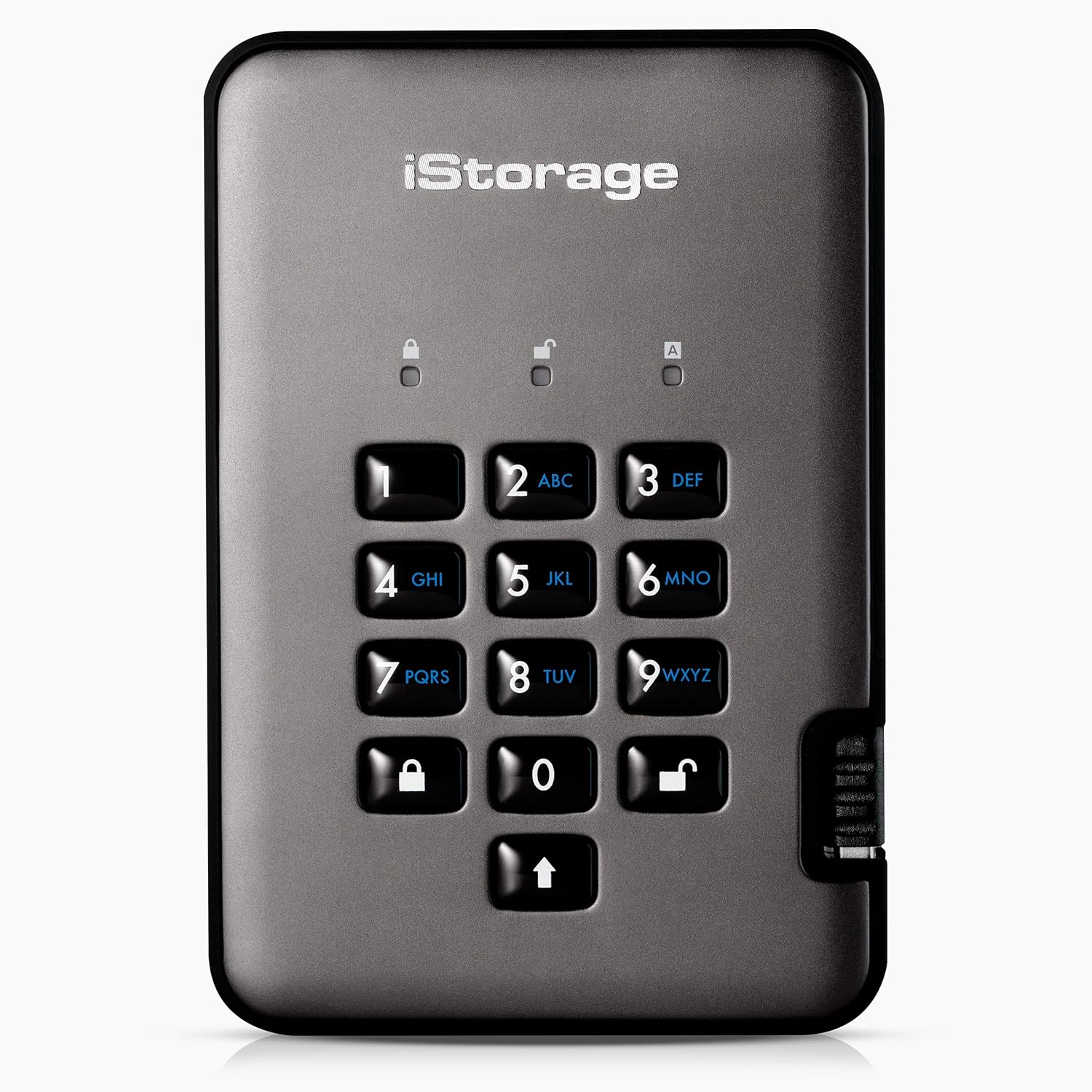
Сүрөт 1: Алдыңкы view of the diskAshur PRO2 secure hard drive, highlighting its integrated alphanumeric keypad for PIN entry.

Figure 2: The diskAshur PRO2 connected to a laptop, with icons representing its broad compatibility across operating systems including MS Windows, macOS, Linux, Chrome, Android, Thin Clients, Zero Clients, Embedded Systems, Citrix, and VMware.
Video Guide: How to Unlock and Encrypt Your Files
This video demonstrates the process of unlocking your iStorage diskAshur PRO2 and securely encrypting your files by transferring them to the drive.
Иштеп жатат
Once unlocked, your diskAshur PRO2 functions like a standard external drive, but with the added security of real-time hardware encryption.
- Дискке кирүү: After unlocking, the drive will appear as a removable storage device on your computer. Open the drive folder to access its contents.
- Storing Encrypted Files: To encrypt your files, simply copy and paste or drag and drop the desired files into the diskAshur PRO2 drive folder. All data transferred to the drive is encrypted in real-time.
- Safely Ejecting the Drive: When you are finished using the drive, safely eject it from your operating system. Upon ejection, the drive will automatically lock, securing your data. You can then safely disconnect the drive from your computer.

Figure 3: Data transfer speeds for diskAshur PRO2 HDD (up to 160MB/s Read, 143MB/s Write) and SSD models (up to 361MB/s Read, 358MB/s Write).
Техникалык тейлөө
Proper care ensures the longevity and reliability of your diskAshur PRO2 HDD.
- Физикалык коргоо: The diskAshur PRO2 is designed to be rugged and is IP56 certified for dust and water resistance. While it can withstand splashes and dust, avoid submerging it in water or exposing it to extreme conditions.
- Тазалоо: Түзмөктү тазалоо үчүн жумшак, кургак чүпүрөктү колдонуңуз. Катуу химиялык заттарды же абразивдүү материалдарды колдонбоңуз.
- Сактагыч: Дискти салкын, кургак жерде, күндүн түз нурунан жана өтө жогорку температурадан алыс сактаңыз.
- Программалык камсыздоонун жаңыртуулары: Periodically check the iStorage webоптималдуу иштөөнү жана коопсуздукту камсыз кылуу үчүн жеткиликтүү болгон программалык камсыздоонун жаңыртуулары үчүн сайт.

Figure 4: The diskAshur PRO2 drive shown amidst water splashes, demonstrating its IP56 certification for dust and water resistance.
Проблемаларды чечүү
If you encounter issues with your diskAshur PRO2, refer to the following common solutions.
- Диск таанылган жок:
- USB кабели дискке жана компьютериңизге коопсуз туташканын текшериңиз.
- Башка USB портуна туташып көрүңүз.
- Verify that the drive is unlocked (solid green LED).
- Компьютериңизди өчүрүп күйгүзүңүз.
- Incorrect PIN Entry / Lockout:
- Ensure you are entering the correct 7-15 digit PIN.
- If multiple incorrect PIN attempts are made, the drive may enter a lockout state. Refer to the full iStorage diskAshur PRO2 manual for specific lockout recovery procedures.
- Маанилүү: Repeated incorrect PIN entries can lead to data wipe for security purposes. Always consult the official manual for advanced recovery or reset procedures.
- Жай өткөрүү ылдамдыгы:
- Ensure you are connected to a USB 3.0 or higher port for optimal performance.
- Маанилүү тутум ресурстарын колдонуп жаткан башка колдонмолорду жабыңыз.
- Check the drive's health using disk utility tools on your operating system.
For more detailed troubleshooting or advanced features, please refer to the complete iStorage diskAshur PRO2 user manual available on the official iStorage website or contact iStorage customer support.
Техникалык шарттар
| Бренд | iStorage |
| Сериялар | diskAshur PRO2 |
| Модель номери | IS-DAP2-256-1000-C-X |
| Санариптик сактоо сыйымдуулугу | 1 ТБ |
| Катуу диск интерфейси | USB 3.0 |
| Катуу дисктин айлануу ылдамдыгы | 7200 RPM |
| Аппараттык платформа | Linux, Mac, PC |
| Элемент Салмагы | 7.9 унция |
| Продукциянын өлчөмдөрү (LxWxH) | 4.88 x 3.31 x 0.75 дюйм |
| Түс | Графит |
| Өзгөчөлүктөр | Dust Resistant, Hardware Encryption, Portable, Shock Resistant, Water Resistant |

Figure 5: The diskAshur PRO2 drive displayed alongside logos indicating its FIPS 140-2 Level 3 and other security certifications.

6-сүрөт: Ички view of the diskAshur PRO2's secure microprocessor, emphasizing its hardware-certified EAL5+ security features.
Кепилдик жана колдоо
For information regarding product warranty, technical support, or to access the full user manual, please visit the official iStorage webсайтка же кардарларды тейлөө бөлүмүнө кайрылыңыз. Кепилдик дооматтар үчүн сатып алуу дүмүрчөгүңүздү сактаңыз.
iStorage Webсайт: www.istorage-uk.com


