Introduction
This manual provides detailed instructions for the installation, operation, and maintenance of your Topvision Top808 8-Camera 1080P Lite DVR Security System. Please read this manual thoroughly before using the product to ensure proper setup and functionality. Keep this manual for future reference.
The Topvision Top808 system includes an 8-channel 1080P Lite DVR and eight 2MP 1080P bullet cameras, designed for both indoor and outdoor surveillance with night vision capabilities.
Пакеттин мазмуну
Пакетиңизде бардык буюмдар бар экенин текшериңиз:
- 1x Topvision XDVR-1008 8-Channel 1080P Lite DVR
- 8x Topvision TCB200 2MP 1080P Bullet Cameras (Indoor/Outdoor)
- 8x 18-meter BNC Video/Power Cables
- 1x Power Adapter for DVR
- 1x Power Adapter for Cameras
- 1x 8-way Power Splitter for Cameras
- 1x USB чычкан
- Колдонуучунун Колдонмосу (бул документ)
- Камераларды орнотуучу бурамалар жана сайгычтар

Сүрөт: бүттүview of the Topvision Top808 security system kit, showing the DVR, eight cameras, cables, power adapters, and a mouse. Icons indicate 2MP resolution, indoor/outdoor use, mobile app compatibility, and night vision.
Орнотуу жана орнотуу
1. Hard Drive Installation (Optional, Not Included)
The DVR requires a 3.5-inch SATA hard drive (up to 8TB, WD Purple recommended) for recording. If you plan to record video, install a hard drive before powering on the DVR.
- DVRдин үстүнкү капкагын бурап алып салыңыз.
- DVRден SATA маалымат кабелин жана кубат кабелин катуу дискке туташтырыңыз.
- Берилген бурамаларды колдонуп, катуу дискти DVR корпусуна бекитиңиз.
- Үстүнкү капкакты ордуна коюп, бурама менен бекитиңиз.
2. DVRди туташтыруу

Сүрөт: алдыңкы жана арткы views of the Topvision DVR, highlighting BNC video inputs, audio inputs/outputs, HDMI, VGA, LAN, and USB ports.
- Камераларды туташтыруу: Attach one end of each 18-meter BNC cable to a camera and the other end to a BNC video input port on the back of the DVR.
- Connect Power to Cameras: Connect the camera power cables to the 8-way power splitter, then connect the power splitter to the camera power adapter. Plug the adapter into a power outlet.
- Мониторду туташтыруу: Connect a monitor to the DVR using either an HDMI or VGA cable (cables not included).
- Чычканды туташтыруу: USB чычканды DVRдеги USB порттордун бирине сайыңыз.
- Тармакка туташуу (милдеттүү эмес): Алыскы үчүн viewАндан кийин, DVRдин LAN портунан Ethernet кабелин роутериңизге туташтырыңыз.
- DVR күйгүзүлгөн: Connect the DVR power adapter to the DVR and then to a power outlet. The system will boot up.
3. Камераны жайгаштыруу

Сүрөт: Жакын план view of multiple Topvision 1080P bullet cameras, emphasizing their 2MP resolution and night vision capabilities for indoor/outdoor use.
- Mount cameras in desired locations, ensuring a clear field of view.
- The cameras are designed for both indoor and outdoor use.
- Adjust the camera angle and focus as needed after installation.
Иштөө нускамалары
1. Баштапкы орнотуу устасы
Биринчи жолу жүктөлгөндө, DVR сизди баштапкы орнотуу чебери аркылуу жетектейт. Экрандагы көрсөтмөлөрдү аткарып, төмөнкүлөрдү аткарыңыз:
- Set language, date, and time.
- Create an administrator password.
- Configure network settings (DHCP recommended for ease of use).
- Format the hard drive (if installed).
2. Түз эфир View
Орнотуудан кийин, DVR түз эфирди көрсөтөт view from all connected cameras on the monitor. You can switch between single-camera view, multi-camera view, and sequence display using the on-screen menu or mouse controls.
3. Жаздыруу
The DVR supports continuous recording, scheduled recording, and motion-detection recording. Configure recording settings via the DVR's main menu:
- барыңыз Main Menu > Record > Record Schedule to set up recording times.
- барыңыз Негизги меню > Сигнализация > Кыймылды аныктоо to enable and configure motion detection for specific cameras.
4. Ойнотуу
Кайраview foo жазылганtage:
- барыңыз Main Menu > Playback.
- Select the date and time range, and the cameras you wish to view.
- Foo аркылуу өтүү үчүн ойнотуу башкаруу элементтерин (ойнотуу, тындыруу, алдыга жылдыруу, артка түрүү) колдонуңузtage.
5. Алыстан Viewинг (Мобилдик тиркеме)
To access your security system remotely via a smartphone or tablet:
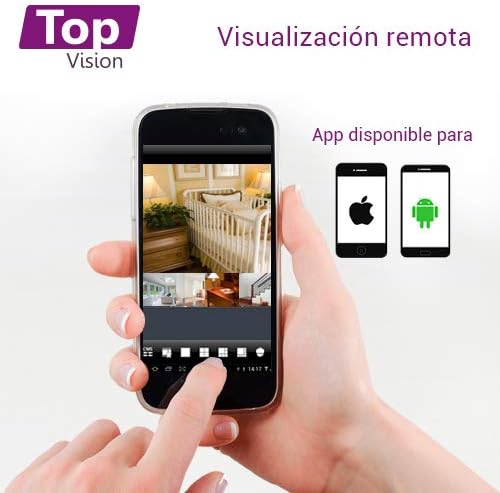
Image: A smartphone screen displaying live camera feeds, illustrating the remote viewing capability of the Topvision security system via a mobile application available for both Android and iOS.
- DVR тармагыңызга Ethernet кабели аркылуу туташкандыгын текшериңиз.
- Download a compatible third-party surveillance app (e.g., XMEye, Danale, or similar apps recommended by Topvision support) from your device's app store (Android or iOS).
- Колдонмонун ичинде каттоо эсебин каттаңыз.
- Add your DVR device to the app using its serial number or QR code (found in the DVR's network settings).
- Кошулгандан кийин, сиз төмөнкүлөрдү жасай аласыз view live feeds, playback recordings, and receive alerts remotely.
Техникалык тейлөө
- Тазалоо: Gently wipe cameras and DVR with a soft, dry cloth. Avoid harsh chemicals.
- Программалык камсыздоонун жаңыртуулары: Periodically check the Topvision website or contact support for available firmware updates to ensure optimal performance and security.
- Катуу дисктин ден соолугу: Monitor the hard drive status through the DVR's menu. Replace if errors are detected.
- Кабелдик байланыштар: Periodically inspect all cable connections for secure fit and signs of wear or damage.
Проблемаларды чечүү
- Видео сигнал жок:
- Камералар менен DVR ортосундагы бардык BNC кабелдик байланыштарды текшериңиз.
- Ensure cameras are receiving power from the power adapter and splitter.
- Verify the monitor is correctly connected to the DVR via HDMI/VGA and is set to the correct input.
- DVR жаздырылбай жатат:
- Confirm a hard drive is installed and properly connected.
- Check if the hard drive has been formatted (Main Menu > HDD > HDD Manage).
- Verify recording schedules are configured correctly (Main Menu > Record > Record Schedule).
- Check hard drive status for errors or full capacity.
- Алыстан Viewing Not Working:
- Ensure the DVR is connected to the internet via an Ethernet cable.
- Check network settings on the DVR (Main Menu > Network) to ensure it has an IP address.
- Verify the mobile app is correctly configured with the DVR's device ID.
- Check your router's firewall settings if connection issues persist.
- Сүрөттүн сапаты начар:
- Clean camera lenses if dirty.
- Ensure sufficient lighting for optimal day vision.
- For night vision, ensure no obstructions are blocking the infrared LEDs.
Техникалык шарттар
| Компонент | Спецификация |
|---|---|
| DVR Model | XDVR-1008 |
| Видео киргизүү | 8 Channels (BNC) + 1 IP Channel |
| Video Resolution | 1080P Lite |
| Камера модели | TCB200 |
| Камеранын чечилиши | 2MP (1080P) |
| Объектив | 2.8 мм |
| Түнкү көрүнүш | Инфракызыл светодиоддор |
| Сактагыч | Supports 1x SATA HDD up to 8TB (not included) |
| Video Output | HDMI, VGA (simultaneous) |
| Байланыш | Зымдуу (тармак үчүн Ethernet) |
| Dimensions (DVR) | 30 x 25 x 7 см |
| Weight (System) | 5.85 кг |
Кепилдик маалымат
Topvision products are covered by a limited warranty. Please refer to the warranty card included with your product or visit the official Topvision webтолук шарттары жана шарттары үчүн сайт. Кепилдик дооматтар үчүн сатып алганыңыздын далилин сактаңыз.
Кардарларды колдоо
For technical assistance, troubleshooting, or product inquiries, please contact Topvision customer support. Refer to the contact information provided in your product packaging or on the official Topvision webсайт.
Online resources such as FAQs and video tutorials may also be available on the Topvision support page.


