1. Киришүү
This manual provides comprehensive instructions for the setup, operation, and maintenance of your Xprinter XP-360B Thermal Label Barcode Printer. Please read this manual thoroughly before using the printer to ensure proper functionality and to prevent damage.
The XP-360B is a high-speed thermal label printer designed for various applications, including barcode printing, shipping labels, and receipt printing. It supports label widths from 20mm to 80mm and offers a maximum print speed of 200mm per second.

Figure 1.1: Xprinter XP-360B Thermal Label Barcode Printer. This image shows the printer from a front-right angle, with labels being fed out of the front slot.
2. Коопсуздук маалыматы
To ensure safe operation and prolong the life of your printer, please observe the following safety precautions:
- Принтерди сууга же ашыкча нымдуулукка дуушар кылбаңыз.
- Принтерди күн тийген жерге же жылуулук булактарынын жанына коюудан алыс болуңуз.
- Принтер менен кошо берилген кубат адаптерин гана колдонуңуз.
- Принтерди өзүңүз чечүүгө же оңдоого аракет кылбаңыз. Квалификациялуу тейлөө кызматкерлерине кайрылыңыз.
- Принтерди чаңдан жана таштандыдан алыс кармаңыз.
- Принтер туруктуу, жалпак бетке коюлганын текшериңиз.
- Принтерди тазалоодон мурун же көпкө чейин колдонбогон учурда аны розеткадан сууруп коюңуз.
3. Пакеттин мазмуну
Пакетте бардык буюмдар бар экенин текшериңиз:
- Xprinter XP-360B Thermal Label Barcode Printer
- Кубаттуу адаптер
- USB кабели
- Колдонуучунун Колдонмосу (бул документ)
- Driver CD (or link to download drivers)
4. Продукт бүтүп калдыview
4.1. Фронт View

Сүрөт 4.1: Алдыңкы view of the XP-360B printer, showing the label output slot and control buttons.
- Label Output Slot: Where printed labels exit the printer.
- Башкаруу баскычтары:
- КҮЧ: Күч көрсөткүчү.
- КАТА: Ката көрсөткүчү.
- ТЫНЫТУУ: Pauses or resumes printing.
- ТОЮТ: Feeds a blank label.
4.2. тарап View
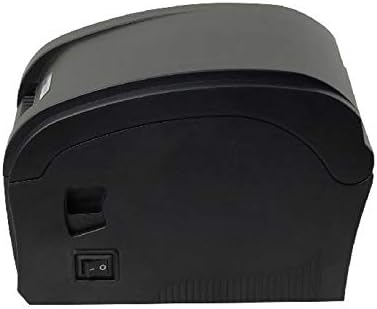
4.2-сүрөт: Каптал view of the XP-360B printer, highlighting the power switch.
- Кубат которгучу: Принтерди күйгүзөт же өчүрөт.
4.3. Ички View (Cover Open)

4.3-сүрөт: Ички view of the XP-360B printer with the top cover open, showing the label roll compartment and print head assembly.
- Print Head Assembly: Contains the thermal print head.
- Этикетка түрмөк отсеги: Area for loading the label roll.
- Adjustable Paper Guides: Guides to align the label roll.
5. Орнотуу
5.1. Пакеттен чыгаруу жана жайгаштыруу
- Принтерди жана бардык аксессуарларды таңгактан этияттык менен алып чыгыңыз.
- Принтерди туруктуу, тегиз жана жетиштүү желдетүү бар бетке коюңуз.
- Ensure there is enough space around the printer for proper operation and maintenance.
5.2. Принтерди туташтыруу
- Кубат адаптерин принтердин кубат киргизүү портуна туташтырыңыз.
- Кубат адаптерин ылайыктуу электр розеткасына сайыңыз.
- USB кабелинин бир учун принтердин USB портуна туташтырыңыз.
- USB кабелинин экинчи учун компьютериңиздеги жеткиликтүү USB портуна туташтырыңыз.
5.3. Энбелгилер жүктөлүүдө
- Принтер өчүрүлгөнүн текшериңиз.
- Принтердин үстүнкү капкагын ачыңыз.
- Place the label roll into the label compartment, ensuring the labels feed from the bottom of the roll towards the front of the printer.
- Adjust the movable paper guides to fit the width of your label roll snugly, without being too tight.
- Pull a few labels out past the print head and through the label output slot.
- Үстүнкү капкакты чыкылдагыча бекем жабыңыз.

Figure 5.1: Loading a roll of thermal labels into the XP-360B printer's internal compartment.
5.4. Драйверди орнотуу
Before using the printer, you must install the appropriate drivers on your computer. Drivers are typically provided on a CD or can be downloaded from the manufacturer's official webсайт.
- Insert the driver CD into your computer's CD-ROM drive, or navigate to the official Xprinter support website to download the XP-360B drivers.
- Драйверди орнотууну аяктоо үчүн экрандагы нускамаларды аткарыңыз.
- After installation, it is recommended to restart your computer.
6. Иштөө нускамалары
6.1. Күйгүзүү / Өчүрүү
- To turn on the printer, flip the power switch located on the side of the printer to the 'ON' position. The POWER indicator light will illuminate.
- To turn off the printer, flip the power switch to the 'OFF' position.
6.2. Негизги басып чыгаруу
- Принтер компьютериңизге туташып, күйгүзүлгөнүн текшериңиз.
- Open the document or application from which you wish to print labels (e.g., label design software, shipping platform).
- Go to the print settings (File > Басып чыгаруу).
- Select "Xprinter XP-360B" as your printer.
- Adjust the paper size and orientation settings to match your labels (e.g., 4x6 inch, portrait/landscape).
- Click "Print". The printer will automatically detect the label gaps and print accordingly.
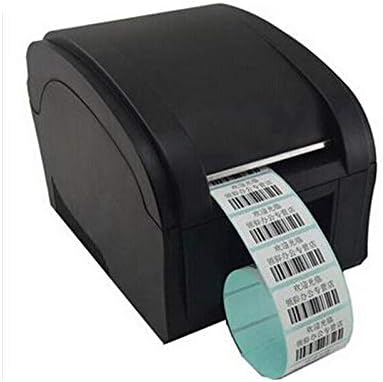
Figure 6.1: The XP-360B printer in operation, feeding out a continuous roll of printed labels.
6.3. Using Control Buttons
- FEED баскычы: Press this button once to feed a single blank label. This is useful for testing label alignment or advancing to the next label.
- ТЫНЫКТЫРУУ баскычы: Press this button to temporarily pause a print job. Press it again to resume printing.
7. Техникалык тейлөө
Принтериңиздин үзгүлтүксүз техникалык тейлөөсү анын оптималдуу иштешин камсыздайт жана анын иштөө мөөнөтүн узартат.
7.1. Басып чыгаруу башын тазалоо
The print head should be cleaned regularly, especially if print quality degrades or after printing a large volume of labels.
- Turn off the printer and unplug it from the power outlet.
- Принтердин үстүнкү капкагын ачыңыз.
- Эгерде принтер жакында эле колдонулган болсо, басып чыгаруучу баш муздаганча бир нече мүнөт күтө туруңуз.
- Gently wipe the thermal print head surface with an alcohol swab or a lint-free cloth lightly dampизопропил спирти менен жасалган.
- Капкакты жаап, принтерди күйгүзүүдөн мурун басып чыгаруу башынын толук кургашына уруксат бериңиз.
7.2. Cleaning the Platen Roller
The platen roller helps feed the labels smoothly. Clean it if you notice feeding issues.
- Follow steps 1-3 from "Cleaning the Print Head".
- Rotate the platen roller manually and wipe its surface with an alcohol swab or a lint-free cloth lightly dampизопропил спирти менен жасалган.
- Allow it to dry completely before closing the cover.
8. Кыйынчылыктарды
This section addresses common issues you might encounter with your XP-360B printer.
| Көйгөй | Мүмкүн себеп | Чечим |
|---|---|---|
| Принтер күйбөй жатат | Электр кабели бош; розетка туура эмес; Принтердин катасы | Check power cable connection; Try a different outlet; Contact support if problem persists. |
| No printing / Printer offline | USB cable loose; Driver not installed; Printer offline in OS | Check USB connection; Install drivers; Check printer status in computer settings. |
| Басып чыгаруу сапаты начар / Өчүрүлгөн басып чыгаруулар | Dirty print head; Low quality labels; Incorrect print density settings | Clean the print head (see Section 7.1); Use high-quality thermal labels; Adjust print density in driver settings. |
| Энбелгилер туура эмес азыктандырылган | Labels loaded incorrectly; Paper guides not adjusted; Dirty platen roller | Re-load labels correctly; Adjust paper guides; Clean platen roller (see Section 7.2). |
| ERROR light is on | Paper jam; Cover open; Print head overheating | Clear any paper jams; Ensure cover is closed properly; Turn off printer and let it cool down. |
9. Техникалык шарттар
| Өзгөчөлүк | Description |
|---|---|
| Модел | XP-360B |
| Басып чыгаруу ыкмасы | Түз жылуулук |
| Интерфейс | USB |
| Басып чыгаруу ылдамдыгы | 200мм/секундага чейин |
| Max Paper Width | 80mm (adjustable from 20mm) |
| Кагаз берүү режими | Автоматтык |
| Тармак басып чыгаруу | Зымдуу |
| Дуплекстүү басып чыгаруу | Жок |
| Өлчөмдөр | 25 x 22 x 21 см |
| Салмагы | 2 кг |
10. Кепилдик жана колдоо
Xprinter products are designed for reliability and performance. For specific warranty terms and conditions, please refer to the warranty card included with your product or visit the official Xprinter webсайт.
If you encounter any issues that cannot be resolved using the troubleshooting guide, or if you require technical assistance, please contact Xprinter customer support through their official webсайт же продукт документациясында көрсөтүлгөн байланыш маалыматы.
Please have your model number (XP-360B) and purchase information ready when contacting support.


