Продукт бүттүview
This manual provides detailed instructions for the Anlapus H.265+ Security System, a comprehensive wired analog surveillance camera kit designed for home and business monitoring. It features a Full HD 1080P 8-channel DVR recorder with a pre-installed 1TB hard drive and 2MP outdoor surveillance cameras.

Figure 1: Anlapus H.265+ Security System Components
Негизги өзгөчөлүктөрү:
- H.265+ Full HD 1080p System: Includes an 8-channel 1080p DVR with a built-in 1TB hard drive and four 2.0MP surveillance cameras.
- Өркүндөтүлгөн түнкү көрүнүш: Cameras are equipped with 24 IR LEDs and an IR-CUT filter, providing clear night vision up to 24 meters (80 feet).
- Акылдуу кыймылды аныктоо: Receive push alerts via the free mobile application when motion is detected, keeping you informed even when away from home.
- IP66 аба ырайы камералары: Durable plastic housing designed for both indoor and outdoor use, capable of withstanding extreme weather conditions. The cable is integrated into the camera mount for added protection.
- Pre-installed 1TB Hard Drive: Ready for immediate use, specifically designed for continuous surveillance data recording.
- Бир нече жаздыруу режимдери: 24/7 үзгүлтүксүз жазууну, кыймылды аныктоону, пландаштырылган жазууну жана кол менен жаздырууну колдойт.
- Алыстан Viewing: Түз эфирдеги жана жаздырылган тамак-ашка кирүүtage anytime, anywhere via smartphone, tablet, or PC.
Пакеттин мазмуну
Орнотууну баштоодон мурун, пакетиңизде төмөндө келтирилген бардык компоненттер бар экенин текшериңиз:

Сүрөт 2: Камтылган пакеттин мазмуну
- 1 x DVR (Digital Video Recorder) with 1TB HDD pre-installed
- 4 x 1080p Surveillance Cameras
- 4 x BNC Video Cables (approx. 18.3m / 60ft each)
- 2 х Power адаптерлери
- 1 x 1-to-4 Power Splitter Cable
- 1 х USB чычкан
- 1 х Инструкция (бул документ)
- 4 x Монтаждык бурамалар баштыктары
- 4 x эскертүү чаптамалары
Орнотуу колдонмосу
1. DVR туташуусу
- Камераларды туташтыруу: Connect each surveillance camera to the BNC video input ports on the back of the DVR using the provided BNC cables. Ensure connections are secure.
- Туташуу кубаты: Use the power adapters and the 1-to-4 power splitter cable to power the cameras. Connect the DVR to a power outlet using its dedicated power adapter.
- Мониторго туташуу: Connect the DVR to a monitor or TV using an HDMI or VGA cable (not included) to view түз эфирдеги берүү жана кирүү тутумунун жөндөөлөрү.
- USB чычканды туташтыруу: Навигация үчүн берилген USB чычканын DVRдеги USB портуна сайыңыз.
- Тармакка туташуу (милдеттүү эмес, бирок сунушталат): Алыскы үчүн viewing and email alerts, connect the DVR to your router using an Ethernet cable (not included).
2. Камераны орнотуу
The cameras are designed for both indoor and outdoor use, with an IP66 weatherproof rating. Choose strategic locations that provide optimal coverage and are within reach of the BNC cables.
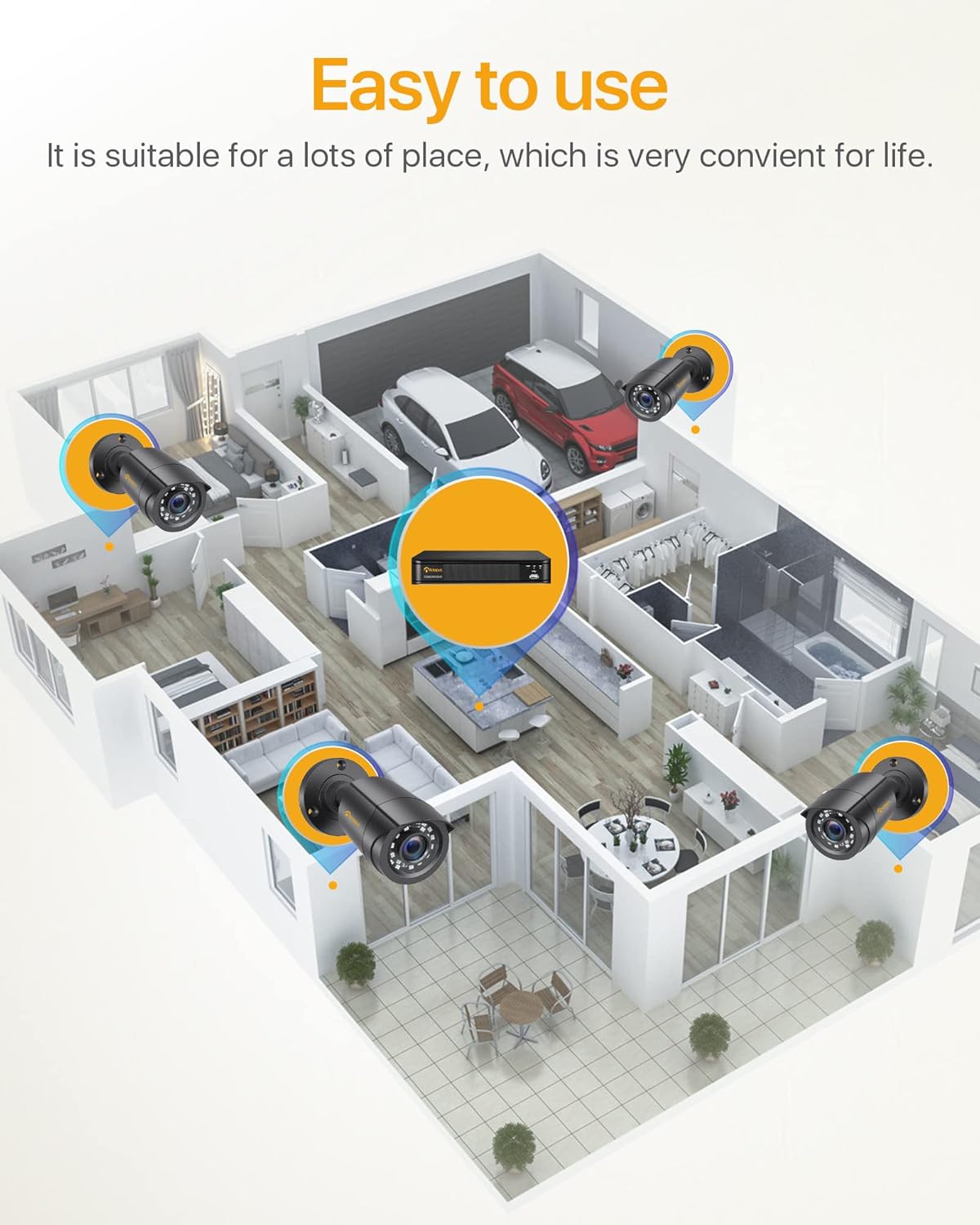
3-сүрөт: Мисample Camera Placement for Optimal Coverage
- Монтаждоо: Use the provided mounting screws and anchors to securely attach the cameras to walls or ceilings.
- Бурчту тууралоо: Adjust the camera's angle (180° horizontal, 360° vertical) to cover the desired area. Ensure the lens is clean and free from obstructions.
- Кабелдик башкаруу: Route the BNC cables neatly and securely to prevent damage and tripping hazards. The cable is integrated into the camera mount for protection.

Figure 4: Camera Features and Adjustability
Иштөө нускамалары
1. Initial Setup and Login
Upon first power-on, the DVR will guide you through an initial setup wizard. You will be prompted to create a strong password for the administrator account. It is crucial to remember this password.
2. Түз эфир View
Once logged in, the system will display the live view from all connected cameras on the monitor. You can switch between single-camera view жана көп камералуу тор view.

Figure 5: 24/7 Live Monitoring Setup
3. Жазуу режимдери
- Тынымсыз жаздыруу: The system is pre-configured for 24/7 continuous recording to the 1TB hard drive.
- Кыймылды аныктоо жазуусу: To enable, navigate to the DVR's menu, select "Record" > "Motion Detection." Configure the detection area and sensitivity for each camera.
- Пландаштырылган жаздыруу: Set specific times for recording via "Record" > "Schedule."
- Кол менен жаздыруу: Initiate recording manually from the live view интерфейс.
4. Алыстан ViewМобилдик колдонмо аркылуу
Download the official Anlapus mobile application (available for iOS and Android) to view камераларыңызды алыстан.
- Колдонмону жүктөп алуу: Издөө "Anlapus" in your device's app store.
- Каттоо эсеби: Колдонмонун ичинде жаңы колдонуучу аккаунтун түзүңүз.
- Түзмөк кошуу: Scan the QR code displayed on your DVR's monitor (found in Network settings) or manually enter the device ID to add your DVR to the app.
- Live View & Ойнотуу: Кошулгандан кийин, сиз төмөнкүлөрдү жасай аласыз view түз эфирдеги берүүлөр, жаздырылган тамак-ашты ойнотууtage, and receive motion detection alerts on your smartphone or tablet.

Сүрөт 6: Алыстан Viewing Across Devices
5. Motion Detection Alerts
Configure email alerts for motion detection events through the DVR's network settings. Ensure your DVR is connected to the internet.

7-сүрөт: Акылдуу кыймылды аныктоо эскертмелери
Техникалык тейлөө
- үзгүлтүксүз тазалоо: Periodically clean the camera lenses with a soft, dry cloth to ensure clear image quality. For outdoor cameras, check for dirt, dust, or spiderwebs.
- Программалык камсыздоонун жаңыртуулары: Anlapus расмий текшерүү website for any available firmware updates for your DVR. Updates can improve performance and add new features.
- Катуу дисктин ден соолугу: The 1TB hard drive is designed for continuous recording. Monitor its health through the DVR's system settings. If the hard drive becomes full, older footage will be overwritten automatically (loop recording).
- Кабелдик текшерүү: Regularly inspect all cables for any signs of wear, damage, or loose connections, especially for outdoor installations.
- Электр камсыздоо: Ensure the DVR and camera power adapters are connected to stable power sources.
Проблемаларды чечүү
| Көйгөй | Мүмкүн себеп | Чечим |
|---|---|---|
| Монитордо сүрөт жок. | Loose video cable, incorrect input selected on monitor, DVR not powered on. | Check all BNC and HDMI/VGA cable connections. Ensure monitor input matches DVR output. Verify DVR power. |
| Камералар көрсөтүлбөй жатат. | Камеранын кубаты маселеси, BNC кабели ажыратылган, камера бузулган. | Check camera power connections and power splitter. Re-seat BNC cables. Test camera on a different port if possible. |
| Пульт жок viewing. | DVR not connected to network, incorrect network settings, app configuration issue. | Ensure DVR is connected to router via Ethernet. Check network settings on DVR (DHCP enabled or static IP configured correctly). Verify app device ID/QR code. |
| Poor night vision. | IR LEDs obstructed, camera lens dirty, insufficient ambient light. | Clean camera lens. Ensure no obstructions are blocking the IR LEDs. Consider adding external IR illuminators if needed. |
| Кыймылды аныктоо иштебей жатат. | Motion detection not enabled, sensitivity too low, detection area not set. | Enable motion detection in DVR settings. Adjust sensitivity. Define the detection area correctly. |
Техникалык шарттар
| Өзгөчөлүк | Деталь |
|---|---|
| Модель номери | 6971627216065 |
| DVR каналдары | 8-канал |
| Видео жаздыруу чечими | 1080p толук HD |
| Видеону кысуу | H.265 + |
| Сактоо сыйымдуулугу | 1 ТБ катуу диск (алдын ала орнотулган) |
| Камеранын чечилиши | 2.0 мегапиксел |
| Камера түрү | Bullet, Wired |
| Түнкү көрүү диапазону | Up to 24 meters (80 feet) with 24 IR LEDs |
| Аба ырайына каршы рейтинг | IP66 (Имараттын ичинде/сыртында колдонуу) |
| Байланыш | Wired (BNC), Ethernet for network features |
| Электр камсыздоо | 12 Volts (via included power adapters) |
| Иштөө температурасы | -10°Cден 55°Cге чейин (14°Fтен 131°Fге чейин) |
| Dimensions (DVR) | Болжол менен 27.94 x 35.56 x 17.78 см (L x W x Y) |
| Weight (Total Package) | 4.56 килограмм |
Кепилдик жана колдоо
Anlapus products are designed for reliability and performance. For specific warranty details, please refer to the warranty card included in your package or visit the official Anlapus webсайт.
For technical assistance, troubleshooting, or any inquiries regarding your security system, please contact Anlapus customer support. Our team is dedicated to providing prompt and helpful solutions.
- Онлайн колдоо: Visit the Anlapus official webКөп берилүүчү суроолор, колдоо макалалары жана байланыш формалары үчүн сайт.
- Электрондук почта колдоо: Колдоо үчүн арналган электрондук почта дареги үчүн продуктунун документтерин караңыз.


