1. Киришүү
Thank you for choosing the VINABTY EUR7659Y70 Replacement Remote Control. This manual provides essential instructions for setting up, operating, and maintaining your new remote control. Please read this manual thoroughly to ensure proper use and to maximize the performance of your device.
This remote is designed as a direct replacement for various Panasonic DVD/VCR Recorder models, offering seamless compatibility and functionality.
2. Продукт бүтүп калдыview
The VINABTY EUR7659Y70 is a replacement remote control specifically engineered to function with a range of Panasonic DVD and VCR recorder units. It replicates the functionality of the original remote, allowing you to control your device's playback, recording, and menu navigation features.
Compatible Panasonic Models include:
- DMR-ES35V, DMR-ES45, DMR-ES46, DMR-ES45VS, DMR-ES45V, DMR-ES46V, DMR-ES46VS, DMR-ES36V
- DMRES45, DMRES46, DMRES35, DMRES45V, DMRES35V, DMRES36V, DMRES45VS, DMRES46V, DMRES46VS
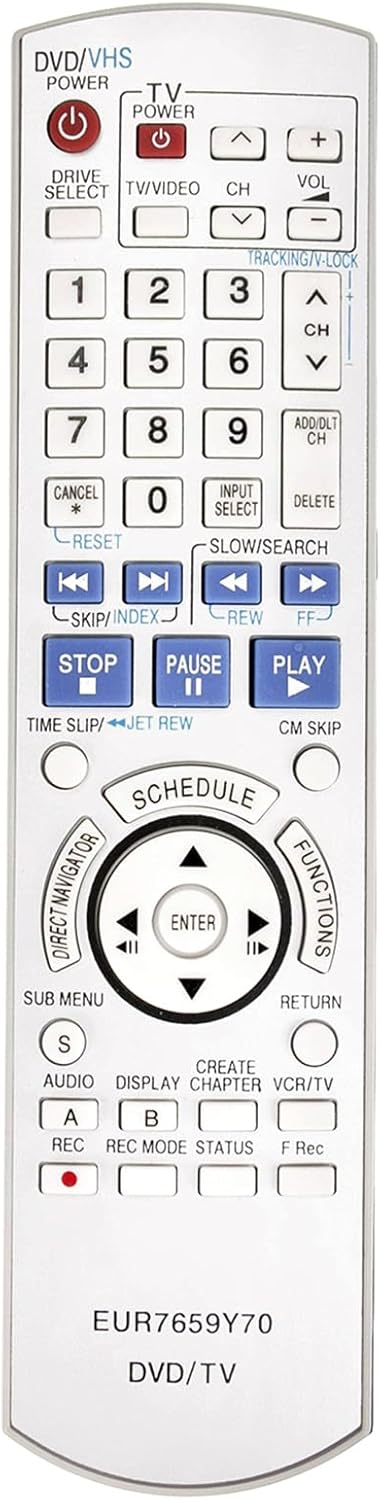
1-сүрөт: Фронт view of the VINABTY EUR7659Y70 Replacement Remote Control, showing all buttons and their labels.
3. Орнотуу
3.1 Батареяны орнотуу
- Пульттун артындагы батарея отсегин табыңыз.
- Батарея бөлүмүнүн капкагын жылдырып ачыңыз.
- Эки жаңы AAA батарейкасын (кошулмага кирбейт) салып, оң (+) жана терс (-) терминалдардын бөлүмдүн ичиндеги диаграммаларга дал келгенин текшериңиз.
- Батарея уясынын капкагын бекем жабыңыз.
3.2 Алыстан башкарууну жупташтыруу
For some Panasonic DVD/VCR Recorder models, it may be necessary to pair the replacement remote control with your device. Follow these steps if the remote does not respond immediately after battery installation:
- Ensure your Panasonic DVD/VCR Recorder is powered on.
- On the remote control, locate the ENTER ачкыч.
- Бир эле учурда басып, басып туруңуз ENTER key and the number key corresponding to the displayed "Set" or "RC" code on your VCR/DVD unit. This code is typically shown on the unit's display when it's in pairing mode or when a remote is not detected.
- Hold both keys down for approximately 3 to 5 seconds.
- Release the keys. The remote should now be paired with your device. Test functionality by pressing various buttons.
If pairing is unsuccessful, repeat the steps, ensuring correct battery insertion and proper alignment with the device's sensor.
4. Иштөө нускамалары
The VINABTY EUR7659Y70 remote control provides full functionality for your compatible Panasonic DVD/VCR Recorder. Refer to Figure 1 for the layout of the buttons. Below are general functions:
- POWER (DVD/VHS, TV): Turns the respective device on or off.
- ТВ/ВИДЕО: Switches between TV and video input modes.
- CH (+/-): Каналдарды өзгөртөт.
- VOL (+/-): Үн көлөмүн тууралайт.
- Сан баскычтары (0-9): Direct channel selection or inputting numerical values.
- PLAY, STOP, PAUSE, REW, FF, SKIP/INDEX: Медиа ойнотууну көзөмөлдөө.
- REC (A, B): Initiates recording. Consult your device's manual for specific recording procedures.
- ENTER / Directional Pad: Менюларды багыттоо жана тандоолорду ырастоо.
- SUB MENU, RETURN, FUNCTIONS: Access various menu options and settings.
For detailed operation of specific features of your Panasonic DVD/VCR Recorder, please consult the original instruction manual provided with your Panasonic device.
5. Техникалык тейлөө
5.1 Тазалоо
Пультту тазалоо үчүн анын бетин жумшак, кургак чүпүрөк менен акырын сүртүңүз. өжөр кир үчүн, бир аз гampкездемени суу же жумшак, абразивдүү эмес тазалоочу каражат менен сүртүңүз. Катуу химиялык заттарды, эриткичтерди же абразивдүү материалдарды колдонуудан алыс болуңуз, анткени алар пульттун сырткы көрүнүшүнө же ички компоненттерине зыян келтириши мүмкүн.
5.2 Батареяга кам көрүү
- Пульттун реакциясы жайлап же туруксуз болуп калса, батареяларды алмаштырыңыз.
- Ар дайым эки батареяны тең бир убакта бирдей типтеги (AAA) жаңылары менен алмаштырыңыз.
- Эски жана жаңы батарейкаларды же ар кандай типтеги батареяларды аралаштырбаңыз.
- Эгерде алыстан башкаруу пульту көпкө чейин колдонулбаса, агып кетүүнүн жана мүмкүн болгон зыяндын алдын алуу үчүн батарейкаларды алып салыңыз.
- Колдонулган батарейкаларды жергиликтүү эрежелерге ылайык жок кылыңыз.
6. Кыйынчылыктарды
If you experience issues with your VINABTY EUR7659Y70 remote control, please refer to the following common solutions:
- Пульт жооп бербей жатат:
- Батареялар туура полярдуулук менен (+/-) туура салынганын текшериңиз.
- Эски батарейкаларды жаңысына алмаштырыңыз.
- Ensure there are no obstructions between the remote control and the Panasonic device's infrared sensor.
- Make sure you are within the effective operating range and pointing the remote directly at the device.
- Specific functions do not work:
- Verify that your Panasonic device model is listed as compatible in Section 2.
- 3.2-бөлүмдө сүрөттөлгөндөй жупташтыруу процессин кайра аракет кылыңыз.
- Some advanced functions might require specific settings on your Panasonic device; consult its original manual.
- Пульт үзгүлтүккө учурап иштейт:
- Бул көбүнчө батареянын кубаттуулугу аз экенин билдирет. Батареяларды алмаштырыңыз.
- Пульттун инфракызыл эмитенти таза жана тоскоолдуксуз экенин текшериңиз.
7. Техникалык шарттар
| Модель номери | EUR7659Y70 |
| Бренд | VINABTY |
| Продукциянын өлчөмдөрү | 9 x 2 x 0.5 дюйм |
| Элемент Салмагы | 3 унция |
| Шайкеш түзмөктөр | Panasonic DVD/VCR Recorders (specific models listed in Section 2) |
| Power Source | 2 x AAA Батареялар (киргизилген эмес) |
8. Кепилдик жана колдоо
This VINABTY replacement remote control is designed to provide reliable performance. For any issues or questions regarding the remote control, please contact the seller directly through your purchase platform. Please note that specific warranty terms may vary by retailer.
For operational details of your Panasonic DVD/VCR Recorder, refer to the original manufacturer's manual for that device.
