1. Киришүү
The FeinTech VSW04202 is an advanced HDMI 2.0 switch designed to manage multiple HDMI sources and distribute audio effectively. This device allows you to connect up to four HDMI sources to a single HDMI display, such as a TV or projector, while simultaneously extracting high-definition audio for an AV receiver or soundbar. It supports modern video standards including 4K@60Hz Ultra HD, HDR10, HLG-HDR, and Dolby Vision, ensuring compatibility with the latest entertainment systems. Additionally, it offers versatile audio output options, including HDMI HD audio, analog stereo via 3.5mm jack, and digital 2.0/5.1 audio via SPDIF Toslink.
2. Продукт бүтүп калдыview
The VSW04202 features a compact design with clearly labeled ports and controls for ease of use. It includes four HDMI input ports, two HDMI output ports (one for video/audio, one for audio only), and dedicated audio output ports.
2.1 алдыңкы панели
The front panel provides essential controls and indicators:
- ON/OFF которуу: Аппараттын кубаттуулугун көзөмөлдөө.
- POWER көрсөткүчү: Түзмөк күйгүзүлгөндө жарык берет.
- INPUT SWITCH Button: Manually cycles through HDMI input sources.
- ARC Indicator: Shows the status of the Audio Return Channel.
- SPDIF Indicator: Indicates SPDIF audio output activity.
- AUDIO MODE Button: Cycles through audio EDID modes (PASS, 2.0, 5.1).
- AUTO көрсөткүчү: Shows if auto-switching is enabled.
- IR алуучу: Алыстан башкаруу сигналдары үчүн.
- HDMI INPUT Indicators (1-4): Show which HDMI input is currently active.
- AUDIO MODE Indicators (2.0, 5.1, PASS): Show the selected audio EDID mode.

Сүрөт 1: Алдыңкы view of the FeinTech VSW04202 HDMI switch, showing power button, input switch, audio mode button, and various indicator lights for inputs and audio settings.
2.2 Арткы панель
Арткы панелде бардык туташтыруу порттору жайгашкан:
- DC 5V: Кубат киргизүү порту.
- HDMI IN 1-4: HDMI input ports for connecting source devices (e.g., gaming consoles, Blu-ray players, streaming devices).
- OUT A (ARC): Main HDMI output for connecting to your TV or display. Supports Audio Return Channel (ARC).
- OUT B (AUDIO ONLY): Dedicated HDMI output for connecting to an AV receiver or soundbar for HD audio extraction.
- SPDIF ЧЫГЫШЫ: Optical digital audio output (Toslink).
- 3.5 мм аудио чыгышы: Analog stereo audio output for headphones or active speakers.

2-сүрөт: Арткы view of the FeinTech VSW04202 HDMI switch, displaying the HDMI input ports (1-4), HDMI output ports (A and B), SPDIF optical output, and 3.5mm audio jack.
2.3 Алыстан башкаруу
The included remote control provides convenient access to all functions, including input switching and audio mode selection.

Figure 3: The FeinTech VSW04202 HDMI switch shown alongside its compact remote control, which allows for easy selection of inputs and audio modes.
3. Орнотуу
Follow these steps to set up your FeinTech VSW04202 HDMI switch:
3.1 Түзмөктөрдү туташтыруу
- HDMI булактарын туташтыруу: Use high-quality HDMI cables to connect your source devices (e.g., gaming console, UHD Blu-ray player, streaming player) to the HDMI IN 1-4 ports on the VSW04202.
- Дисплейге туташуу: Connect the HDMI OUT A (ARC) port of the VSW04202 to the HDMI input of your TV or display.
- Аудио системага туташуу (милдеттүү эмес):
- For HD audio (e.g., Dolby Atmos, DTS-HD) to an AV receiver or soundbar, connect the HDMI OUT B (AUDIO ONLY) port to an HDMI input on your audio system.
- For digital 2.0/5.1 audio, connect the SPDIF OUT port to your audio system's optical input.
- For analog stereo audio, connect the 3.5mm Audio Out port to headphones or active speakers.
- Туташуу кубаты: Plug the included 5V power adapter into the DC 5V port on the VSW04202 and then into a power outlet.

Figure 4: Connection diagram illustrating how to connect various 4K HDMI sources (gaming console, UHD Blu-ray player, Fire TV 4K, streaming player) to the FeinTech VSW04202, which then connects to an Ultra-HD TV and an AV receiver for 7.1 sound.
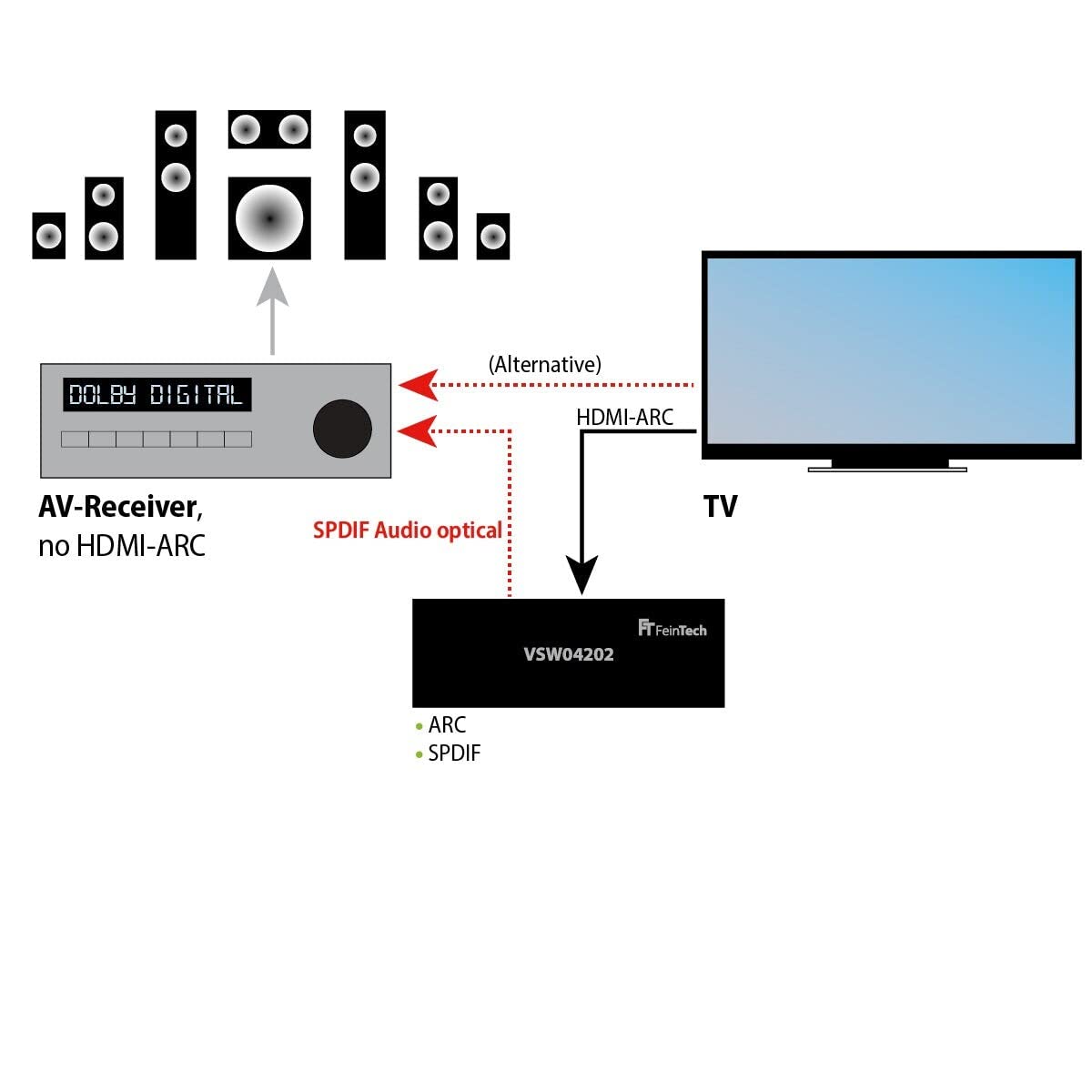
Figure 5: Alternative connection diagram demonstrating how the FeinTech VSW04202 can connect to a TV and an AV receiver, utilizing either HDMI ARC or SPDIF optical audio for sound output.
3.2 Audio EDID Settings
The VSW04202 allows manual adjustment of the audio EDID (Extended Display Identification Data) via the AUDIO MODE button on the front panel or remote. This setting determines the audio format that the HDMI source provides. Note that the selected sound format applies to all outputs simultaneously.
- ӨТҮҮ: In this mode, the output audio format is based on the best sound format supported by the device connected to HDMI OUT B. This allows for 7.1 sound if your AV receiver supports it.
- 2.0: The audio output will be stereo (2.0 LPCM) on all outputs.
- 5.1: The audio output will be in 5.1 surround sound format, provided the source material contains a 5.1 soundtrack.
For HD audio formats like Dolby TrueHD or DTS-HD, these can only be transmitted via HDMI. SPDIF Toslink can output digital stereo (LPCM 2.0) or 5.1 sound (Dolby Digital / AC-3 or DTS) depending on the source material. Digital audio formats via SPDIF do not have volume control; volume must be adjusted on the connected audio ampкөтөргүч же кабыл алгыч.
4. Иштөө
4.1 Input Switching
The VSW04202 supports both automatic and manual input switching:
- Automatic Switching (Auto-Switching): When a connected HDMI source is turned on, the switch will automatically activate that input. If the active HDMI source is turned off, the switch will revert to the previously used HDMI input.
- Кол менен которуу: You can manually switch between inputs using the INPUT SWITCH button on the front panel or the corresponding buttons on the remote control. If you experience issues with auto-switching (e.g., a source not turning off its HDMI output in standby), you can disable the auto-switching function.
4.2 Аудио кайтаруу каналы (ARC)
The VSW04202 supports Audio Return Channel (ARC) for outputting TV sound via its digital audio outputs (HDMI OUT B and SPDIF OUT). Please note that ARC is not supported via the analog 3.5mm output.
5. Техникалык тейлөө
To ensure optimal performance and longevity of your FeinTech VSW04202, follow these maintenance guidelines:
- Тазалоо: Use a soft, dry cloth to clean the device. Do not use liquid cleaners or aerosols, as they may damage the unit.
- Жайгашкан жери: Коммутаторду жакшы желдетилген жерге, түз күн нурунан, жылуулук булактарынан жана ашыкча нымдуулуктан алыс коюңуз.
- Колдонуу: Аппаратты этияттык менен колдонуңуз. Аны түшүрүүдөн же катуу таасирлерге дуушар кылуудан алыс болуңуз.
- Күч: Disconnect the power adapter if the device will not be used for an extended period.
6. Кыйынчылыктарды
If you encounter issues with your FeinTech VSW04202, refer to the following common problems and solutions:
- Сүрөт же үн жок:
- Ensure all HDMI cables are securely connected to both the source devices, the VSW04202, and the display/audio system.
- Verify that the VSW04202 is powered on and the POWER indicator is lit.
- Check the selected input on the VSW04202 matches the active source.
- Confirm the correct input is selected on your TV/display and AV receiver.
- No 7.1 Audio Output:
- Set the AUDIO MODE switch to PASS.
- Ensure your AV receiver supports 7.1 audio.
- After connecting, restart your media player by disconnecting and reconnecting its power.
- Many 7.1 audio tracks are in English. Ensure the playback language for movies is set to original/English if available.
- Auto-Switching Issues:
- Some source devices may not fully turn off their HDMI output in standby, causing the switch to remain on that input. In such cases, disable the auto-switching function and switch inputs manually.
- Signal Loss Over Long Cables:
- The maximum recommended cable lengths are: 1080p: 8m input + 8m output; 4K: 5m input + 5m output. Using cables longer than these specifications may result in signal degradation or loss.
7. Техникалык шарттар
| Өзгөчөлүк | Спецификация |
|---|---|
| Модель номери | VSW04202 |
| HDMI версиясы | HDMI 2.0b |
| Max чечим | 4K@60Hz YUV 4:4:4 Ultra HD 2160p |
| HDR колдоо | HDR10, HLG-HDR, Dolby Vision |
| HDCP Нускасы | HDCP 2.2 |
| өткөрүү жөндөмдүүлүгү | 18 Гбит/сек |
| HDMI кириштери | 4 |
| HDMI чыгыштары | 2 (1x Video/Audio, 1x Audio Only) |
| Аудио чыгуулар | HDMI HD Audio, SPDIF Toslink, 3.5mm Stereo |
| Колдоого алынган аудио форматтары | Dolby Atmos, DTS-HD, Dolby TrueHD, DTS, Dolby Digital, LPCM 2.0/5.1/7.1 |
| ARC колдоо | Yes (via digital outputs) |
| Автоматтык которулуу | Ооба (өчүрүү мүмкүн) |
| Өлчөмдөрү (L x W x Y) | 20.5 x 7.5 x 2.3 см |
| Салмагы | 586 грамм |
| Энергияны керектөө | <3 Вт |
| Электр камсыздоо | DC 5V |
| Батарея камтылган | 1 Lithium metal (for remote) |
8. Кепилдик жана колдоо
For information regarding warranty coverage, terms, and conditions, please refer to the documentation provided with your purchase or visit the official FeinTech website. For technical support, product inquiries, or assistance with troubleshooting beyond this manual, please contact FeinTech customer service directly.


